
Analytics, user feedback, and SEO
OINK does not contact analytics, form, comment, or advertising services by default. These integrations are site decisions: enable them explicitly, document the data boundary, and provide any consent or policy required by the site’s users and jurisdiction.
Adding analytics
Hugo provides embedded templates for analytics services. When a site configures Google Analytics, browser usage information such as page views and custom events is sent to Google. This is incompatible with a fully air-gapped runtime and may be incompatible with a strict same-origin Content Security Policy.
Setup
Obtain a Google Analytics measurement ID for the site, then use Hugo’s current service configuration:
services:
  googleAnalytics:
    id: G-YOUR-ID
Do not also set the deprecated top-level googleAnalytics key. Analytics are
normally emitted only for a production Hugo environment. Build a production
preview and inspect its HTML and browser network log before publication.
If analytics is disabled, OINK emits no Google Analytics request. Remove the configuration entirely rather than inserting a fake identifier.
User feedback
OINK can show a “Was this page helpful?” widget at the bottom of documentation pages. The widget presents Yes and No actions and then displays a configured response, usually with a link to open a documentation issue.
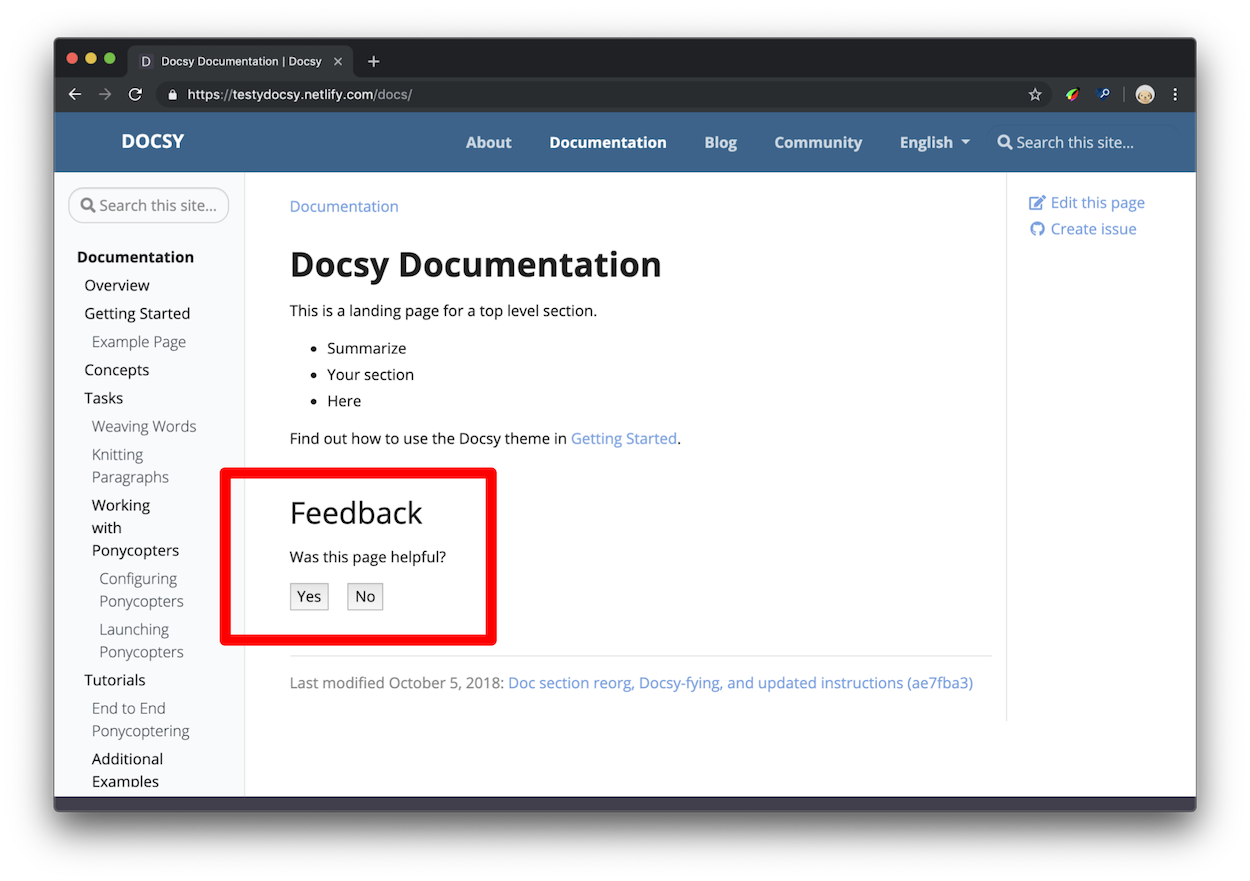
The response can remain useful without analytics: it can direct the reader to an issue template, discussion, email address, or another site-owned feedback channel. Collection and event reporting happen only when the site configures an appropriate destination.
How feedback data is useful
Combine feedback with context instead of treating one score as proof. Pages with high traffic and repeated negative feedback are useful review candidates; highly rated pages can reveal patterns worth testing elsewhere.
Make focused editorial changes when possible. For example, update one stale tutorial, or move a code example earlier on a small group of pages, then compare feedback over an appropriate period. Record releases, traffic shifts, support events, and other factors that could explain the change.
Feedback is directional evidence, not a substitute for user research, accessibility review, support data, or technical validation.
Setup
OINK keeps the widget off by default. Set the global default and configure localized responses. For English:
params:
  ui:
    feedback:
      enable: false
languages:
  en:
    params:
      ui:
        feedback:
          yes: >-
            Glad to hear it! Please <a
            href="https://github.com/OWNER/REPOSITORY/issues/new">tell us how we
            can improve</a>.
          no: >-
            Sorry to hear that. Please <a
            href="https://github.com/OWNER/REPOSITORY/issues/new">tell us how we
            can improve</a>.
For Simplified Chinese, put translated strings in languages.zh.params:
languages:
  zh:
    params:
      ui:
        feedback:
          yes: >-
            很高兴本页对你有帮助!欢迎<a
            href="https://github.com/OWNER/REPOSITORY/issues/new">告诉我们如何继续改进</a>。
          no: >-
            很抱歉本页没有解决问题。请<a
            href="https://github.com/OWNER/REPOSITORY/issues/new">告诉我们缺少什么</a>。
Visible response HTML is trusted site configuration. Keep it small, review its links, and do not interpolate untrusted values.
When Google Analytics is configured, the widget can emit a custom page_helpful
event. A positive action uses params.ui.feedback.max_value (100 by default); a
negative action uses 0.
Access feedback data
For Google Analytics, inspect the page_helpful event in the provider’s events
report and create a page-level report when needed. An absent event may mean no
interaction occurred, analytics was blocked or disabled, consent was not given,
or the selected time range is wrong.
Do not enable analytics solely to make the widget visible. A site can keep the response-and-link experience while leaving event collection disabled.
Override feedback on one page
Set feedback in page front matter. The page value overrides the global default
in either direction:
---
title: Feedback example
feedback: true
---
Use feedback: false to hide the widget on a page when the global default is
enabled. For compatibility, hide_feedback: true also hides it when feedback
is not set.
Set the default for all pages
Set the site parameter. OINK defaults it to false; set it to true only when
most documentation pages should show the widget:
params:
  ui:
    feedback:
      enable: false
Add a contact form with Fabform
Fabform and similar hosted form endpoints are optional online services. After creating an account and reviewing its data handling, a site can post a form to its assigned endpoint:
<form action="https://fabform.io/f/{form-id}" method="post">
  <label for="email">Your email</label>
  <input id="email" name="email" type="email" autocomplete="email" />
  <button type="submit">Submit</button>
</form>
Replace {form-id}, translate the visible labels, add a privacy notice, and
provide error and success states. The form will not work offline. A local or
first-party endpoint is preferable when the site must keep submissions within
its own boundary.
Search engine optimization metadata
For each page, OINK chooses the HTML meta description from the first available value:
- the page’s
descriptionfront matter field; - Hugo’s computed page summary for non-index pages;
- the site description in
params.
Write a concise, page-specific description in every language. Do not copy the English description into a Chinese page. Search metadata cannot compensate for thin, duplicated, or inaccurate content.
The theme also emits canonical and alternate-language links from Hugo’s page
translations. Use a correct production baseURL, stable translated routes, and
explicit translated heading IDs. Add other meta tags through the site’s
layouts/_partials/hooks/head-end.html override only when they are not already
provided by the theme.
See Hugo’s Google Analytics configuration, page summaries, and Google’s SEO starter guide for the underlying service and content concepts.