Get startedstart here
Use OINK Starter and establish a local preview before customizing.
This is the multi-page printable view of this section. .
New to OINK? Start with the Starter to preview a working site, then replace its sample content. Write in Markdown and build with Hugo Extended; Hugo Modules also require Go to resolve the theme. Bundled theme assets need no CDN or npm build step.
The current release is v1.2.0. See the 1.2 release notes or the upgrade guide for an existing site.
| What you want to do | Where to go |
|---|---|
| Decide whether it fits | What is OINK |
| Install and preview | Get started |
| Write a documentation page | Writing pages |
| Turn a directory tree into a sidebar | Organizing content |
| Look up a component’s syntax | Components |
| Change the name, logo, colours and fonts | Brand and appearance |
| Look up a configuration key’s default | Configuration |
| Run a bilingual or multilingual site | Languages |
| Practice building and writing | Write Beautiful Docs |
| Study a production implementation | Case studies |
| Deploy | Deploy |
| Upgrade, or migrate from Docsy | Upgrade |
| Maintain the theme, review a contract, or write a PRD | Design and development |
The seven Docs sections are ordered the way they are read: understand, install, write content, look up components, adjust the site, run the release, then study or maintain the contracts and design records behind it.
OINK is a standalone Hugo theme for medium and large technical documentation sites. It evolved from Docsy: the content model and the multilingual behaviour are kept, while the shell, navigation, search and content components are replaced.
A consuming site builds with Hugo Extended. Hugo Module installations also need Go to resolve modules; the initial download needs access to the module source. Theme assets need no Node.js, npm, PostCSS, or CDN request. Bootstrap, Font Awesome, the fonts, local search, the diagram runtimes and the API reference runtimes are all committed to the theme repository and shipped only to the pages that use them.
Components are not a second template language: > [!NOTE] is a callout, a table
with a {.fields} line is a parameter list, and an image followed by
{caption=} has a caption. Fifteen production sites
run on it today, this one among them.

The theme does not handle source hosting or deployment: a site can live on GitHub, GitLab or a private Git server, and the static files Hugo produces can be published anywhere. A site’s own content, brand and business components stay with the site; the theme supplies the shell and the reusable components.
| A good fit when | A poor fit when |
|---|---|
| There are many pages and mixed content types: documentation, blog, a book, release pages and an API reference in one site | There are one or two pages and no need for structured navigation; a README or a lighter Hugo theme is simpler |
| You need real multilingual support, not a translation link bolted onto an English site | The site is mostly application UI rather than documentation: OINK can carry the documentation part while business components stay at the site layer |
| Reproducible builds and network isolation matter, and the build machine has no outbound access | You need interactive components inside the prose (React / MDX) |
| Several sites share one shell, so layouts and shortcodes are not copied around | You want one switch that swaps in a different look: the theme has no brand switch, and appearance changes go through CSS tokens and partial overrides |
| The team has no front-end engineers and maintains no Node toolchain | You need a built-in CMS or a WYSIWYG editor |
Choose a toolchain and authoring model before comparing individual features. The same project can be a good fit for different systems depending on who maintains it:
| Your priority | What to evaluate |
|---|---|
| Keep an existing Hugo content workflow | Compare OINK with Docsy and Hextra using your own content tree, overrides, and language needs |
| Build without a Node toolchain | OINK ships its browser assets with the theme; the Hugo Module install path still needs Go to resolve modules |
| Write React components inside documentation | Evaluate an MDX-based system such as Docusaurus; OINK’s main authoring model is Markdown plus attributes and shortcodes |
| Publish books, downloads, or data-driven landing pages | Try OINK’s built-in patterns on one representative page before adopting them site-wide |
Check each candidate’s current installation and extension documentation. OINK’s
search, image zoom, comments, and feedback are opt-in; the site also chooses
Markdown and agent outputs under outputs.
OINK is not a skin layered over Docsy but a theme that forked and evolved separately. Docsy’s source history, its Apache-2.0 obligations and its attribution are kept intact; the details are in License and acknowledgements.
Highlights lists what the theme provides capability by capability, each entry linking to the guide that covers it.
This page lists what separates OINK from an ordinary Hugo theme, each item ending with the guide that covers it. To install straight away, see Quick start.
A callout is a > [!NOTE] blockquote (ten semantic types plus one neutral
disclosure). A field list is a table with a {.fields} line. Steps and cards
are lists with {.steps} / {.cards}. A caption is a {caption="…"} line
under an image. Tabs are adjacent fences each carrying a {tab="…"}; file
trees, galleries, Mermaid and ECharts are data fences named after their
language. On GitHub or in any plain Markdown reader these degrade to
blockquotes, tables, lists and code blocks, and nothing is lost.
29 shortcodes cover what the native forms cannot express: cards with icons and images, field entries whose body is several paragraphs of Markdown.
Hugo Extended 0.160.1 or newer compiles the site’s assets. SCSS is compiled by
Hugo’s embedded Sass transpiler; the theme never invokes postCSS and needs
neither npm nor webpack. Installing the theme as a Hugo Module also needs Go
and access to the module dependencies, either over the network or from a local
cache. With an offline archive or a submodule already prepared, Hugo is enough
to build the site.
The interface runs JavaScript in the browser: search, the command palette, diagrams and tabs are page scripts. Those scripts ship with the theme and are delivered per page according to what that page actually uses.
Everything the browser needs is committed to the theme repository: Bootstrap,
Font Awesome, four fonts, Lunr, Mermaid, KaTeX, Markmap, Swagger UI, Redoc,
Asciinema, ECharts, Infographic. VENDOR.json records the version, source,
licence file and SHA-256 checksum of each of the 26 dependencies; updating a
runtime means updating artifact, licence and checksum together.
Where a feature could cause a network request, the theme leaves it off rather
than reaching out silently: PlantUML without params.plantuml.svg_image_url,
Diagrams.net without params.drawio.drawio_server, and Algolia without
appId / apiKey / indexName each warn and stay disabled, and a publishing
gate built with --panicOnWarning turns that warning into a failure.
Local-first does not extend to what an author adds. All of these are explicit network choices: external links, remote images and video, iframes, remote API specifications; hosted search such as Algolia or Google Programmable Search; analytics, comments and other SaaS integrations; and PlantUML or Diagrams.net once the author configures a remote renderer. Pages using them are still valid pages, but a site should stop claiming those pages work fully offline.
→ License and acknowledgements · Configuration
Every component has a defined shape in all four outputs: interactive HTML; a
print page with zoom and copy controls stripped and disclosures fully expanded;
plain Markdown; and RSS. The print view is generated per section (this one is
/_print/docs/about/), and the Markdown version is the same page address plus
index.md.
A site chooses which of them it wants under outputs; the theme does not decide
for it.
Multilingual support uses Hugo’s own mechanism: translation routing, a language
picker ordered by weight, fallback for untranslated pages, RTL, and canonical
and alternate metadata. Interface strings come in 32 language packs sharing one
194-message schema: all 31 locale filenames supported by Docsy, plus generic zh.
Every pack now contains native OINK interface text rather than English
placeholder blocks; zh and zh-cn use Simplified Chinese and zh-tw uses
Traditional Chinese.
With params.offline_search on, Hugo generates one index per language. The
browser searches Latin text with a local Lunr index and falls back to substring
matching for CJK text; no query leaves for a third party. A page can adjust its
weight with search_boost and add synonyms with search_keywords.
→ Search
Cmd/Ctrl + K opens the command palette; a bare / enters search mode and a
bare \ enters command-only mode. The palette holds pages, commands and page
actions (switch language, switch theme, copy Markdown) together, so searching
and acting share one entry point.
On by default, and switchable off per site or per section. w and s move up
and down the sidebar tree, a and d collapse and expand, q and e go to
the previous and next page, j and k jump along the page’s table of
contents, t toggles light and dark, l switches language, h hides the
reading shell. Every single-key shortcut stands down while an input or textarea
has focus or an input method is composing. The question-mark button in the
footer’s bottom bar opens the cheatsheet.
Turn on params.ui.backlinks and every page lists the pages that link to it —
derived at build time from the ordinary links you already write, with no new
syntax and no JavaScript. This site enables it site-wide: look at the “Linked
from” group in this page’s right rail, and the more a page is referenced, the
longer its list — past eight entries it folds.
The theme also has four kinds of page that need extra structure:
{#id num=} and cross-referenced with xref, indexes generated by book-toc and book-figures and friends, and a printable whole.data/download/*.yaml produces release cards, asset tables and checksums, with a controlled publication state.data/home/<lang>.yaml assembles the home page sections; any page with layout: landing can use data under data/landing/.→ Books · Releases and downloads · Home and landing pages · API reference pages
Add markdown to outputs and every page gains a .md twin, the HTML <head>
gains a rel="alternate" pointing at it, and the page actions gain “Copy
Markdown” and “View source”. The LLMS output format writes an llms.txt
inventory at the site root (this site’s is
https://oink.pgsty.com/llms.txt).
0.8.0 adds two more: a section that enables LLMSFULL becomes one
llms-full.txt an agent fetches in a single request, and a site that enables
NAVJSON publishes navigation.json per language — the sidebar’s tree
readable as data. Both are live on this site:
https://oink.pgsty.com/docs/llms-full.txt and
https://oink.pgsty.com/navigation.json are the real artifacts.
“Open in ChatGPT / Claude” is off by default: clicking it hands the current URL
to a third party, so the site must turn on
params.ui.page_context_menu.assistant_links explicitly.
Configure params.versions and a version menu appears in the navbar, while an
archived version shows a banner at the top of the page pointing readers at the
current one; whether the menu jumps page-for-page is the site’s choice. The
versions are separately built and separately deployed static sites, so nothing
is needed at runtime.
→ Versions
This site has most of the above enabled. Four checks:
Cmd/Ctrl + K on any page and type postgres to see local search results; press \ for command-only mode.index.md to the current page address to get this page’s Markdown version.llms-full.txt and to navigation.json.The Case library describes fifteen OINK site projects and their implementation patterns, including this documentation site. Case pages link to the live result or project source and distinguish site-owned code from theme features where a pattern needs custom implementation.
Use this guide when you know the shape of the site you want to build. Follow a case for its architecture and trade-offs, then use the linked documentation for the exact configuration. Counts in individual cases describe the audited snapshot rather than a permanent property of a live site.
A very large English site combining a distribution manual, editorial blog, extension catalogue, taxonomies, version navigation, and pricing landing pages.
The Chinese peer deployed as an independent single-language site—a useful trade-off when both language corpora have become products in their own right.
A bilingual version archive that renders many release pages from reusable, structured release data.
A compact bilingual CLI manual with a data-driven home page and a much larger companion blog.
A bilingual operations manual with a dedicated download content type fed by release metadata.
A large upstream migration whose checked manifest generates the bilingual documentation navigation.
A metrics manual combining generated navigation, a structured catalogue, and a system-font presentation.
A multilingual, multi-edition book and the strongest example of numbered figures, cross-references, chapter navigation, and indexes.
A focused bilingual publication that needs only OINK’s Book shell.
A finished Chinese translation published as a deliberately single-language Book, with no documentation tree and nothing to switch languages to.
An aggregate operations library where several upstream manuals and partially translated language trees share one search and visual system.
A small bilingual corporate site showing that OINK can primarily be a data-driven landing-page system.
A two-page-per-language project whose custom shell hosts an interactive, data-driven configuration generator.
The full reference site: public documentation, live component examples, design contracts, multiple content shells, and regression coverage in one repository.
The PostgreSQL extension catalog: a queryable dataset as the primary object of a site, indexing 2,241 extensions and 576 packaged builds across 16 platforms.
The theme repository’s tests/site/ is an internal CI fixture, not a starter
template. Its pages exist to exercise rendering behavior; the production cases
above are the better design references.
OINK is three layers of material: the theme source, the documentation content, and the third-party assets shipped with the theme. None of them is relicensed into a single combined work. Every table below points at the authoritative file in the repository; where a summary and the licence text disagree, the file wins.
| Scope | Licence | Authoritative file |
|---|---|---|
| OINK theme source (layouts, partials, shortcodes, SCSS, JS, i18n) | Apache License 2.0 | Theme LICENSE, NOTICE |
| This site’s own code, build scripts and material derived from Docsy | Apache License 2.0 | Site LICENSE, NOTICE |
| This site’s original documentation content, except where stated otherwise | Creative Commons Attribution 4.0 International | Site LICENSE-CC-BY-4.0 |
| Browser libraries, fonts and icons shipped with the theme | Each component’s own licence | Theme VENDOR.json and the licence files beside each asset |
Two boundaries are worth keeping straight. CC BY 4.0 covers the original documentation content only, not the theme code, the trademarks, the screenshots or the third-party assets. And the theme being Apache-2.0 does not turn its bundled dependencies into Apache-licensed works.
What the theme’s NOTICE records:
VENDOR.json, and each NOTICE file a dependency requires is distributed beside the asset it belongs to.This site is likewise derived from the Docsy project website, and that lineage
is recorded in the site’s own NOTICE. Docsy is OINK’s only code upstream: the
source history, the Apache-2.0 obligations and the copyright notices are kept
intact, and as Apache-2.0 requires, modified files carry a modification notice.
The theme commits everything the browser needs to the repository
(assets/third_party/, assets/js/third_party/, static/webfonts/), so a
consuming site needs no npm and downloads nothing at build time. VENDOR.json
is the machine-readable manifest for that material: for each entry it records
the name, the pinned version, the source URL, the licence file path and the
SHA-256 of every selected artifact, plus an aggregate checksum for each of the
three asset trees.
The table below is a snapshot of that manifest (VENDOR.json generated
2026-08-17, schema 1, 26 entries). Versions change with each theme release, so
the VENDOR.json in the repository is authoritative. Every source is the
npm registry (https://registry.npmjs.org/…).
| Package | Version | Licence | What it does in the theme |
|---|---|---|---|
| bootstrap | 5.3.8 | MIT | Grid, components and the RTL stylesheet |
| @popperjs/core | 2.11.8 | MIT | Overlay positioning for Bootstrap |
| @fortawesome/fontawesome-free | 7.3.1 | CC-BY-4.0 AND OFL-1.1 AND MIT | Icons throughout the site |
| @fontsource-variable/inter | 5.3.0 | OFL-1.1 | Interface and body font |
| @fontsource/chakra-petch | 5.3.0 | OFL-1.1 | Brand display font |
| @fontsource/ibm-plex-mono | 5.3.0 | OFL-1.1 | Code font |
| lunr | 2.3.9 | MIT | Local full-text search |
| @docsearch/js | 5.0.1 | MIT | The optional Algolia DocSearch front end |
| @docsearch/css | 5.0.1 | MIT | Its stylesheet |
| mermaid | 11.16.1 | MIT | Mermaid diagrams |
| katex | 0.18.4 | MIT | Mathematics |
| markmap-autoloader | 0.18.12 | MIT | Mind maps |
| markmap-lib | 0.18.12 | MIT | Mind maps |
| markmap-view | 0.18.12 | MIT | Mind maps |
| markmap-toolbar | 0.18.12 | MIT | Mind map toolbar |
| d3 | 7.9.0 | ISC | Markmap dependency |
| @highlightjs/cdn-assets | 11.12.0 | BSD-3-Clause | Markmap dependency |
| webfontloader | 1.6.28 | Apache-2.0 | Markmap dependency |
| swagger-ui-dist | 5.32.13 | Apache-2.0 | OpenAPI reference pages |
| redoc | 2.5.3 | MIT | OpenAPI reference pages |
| asciinema-player | 3.17.0 | Apache-2.0 | Terminal recording playback |
| echarts | 6.1.0 | Apache-2.0 | Charts |
| @antv/infographic | 0.2.19 | MIT | Infographics |
| pako | 3.0.1 | MIT AND Zlib | Decompression (diagram data) |
| external-svg-loader | 1.7.1 | MIT | Inlining external SVG |
| idb-keyval | 6.2.0 | Apache-2.0 | Browser-side caching |
Licence texts sit beside the asset they belong to — for example
assets/third_party/bootstrap/LICENSE and
assets/third_party/katex/LICENSE — and Swagger UI, Redoc and ECharts also ship
their own NOTICE or bundled-declaration files. Lunr is the one exception: its
code is in assets/js/third_party/ while its licence is at
assets/third_party/lunr/LICENSE.
Redistributing the theme means carrying all of this licence and notice material with it. Updating a runtime means updating the artifact, the licence file, the source and the checksum in the same change.
All three fonts (Inter, Chakra Petch, IBM Plex Mono) are under the SIL Open Font
License 1.1, and the font files are committed to static/webfonts/: fourteen
Inter subset files, four brand-font files, and Font Awesome’s three, twenty-one
in all. Font Awesome Free 7.3.1 carries a composite licence — CC BY 4.0 for the
icon artwork, SIL OFL 1.1 for the font files, MIT for the code — with the text
in assets/third_party/Font-Awesome/LICENSE.txt.
The theme makes no request to a remote font service: there is no Google Fonts
link in the repository, and fonts are always served from the site’s own
baseURL. To change fonts or switch to the platform stack, see
Brand and appearance.
Docsy is the only code upstream. The projects below are references for the design language. They are neither a source of code nor a runtime dependency, and OINK has ported no code from them:
| Project | What was learned from it |
|---|---|
| Fumadocs | Content-first presentation, information hierarchy, and writing components such as file trees and field lists (the theme’s NOTICE records this acknowledgement) |
| Nextra | A spare documentation shell, filename and copy affordances on code blocks, per-page layout switches |
| Hextra | A Hugo-native approach to implementation, file trees, badges, tabs |
| Mintlify | Layered navigation structure, synchronized code groups, the reading experience of an API reference |
Hugo is the build platform, and Go resolves modules when the theme is installed as a Hugo Module. Both are prerequisites, and the theme redistributes neither binary.
Naming these projects describes lineage, dependency or inspiration and implies no endorsement by them; project and product names belong to their respective holders.
CC BY 4.0 permits sharing and adaptation for any purpose, provided you give attribution, link to the licence, state whether you made changes, and do not imply that OINK, PGSTY or any upstream project endorses your adaptation. A sufficient attribution reads:
Adapted from the OINK documentation by PGSTY contributors, licensed under CC BY 4.0, with modifications.
Images or quotations that carry their own attribution on a page keep their own credit and licence; removing the footer does not discharge the attribution obligation.
Apache-2.0 permits using, modifying and distributing the theme source and its
build output under its terms, provided you keep the licence, copyright and
attribution notices, keep the contents of NOTICE, and state which files you
changed when distributing modified source. A theme distribution should include
LICENSE, NOTICE, VENDOR.json, and every third-party licence file the
manifest references.
Apache-2.0 grants no trademark rights, and it does not turn third-party assets into Apache-licensed works.
The recommended path for a new site starts from
pgsty/oink-starter, not from a copy
of this documentation and regression repository. The Starter is a public
GitHub template: it pins a published OINK release, builds as-is, and contains
only neutral project content and deployment workflows.
OINK’s declared compatibility floor is Hugo Extended 0.160.1. The current Starter and its CI use Hugo Extended 0.165.0 and Go 1.27. Use that pinned Starter toolchain for the path below; use the lower floor only when maintaining an existing site that deliberately supports it.
| Starting point | Recommended path | Result |
|---|---|---|
| New documentation or project site | OINK Starter | A small three-language Docs, Blog, and Book site with two deployment workflows |
| Existing Hugo site | From scratch | Add the OINK module and required Goldmark settings without replacing content |
| Existing Docsy or older OINK site | Upgrade | Preserve content, migrate supported syntax, and review site overrides |
Install Git, Go 1.27 or newer, and Hugo Extended 0.165.0 or newer. The Hugo
output must contain extended:
On macOS, brew install git go hugo supplies them. On Linux and Windows,
use the official Hugo installation guide
and Go downloads; choose Hugo Extended.
For a repository you intend to keep, open the Starter and select Use this template, then clone the repository GitHub created for you. To evaluate the untouched original locally:
Open http://localhost:1313/. The default Starter also publishes Chinese at
/zh/ and French at /fr/. Confirm that Docs, Blog, Book, search, language
switching, and light/dark mode all work before editing anything.
Change the title and canonical URL at the top of hugo.yaml, then edit one
sentence in data/home/en.yaml. A browser reload that shows both changes is
the first useful proof that configuration, content, and the pinned theme are
connected correctly.
This order is deliberate. A site that first proves its build and content tree is easier to debug than one that changes languages, navigation, CSS, analytics, and hosting at the same time.
Before the first push, run the same warning-strict production build the Starter workflows use:
Success means the command ends with Total in …, prints no warning or error,
and public/ contains the language roots and representative Docs, Blog, and
Book routes. It does not yet prove deployment: a local build, a commit, a push,
a green workflow, and correct public rendering are separate gates.
Start with the complete Starter tutorial. If the template deliberately carries more structure than your project needs, use the repository tour to remove it safely. Use From scratch only when adding OINK to an existing site or when you explicitly want to assemble every file yourself.
pgsty/oink-starter is the supported
starting point for a new OINK site. It is deliberately smaller than
oink.pgsty.com: no theme documentation, analytics account, comment
repository, browser regression suite, or PGSTY-specific brand is copied into
your project.
As of 2026-09-20, the template pins OINK v1.0.0, Go 1.27, and Hugo Extended 0.165.0. Its default three-language, English-only, and English–Chinese profiles have all been built warning-strictly against that release.
| Surface | Included baseline | First decision |
|---|---|---|
| Languages | English, Simplified Chinese, French | Keep all three, or select a supplied single/bilingual profile |
| Content | Docs, Blog, and a short Book tutorial | Rewrite the examples; delete a whole surface only when you do not need it |
| Home | One compact data/home/<lang>.yaml per language |
Replace the project promise and destinations |
| Brand | Neutral logo and favicon | Keep them until real project artwork exists |
| Integrations | Repository, Giscus, analytics, share, and feedback examples are commented | Enable only complete configurations you intend to operate |
| Deployment | GitHub Pages and Cloudflare Pages Direct Upload workflows | Choose one production path and verify its real URL |
The Starter’s own Book at /book/ is a four-chapter tour from preview to
deployment. This page is the maintainer-grade version: it explains the order of
changes, the boundaries between them, and the checks after each layer.
Open the Starter repository, select Use this template → Create a new repository, then clone the repository created under your account or organization:
This gives your site its own Git history and keeps the original Starter as an upstream reference rather than as a remote you might accidentally push to.
For a disposable local evaluation:
Do not start a real project by deleting this clone’s .git directory. GitHub’s
template operation already creates the clean project boundary and preserves an
auditable first commit.
Open these routes:
/, /zh/, /fr/ — the three home pages;/docs/, /blog/, /book/ — the three content surfaces;Also record the resolved module:
The template snapshot 137843b documented here pins
github.com/pgsty/oink@v1.0.0; if the template has since changed, use the version
in your clone’s go.mod. This unchanged preview is your baseline. After that
first success, upgrade a site still using 1.0 as a separate step with the
1.0-to-1.1 checklist, before customizing content.
The root configuration enables English, Chinese, and French. Before making other configuration edits, choose one of the supplied profiles when that is not your intended language set. Choose one of these commands:
These are complete minimal configurations, not fragments: copying one replaces
the commented integration examples in the root file. Do it at the beginning;
if hugo.yaml already contains project changes, merge the languages and
disableLanguages sections instead of overwriting it.
If you already changed the title and URL in Get started, keep that file. To
change the default three-language setup to English and Chinese, add only
disableLanguages: [fr] at the top level; use [zh, fr] for English only.
This preserves the identity and integration settings you have already changed.
Disabled languages stay declared so Hugo recognizes .zh.md and .fr.md as
translations and safely ignores them. If you remove a language permanently,
remove its content and home data only after the selected profile builds.
Change the two marked values at the top of hugo.yaml:
The YAML anchor carries the title to all enabled languages. Then change the copyright holder and, after the new repository exists, uncomment its links:
Run hugo server again and check the browser title, footer, edit/history links,
and canonical URL. Do not change the logo yet unless the project has final
artwork; text identity is easier to review first.
The home page is data rather than an opaque layout override:
Edit one language first. In each file, sections fixes the order; hero,
cards, and cta provide the content. Replace the promise, destination URLs,
and sample card copy while keeping the structure. After the first language is
right, translate the same information into the enabled peers.
For another composition, use the full registry in Home and landing pages; do not copy the Starter home partial, because there is no site-specific template to copy.
Rewrite or remove sample leaf pages under content/. Keep section roots until
you decide whether that whole surface belongs in your project:
The content tree becomes the sidebar. Top navigation lives in menus.main on
the translated _index roots, so renaming Docs, Blog, or Book happens beside
the content it names rather than in a second global menu tree. Keep translated
files side by side and give corresponding headings the same explicit IDs:
Follow Organizing content before creating a custom navigation data file; the generated tree is enough for most sites.
Replace assets/icons/logo.svg and static/favicon.svg when real assets are
ready. Then enable the smallest useful configuration changes, one at a time:
For custom local fonts, use params.ui.fonts for family names or declare font
files in site CSS. For layout, sidebar, search, and component settings, consult
the Configuration reference rather than copying the
much larger configuration of oink.pgsty.com.
The Starter leaves repository actions, Giscus, Google Analytics, feedback, and sharing off or commented. Enable an integration only after all of its required facts are known:
gtag events only when analytics is present;An incomplete optional block should remain commented. See Comments, Analytics and SEO, and Repository links for the operating boundary of each integration.
Before enabling a hosting workflow:
Commit hugo.yaml, go.mod, and go.sum; never commit generated public/,
resources/, module caches, or a local module replacement.
The Starter already contains .github/workflows/github-pages.yaml. In
Settings → Pages, select GitHub Actions as the source. A push to main
builds with the pinned toolchain, asks GitHub for the correct project subpath,
and publishes public/ through the Pages deployment API.
The supplied .github/workflows/cloudflare-pages.yaml uses Direct Upload.
Create a Pages Direct Upload project, add CLOUDFLARE_ACCOUNT_ID and
CLOUDFLARE_API_TOKEN, then run the workflow manually once. Set the repository
variable CLOUDFLARE_PAGES_ENABLED=true for automatic deploys, and
CLOUDFLARE_SITE_URL when the canonical address is not the default
pages.dev domain.
Use either Direct Upload or Cloudflare Git integration for one project, not
both. The complete host comparison and baseURL rules are in
Deploy.
Before calling the site ready:
Project Name, example.org, OWNER, and
PROJECT, then decide whether each remaining occurrence is intentional.Delete the sample Book or Blog only after removing its top-menu root and any home-page card that links to it. A warning-strict rebuild after each whole surface is removed keeps failures attributable to one change.
Use the Starter repository tour as a file-level map, then continue with Writing pages and Configuration. For an existing site that should not inherit the Starter’s content model, use From scratch.
This page describes the repository created from
pgsty/oink-starter. It is not a tour
of the much larger oink.pgsty.com documentation and regression repository.
The theme source is not copied into either site: go.mod pins it as a Hugo
Module, and Hugo stores the resolved source in the Go module cache.
oink-starter/
Generated public/, resources/, .hugo_build.lock, and module caches are
ignored build state, not source.
| Path | Responsibility | Initial action |
|---|---|---|
hugo.yaml |
Identity, canonical URL, languages, outputs, theme features, optional integrations | Change the two marked values; choose a language profile before other edits |
data/home/ |
Home-page promise, cards, calls to action | Rewrite every enabled language after one language is approved |
content/ |
All reader-facing material | Replace example leaves; keep a section root until deciding to remove that whole surface |
assets/icons/logo.svg |
Processed logo | Replace only with final artwork |
static/favicon.svg |
Browser icon | Replace together with the logo review |
params.github_* in hugo.yaml |
Edit/history/new-page/issue links | Uncomment only after the destination repository exists |
go.mod and go.sum: together they pin and verify the template’s selected
OINK release. Commit both; keep that baseline distinct from a later upgrade.hugo.yaml: native Steps, Cards, Fields,
image attributes, and Book targets depend on them.outputs: removing markdown, LLMS, or print intentionally removes the
corresponding Markdown, agent-index, or print surfaces.fetch-depth: 0 in workflows when enableGitInfo stays on: last-modified and
contributor facts need repository history.GOWORK: off and HUGO_MODULE_WORKSPACE: off in CI: a developer’s local
workspace must not replace the published release being verified.Docs, Blog, and Book are independent top-level surfaces. To remove one safely:
content/<surface>/ tree;Do not delete only translated section roots: that creates language-specific navigation and fallback behaviour that is difficult to distinguish from a mistake. Remove a surface in all enabled languages or document the asymmetry.
The two configuration profiles under examples/ are optional after the
language decision. They are useful references, but the root hugo.yaml is the
only active site configuration.
Under Docs and Book, directory structure and weight form the sidebar and
pager sequence. Top navigation comes from menus.main on section roots. A
translated root repeats the same identifier, parent, and weight while
translating visible labels.
The Starter intentionally demonstrates the Documentation System model:
Rename or reshape those sections for the project, but preserve the separation between learning paths rather than mixing every kind of answer into one tree.
English source files end in .md; Chinese and French peers end in .zh.md and
.fr.md. Home data uses language keys under data/home/. The root profile
declares the languages, their locale, order, and site description.
The single and bilingual profiles keep disabled languages declared. This is intentional: Hugo then recognizes the unused suffixes as translations instead of rendering several files onto one English URL. Copy a profile only before project-specific configuration begins; afterwards merge changes by hand.
Two files establish the module boundary:
This is the 137843b Starter snapshot used by the tutorial, not the latest
OINK release. For a newer template, read its own go.mod.
hugo mod graph shows the resolved version. Production follows the exact tag
in go.mod; a local HUGO_MODULE_REPLACEMENTS value is a development override
and must never be committed or treated as release proof.
The GitHub Pages workflow runs automatically on pushes to main; repository
settings must select GitHub Actions as the Pages source. The Cloudflare workflow
runs manually, or automatically only after the repository variable
CLOUDFLARE_PAGES_ENABLED=true is set. Its required account ID and API token
remain repository secrets.
Keep only the workflows for deployment paths you operate. Cloudflare Direct Upload and Cloudflare Git integration are alternative ownership models for the same project, not two gates to run together.
Commit between layers when the repository is already yours. Small boundaries make a later regression or rollback attributable to one decision.
The module graph names the pinned release, the build emits no warning or error,
and Git status contains source edits but no public/ or cache files. Then open
the enabled language roots and one Docs, Blog, and Book route before moving to
deployment.
This is the manual alternative to the recommended
OINK Starter. It builds a minimal site in an empty
directory: a small hugo.yml plus one hugo mod get gives a single-language
site you can preview. The cost is that the home page, example content,
deployment workflow, and every component usage are yours to assemble.
For an existing Hugo site, use the short integration path below. For an existing Docsy site, see Upgrade.
The second half weighs four install methods: Hugo Module, Git submodule, offline archive, and pinned source copy. OINK 1.1.0 uses Go 1.27 and Hugo Extended 0.165.0 for release validation. The theme’s lower declared compatibility floor is for existing sites that deliberately retain an older toolchain.
Work on a branch with the site’s current configuration and content preserved.
Skip hugo new site and keep the existing configuration filename.
go.mod, run hugo mod init with your repository’s module
path. Otherwise keep the existing module declaration.hugo mod get github.com/pgsty/oink@v1.2.0.module.imports entry shown
below; preserve unrelated imports and configuration. Merge the three
markup.goldmark settings and markup.highlight.noClasses: false from
the example. Do not replace your whole configuration with it.layouts/ and assets, old theme shortcodes, and page
type/layout values: those overrides and conventions may still select the
previous theme’s behavior. Keep content and make only the adaptations needed.hugo --panicOnWarning, then open an existing representative page with
hugo server. Check its navigation, images, and code blocks before applying
optional OINK features. Continue with verification.What follows hugo mod init is your own site’s module path, usually the
repository address. hugo mod get writes go.mod and go.sum, and both are
committed.
Before building, create .gitignore so generated files stay out of Git.
Leave enableGitInfo off until you have made the first commit:
The newest version number is on
GitHub Releases; the
v1.2.0 on this page is what this site currently
pins. A production site pins a release tag rather than following main:
@latest is a one-off resolution, not a version policy.
hugo.yml
For this new site only, rename the generated hugo.yaml to hugo.yml
(Hugo accepts both) and replace its contents with the following. Existing
sites should merge the relevant settings instead:
What each of the five blocks governs:
| Block | Governs | Consequence of omitting it |
|---|---|---|
Top level + languages |
Site name, domain, languages and navbar menu | A wrong baseURL sends every absolute link astray in production |
markup.goldmark |
The three component prerequisites | An attribute line becomes a literal {.steps} in the prose |
params |
Search, repository links, shell switches | Interactive features stay off; the theme does not decide for the site |
outputs |
The per-page .md, llms.txt and print pages |
No “Copy as Markdown” in the page menu, and no print view |
module |
References the theme and declares the Hugo floor | The build cannot find the theme |
Mathematics additionally needs Goldmark’s passthrough extension; see Math. Every key’s full meaning and default is in Configuration.
Every top-level directory under content/ is a section, and the directory
structure is the sidebar structure. A documentation section needs at least an
_index.md:
Write explicit {#id} anchors on headings: when a translation is added
later, the two languages’ anchors have to correspond. How to write a page is
in Writing pages.
Open http://localhost:1313/docs/; the Docs section lists Install. The home page is still empty until you add home content. Edit the Install page and confirm that the preview updates.
The steps above use a Hugo Module. The other three address particular
constraints: network isolation, a platform that requires the build input to
contain the whole theme tree, or an organization that reviews its own copy of
the theme. Apart from hugo mod vendor, none of them creates a Go module, and
the site references the theme with theme: oink rather than module.imports.
The shared cost is that version resolution and integrity checking become your
responsibility.
The only method where Hugo resolves the version itself, verifies the checksum,
and leaves an audit record in go.sum. hugo mod graph shows what actually
resolved and hugo mod get -u upgrades. It needs Go on the machine.
Record an exact theme commit in the site repository:
CI must initialize the submodule before running Hugo, or themes/oink is an
empty directory:
For network-isolated environments. Two paths, both prepared on a connected machine and carried in whole.
With hugo mod vendor, the resolved theme source is frozen into the site
directory, and later builds need neither the network nor Go.
When _vendor/ exists Hugo prefers it (hugo mod graph prints +vendor), and
module.imports in hugo.yml stays as it is. This step needs Go; the builds
after it do not. Upgrading the theme means returning to a connected environment
and running hugo mod get and hugo mod vendor again.
_vendor/ collects only the directories the theme mounts (assets, data,
i18n, layouts, static) plus hugo.yaml and theme.toml. It does not
include LICENSE, NOTICE or VENDOR.json. To redistribute that archive, take
those three files from the theme repository as well.
With a tag source archive, no Go module is created; a version of the theme is
simply unpacked into themes/oink/.
The theme repository’s root is the module root, so unpacking lands directly on
layouts/, assets/, i18n/ and static/ with no further level to descend
into. Redistribution must keep LICENSE, NOTICE and VENDOR.json; the last
records each third-party runtime’s version, source, licence path and SHA-256,
and is what an offline audit rests on.
When moving between machines, generate the archive and its checksum from an immutable tag on the connected side:
Carry the archive and its .sha256 into the isolated environment, verify, then
unpack:
An archive produced this way is your own artifact, not a project release. Whether a given tag’s release page carries an archive and a checksum file varies by release; verify the checksum independently when using a public attachment.
Before building offline, confirm the archive is complete. All eleven of these must be present:
themes/oink/
When a hosting platform needs the theme files in the site repository, use the
tag archive procedure above and unpack it into
themes/oink/. Set theme: oink and commit the extracted files together with
the tag and checksum you verified.
A plain git clone ... themes/oink leaves a nested .git directory. Adding it
to the parent repository records a Git link, not the theme files; it therefore
does not provide this self-contained source copy. Use a submodule if you want
Git to track the theme by reference.
| Method | Needs Go | Version auditable | Theme source in your repository | Use when |
|---|---|---|---|---|
| Hugo Module | Yes | go.sum verifies automatically |
No | The default |
| Git submodule | No | The repository records the commit | By reference | The theme source has to be in the repository |
| Offline archive | No | Checksums verified by hand | Yes | Network isolation |
| Pinned source copy | No | Record the tag and checksum | Yes | The platform requires a complete tree |
Bootstrap, Font Awesome, the fonts, and the search and diagram runtimes all
ship with the theme. A site needs no node_modules, no PostCSS, no RTLCSS and
no CDN. Tutorials that install npm dependencies for a Docsy site describe
upstream Docsy’s process and do not apply to OINK.
This section applies only when changing the theme and the site together. Clone the two repositories as siblings:
Use the HUGO_MODULE_REPLACEMENTS environment variable to substitute the local
checkout temporarily, leaving go.mod untouched:
The documentation site’s Makefile is an alias for exactly these commands, and
make dev and make check expect the theme checkout at the sibling ../oink:
A Go workspace (go work init plus HUGO_MODULE_WORKSPACE=go.work) is an
equivalent alternative. Both apply to the local machine only: CI and production
builds use the version in go.mod, and go.work is never committed.
It passes when the build ends with Total in … and no WARN or ERROR. Then
confirm:
/docs/ opens and the sidebar holds the page you wrotemarkup.highlight.noClasses: false took effect)git status --short lists only source changes; generated output is ignored.
For the Module path, commit both go.mod and go.sum; other install methods
keep their own theme source or submodule record.hugo.yml key and its defaultThis page retains the 2026-09-30 command inventory and evidence. Its six-command, platform and suggested-CI statements describe that date. Current maintenance behavior belongs to the CLI contract and usage guide; the maintenance record preserves earlier acceptance for its identified source and binaries. Local acceptance does not imply a public CLI release or deployment.
oink is a command-line tool for OINK site maintainers. It brings site creation,
environment diagnosis, output validation, local preview, and theme upgrades
into one interface. Its six commands already form a usable local workflow.
The next useful investment is to help more users install it, understand
failures, and repeat routine maintenance. Migration, documentation version
management, and API reference generation can follow one capability at a time.
This page explains current capabilities and possible next steps. For complete installation instructions, see Using OINK CLI. Executed tests are recorded in the first-stage acceptance report.
As of 2026-09-30, this page describes local 0.1.0-dev, commit e623d93.
Code, tests, installation, and reproducible archives have been prepared and
validated. Public CLI publication and deployment have not been completed.
Future capabilities below are suggestions or existing proposals, not available
commands or committed delivery dates.
The OINK theme owns presentation, navigation, search, content components, and output formats. Hugo loads configuration and renders the site. The CLI connects those inputs and results into repeatable maintenance: configuration mistakes, the actual theme source, broken references, and proposed upgrade changes should all have inspectable evidence.
The CLI is a standalone Go executable that calls external Hugo. It requires no Python, Node.js, account, or background service. Initialized sites retain normal Hugo configuration and content. Once dependencies are available, ordinary Hugo can build them without the CLI. Theme and CLI version numbers serve different purposes.
It serves three audiences: new maintainers establishing a working baseline, existing maintainers diagnosing and upgrading sites, and CI or automation programs consuming stable JSON results and exit codes.
| Command | Problem it addresses | Current behavior and boundary |
|---|---|---|
oink doctor |
Is the environment ready, and what does this site actually use? | Inspects Hugo Extended/version, required Go/Git, effective configuration, the declared theme version and resolved source, workspaces, replacements, vendor, languages, and outputs. Read-only diagnosis; no site build. |
oink check |
Does the rendered site contain detectable problems? | Copies inputs, isolates output and caches, builds with --panicOnWarning, then checks actual local links, anchors, resources, and supported machine outputs. |
oink init <directory> |
How can I get a usable, reproducible starting point? | Creates a site from an embedded, fixed Starter snapshot with its license and provenance. Supports en, en,zh, and all (EN/ZH/FR); validates before creating files and refuses nonempty targets. |
oink upgrade --to <tag> |
Will an upgrade work, and what will it change? | Handles one selected site, validates a candidate, and reports a plan. Preview is the default; only explicit --write applies selected module-file changes. |
oink dev |
How do I start everyday local preview? | Transparently runs hugo server, forwards arguments after --, and forwards process signals. |
oink build |
How do I run a strict production build? | Transparently runs Hugo, defaults to production, and adds --panicOnWarning. It does not run the additional reference checks provided by check. |
doctor inspects readiness; check also builds and validates artifacts.
build produces the site’s normal publishing output, while check validates
in an isolated copy. dev and build can write normal Hugo output and caches;
read-only diagnosis and upgrade preview preserve site sources.
check asks Hugo to enumerate the output formats and URLs declared by each
page in each language, then verifies the generated files. It handles multiple
languages, root URLs and subpaths, URL encoding, and external-link boundaries.
It does not derive a second routing system from Markdown filenames. Page-level
output overrides, statically mounted unlisted pages, and intentional link-only
pages follow Hugo’s actual semantics.
Supported machine outputs include NAVJSON v1 navigation trees, BookManifest v1 book manifests, offline search indexes, LLMS indexes, and LLMSFULL content bundles. Disabled outputs are optional. A valid artifact in one language cannot hide a missing required artifact in another. An unknown required contract is reported as incomplete coverage.
check --release verifies a build intended to use a public theme version. It
disables both Go and Hugo workspaces and Hugo replacements in the isolated
copy. A conflicting theme go.mod replace is reported, never silently removed.
Ordinary check can validate a selected vendor build; --release explicitly
reports that verification of its public-source byte identity is incomplete.
An upgrade plan identifies the target version, selected files, and before/after
state. --expect-plan can bind a write to a reviewed plan; the command also
checks whether target files changed after planning. Dirty target module files
are protected, unrelated dependencies and edits survive, and write failures
provide backup and recovery evidence. Recovery must preserve concurrent user
edits instead of overwriting them to undo the CLI’s own work.
Current upgrades handle go.mod and go.sum. They do not refresh _vendor or
rewrite arbitrary content or configuration. Vendor refresh requires a separate,
explicit, reviewable workflow. The CLI does not commit, push, or deploy.
Every command is non-interactive. With --json, stdout contains exactly one
oink.result/v1 result; tool logs go to stderr. Results include rule IDs,
severity, known locations, explanations, actions, coverage, and raw Hugo
evidence. A source line number is never invented when the available evidence
cannot establish it.
| Exit | Meaning | Interpretation for automation |
|---|---|---|
0 |
Required work completed without blocking findings. | This request passed; still inspect coverage that was not checked. |
1 |
Completed checks found policy violations. | Fix the reported inputs and check again. |
2 |
Required work did not complete. | Investigate tools, builds, I/O, caches, or unsupported inputs; this is not a passing check. |
The default process policy is offline. Only explicit --network allows network
use for that invocation. The CLI does not download Go toolchains, install system
packages, change global configuration, or add telemetry. Supported workflows
can run offline after module preparation; a missing cache entry fails explicitly.
Isolated commands use disposable caches. A successful init --network does
not establish a persistent cache for subsequent commands. Only prepared module
download artifacts are reused; Hugo’s global remote-resource cache is not.
Required remote content must be materialized locally or fetched during an
invocation that explicitly permits network access.
After installing locally and installing the Go, Git, and Hugo Extended versions required by Starter, use the following sequence. The first command is an explicit dependency-preparation step that may use the network:
Edit the site title, baseURL, and content during preview. After stopping the
preview process, run:
For an existing site’s upgrade, preview first, then review and explicitly apply the plan using the upgrade guide. OINK v1.1.0 here is the tested initialization baseline, not a claim that it is always the latest theme version.
First-stage acceptance covers Go tests, vet, race checks, ordinary Hugo builds for all three Starter profiles at root URLs and subpaths, and three real consumer repositories: the OINK documentation site, the PIG site, and repository documentation. It also includes initialization and checking with OS-level network denial, real upgrade write protection, thin-wrapper process checks, and archive reproduction.
The exercised runtime platform is macOS arm64, with Go 1.27.1 and Hugo Extended 0.166.0. Darwin amd64 and Linux amd64/arm64 were cross-compiled but have not completed runtime qualification on those systems. Windows is outside the first-stage support scope. Source installation is available; public downloads, tag-based installation, and Homebrew distribution are not delivered yet.
Isolated checks currently support materialized, single-host sites. Linked Git worktree metadata, mounted symlinks, mounts outside the isolated inputs, custom configuration directories, dynamic content adapters, multihost language output, and render segments that suppress verification probes have explicit boundaries in the input scope table. Unsupported required inputs cannot receive a complete passing result.
Static checking does not certify browser interaction, accessibility, external URL availability, hosting redirects, translation completeness, or content semantics. Browser and deployment acceptance remain separate workflows.
First reduce friction in the six existing commands. These are suggested capabilities based on current limitations, not implemented features. New flags and contracts still belong in the formal proposal process.
| Priority area | Possible additions | Evidence of completion |
|---|---|---|
| Installation and platform support | Exercise complete workflows on target macOS/Linux systems, publish checksummed archives, and provide reproducible tag-based or Homebrew installation. | New users can install, initialize, preview, and check using public instructions; supported platforms have execution evidence. |
| More actionable diagnosis | Group findings by tools, dependencies, configuration, and artifacts; add rule explanations and repair examples; map to source only when reliable; evaluate CI annotations or SARIF export. | Users can identify the input to change, CI retains raw evidence, and false positives can be reviewed against real samples. |
| Explicit dependency preparation | Offer deliberate cache preparation and missing-input reports, distinguish modules from remote resources, and record exact versions, sources, and network requirements. | One preparation step supports repeated offline runs, with precise explanations when an input is missing. |
| More complete upgrade maintenance | Evaluate separate vendor candidate refresh and byte comparison, persistable review plans, and clearer recovery instructions. | Users can review the complete diff while vendor content, unrelated dependencies, and concurrent edits remain protected. |
| Easier initialization and authoring | Accept declarative site title, URL, and supported language-profile inputs; add a small set of official document, article, and Book page templates. | Fewer manual placeholder edits; output remains ordinary Markdown, data, and Hugo configuration. |
| Broader real-project coverage | Qualify common structures such as linked worktrees first; extend to multihost, external mounts, and dynamic content when needed; optimize large-site checks from measurements. | Every added input profile has regression evidence for source preservation and explainable failures. |
These directions should not all start at once. Use independent installation and maintenance sessions to identify recurring obstacles, then choose one measurable improvement at a time. Future ignore rules or lint baselines must not hide Hugo build failures or missing required coverage.
The following directions are discussed in the CLI roadmap and remain proposals. They preserve the boundary that generated site sources are ordinary files and rendering does not depend on the CLI.
| Capability | The CLI’s possible responsibility | Prerequisites and limits |
|---|---|---|
| Bounded Docsy migration | Produce an assessment classifying inputs as compatible, convertible, requiring review, or unsupported; later convert into a new directory and compare old/new routes. | Start with one documented profile from real sites, not arbitrary Docsy, MDX, or React conversion; preserve original files and literal code examples. |
| Documentation version lifecycle | Prepare version snapshots, maintain a small version manifest, and validate page correspondence and archive status. | The theme owns reader presentation; the CLI generates reviewable configuration. Missing pages must not be presented as equivalents, and versions remain independently buildable. |
| Static OpenAPI reference | Generate operation, parameter, request/response, and schema Markdown/data from local specifications for the existing Hugo output pipeline. | Define the specification subset, generate deterministically, and protect manual edits. Prepare remote references explicitly; request execution, credentials, and SDK platforms are separate work. |
| Agent and editor integration | Evaluate editor entry points or MCP over stable JSON results so other tools can reuse the same diagnostics and upgrade plans. | Establish repeated use of the core commands first. MCP, Studio, graphs, and hosted services require independent demand and maintenance capacity. |
The recommended sequence is a publicly usable maintenance tool, followed by assessment for one migration path. For the next content capability, prefer documentation version lifecycle unless real API users demonstrate stronger repeated demand for static OpenAPI. Choose one foundation per stage to avoid maintaining several models before users have validated them.
oink is an optional Go CLI for Hugo sites. The local 0.1.0-dev candidate
focuses on diagnosis, real output checks, initialization, builds, theme
upgrades, and guarded maintenance plans. Hugo remains the renderer. Sites
continue to work with ordinary Hugo.
This guide describes the reduced command surface on 2026-10-04. The CLI has no established public release or distribution. Earlier R1–R8 acceptance belongs to its historical source and binaries. The CLI contract defines current behavior. Studio, general editing, context, snippets, editor setup, and CI generation are retired.
The current cached-module move integration failed once and passed a targeted rerun; the intermittent failure remains open. For the recorded scope, see the verification limits.
From an available oink-cli source checkout, use Go 1.26 or newer and Make:
The export affects this shell only. The CLI does not install system tools or
change a shell profile. make install PREFIX=/your/prefix chooses another
prefix; BINDIR=/your/bin selects the exact directory. A source build needs
the dependencies in go.sum; make deps explicitly prepares them when network
access is available. The build and install targets then use the local
toolchain without downloading dependencies or another Go compiler.
The dated runtime acceptance record exercised its identified historical candidate on macOS arm64, native Linux arm64 and Linux amd64 emulated through QEMU TCG, with Go 1.27.1, Hugo Extended 0.166.0 and the public OINK v1.1.0 module. The Hugo version gate accepts Extended 0.160.1 or newer; this is not a claim that every accepted version has been tested. The embedded Starter documents Hugo Extended 0.165.0 or newer and requires Go 1.27. Those Linux tests ran as nonroot users on ext4 with provisioned offline dependencies; required filesystem/signal and selected actual-Hugo cases execute. Optional tools absent from a guest stay explicit skips; they have separate host protocol evidence. Two fresh builds reproduced all five archives, and the three declared runtime archives were extracted and executed outside a checkout without Node. Darwin amd64 is an experimental archive and remains unverified after actual Bad CPU type; cross-compilation does not prove runtime support. Windows is outside the declared scope. These results remain bound to the recorded source and archives; they do not qualify the later reduced CLI or a newly built executable automatically.
make release VERSION=0.1.0-dev DIST=dist prepares four binary archives, a
source archive, and SHA256SUMS in a new or empty directory. It does not
publish them. See the archive acceptance and reproduction steps
for the exercised platform and reproducibility limits.
Prepare the public theme once if it is not already cached. This explicit provisioning command may use the network:
init accepts a new directory or an existing empty directory. Its parent must
exist. It refuses existing files, including dotfiles, and refuses a symbolic
link as the target. It validates a temporary candidate before creating any
target file and detects target changes during that operation.
Choose --profile project (the default), docs, blog, or book. project
keeps the complete previous Starter projection. The other choices retain their
archived content section and adapt the existing localized site title, home
cards/actions and navigation to that section. Selected content and shared
assets/examples/workflows/license retain their archived bytes; generated
configuration and homepage YAML are the only serialized profile projections.
The archived workflow examples remain unchanged and are not the checksum-bound
CI plans from ci init.
Language choices remain en (default), en,zh, and all (English, Chinese and
French), independently of the selected profile. Every composition uses the
same MIT-licensed Starter commit
137843b25bacd76ddd1f7ce71330bf2e3155b954 embedded in the executable, pins OINK
v1.1.0 with recorded Go checksums and disables enableGitInfo before the first
Git commit. No runtime template fetch, Git initialization or commit occurs.
Unknown profiles fail before writing; unavailable or failed required Hugo
validation leaves the new/empty target unchanged.
Edit the title and baseURL in my-docs/hugo.yaml, then edit the home data and
sample content using the Starter tutorial. After
creating Git history yourself, you can enable enableGitInfo if wanted.
Ordinary Hugo can build the generated site without the CLI:
This uses the GOMODCACHE exported above and provisioned dependencies. All
12 profile/language combinations passed ordinary warning-strict Hugo at both
root and /manual/ URLs (24 builds). Rendered local references were checked,
and complete source bytes/modes/file inventories compared equal before/after.
Public init/check tests separately cover all four profiles in English and
bilingual configurations, default-project byte/mode parity and failure paths.
Start from the initialized bilingual site above. Preview a new bundle and its Chinese draft, inspect the diff and candidate result, then apply the saved plan:
--language defaults to the effective default language; --kind defaults to
page and also accepts docs, blog, or book. The site-relative bundle path
must map unambiguously through actual content mounts and their language-site
matrix. Language directories retain distinct physical indexes; shared filenames
use the actual language relationships. Existing bundles or
same-page sibling files are preserved. The primary file is an ordinary page;
selected translation files are drafts with the supplied title as placeholder.
They remain unreviewed until explicit human review. Each proposed file must
be recognized as one actual site-owned Hugo page with actual rendered outputs;
link-only/no-output, ignored or build-never new files cannot pass merely because
existing content builds cleanly.
Saving a plan does not write those site files. Apply rechecks the bound fresh
directory and source state and preserves later editor attachments on failure.
Configure editor hints and snippets with the ordinary site editor. The CLI no longer generates these settings.
Use an actual page ID, Hugo Path, permalink or captured source path. The language:path ID removes multilingual selector ambiguity:
Choose IDs from the actual captured page facts; these example pages must exist
in your site. inspect exposes observed references, actual outputs, translation
peers and physical bundle inputs. impact renders the selected committed Git
tree and the current site, including old deleted identities and unchanged
inbound pages. Changed global configuration/templates/data and uncertain
ownership expand scope. An observed alias output with unproven page ownership
also causes full scope, without guessing an owner from front matter.
check --since currently runs the full current check. Read
data.check_scope: full separately from causal data.impact.full_scope.
Completed inspect/impact queries return 0 while quality findings remain
in data.current_check; full checking retains policy findings 1. Missing
or unrenderable history is required incomplete 2: known current facts remain
visible, while old identities and changes stay unknown. Current external
local dependencies are never borrowed as historical bytes. A committed
site-owned theme is supported; symlink/submodule and required unsupported or
incomplete history states are explicit limits.
Use clean physical site-relative file/bundle paths and save the new plan
outside the selected site. The preview shows original checks, a provisional
route probe, final validation, translation/attachment mappings, byte/full-mode
diffs, actual old/new routes, alias advice and manual references. A provisional
probe may report stale-link findings 1; only the final candidate can validate
the plan. Raw HTML, shortcode output, transformed or ambiguous destinations
are not rewritten. Repeated ordinary Markdown destinations can also stay
manual when exact source/output occurrence ownership is unproven, including
aggregate/print output. Their final broken targets return 1 and no plan is
saved. Review manual source locations and actual output pointers in your editor,
then create a fresh preview. A moved attachment needs a proven new published
URL, not merely a new physical path. Paired equal-byte processed image outputs
can be proven while absolute original-resource URLs remain manual; those
unproven URLs are not constructed automatically.
Aliases are advice for review, not automatically serialized front matter.
Explicit saved apply captures and regenerates the actual proof before selected
writes. Complete source hashes/modes/inventory, external inputs and fresh
target directories remain guarded. Existing targets, later source/attachment/
configuration edits or mode changes return 2 without overwriting them.
The move preserves original modes and binary bytes, unrelated files and the
Git index; it does not commit. The resulting ordinary Hugo inputs remain
buildable with Hugo independently of the CLI. Inspect the named recovery
directory if an apply reports a failure during writes.
Run these commands from any directory and select exactly one site:
doctor reports the real Hugo executable and version, required tools, the
declared theme pin, effective Hugo configuration, module graph and mounts,
workspaces, replacements, vendor presence, languages, and enabled outputs.
It does not build the site. Keep the raw subprocess evidence alongside the
structured findings when investigating a Hugo error.
check copies the inputs into a disposable directory, isolates build outputs
and caches, invokes Hugo with --panicOnWarning, and checks supported local
links, anchors, resources, and machine-output references against the rendered
files. Hugo itself enumerates each page’s enabled output formats and URLs for
each language, including front matter overrides and statically authored pages
excluded from ordinary page lists. A temporary verification output is added
only in the disposable copy and removed before artifact checks. The CLI does
not infer routes from Markdown filenames. Disabled machine outputs are not
errors. Coverage entries identify checks that were
completed, omitted, unsupported, or incomplete. Browser interactions,
accessibility, external URL availability, server redirects, and deployment are
outside this static check.
JSON data.pages supplies Hugo’s page identities, actual routes, aliases,
languages, translations, publication settings, known source provenance and
outputs. data.references supplies observed rendered references and checked
anchor state. Generated pages with no proven file retain an explicit unknown
source. These are production-view facts; their presence does not certify
undeclared translation coverage or invent a Markdown source line.
Human output summarizes page/reference counts; use JSON for the full arrays.
Both commands preserve source files. --keep-work retains the disposable
directory and reports its path for inspection; otherwise it is removed. Use
--config FILE, --environment NAME, and --hugo PATH when the site needs a
specific configuration, environment, or Hugo executable. Configuration files
must be inside the selected site. For inspection, --environment takes
precedence over HUGO_ENVIRONMENT; otherwise the environment is production.
If Hugo adds or changes go.mod or go.sum in the temporary copy, the CLI
reports that required dependency preparation remains unreviewed; it does not
apply those changes to the source or silently call the original inputs ready.
--release disables both Go and Hugo workspaces and disables environment and
Hugo-configuration replacements in the disposable copy. It preserves go.mod
replacements. A local
OINK replacement must be reviewed explicitly before claiming a public-pin
check; the CLI does not silently delete it. Vendor evidence is also separate:
a public requirement in go.mod does not establish which bytes are in
_vendor.
The initial isolated-check scope has these limits:
| Input shape | Current behavior |
|---|---|
Normal checkout with its own .git directory, or materialized files without Git |
Supported within the other documented boundaries |
Linked Git worktree with a .git file |
Rejected; use a separate materialized copy with its own Git metadata if Git history is needed |
| Mounted symlinks or mounts still pointing outside the isolated snapshot | Rejected; materialize those inputs inside the selected site or supported local dependency |
| Unmounted auxiliary symlinks | Omitted from the snapshot; this does not validate their contents |
Mounts using excluded public, resources, node_modules, or tmp trees |
Rejected when they are required source inputs; keep authored/generated source in a dedicated source directory |
Custom HUGO_CONFIGDIR outside the supported config location |
Rejected; use the site’s config tree or an explicit in-site --config file |
Hugo content adapters (_content.gotmpl) |
Complete enabled-output enumeration is unsupported; check and candidate validation return incomplete work |
| Multihost language configuration | Unsupported for full output validation; returns incomplete work rather than treating each host as one output tree |
Likewise, disabling page rendering or selecting render segments that omit an
enabled language’s verification output cannot produce a successful full
check. These are coverage limits, not instructions to delete a worktree,
replacement, symlink, or authored content. doctor can still inspect supported
configuration without claiming a completed output build.
Create a regular oink.yaml at the site’s root when the project needs explicit
checking policy. It uses schema_version: oink.policy/v1 in one YAML document.
Keep languages, menus, URLs and theme versions in existing Hugo/module inputs.
Unknown policy keys/groups, invalid reviews and required disabled groups
return 2.
This example retains required links and demonstrates a reviewed finding and a separately deployed URL scope. Replace illustrative paths and review metadata with actual project decisions:
Rules use exact diagnostic IDs and error, warning or info. Exclusion
globs use clean relative paths; recursive ** and escape paths are unsupported.
Excluded findings stay visible with disposition: "excluded" and review
metadata. Checks never create review records as a side effect. Required
build/input/tool failures and unsupported coverage remain 2 despite policy.
For a site at https://example.org/manual/, same-origin HTML /status/
references normally fail as outside the published base path. The reviewed
scope declares that separate application; availability remains untested.
Complete path-segment matching excludes /status-other/. A scope cannot hide
missing targets inside /manual/ or required local machine-output references.
Without a policy, check enables required links, translations and style.
check links, check translations and check style each select one required
engine; unselected groups report optional not_checked. Explicit policy groups
can disable optional checks. Every check retains its strict Hugo prerequisites.
Start with Hugo’s actual page identities in check --json (data.pages), then
declare the source Page.Path scope and required enabled languages. Paths are
Hugo source identities, independent of slug, URL, aliases or language prefixes.
Extend the same single oink.yaml object; this complete example also declares
protected prose and the baseline path:
Use real page paths, filenames, IDs and protected literals from your project.
mode defaults to localized, drafts to include. Strict mode with
explicit_ids: true requires complete recognized explicit-ID correspondence;
localized mode protects the selected ids. Placeholder counts, named fenced
code, required dotted fields and equal dotted values are separate opt-in
constraints. Other prose, heading counts and code may differ.
drafts: ignore skips draft sources and treats draft targets as unavailable;
require-published requires the source and required targets in the production
view. Hugo-disabled known languages are optional not_applicable; unknown
languages fail policy loading. Without scopes, existing default-language pairs
and duplicate relationships are inspected, but universal localization is not
required. JSON data.translations distinguishes missing, draft and hash-review
states. An explicit nonpublishable analysis includes draft/future/expired pages
without replacing production output or publishing them.
Generic rules inspect recognized explicit IDs and declared protected prose.
The parser follows effective Hugo markup.goldmark.parser.attribute.title
and .block, plus markup.goldmark.extensions.passthrough.enable and its
configured .delimiters. These settings remain in Hugo configuration.
It keeps original UTF-8/CRLF/BOM offsets and accepts
unknown valid YAML/TOML/JSON front matter. Code, shortcode bodies, raw HTML and
math contents are excluded from prose evidence; an attribute after a fence is
not treated as a supported code attribute. Unsupported required source syntax
or absent declared protected inputs returns 2.
The small native OINK v1.1.0 catalog reports advisory code/table conflicts,
deprecated attribution fields and attributes the published theme drops.
data.native_rule_provenance records immutable source/license hashes. The
catalog runs only for a SHA-verified actual public module-cache mount. Other
versions, replacements, vendor copies and unknown identities report optional
native-theme-rules: not_checked; generic rules still run. Review this coverage
before treating the check as complete for a particular component.
Use the exact Hugo IDs or unambiguous captured source filenames from the report:
Review previews .oink/translations.json (oink.translations/v1) after candidate
validation. It never writes the site during preview. The record binds full
source/translation byte SHA-256 values and explicit reviewer/reason/time.
--reviewed-at RFC3339 is optional and defaults to current UTC. No record means
unknown; current, source_changed, translation_changed and both_changed
describe hashes since review, without judging translation accuracy. Modification
time is not review evidence. diff shows captured source text for comparison.
To acknowledge completed, reviewed existing findings while keeping them visible:
The default baseline is .oink/baseline.json (oink.baseline/v1); baseline in
policy can select another clean relative file. Acknowledged exact rule,
normalized location/pointer and condition remain visible with
disposition: "baseline" and review metadata. Severity changes do not invalidate
that fingerprint; new conditions still block. Required incomplete work cannot
be captured or hidden by a baseline.
Both preview commands require reviewer and reason. --plan FILE creates a new
oink.plan/v1 file without overwriting; omitting it prints the validated plan
only. Review the readable diff, site, file list and base byte/mode guards before
plans apply. That command validates a fresh isolated candidate and refuses
stale guards, escapes, .git, symlinks and nonregular files. It writes only
the plan’s selected files; these commands do not use --write. Failed partial
writes restore owned unchanged files and preserve later editor bytes, modes or
deletions. The reported recovery directory retains original/concurrent evidence.
Choose an explicit release tag. The following command validates a candidate and prints the proposed module-file changes without applying them:
The normal human output shows a unified module diff, mode changes and bounded
route/alias/capability changes. In JSON, review data.plan_id, data.changes,
data.comparison, baseline/candidate check summaries and raw evidence. A
missing old URL/output blocks the update unless an observed redirect at its
old output file proves preservation; unknown custom alias identity stays
incomplete. This is not universal theme or browser compatibility. To apply
the freshly revalidated reviewed plan, use its recorded ID:
The CLI changes only the selected go.mod and go.sum bytes after candidate
validation. It preserves unrelated requirements, replacement directives,
comments, and unrelated uncommitted work. --write refuses uncommitted changes
to either selected file, and detects changes after planning. Recovery evidence
identifies backups and any rollback that could not safely restore a
concurrently changed file.
The ID binds current copied source bytes/modes/inventory and actual comparison, not just module-file text. A later source/workspace/dependency edit requires a new preview; only selected module files are applied. Unknown resolved pins or changed/unknown renderer/environment cannot pass. Comparison supports a single HTTP(S) base origin/path; multihost inputs stay incomplete. Emitted byte hashes also bind the ID, so nondeterministic templates can require a refreshed preview. No configuration migration is performed automatically; review unsupported changes manually.
An OINK go.mod replace is a blocking condition for this public-pin workflow.
A site containing _vendor is also refused: this release does not refresh
vendor content. Prepare a separate reviewed copy, update the intended pin and
run hugo mod vendor explicitly, then review and validate the entire vendor
change. A go.mod bump alone is never reported as a vendor upgrade.
Arguments after -- go directly to Hugo. The CLI shows the effective command
and forwards process cancellation. dev runs hugo server; build selects
the production environment by default and adds --panicOnWarning. These are
direct Hugo operations by default and may create the site’s normal output and
cache files. They do not run the reference checks performed by oink check.
Choose a real publication URL in OINK_PUBLIC_BASE_URL, prepare the site’s
exact dependencies, then use a fresh output directory and separate new manifest:
Add --network to this operation only if its dependencies or required remote
resources need downloading. An example/local publication address is a release
error; ordinary diagnosis reports a warning. --release also checks actual
public theme resolution independently of local Git history or declared pins.
Hugo renders one isolated production output. The CLI checks, seals and exports
that same tree without rebuilding or changing site sources. Required incomplete
coverage returns 2; blocking findings return 1. Neither result creates a verified
export. An explicit scoped translation policy needing publication-excluded Hugo
identities returns 2; run standalone check/translations for the full
nonpublishable maintenance view, or deliberately select a production policy.
The command does not infer identities from filenames.
The destination must be new or empty and its parent must exist. The manifest
must be a new file outside the public tree. Existing entries are preserved;
failed partial export remains explicitly unverified. Optional --marker adds
only the artifact identity at .well-known/oink-build.json; without the flag,
no marker is added. The local oink.artifact/v1 manifest records original
input identity, known Git state, effective settings/theme/tools, required
coverage, Hugo routes and exact file digests/modes. It excludes absolute local
paths and logs and is saved with mode 0600. Keep it outside the upload.
Managed builds allow only --minify, --gc, --ignoreCache and --noTimes
after --, with optional boolean =true/=false. The ordinary build example
above still accepts transparent Hugo arguments.
Immediately before uploading, check the exported directory offline:
This compares the exact files, bytes and full modes. Missing, additional or
modified files invalidate the previous identity. Upload this directory without
rebuilding; preserve its hidden .well-known marker when enabled.
After a separately authorized deployment, check its public URL explicitly:
Verification reads every declared file and distinct actual Hugo route, including
language/subpath URLs, and compares bounded decoded response digests plus recorded HTML
canonical/language identities and the enabled marker. HTTP cannot inspect local
file modes. Wrong content, a soft-404 or a different captured identity returns
1. Timeouts, authentication/rate-limit failures, server unavailability and a
missing required marker return 2; redirects outside the selected origin/path
are blocked. No credentials are discovered or sent. A build’s --network
permission does not authorize this later request or any upload.
ci init is removed. Keep CI configuration in the site or Starter.
Local CLI validation does not execute hosted CI or deploy a site. Previously
saved CI plans are rejected by plans apply.
Workspace and adapter examples passed owning/runtime, actual protocol, four-consumer parity/preservation and canonical source/render gates. A07/A15 supported scope is accepted locally in the R6 record. They do not describe a published CLI release or a completed platform refresh.
Create a separate registry such as oink.workspace.yaml beside your selected
projects. Its only site fields are name and directory; keep Hugo settings
in each site and checking policy in that site’s oink.yaml.
| Command | Selection |
|---|---|
workspace list --workspace FILE |
List explicit entries without running Hugo |
workspace check [GROUP] --workspace FILE [--sites NAME,NAME] |
Check all or an exact subset, in registry order |
check ... --workspace FILE --site NAME |
Run the normal single-site check for one registered name |
plans apply FILE --workspace FILE --site NAME |
Revalidate and apply only a plan bound to that named canonical site |
Names are case sensitive ASCII identifiers matching
[A-Za-z][A-Za-z0-9_-]{0,63}. A regular nonsymlink registry has one strict YAML
document, 1–64 nonoverlapping sites and a 256 KiB limit. Directories are literal
relative paths from its actual parent, or absolute paths; no environment/glob
expansion or sibling discovery occurs. Canonical aliases identify the same site
and cannot register it twice. Missing directories remain listed; their check
returns 2, while the remaining explicit sites are still checked. The aggregate
returns 2 before 1 before 0, preserving full per-site findings and coverage.
Omitting --sites means all registered sites; an explicit list rejects blanks,
duplicates and unknown names and keeps registry order.
A direct command needs --site NAME; there is no default registry site. init,
artifacts and verify do not accept registry selection. Save a
reviewed plan outside its site, then explicitly apply it to the same name:
Use actual page identities returned by your site’s checks for the review
selectors. Selecting blog for a plan bound to docs returns 2 before a
source write. Preview, validation, freshness and byte/mode safeguards are the
same as direct single-site use; no other registered or neighboring site is
updated automatically.
The CLI does not install markdownlint, Vale or lychee. After provisioning tools
separately, add explicit entries to the selected site’s oink.yaml. The current
protocols are markdownlint-cli 0.49.1, Vale 3.24.0 and lychee 0.24.2;
other reported versions remain unsupported until qualified.
enabled defaults to true, required to false, and command to the kind’s
name. You can select one provisioned executable by name or absolute path;
commands are not shell snippets. Configuration paths must be clean relative
paths inside the captured site. Process time defaults to 60 seconds, with
bounded nondefault values 1–300. Unavailable optional tools show omissions;
required unavailability or unsupported protocol returns 2. A problem baseline
or lower rule severity cannot turn required incompletion into success.
Markdownlint and Vale belong to style; lychee belongs to links. Select the
group whose tools you intend to run:
The second command explicitly permits actual external HTTP requests. Without
--network, lychee is not invoked: optional coverage is not_checked, required
coverage returns 2. A successful native local-links check does not attest
external availability. HTTP 401, 403, 408, 425, 429, 5xx, DNS/TLS
failures and timeouts are inconclusive, not definite broken links. Other failed
4xx responses are typed findings. External locations remain actual output
files and DOM pointers; the CLI does not guess their Markdown line.
For markdownlint, use declarative JSON, YAML or TOML, for example:
JS/JSONC configs, custom rules and extends are unsupported. The CLI stages
a private rule object behind an unpredictable JSON pointer so upstream rc data
does not change its effective rules. Vale requires an explicit INI and captured
styles. A supported minimal configuration is:
Provide declarative rule files under styles/Project/. Supported rule kinds are
existence, substitution, repetition, occurrence, consistency,
capitalization and sequence. Actions, scripts, packages, sync, conversion
assets and style pipelines require manual review and are not executed by this
adapter. Lychee accepts these bounded request settings:
Allowed ranges are 1–300 seconds, 0–3 retries and 1–32 concurrent requests.
The literal cache = false is also accepted; cache = true is refused. Cache
and preprocessors are disabled; arbitrary extra tool arguments are not
accepted. No adapter fixes or formats source files. Code prose is outside
source attribution; Markdown structure and fence/inline code boundaries remain
available to markdownlint, while Vale receives the prose-only mask. Private
masks preserve proven UTF-8/BOM/CRLF boundaries around front matter, shortcodes,
raw HTML, configured math and attributes; findings from excluded/synthetic text
remain omissions. Only already captured site-owned Markdown is read for prose
tools.
Inspect data.adapters, adapter.KIND coverage and raw evidence before
interpreting an exit. Each adapter retains version/executable/configuration
hashes and protocol provenance. Caller proxy URLs/credentials and Node preload
settings are not forwarded; literal NO_PROXY/no_proxy host-list data may be
retained for the qualified runtime. This does not disable every operating-system
proxy route or create a network sandbox. Network checks do not verify external
fragments, browser behavior or remote content identity.
studio is removed from the CLI. Use an ordinary editor and oink dev for
a site preview. Read maintenance facts through inspect and structured reports.
The dated R7 acceptance remains historical evidence for its identified inputs.
Read page and quality facts with inspect, check, and structured reports.
The CLI Studio browser test targets are removed with the implementation. Current CLI checks remain Go and actual Hugo tests.
edit and Studio editing are removed. Edit source with an ordinary editor,
then run check. new, move, review records, and baseline plans retain
candidate validation and byte/mode guards. Previously saved editing plans
are rejected. The dated R8 record remains historical evidence.
The edit text|field|snippet|attachment command family is removed.
Run new --help or move --help for the retained bounded file workflows.
The CLI does not serve an editor or accept browser Apply requests.
Retained previews display the complete proposed diff. Save a new plan, then
explicitly run plans apply FILE --site DIR. Candidate validation, source and
external input guards, and concurrent-edit recovery remain required.
Network access is disabled by default; --offline makes that choice explicit.
Missing dependencies produce an incomplete result. The CLI does not install
Hugo, download a Go toolchain, change global configuration, or enable telemetry.
Allow the current operation to use the network only when intended:
--network and --offline cannot be combined. Diagnostic and validation
operations use disposable caches; a download there does not establish a
persistent cache for the next offline run. For repeatable offline work,
provision the exact module versions in a normal Go module cache and set
GOMODCACHE explicitly as shown above. Include all transitive dependencies
needed by your site. Isolated validation reuses provisioned module download
artifacts, not Hugo’s global remote-resource (GetRemote) cache. A prewarmed
remote-resource cache alone does not make this check work offline. Materialize
required remote content as local site resources, or explicitly use
--network for that build. Theme assets that already ship as local files do
not require such a download.
| Option | Output |
|---|---|
| Default | Concise colored English text |
--json, -J |
One JSON oink.result/v1 object |
--yaml, -Y |
One YAML document with the same result fields and types |
--verbose, -v |
All findings, coverage details, and tool logs |
--no-color |
Plain English text |
Choose one structured format. Nonempty NO_COLOR or TERM=dumb also disables
text colors. Structured output adds no terminal colors. Tool logs go to
stderr. --format json|yaml and --non-interactive remain hidden compatibility
options. Every command is non-interactive.
Default text shows status, counts, up to eight active findings, and explicit coverage omissions. Detailed facts and reviewed findings remain available in structured results. Plan and upgrade previews retain their complete diffs. Cobra owns command dispatch and focused help. CLI messages use short, active English sentences inspired by ASD-STE100; this does not assert certification. User content and external tool evidence retain their original language.
| Exit code | Meaning |
|---|---|
0 |
Requested work completed without blocking findings |
1 |
Completed checks found a policy problem |
2 |
Required work could not complete, including tool, build, or I/O failure |
Always inspect coverage alongside the exit code. An exit code of zero from
doctor does not prove a build, and a successful static check does not prove
browser behavior or a public deployment. These commands do not commit, push,
publish a theme, or deploy a site.
This section covers the content types OINK supports: documentation pages, blog posts, books, release and download pages, and OpenAPI references. They share one Markdown dialect and one front matter schema, and each adds its own conventions.
A documentation page is one Markdown file. Between the two --- lines at the
top is the front matter — the page’s metadata: title, short sidebar name,
description, ordering. The rest is the body: ordinary Markdown plus OINK’s
native components. Here is a complete page:
Save it as content/docs/install.md, run hugo server, and the page appears at
/docs/install/ with an “Install” entry in the sidebar.
| What you are writing | Where to go |
|---|---|
| A documentation page: front matter, heading anchors, links, images, drafts | Writing pages |
The tree and the sidebar: _index.md, weight, icons, folding, multiple sidebar roots |
Organizing content |
| Looking up what a front matter key means | Page parameters |
| A blog post, a release announcement, RSS | Blog posts |
| A book: chapter numbering, figures and tables, cross-references, whole-book print | Books |
| A release and download page: version cards, asset tables, checksums | Releases and downloads |
| An OpenAPI reference page | API reference pages |
| Writing in two languages: paired files, aligned anchors, fallback for untranslated pages | Languages |
| A component’s syntax and parameters | Components |
This page covers writing a documentation page end to end: where the file goes, the front matter, heading anchors, links, images, drafts, and the page end. It assumes the site already builds locally; if it does not yet, start with Quick start.
A page is a Markdown file under content/, and its URL follows its position
there: content/docs/install.md is published as /docs/install/. The Chinese
translation is a .zh.md file of the same name in the same directory, sharing
one logical path with the English page.
A page with no attached resources is a single file. When a page carries images,
cast files or example configuration, make it a directory instead, name the page
itself index.md, and put the resources beside it — Hugo calls this a
page bundle:
the two page shapes inside content/
hugo new content docs/install.md generates an empty file with front matter
from an archetype — see the Hugo documentation —
and writing the file by hand works just as well.
When a Chinese page has no English counterpart, Hugo does not hand it
resources that carry no language suffix. In that case the resource filename
needs the .zh. infix (shell.zh.webp) while the body still writes
shell.webp.
Between the two --- lines at the top of the file is YAML front matter. Four
keys belong on every page:
Let description say in one sentence what the page lets the reader accomplish.
It appears on the section index cards, in search results and on social cards.
weight decides the sidebar order, and only equal weights fall back to
alphabetical order.
The remaining keys are optional — icon, draft, search weight, comment switch, page shell and so on. The full table is in Page parameters.
Start sections at ## in the body and leave # to title. The theme already
renders the page heading, so another # in the body produces two top-level
headings. The outline in the right column starts at ##, and how deep it goes
is decided by Hugo’s markup.tableOfContents — #### on this site.
Write an explicit English anchor {#id} on every ## and ###:
There are two reasons:
/docs/install/#prerequisites and /zh/docs/install/#前提条件 point at the same semantic place through two different anchors, which no translation audit can compare. Give the translated heading the English page’s ID and both sides share one fragment.Use lowercase English with hyphens, unique within the page. This site’s translation audit compares the heading IDs rendered by the English and Chinese pages and fails on a mismatch.
Three forms, for different purposes:
| Form | Example | When to use it |
|---|---|---|
| Absolute site path | [Configuration](/docs/customize/config/) |
The default. It points at a published route, is easy to audit and replace site-wide, and survives source files moving |
| Relative path | [another page](../organize/),  |
Resources inside the same page bundle, or a neighbouring page that should deliberately follow the source directory |
The ref / relref shortcode |
[Configuration]({{</* ref "/docs/configure/overview" */>}}) |
When the target’s existence must be checked at build time; a missing target fails the build instead of leaving a dead link |
All three carry a trailing slash and point at directory-style routes
(/docs/write/pages/), matching Hugo’s default permalinks.
The theme has no link render hook: links go to Goldmark untouched. External
links get no automatic target="_blank"; write HTML where a new tab is needed,
or handle it in the site’s own layouts/_markup/render-link.html.
Plain Markdown links are not checked for existence. So:
grep to replace them site-wide after a restructure;aliases for the old path and update internal links to the new route — do not let an alias carry navigation indefinitely;ref for a target you are unsure of, and let the build check it for you.In a bilingual site, link to the logical page (/docs/write/pages/) rather than
to a .zh.md filename, and keep fragment IDs language-neutral.
A page’s own screenshots go in its page bundle, images shared by several pages
go in assets/images/, and large files that need no processing go in static/.
All three are written  in the source, and an attribute line
controls caption, size, zoom and numbering — see Images.
A page with draft: true never reaches the build output:
Preview with hugo server -D to show drafts (-D is --buildDrafts). A page
whose date is in the future is excluded too; -F shows those. A production
build uses neither switch, and plain hugo publishes only finished content.
The body is standard Markdown (Goldmark) plus the native forms below. Each is ordinary Markdown syntax with one attribute line, and each stays readable as source on GitHub:
| Component | Shortest syntax | Page |
|---|---|---|
| Callouts | > [!NOTE] on the first line of a blockquote |
Callouts |
| Tabs | Two adjacent fences each carrying {tab="Homebrew"} |
Tabs |
| Steps | An ordered list followed by a {.steps} line |
Steps |
| Cards | A list of links followed by a {.cards} line |
Cards |
| Field lists | A table followed by {.fields meta="type default"} |
Fields |
| Table extras | A table followed by {.matrix} or {caption="…"} |
Tables |
| Code blocks | {title="hugo.yml" copy=false} on the fence info line |
Code Blocks |
| Images | A standalone image followed by {caption="…" width="600"} |
Images |
| File trees | A filetree fence, one - name/ # comment per line |
FileTree |
| Mathematics | A math fence, or display maths wrapped in $$ |
Math |
| Diagrams | A mermaid fence (also plantuml, markmap, echarts) |
Mermaid |
The few remaining components — badges, keys, file includes, terminal recordings, the Book figure and table family — are shortcodes, with syntax and parameters in Components.
A combined example: code fences and a callout inside steps.
Add -D to preview drafts as well.
Four blocks are generated by the theme in a fixed order, and none is written in the body:
| Position | What it is | Default | Where to configure |
|---|---|---|---|
| 1 | Feedback: the two “Was this page helpful?” buttons | Off | Repository links and page info |
| 2 | Last modified: the time and the most recent commit subject, linked to GitHub | On when Git information is available | Repository links and page info |
| 3 | Pager: previous and next, in sidebar tree order | On for docs / book / blog | Navigation and menus |
| 4 | Comments: giscus | When configured and enabled | Comments |
The action menu beside the title (copy Markdown, edit this page, view history, open an issue, print) is automatic too, and is configured in the same place, Repository links and page info.
To turn one of them off for a single page, use front matter: feedback: false,
annotation: false, pager: false, comments: false. The keys are described
in Page parameters.
After writing a page, run a strict build:
Total in … and no ERROR and no WARN. A disallowed key on an attribute line, an invalid component parameter, or a ref whose target is missing all fail here naming the file and the line; the theme never degrades silently.--printPathWarnings reports two pages resolving to the same output path, which turns up most often in multilingual sites or after changing permalinks.Then confirm three things in the browser:
weight implies;## headings you wrote, and clicking one puts an English anchor in the URL;node scripts/check-doc-translations.mjs --public public).hugo server switches worth knowing_index.md and weight, section index styles, icons and folding, hiding pages, and putting documentation at any path.OINK needs no separate navigation configuration: the directory structure under
content/ is the sidebar tree. This page covers how directories and files are
arranged, section indexes, ordering, icons, folding, hiding, and multiple
sidebar roots.
A directory is a section (Hugo’s term), the Markdown files inside it are its
pages, and a nested directory is a subsection. The sidebar renders that tree
level by level, ordered by weight, labelled with linkTitle and falling back
to title. The tree on the left comes from this source:
the first two levels of content/docs/
_index.md
A section index is the _index.md inside the directory (_index.zh.md for
Chinese). Without one Hugo still creates the section, but it has no title,
description, icon or weight: the sidebar row shows the directory name and the
ordering is out of your control.
A section _index.md has one further power: cascade pushes shared settings
down the whole subtree once, instead of repeating them on every page.
Pages in a section are sorted by ascending weight, and only equal weights fall
back to date and linkTitle. Always use multiples of 10 (10, 20, 30) so a page
can be inserted between two others without touching the rest. A section’s own
weight decides its position among its siblings.
A page with no weight counts as 0, and Hugo places those after every page that
does have one, ordered among themselves by date and title. That order drifts as
content changes, so give every page a weight.
A page with no resources of its own is a single slug.md. A page carrying
images, cast files or example files becomes a directory with an index.md and
the resources beside it. The two shapes look identical in the sidebar and
produce the same URL. See
Writing pages.
After the body of an _index.md, the theme appends an index of the child pages
in one of two styles:
list is the theme default — one line per child page with its title and
description. cards is a grid of link cards reading each child’s icon,
linkTitle and description. This site uses cards, and this section’s index
page is the example. Override it in a single section’s front matter when that
section needs the other style:
Two page-level switches are independent of the style: simple_list: true
renders a compact bulleted list, and no_list: true generates no index at all,
for a page whose body writes its own navigation.
In the card style, description is the card body. Keep it to one sentence
that fits on a single line.
Write one Font Awesome class pair in a page’s or section’s front matter:
Icon density is a site-level policy, so that leaf pages do not all carry icons:
| Value | Effect |
|---|---|
all |
Every entry that declares an icon shows it (the compatibility default when unset) |
groups |
Only the root and nodes that have children show icons; ordinary leaf pages do not |
none |
No entry icons in the sidebar |
A new site is better off writing groups explicitly: the semantic markers on
groups stay and the leaf-level icons go. This site uses that setting, so only
the six sections on the left carry icons.
A section with children carries a fold arrow in the sidebar. OINK saves the whole sidebar’s collapse, width, and scroll state; persisting individual branch choices is optional site code using the sidebar runtime API. The default behaviour: the path containing the current page is expanded and everything else is collapsed; blog-type sections are expanded by default.
Site-level folding, compact mode, initial expansion depth, width and truncation are configured in Layouts and page types; the full key definitions are in Configuration.
| Front matter | Effect |
|---|---|
toc_hide: true |
The page is absent from the sidebar tree (it is still published, and links to it still work) |
hide_summary: true |
The page is absent from the section index |
sidebar_divider: true |
The entry stops being a link and becomes a group heading in the sidebar |
manual_link: https://… |
The sidebar row points elsewhere; pair it with manual_link_title and manual_link_target: _blank |
toc_hide and hide_summary control two different entry points, so set both
only when the page should appear in neither.
Since OINK 1.1, a divider section keeps its children while its title has no
link. This fixes the missing children in v1.0.0. Use this
_index.md when the directory should only organize child pages:
The title is a group label, its button folds the children when sidebar folding
is enabled, and the children
remain in the pager, search, navigation JSON, and Print. Without JavaScript,
the group stays expanded. Omit build to keep publishing the section page
while still showing a non-link sidebar label. Leaf dividers keep their old
separator appearance.
toc_hide hides a section’s entire subtree. no_list only removes the child
list from a section’s body, and hide_summary removes an entry from its parent
page. None of these is a replacement for a group-only section. build.render: link retains a permalink without publishing a page; prefer never for an
unpublished group so other navigation cannot invent a destination.
type, not the path
The documentation shell (sidebar, table of contents, breadcrumbs, pager) does
not depend on the directory name. It depends only on whether the page’s type
is listed in params.ui.shell_types:
Documentation can therefore live at any path, with type assigned by a cascade.
To put a handbook at content/handbook/, the section root reads:
When the documentation directory is not called docs, sidebar_root_for: self
is needed alongside type: docs. Otherwise the sidebar looks for its root at
params.ui.docs_section (default docs), and a reader under /handbook/
sees the /docs/ tree.
By default the sidebar tree roots at the top-level section the reader is in, and a row above the tree names the current root. A large subtree can become a root of its own — a versioned API reference, say, or a self-contained handbook:
| Value | Meaning |
|---|---|
self |
The section’s index page and all its descendants take it as their sidebar root |
children |
The index page stays in the parent tree; only the descendants root here |
The switcher above the root is site-wide: it lists every top-level section plus
every section anywhere that declares sidebar_root_for: self. With only one
entry it degrades to a plain link; two or more make it a dropdown. To keep a
top-level section or nested self-root out of the global choices, write
sidebar_root_menu: false in its _index.md. The current root remains as a
location marker when browsing that section.
Below the switcher, the section index remains the first link in the tree: the
switcher picks a tree and the root link points at a document.
sidebar_root_link_self: false makes that row point at the parent section
instead.
It must reach Total in … with no ERROR and no WARN. --printPathWarnings
reports two pages resolving to the same output path, which happens most often
while changing the directory structure.
Then confirm each of these in the browser:
weight values you wrote, and a new section appears where expected;hide_summary or a missing _index.md);_index.md needs a .zh.md counterpart).When sidebar entries exceed params.ui.sidebar_menu_truncate, the build warns
and says what to raise it to. That warning cannot be ignored: truncated entries
never appear in the sidebar.
The window.OinkSidebar API is available since OINK 1.1; v1.0.0 does not
provide it. Load site code after the theme scripts, for example through
layouts/_partials/hooks/body-end.html, and wait for ready before reading or
restoring branch state. This example expands the first sidebar group:
Use the button’s existing aria-controls value as the region ID;
getState(id) returns {id, expanded} or null. A change sends one
oink:sidebar-disclosure event on document, after the button, region and
accessibility state agree. Its detail is {id, expanded, source}; repeated
writes of the same value send no event. Restoring through the API keeps the
current page’s ancestor groups open, while a reader can still fold them.
The theme does not save individual branch preferences. A site that adds this should own the storage key’s language and navigation-version scope, tolerate unavailable storage, and ignore IDs absent from the current page. The sidebar contract defines the lifecycle.
This page is the complete table of page-level parameters, listing the keys the
OINK theme reads plus explicit 1.x compatibility no-ops. Keys the theme reads solely to warn that they were
renamed or removed are not listed here — they are in
Migration, and they are also kept out of the
generated editor schema. Hugo’s own front matter fields (slug, url, build,
sitemap, expiryDate and the rest) work as usual; their meaning is in the
Hugo documentation. Site
parameters (params.* in hugo.yml) are in
Configuration.
Precedence, highest first:
cascade (when several cascade layers set the same key, the one closest to the page wins);hugo.yml.Keys whose Default column says “site value” fall back to the site parameter of the same name when unset.
Page keys are written at the top level of the front matter, and the key name is
the site key with its ui. prefix dropped: the site’s
params.ui.section_index is the page’s section_index. Front matter never
carries a ui: block; the keys sit at the top level. A ui: block written
there is not read and not reported, so check the key name against this page
when a setting seems to have no effect.
Inside a cascade the key names are unchanged, just one level deeper:
An invalid value does not stop the build. The theme warns — naming the key, the
value it got and the fallback it used — and renders the page with the default in
the table, so one typo degrades one setting instead of serving HTTP 500 on every
URL under hugo server. It still never ships: every publishing gate builds with
--panicOnWarning, which turns that warning back into a hard failure where it
counts.
No front matter key stops the build; the theme’s templates never raise an error. Where carrying on would publish something wrong rather than merely plain — an incomplete upstream attribution, for instance, because a partial notice reads exactly like a complete one — the warning is followed by omitting that block entirely rather than by a fallback. The one thing here that does stop a build belongs to Hugo, not the theme: a reference that cannot resolve.
title
,
,
linkTitle
,
,
description
,
,
meta description; rendered as a standfirst above the body on blog pagesweight
,
,
0 (unset) sorts after every page that has a weight — see Organizing contentdraft
,
,
hugo server -D previews it — see Writing pagesdate
,
,
lastmod
,
,
enableGitInfoaliases
,
,
type
,
,
docs, book, blog, swagger — see Organizing contentlayout
,
,
landing, releasescascade
,
,
The guide is Organizing content.
icon
,
,
fa-solid fa-rockettoc_hide
,
,
hide_summary
,
,
sidebar_divider
,
,
build.render: never for a group without its own pagesidebar_expanded
,
,
sidebar_root_for
,
,
self includes the section index, children covers descendants only. Any other value warns and is ignoredsidebar_root_link_self
,
,
false links to the parent section instead. A non-boolean warns and uses truesidebar_root_menu
,
,
toc_root
,
,
manual_link
,
,
manual_link_relref
,
,
relref; a missing target fails the buildmanual_link_title
,
,
manual_link_target
,
,
_blank; the theme adds noopenerno_list
,
,
simple_list
,
,
section_index
,
,
section_index_columns
,
,
notoc
,
,
pager
,
,
false turns off previous / next for this page. A non-boolean warns and is ignorednavbar_enabled
,
,
navbar_autohide
,
,
breadcrumb
,
,
theme_color
,
,
#rgb/#rrggbb hex tinting this page’s accent grounds. On a section root’s cascade it gives the whole section an identity — see Brand and appearancetheme_color_dark
,
,
theme_color under a cascade that also sets this key inherits that dark value, so override both. theme_color: false opts the page out of an inherited section color entirelypage_context_menu
,
,
page_context_menu.assistant_links
,
,
page_context_menu: { assistant_links: false }. A page may only narrow the site policy, never enable it aloneSite-level defaults and what they do are in Layouts and page types.
page_width
,
,
reading_width
,
,
type: book onlyfooter_style
,
,
body_class
,
,
<body> for the site’s own CSSreading_time
,
,
false hides itsidebar_enabled
,
,
false hides itscroll_spy
,
,
keyboard_nav
,
,
lastmod_commit
,
,
sidebar_expand_levels, sidebar_menu_compact, sidebar_menu_foldable, sidebar_item_overflow
,
,
sidebar_width_min, sidebar_width_max
,
,
code_copy
,
,
copy= still winstoc_style
,
,
toc_taxonomies
,
,
taxonomy_icons
,
,
The guide is Search.
search_keywords
,
,
search_boost
,
,
1.0search_exclude
,
,
The guides are AI-agent support (.md and
llms.txt) and Print.
outputs
,
,
[HTML] stops the .md twinno_print
,
,
The order is fixed as feedback → provenance → pager → comments; see Writing pages.
comments
,
,
feedback
,
,
enable and reasons. Anything else warns and falls backannotation
,
,
backlinks
,
,
translation_notice
,
,
false on a page authored natively in this languageWhen a page is derived from material elsewhere, upstream_link declares the
source and the page-end provenance line gives the work, the copyright holder,
the licence and a link to the full notice. This family resolves site parameters
→ the data/upstreams entry named by upstream_source → this page’s front
matter, so the most specific declaration wins.
upstream_link is read from front matter only (a cascade counts, site
parameters do not) — a site-wide value would make every page claim the same
source. A companion key without upstream_link warns and the attribution is omitted.
upstream_link
,
,
upstream_name
,
,
upstream_link is setupstream_copyright
,
,
upstream_license
,
,
data/licenses, or it warns and the attribution is omitted. Requiredupstream_notice
,
,
upstream_ref
,
,
upstream_source
,
,
data/upstreams, for upstream facts shared by many pages; a missing entry warns and the attribution is omittedupstream_modified
,
,
Missing any one of the four required keys (upstream_name,
upstream_copyright, upstream_license, upstream_notice) warns and omits the attribution: a
partial attribution is worse than an obvious omission. The theme ships an SPDX
table at data/licenses.yaml, and a site adds to or overrides it with a file of
the same name.
image_zoom
,
,
The guide is Blog posts.
author
,
,
authorsauthors
,
,
authors taxonomy, in byline order — see Authors and bylines. Needs author: authors under taxonomies:series
,
,
series taxonomy. The strip above the body uses the first one — see Seriesseries_weight
,
,
tags
,
,
categories
,
,
images
,
,
_index.md cascade for a section-wide default. images: [] opts the page out of an inherited cascade value; it does not suppress an image the page bundle already supplies under a featured, cover or thumbnail namebyline
,
,
featured_image
,
,
hero paints the immersive full-bleed shell. An invalid value warns and falls backblog_index
,
,
table with blog_index_toggle: false lists the whole section without pagination. An invalid value warns and falls backblog_index_columns
,
,
blog_index_size
,
,
list, cards, and all three views when the toggle is enabled; a standalone table ignores itblog_index_toggle
,
,
share
,
,
false opts this page out — see Share. An unknown target warns and is droppedsummary
,
,
description winsThe guide is Books. A whole book sets type: book through
a section cascade.
book_number
,
,
book_status
,
,
sidebar_headings
,
,
book_draft_banner
,
,
The guide is Home and landing pages. Any page with
layout: landing uses the landing shell.
landing
,
,
data/landing/<key>/<language>.yamlsections
,
,
landing. Anything but an array warns and no sections renderThe guide is Releases and downloads. A section with
layout: releases ignores weight and sorts by release date and SemVer,
newest first.
release_url
,
,
https://github.com/<owner>/<repo>/releases/tag/<tag>. The theme extracts the owner, project and tag and generates source archive links. The date comes from the page’s date; download assets come from the release body’s checksums block (see Releases). Anything else warns and the release block is skippedhugo.ymlA blog post’s body is written exactly like a documentation page; the shell is what differs. A post carries a date, an author, tags and a featured image, the list is ordered by date newest first, and the section has an RSS feed. This page covers creating the blog section, a post’s front matter, featured images, list pagination and feeds.
A blog is a section under content/, and type: blog gives it the blog shell.
Subdirectories divide it by publisher and audience, with posts sitting flat
inside. Year directories are unnecessary: the list orders posts by their
date.
this site's content/blog/
The section root pushes the type down the whole subtree and sets the behaviour that section shares:
params.ui.blog_section (default blog) names where the blog root is. Rename
the directory and either change that parameter or use sidebar_root_for: self
as above.
Blog sections are expanded by default in the sidebar and ordered by date, newest
first; giving one post a weight pins it to the top.
Where it differs from a documentation page:
date is required. It decides the post’s place in the list and its RSS timestamp. A date in the future is not built by default; hugo server -F previews it.description is rendered as a standfirst above the body, not only as a search snippet, so write it as a sentence for the reader.author accepts inline Markdown, so [Vonng](https://vonng.com) works. For more than one author, a portrait, or a profile page, use the authors taxonomy below instead; the two do not interfere, and a post keeps rendering author wherever authors is absent.params.time_format_blog and can be set per language (this site uses Monday, January 02, 2006 in English and 2006年1月2日 in Chinese).Bilingual posts are stored in pairs, keeping date, author, weight and
aliases identical across the two. Titles, descriptions and tags are
translated; commit IDs, version numbers, commands and URLs are not.
Each row on a list page or a tag page has a thumbnail on the left, resolved in this order, first match winning:
images in the post’s front matter, first entry;featured or feature, then cover or thumbnail (it is cropped to a thumbnail, and the resource’s own byline becomes its caption);images value inherited from an ancestor section’s cascade, nearest first.A section-wide default uses Hugo’s native cascade over the whole subtree; this
site sets one for each of its two subsections:
To clear an inherited image on one post, write images: [] in its front matter;
for a whole subsection, put it in that level’s cascade. This does not suppress
an image supplied by the page bundle. To hide the image on the article itself,
use featured_image: none; list thumbnails and share cards are separate uses.
The site-level params.images feeds the share card only and is never rendered
as a list thumbnail.
By default the resolved image appears on list rows and in the social card. Set
params.ui.featured_image to use the same image on the article itself:
| Mode | What the article shows |
|---|---|
none |
No article image; the theme default |
banner |
The image above the title in a fixed 16:9 figure, so a run of articles keeps one rhythm |
wash |
A faint image behind the article header, fading before the body |
hero |
An immersive full-bleed image header |
The page key is featured_image, so a cascade on one subsection turns it on
for that tree and a single post can opt out. A post with no image renders
no image in any mode, so a section can enable it even when only some posts have
art. These modes need no additional script.
After the body of the section _index.md, the theme appends the post list:
ordered by date, newest first, with no year groups. Each row shows the
title, date, subsection, tags, thumbnail and the first 250 characters of the
body as a summary.
List and card views show 12 posts per page by default. Set the theme’s
blog_index_size in hugo.yml to change it:
The same key in a blog section’s front matter overrides the site value. The
theme passes this size to Hugo’s paginator explicitly, so pagination.pagerSize
does not control these lists.
params.ui.blog_index: cards renders the same list as a grid of content cards
instead of rows: a 16:9 crop of the post’s image above the title, the date and
subsection line, and a three-line summary.
List and card views share date ordering, pagination and manual_link behavior.
The column count applies above the xl breakpoint; between md and xl the grid is
two columns and below md it is one. Front matter blog_index on a blog root,
or its cascade, sets the view per section. Term and taxonomy pages keep the
row list.
A standalone blog_index: table with blog_index_toggle: false lists the
entire section without pagination. Set blog_index_toggle: true to let readers
switch among list, cards and table:
With switching enabled, all three views show the same current page of posts,
using blog_index_size. Only the standalone table with
blog_index_toggle: false shows the entire section. Hidden views do not load
their images.
Card images go through Hugo’s .Fill whenever the resource can be processed, so
a grid of posts does not download a full-size original per card.
Which pages produce a feed is decided by outputs. Adding RSS to section
gives every section its own feed:
Writing outputs at all replaces Hugo’s defaults wholesale, so RSS has to be
written back explicitly. Omitting it turns off the feed for that page kind, and
the build does not complain.
This site therefore has /blog/index.xml (the whole blog) and
/blog/release/index.xml (release notes only). A section feed recursively
includes every subsection’s posts, so subscribing to /blog/ covers
everything. An individual post has no .xml of its own.
Each language has its own feed at that language’s route plus index.xml. The
item limit is Hugo’s services.rss.limit. On the blog root and its first-level
subsection pages, the first action button beside the title row is the RSS link,
so a reader need not assemble the address by hand.
To drop feeds site-wide, turn the kind off with disableKinds, which is more
thorough than removing RSS from each page kind:
Components degrade to their static shape in a feed: disclosures are expanded and interactive controls are removed. The four-output rules are the same for blog posts as for documentation.
tags and categories are Hugo’s taxonomies, and the theme renders them as
chips in the post header, a tag cloud in the right column, and a filter menu in
the navbar. Enabling them, bilingual term labels, and switching them per content
type are covered in Taxonomies.
A versioned release announcement is an ordinary post, conventionally under
blog/release/, with the version in linkTitle (Oink v0.4.0). For a download
page with release cards, asset tables and checksums, see
Releases and downloads.
Callouts, tabs, code blocks, images and tables work exactly as on a
documentation page; the syntax is in Components. Headings
in a post body take explicit English {#id} anchors too.
The four blocks at the end of a post — feedback, last modified, pager, comments — behave as on a documentation page; see Writing pages. A blog usually turns feedback off and keeps comments.
Declaring the taxonomy is the entire switch; the theme adds no parameter:
A post then names its authors in order:
The article head renders portraits and linked names in that order; list rows
show the names. The blog feed includes each author alongside the site-level
managingEditor.
An author’s profile is the taxonomy term page; no data/authors file is needed:
The display name is the term page’s link title — linkTitle when it has
one, title otherwise — so a profile can carry a full name and byline a short
handle. description is the one-line introduction, the body the long one, and
the avatar is whatever the featured-image resolver selects for that page — so images: and a bundled portrait follow the same rules an
article’s own image follows. A bilingual profile is an _index.zh.md beside it.
A name a post uses but nobody gave a profile page still bylines: the link title,
an initial, and a link to its archive.
The 0.4 author: string is untouched wherever authors is absent, and neither
form warns about the other.
A series is a reading path through articles that each stand alone. Numbering, cross-references and aggregate output belong to Book; this is the lighter thing. Declaring the taxonomy is again the whole switch:
An article names the series and may place itself in it:
It then carries a strip above its body naming the series, its position, the next
part, and the whole list behind a <details> — no JavaScript, no bundle member.
The term page content/series/<name>/_index.md is the introduction, and an
_index.zh.md beside it makes the pair bilingual.
Members with series_weight come first in ascending order; the rest follow
from oldest to newest, with the content path breaking ties. The series strip
and term page use this same reading order. For implementation details, see
Authors and series.
A member of several series shows one strip, for the first term it names. A series of one shows none.
Neither authors nor series appears in the generic taxonomy chip row on an
article, because each has a surface of its own. Name one in
params.taxonomy.page_header to put it back.
params.ui.share puts a share bar at the top of the page end. It is empty by
default, so nothing renders until a site names its targets, in the order it
wants them:
Sixteen targets are available: x, bluesky, mastodon, facebook,
linkedin, reddit, hackernews, telegram, whatsapp, line,
pinterest, weibo, chatgpt, claude, email, and copy. An unknown name
warns and is dropped. Discord is absent on purpose: it publishes no share-intent
URL at all, so copy stands in for it rather than the theme guessing at a
private scheme.
The page key is share, so a cascade scopes the bar to one tree, a page’s own
list replaces the inherited one, and share: false opts a single page out:
Only a regular page renders the bar — a list, a term page and the home page have no single thing being shared — and print, Markdown and RSS carry none of it.
Share targets are links carrying the page’s permalink and title, plus a local copy button. The bar loads no third-party scripts or stylesheets; a target is contacted only when the reader clicks its link. See the Share contract for the implementation rules.
chatgpt and claude hand that same build-time permalink to an assistant with
a prompt asking it to read the page. They are not the “open in ChatGPT” /
“open in Claude” entries of the page action menu, which the runtime rewrites at
activation time to the live browser URL and which therefore stay behind
page_context_menu.assistant_links.
The copy button is the built-in copy_link action, which means the Command
Palette carries it on every page of every site whether or not a bar is
configured.
It must reach Total in … with no ERROR and no WARN. Then confirm:
/blog/, with the date in the expected format;public/blog/index.xml exists, contains the post, and its links are complete absolute addresses;author, images and the resttype: book: chapter numbering, numbered figures and tables, cross-references, generated indexes and whole-book print.A book is a content tree of type: book: the directory decides chapter order,
front matter decides chapter numbers, and figures, tables, equations and
examples each carry a hand-written number and a stable anchor. Cross-references
resolve in all four outputs, and the book’s root page can generate a
whole-book print HTML.
Two prerequisites: the site’s markup.goldmark has attribute lines and
passthrough enabled (see Components); and
params.ui.shell_types still contains book (the theme default includes it).
For a new book, start with the directory below. For an existing manuscript, see Migrating an existing manuscript.
The book root is an ordinary Hugo section, chapters are its subdirectories, and sections are the pages inside a chapter. There is no second chapter list: the sidebar, the pager and the generated contents all read this one tree.
content/handbook/, one book
Chapter numbers are written by hand: book_number displays exactly what you
write, and the theme never numbers by directory order. The num on a figure,
table, equation or example works the same way — a string the author controls
(2-1, 5.3 and A-2 are all valid), not an index computed at render time.
Rearranging the tree therefore never shifts a number that has already been
printed.
The book root declares the type, cascades it to descendants, and explicitly
requests the print output. That aggregate is expensive to build, so the theme
does not turn it on for a consuming site:
A book that is a section maps to Hugo’s section output kind; home applies
only when the book sits at the site root:
A chapter page needs only its number and its order:
book_number appears before the page title, in the sidebar and in the generated
contents. book_status: draft is a visible editorial label and does not change
Hugo’s publication state: a draft chapter builds and publishes as usual.
sidebar_headings accepts false, true (h2 only) or a maximum level from 2
to 4. Give every heading that will be referenced an explicit ID, such as
## Synchronous replication {#sync-replication}: a generated slug is fine for
navigation and unfit as a long-lived reference target.
The full key definitions are in Configuration and Page parameters.
Each of the four numbered kinds has a native form: one Markdown block followed
immediately by an attribute line. On that line num= is the number, #id is
the anchor, and caption= is a plain-text caption.
An attribute line follows the image block. Omitting #id defaults it to
fig-<num>.

The native figure form requires the site to set
markup.goldmark.parser.wrapStandAloneImageWithinParagraph: false; otherwise
the attribute line attaches to the paragraph and is ignored. The alternative
text comes from the Markdown image itself and is never replaced by the caption.
An attribute line follows a pipe table, and the default ID is tbl-<num>.
| Isolation level | Dirty read | Non-repeatable read | Phantom read |
|---|---|---|---|
| Read Committed | Not possible | Possible | Possible |
| Repeatable Read | Not possible | Not possible | Possible |
| Serializable | Not possible | Not possible | Not possible |
An attribute line follows a $$ block, and the default ID is eq-<num>. The
number and caption sit to the right of the formula on wider screens. On narrow
screens they move below it and wrap; a wide formula can scroll horizontally.
Short captions keep the equation easy to scan.
The native form depends on the site enabling Goldmark passthrough. Without it,
use the eq shortcode below, which goes through local server-side KaTeX.
A code fence with num= and caption= is a numbered example, and the default
ID is eg-<num>. An #id written on the fence names the enclosing <figure> —
the reference target — rather than the code block itself. The caption is
required: a lone caption is ignored and a lone number is dropped with a
warning; strict publishing rejects the warning. A numbered
example renders as one framed unit: the caption is the frame’s header and the
body sits inside it, and a body that is exactly one code block sits flush
against the frame instead of drawing a second border.
The four shortcodes fig, tbl, eq and eg render a <figure> identical to
the native form, register into the same target table, and sort by source
position. Use them where the native form cannot reach: a figure with several
images or other Markdown, several tables under one number, a site without
passthrough, or an example body made of several fences and prose. A single
numbered image can use link in its native attribute line; it does not need
fig just for an outbound link.
fig takes src= (it also accepts inner Markdown content, and the two are
mutually exclusive) and additionally supports link, alt, width, height,
class, and the migration alias title:

tbl wraps the label, the table, the caption and the anchor in one semantic
figure:
| Output | Label | Anchor |
|---|---|---|
| HTML | Visible | Stable |
| Visible | Stable |
eq hands its content to local server-side KaTeX, so it does not depend on
passthrough:
A bare {{< eq >}} with no parameters is the unnumbered display-maths
escape hatch: it registers no target, cannot be reached by xref, and does not
appear in the equation index.
eg is a wrapping shortcode whose body renders under the page’s Markdown
policy, usually holding one or more fences:
IDs must be unique within a page, and within one kind a number maps to exactly one ID. A duplicate warns and keeps the first registration; strict publishing rejects the warning, which names the line that claimed it first.
Hugo renders a shortcode body as its own Goldmark document, and footnotes are
page-level. A [^label] inside the body of tbl, eg, fig, card, tab,
field or include warns, naming the file, line, and label. Strict
publishing rejects the warning.
With the definition on the page, the reference would print literally as
[^label]; with the definition in the body, it would build a second footnote
list whose fn:N ids collide with the page’s own. Neither belongs in
published output.
A table or code block that needs footnotes uses the native form instead: a
table, image or fence carrying {num=… caption=…} keeps its content in the
page document, where a footnote numbers, links and backlinks like any other.
The rendered figure is the same either way, so this is usually a one-line
change. Footnote-shaped text in code — a [^0-9] character class in a
listing, or a code span — is left alone.
A target on the same page can be reached with a plain Markdown link: Table 2-1 points at the isolation table above. The cost is that the label and the number are hand-written, so changing a number means finding them yourself.
xref composes the label, the number and the anchor in one place, and works
across pages and languages:
See Figure 2-2 and Example 2-1; with an explicit anchor: Figure 2-1.
The rules:
fig, tbl, eq, eg). The kind supplies the localized label (Figure / Table / Equation / Example) and derives the default anchor <kind>-<num>.anchor= overrides the derived anchor, for a target that wrote an explicit #id.page= references another page through Hugo’s page lookup in the current language, so the source never hard-codes a /zh/ prefix.anchor= and inner link text are required: {{< xref page="../ch01/install" anchor="sync-replication" >}}synchronous replication{{< /xref >}}.A plain cross-page Markdown link is still a site URL inside the whole-book
print. A reference that must also jump within the aggregate document is written
as an xref.
Five index shortcodes walk the same book tree, triggering descendant content and
aggregating what it registered. They usually sit on the book home
(_index.md) or on a dedicated “list of figures” page.
These five appear here as source only. They walk down from the navigation root
the current page belongs to, so placing one in an ordinary documentation tree
would list the whole docs tree as a book. For the real effect, read
Write Beautiful Docs and inspect its
content/book/_index.md
source.
book-toc takes a depth of 1 to 3: 1 lists chapters, 2 adds nested sections, 3 also projects each page’s heading tree. drafts=false filters book_status: draft rows out of this generated list only, and does not affect publication.book-figures, book-tables, book-equations and book-examples take no parameters. Each lists one kind, with entries like “Figure 2-1 — caption” linked to the stable ID.The pager is on by default for the docs, book and blog types, and its
order is a pre-order walk of the sidebar tree: a section index first, then its
children by weight. Turn a whole type off with params.ui.pager_types, and a
single page off with pager: false.
Entries hidden with toc_hide, manual_link link-only placeholders and
sidebar_divider rows never become pager destinations.
Besides the “draft” label in the sidebar, a draft chapter can carry a banner above its body:
The banner appears only on pages that are both type: book and
book_status: draft, and its wording comes from the localization key
book_draft_notice.
Once the book root has the print output, it generates a cover, a local table
of contents, the root page’s body and every descendant chapter in visible
reading order, all inside one HTML document. Pages with no_print: true,
link-only nodes, divider rows and hidden placeholders never become chapters.
Inside the aggregate, the IDs of numbered components are preserved byte for
byte. Markdown heading and footnote IDs within a page are prefixed with their
source page to avoid collisions when several chapters share an anchor such as
summary or each start with fn:1; generated links are rewritten to match. A
page rendered alone as Print keeps the same page-local IDs as ordinary HTML —
only a multi-page section or whole-Book aggregate adds the namespace.
The output is print-oriented HTML. An opt-in BookManifest output records that
same reading order as JSON, and the theme ships bin/book-epub.py and
bin/book-pdf.py, which turn the manifest and the print HTML into EPUB and
PDF.
The switches themselves, and per-chapter print, are covered in Print.
An existing manuscript usually expresses figure and table numbering with the
site’s own figure shortcode, bold pseudo-captions, and bare links to #fig_*.
The theme repository ships a migration script that rewrites those legacy forms
into fig, tbl and xref while preserving the public anchors already
published. Pin the site to a released OINK version that includes the Book
components first, then migrate the content.
Four profiles cover the legacy conventions of three real manuscripts (DDIA contributes one each for v1 and v2), and each recognizes only the forms actually observed in them:
--profile |
Legacy form it recognizes |
|---|---|
tpme |
A pseudo-h6 caption beside an image, a caption beside a table, and bare /en/...#fragment links |
ddia-v2 |
The site’s own figure shortcode, classified by number into figure / table / code example |
ddia-v1 |
A bare image with an adjacent bold numbered caption, with the ID derived from the image filename |
pg-internal |
A bold or italic “Figure N” caption in Chinese or English next to an image, and a numbered table caption next to a table |
--profile
--root
--path
--root; repeatable. The default scans the whole content tree--write
--no-diff
--report
The diff goes to standard output, the summary to standard error, and the report
carries files_scanned, files_changed, counts, skipped and idempotent.
The script rewrites only targets it can determine uniquely: where the number is
unclear, the caption is not unique, or the marker form is unrecognized, the text
is left as it stands and recorded in skipped for a human. Bold text, inline
code and formulas inside a legacy caption degrade to plain text, because a Book
caption is plain text by contract.
After reviewing the diff, apply it on a dedicated branch and run a second pass to confirm idempotency:
The second report should read files_changed: 0, an empty counts and
idempotent: true; the script signals idempotency with exit code 0.
The profiles recognize only the legacy forms actually observed in those three
manuscripts. Where a manuscript’s conventions fall outside the four, the script
does not apply and the rewrite is manual, following
Numbering: the native form. The theme repository’s
bin/check-book-migrations.py covers all four profiles with a dry-run and an
idempotency check.
hugo --printPathWarnings --panicOnWarning. A malformed number, a duplicate ID and a missing caption all fail here.xref links, and anchors that land correctly.book-toc and whole-book print.curl -s http://localhost:1313/handbook/ch02/index.md. The shortcode form should degrade to **Figure 2-2.** caption plus the original body, and the native form should keep its source block and attribute line as they are.It verifies that every reference’s target anchor exists, that kind and number agree, that page-local IDs are unique, and that a numbered image has alternative text worthy of its caption.
num
,
,
eq form). Matches [0-9A-Za-z.-]+ and must be quotedid
,
,
[A-Za-z][A-Za-z0-9_.:-]* and is preserved byte for bytecaption
,
,
eg; optional for fig, tbl and eq. Not Markdownclass
,
,
<figure>; requires numsrc
,
,
fig only. Mutually exclusive with inner content, and follows the shared image resolution orderlink alt width height
,
,
fig only. Width and height are positive integerstitle
,
,
fig only. A migration alias for caption, mutually exclusive with itxref:
fig tbl eq eg
,
,
anchor
,
,
page
,
,
book-toc:
depth
,
,
drafts
,
,
false filters draft chapters out of the generated listbook-figures, book-tables, book-equations and book-examples take no
parameters.
book_kind and book_part are metadata keys the contract acknowledges but the current templates do not render. The ones with a visible effect are book_number and book_status.print has to be requested explicitly.BookManifest plus bin/book-epub.py / bin/book-pdf.py produce EPUB and PDF, but no Hugo build emits either file on its own, and typeset pagination, font embedding and index compilation remain outside the contract.OINK keeps release facts in two local places: a release_url in a page’s
front matter names the GitHub release this page is about, and
data/download/<key>.yaml says how to install it. Release cards, asset tables, download blocks and index pages all
derive from those two. Nothing contacts GitHub at build time, and nothing claims
a tag or an asset already exists.
Its front matter holds a release_url (OINK v0.4.0), and the card, asset
table and download block below are really rendered. The checksums and asset
filenames are fabricated: the URLs are derived locally from the repository and
the tag, the files they point at do not exist in any real release, and the
hashes here must not be used to verify anything.
| What you want | What renders it | Facts come from |
|---|---|---|
| A version summary card (tag, date, archives, repo) | release-card |
The page’s release_url |
| A checksum asset table | The checksums fence / release-assets |
sha*sum lines in the body |
| A multi-channel download block | download |
data/download/<key>.yaml |
| A chronological release index | layout: releases |
Each page’s release_url, or its title |
One key in the release page’s front matter is the whole record — the exact-tag GitHub release URL:
The owner, the project, and the tag come out of the URL, and the date is the
page’s own date. A value that is not an exact-tag GitHub release URL warns
and skips the release block — and fails a --panicOnWarning build. The 0.5
release map (product / version / repo / tag / date / prev / checksums) and
its string shorthand are gone; a page still carrying one gets a warning that
names release_url.
Put a parameterless shortcode wherever the summary belongs; the call itself accepts no facts:
The card carries the four links the URL alone can name — the release, both source archives, and the repository — all derived locally. Checksum files belong in the asset table below a note, and comparisons live on GitHub.
A section can switch to the release index layout. It lists every regular page of the section, newest first — the page date, with the tag’s version as the tiebreaker inside one day (SemVer precedence, with a deterministic fallback for non-SemVer tags):
An entry whose release_url parses reads as project tag — oink v0.4.0 —
over the page’s description; a page without one keeps its own title, so a
plain note between releases is a plain entry, not a warning. The 0.5
release_products filter and release_group_by_product grouping are gone;
naming either warns.
This site’s Releases currently uses the ordinary blog list.
Switch to layout: releases when a strict chronology is wanted.
The checksums fence is the native form of a checksum table, holding the
verbatim output of a sha*sum command:
| File | Checksum |
|---|---|
| oink-0.4.0-linux-amd64.tar.gz Linuxamd64SHA-256 | 1e2f4c8a9d05b7361f8ac25d0e7b4913a6c8df215047eb9c3a1d6b8250f9e7c4 |
| oink-0.4.0-darwin-arm64.tar.gz macOSarm64SHA-256 | 7b3d9e0c145a8f26d0b7e93c48156aa2f0d9c7b31e846a5029df1b6c7a3e8250 |
Only two line shapes are accepted: <hex><two spaces><filename> and
<hex><space>*<filename>. Blank lines and lines starting with # are ignored.
The hash length decides the algorithm (MD5 / SHA-1 / SHA-256 / SHA-512), and one
block holds one algorithm. A malformed line warns and is skipped with its line
number; strict publishing rejects the warning. A filename must be a single path segment. The type, operating system and
architecture badges are inferred from the filename; they are decoration, and
nothing shows when the inference fails.
The base for asset links: with release_url front matter on the page it is derived
as https://github.com/<repo>/releases/download/<tag>/; a page without release
facts must write base= explicitly. Having both is an error.
release-assets is the shortcode form of the same parser and renderer. It adds
one thing the fence lacks, src=, so the checksum file itself can be committed
as a page resource or a global asset (src and inner content are mutually
exclusive); group="auto" groups by platform and architecture:
.rpm| File | Checksum |
|---|---|
| oink-0.4.0-1.el9.x86_64.rpm Linuxamd64SHA-256 | 5a0c7d1e93b4826f0ad35c9e17b6402d8f1c95ae63d70b28c4e19a5f38207db6 |
| oink-0.4.0-1.el9.aarch64.rpm Linuxarm64SHA-256 | c93f16a8d052b7e41ac68d3907b25fe0a41d8c7362b95e0187ac4d63f9520ea8 |
In HTML the hash is shown truncated while the full value stays in the accessible name and in what the copy button copies, and that button comes from a local runtime loaded on demand. With JavaScript disabled it is still a complete linked table. Print expands the full hash without controls, and Markdown and RSS emit a pipe table of full hashes.
How to install belongs to the product rather than to one release, so it lives in
data/download/<key>.yaml. This site’s real record is
data/download/prd5.yaml:
The record has exactly five top-level fields — version, repo, tag,
published, channels. An extra key warns and skips the record; strict
publishing rejects the warning. version may be omitted here and supplied by
the site’s params.version instead.
version
,
,
repo
,
,
tag
,
,
published
,
,
false means the immutable release does not exist yetchannels
,
,
Each channel:
id
,
,
kind
,
,
title
,
,
note
,
,
icon
,
,
fa-solid fa-bolturl
,
,
pinned onlysteps[]
,
,
checksums
,
,
pinned only; mutually exclusive with checksums_srcchecksums_src
,
,
Two rules:
<field>_<exact language> → <field>_<base language> → <field>. A Chinese site resolves title_zh_cn, then title_zh, then title. camelCase aliases are not accepted.url and steps[].code interpolate ${version} and ${tag}. A rolling channel refuses interpolation, so a stable install command is never bound to one version. Titles and notes never interpolate.download takes exactly one positional parameter, the data key:
The rolling channel deliberately contains no version interpolation.
| File | Checksum |
|---|---|
| oink-0.4.0.tar.gz SHA-256 | aaaaaaaaaaaaaaaaaaaaaaaaaaaaaaaaaaaaaaaaaaaaaaaaaaaaaaaaaaaaaaaa |
In HTML it renders a row of anchor chips plus one section per channel; code steps reuse the enhanced code block and its on-demand copy runtime, and a checksum channel reuses the asset table above. Print statically expands the same content, Markdown emits the titles, source fences and full hashes, and RSS omits the component.
Before the tag is cut and the assets are uploaded, mark the record unpublished:
Rolling channels keep working. Pinned channels become an unclickable “pending release” state, omit the pinned commands, and disable asset links and copy controls. Flip the switch once the tag and the assets resolve, rather than writing a guessed link into the prose first.
The same record can also feed a landing page’s download section, with no
second version model — see
Home and landing pages.
The two have different jobs:
content/blog/release/) is the narrative: what changed, how to upgrade, what breaks. Its front matter carries release_url, and a release-card can sit at the top. How to write one is in Blog posts.The order for a release: update version in data/download/<key>.yaml → write a
new content/blog/release/<version>.md with its release_url → flip
published to true once the tag and assets are in place.
hugo --printPathWarnings --panicOnWarning. A malformed hash line, mixed algorithms, a missing base and a misspelled channel field all fail here.published: false first and switch to true only once the tag and assets really exist; test each language and a subpath deployment.download sectionparams.version and the related site parametersAn API reference page is one OpenAPI specification plus one shortcode. Choose Swagger UI when readers need to try requests, or Redoc for browsing endpoint descriptions and schemas. Both runtimes ship with the theme and load only on pages that use them in HTML output, without a CDN. Swagger UI’s online validator is disabled; remote specifications and API requests still contact their configured hosts.
Three steps: put the specification file under static/, create a page with the
shortcode, and change the page type to swagger if it needs the dedicated
shell.
The specification goes under static/, is published unchanged at the site root,
and both shortcodes then receive a URL the browser can fetch:
where the specification lives
Do not put the specification beside the page. Both shortcodes treat a local
value as a path under static/; neither resolves page resources. A .yaml
beside a content page is a page resource, and Hugo does not publish it merely
because its name appears in one of these shortcodes, so the browser gets a 404.
A remote specification (starting https://…) is accepted by both shortcodes,
but that is a network dependency, and it exposes the reader’s metadata to that
host. Intranet deployments and sites with a CSP should use a same-origin
specification. Only http and https are accepted: any other scheme, a
protocol-relative //host, or an empty value warns and the shortcode renders
nothing.
To try the examples, download docs-demo.yaml and save
it as static/openapi/docs-demo.yaml in your site. It describes a demonstration
cluster-management API with no reachable server behind it.
swagger has one named parameter, src, whose value is a URL from the site
root. It passes through the theme’s URL validation, so a subpath deployment
resolves correctly:
In your local preview, this displays expandable API operations, request
parameters and response schemas. “Try it out” sends requests to the
specification’s servers address; the sample has no working backend.
This page shows Swagger UI source and a live Redoc example below. Both widgets have known accessibility limitations; see Limits.
redoc takes exactly one positional parameter, the specification path. A
second parameter warns and the shortcode renders nothing.
OpenAPI specification — https://oink.pgsty.com/openapi/docs-demo.yaml
An http or https URL remains remote. Any other accepted value is a path
under static/; leading and non-leading slash forms are equivalent. For
example, openapi/docs-demo.yaml and /openapi/docs-demo.yaml both become
https://example.com/preview/openapi/docs-demo.yaml when the site baseURL is
https://example.com/preview/. Unlike swagger, Redoc receives this absolute
URL based on baseURL.
The theme pins five attributes — hide-hostname, hide-logo,
suppress-warnings, lazy-rendering, native-scrollbars — and hides the
Redocly brand mark with CSS. Redoc’s remaining attributes are not exposed to
authors; a site that needs them overrides
layouts/_shortcodes/redoc.html.
API reference pages tend to be wide and long, which is what the swagger page
type is for:
swagger is one of the theme’s default shell types (params.ui.shell_types
defaults to [docs, book, blog, swagger], and a site that overrides the list
needs to keep it). It differs from the docs shell in exactly two ways: an
extra td-swagger class on <body> for styling hooks, and no version banner.
Sidebar, table of contents, breadcrumbs, pager and page end all behave normally.
Shells and page width are covered fully in Layouts and page types.
| Output | What appears |
|---|---|
| HTML | The full interactive Swagger UI / Redoc; the runtime loads on demand from local files, with no CDN, and only in this output |
| A labelled static link showing the specification’s address; neither runtime loads | |
| Markdown | A plain Markdown link, [OpenAPI specification](/openapi/example.yaml); it does not degrade into an endpoint list |
| RSS | The same plain link |
Outside HTML an API reference is a pointer, not a reference. To put endpoint information into print or agent output as well, describe the key endpoints in prose on the same page; body text outside the shortcode survives intact in all four outputs.
redoc accepts no attribute parameter: a second positional argument warns and the shortcode renders nothing.redoc path is rooted under static/; a leading / is optional, and page resources are not resolved.static/ and confirm the file exists under public/ after a build.servers names, and the address in the sample specification is not reachable.hugo --printPathWarnings --panicOnWarning.ls public/openapi/docs-demo.yaml, or open http://localhost:1313/openapi/docs-demo.yaml.shell_types, page width and the sidebarThis section answers one question: how do I write this component in Markdown? Every page has the same shape — the shortest example, progressively richer examples, the output matrix, the parameter table, the limits. For syntax at a glance, use the cheatsheet below.
A component’s first form is Markdown itself: blockquotes, lists, tables,
images, fences — plus a single {…} attribute line right after them. The
native form stays readable on GitHub and in any Markdown editor, and the
Markdown output keeps the source rather than the rendered HTML.
Whatever the native form cannot express is a shortcode: tabs in running text, parameter tables with block-level descriptions, cards with icons and badges, terminal recordings. Five rules cover them:
{{</* name */>}}. Only {{%/* steps */%}} uses
the % delimiter, because its body is page-level Markdown.tab, card, field) are valid only inside their parent.--panicOnWarning fails on that warning.tab, card and field
bodies, files pulled in by include, and the Book fig / tbl / eg
bodies.Components depend on three Goldmark settings. OINK Starter provides them already configured; copy the snippet when starting from scratch:
renderer.unsafe: true — Goldmark drops raw HTML in content by default;
with it off, HTML nested inside component bodies disappears.parser.attribute.block: true — the master switch for attribute lines. With
it off, {.steps} and {caption="…"} are just a line of text.parser.wrapStandAloneImageWithinParagraph: false — a standalone image is no
longer wrapped in <p>, so it can become a captioned figure and an attribute
line can follow it.A few components have their own prerequisites: mathematics needs Goldmark passthrough, PlantUML and Draw.io need a rendering server you run yourself. Each page says so. The complete set of configuration keys is in Configuration.
Values in the Form column: native = Markdown syntax plus an attribute line;
fence = a fenced block with a language tag; shortcode = {{</* … */>}}. The
Runtime column says whether the component ships JavaScript to the page.
| Component | In one line | Shortest form | Form | Runtime |
|---|---|---|---|---|
| Callouts | Separate prerequisites, warnings and asides from the prose | > [!NOTE] |
native | none |
| Images | Captions, sizing, zoom, numbering and build-time processing |  |
native | site switch |
| Code Blocks | Highlighting, titles, copy, folding, linkable lines | ```sh |
fence | per page |
| Tabs | One thing, several platforms or languages | attribute {tab="Linux"} |
native + shortcode | per page |
| Tables | Plain tables plus full-width, matrix, caption and numbering | {.full-width} |
native | none |
| Fields | Parameter lists with type / required / default chips | {.fields meta="type default"} |
native + shortcode | none |
| Steps | A procedure with an order | {.steps} |
native + shortcode | none |
| Cards | A set of parallel destinations | {.cards} |
native + shortcode | none |
| FileTree | Directory structure with an aligned comment column | ```filetree |
fence | per page |
| Math | KaTeX inline and display formulas | $$ … $$ |
native | none |
| Mermaid | Flowcharts, sequence diagrams, Gantt charts | ```mermaid |
fence | per page |
| PlantUML | UML diagrams; needs a rendering server | ```plantuml |
fence | site switch |
| Markmap | A Markdown outline becomes a mind map | ```markmap |
fence | site switch |
| Draw.io | Diagrams that stay editable; needs a server |  |
native | site switch |
| ECharts | Declarative statistical charts | ```echarts |
fence | per page |
| Infographic | AntV infographics | ```infographic |
fence | per page |
| Gallery | A set of images sharing one zoom dialog | ```gallery |
fence | site switch |
| Badge | Inline status markers | {{</* badge text="Beta" */>}} |
shortcode | none |
| Kbd | Key names and chords | {{</* kbd "Ctrl" "K" */>}} |
shortcode | none |
| Includes | Pull in files, print site parameters, drop build-time notes | {{</* include file="parts/x.md" */>}} |
shortcode | none |
| Asciinema | Terminal recordings | {{</* asciinema file="images/x.cast" */>}} |
shortcode | per page |
Four notes on the Runtime column:
code-block.js only when a block on the page has a copy
or fold control; a file tree loads filetree.js only when the tree has a
comment column, which is the runtime that drags the split.ui.image_zoom
on for the site and at least one eligible image on the page.Every component has a defined shape in all four outputs — HTML, print, Markdown and RSS. See the Output section on each page.
> [!NOTE] blockquotes, no shortcode involved.A callout is a GitHub / Obsidian style blockquote: > [!TYPE] on the first
line, the body underneath. Use it to lift a prerequisite, a warning or an aside
out of the running text; if a sentence in the prose says it, a callout is not
needed.
Hugo Modules need Go on the machine; an offline archive does not.
Without a title the localized type name is used (“Note” on an English site, 「注意」 on a Chinese one). The source renders as a GitHub callout on GitHub and as a plain blockquote in any other Markdown reader — nothing is ever lost.
The first five match GitHub; the other five are semantic types OINK adds. Every type has a default icon and accent colour.
hugo server -D previews drafts.
The floor is Hugo Extended 0.160.1; anything older fails the build outright.
hugo --cleanDestinationDir empties public/.
The first build after deleting resources/_gen is much slower.
Build passed with zero warnings — ship it.
Never commit go.work.
Should the site have comments? See enabling comments.
pgsty.com is a documentation site built from callouts and tables alone.
Documentation is a love letter that you write to your future self.
Type names are case-insensitive.
Text after the marker on the same line becomes the title and accepts inline Markdown — code, bold, links.
public/Check that baseURL points at the production domain before a production
build, or every absolute link will be wrong.
The body is page-level Markdown: lists, fenced code, tables, images, nested
callouts. Every line starts with >, fences included.
git clone https://github.com/pgsty/oink-starter my-docs| Port | Purpose |
|---|---|
| 1313 | Hugo development server |
A - after the type starts the callout closed, a + starts it open. Both
render as a native <details>; no JavaScript is loaded. Use them for full
command output, alternatives, background — anything that need not be visible by
default.
Hugo downloads themes through Go’s module system (hugo mod get). A submodule
or an offline archive works without Go installed.
The closed state is not remembered; a reload returns to the default.
[!DETAILS] is a disclosure without a semantic colour: closed by default,
[!DETAILS]+ open. Use it for long output, whole configuration files, anything
that has to be foldable.
hugo version outputThe line right after the blockquote can carry {icon="fa-solid fa-xxx"} — one
Font Awesome class pair — replacing the type’s default icon. The attribute line
must follow the blockquote immediately, with no blank line between them.
Pigsty v4 installs PostgreSQL 18 by default.
Callouts nest (one more > per level) and can sit inside list items or steps.
One level of nesting is plenty.
A theme version bump can change how a page renders.
git tag pre-upgrade is enough — rolling back is git checkout pre-upgrade.
An unknown type name neither fails the build nor loses content: the block
renders as an ordinary blockquote with the [!TYPE] marker still visible.
[!NOTICE] Not a valid type
The marker stays on the page to tell you so.
Other things that bite:
> line under the title line, or the formatter folds the title
into the body.{icon=…} in
<!-- prettier-ignore-start --> / <!-- prettier-ignore-end -->.style, onclick, and unsupported attributes warn and are ignored: the
attribute line accepts icon and class only. Strict publishing rejects the
warning (see the table below).| Output | Shape |
|---|---|
| HTML | Static types are <div class="td-callout" role="note">; collapsible types are a native <details> + <summary> |
All static and expanded; disclosures carry a data-td-callout-collapsible marker |
|
| Markdown | The source blockquote is preserved, [!TYPE] marker and title included |
| RSS | Same as print — static and expanded |
Callouts load no script.
The marker line > [!TYPE]± Title:
TYPE
,
,
NOTE TIP IMPORTANT WARNING CAUTION SUCCESS DANGER QUESTION EXAMPLE QUOTE DETAILS; case-insensitive; an unknown value renders as a plain blockquote±
,
,
- collapses closed, + collapses open; bare DETAILS is closedTitle
,
,
The attribute line {…}, immediately after the blockquote:
icon
,
,
fa-solid fa-database; DETAILS has no default iconclass
,
,
style, on*, and other keys warn and are ignored; strict publishing rejects
the warning.
{.steps} list items and {{%/* steps */%}} steps (see
Steps); every line of the blockquote starts with
> and lines up with the list item’s indent.There is one way to write an image: Markdown’s . An
image standing alone as its own paragraph can be followed by a {…} attribute
line, making it a captioned figure, a zoom candidate, a numbered figure, or a
derivative processed by Hugo. The theme has no image shortcode.
This image sits in the same directory as the page (a page bundle), so the theme
reads its intrinsic size and writes width/height, and the page does not
shift while loading; every image is lazy-loaded. Alternative text serves screen
readers and search engines and should always be written; an empty alt marks a
decorative image, which zoom skips.
Sources resolve in the following order, written the same way in each case:
| Placement | How it is written | Suited to |
|---|---|---|
Beside the page (a bundle: index.md plus the image) |
 |
A screenshot only this page uses; it travels with the page and is shared by translations |
Current section bundle (_index.md and its resources) |
 |
Images belonging to a section; use the resource path relative to that section |
Global resource assets/images/… |
 |
Images several pages share, especially ones needing processing (resize / crop) |
Static directory static/images/… |
 |
Large images and downloads that need no processing; supply width/height where the theme cannot measure them |
| Remote URL |  |
Rare: nothing is downloaded at build time and nothing can be processed |
A relative path is looked up as a page resource, a resource of the current section, and then a global resource; if none matches, it is emitted as a static path. The theme does not check whether a static path or a remote URL exists. When processing cannot resolve a processable resource, ordinary preview warns and leaves the image unprocessed; strict publishing rejects the warning.
Markdown alternative text takes precedence over resource metadata, including an
explicitly empty alt for a decorative image. Resource params.alt must be a
string; invalid metadata warns and is ignored, preserving the authored alt.
Strict publishing rejects that warning.
An image inside a line of text is an inline image, rendered as one <img> and
unable to carry attributes; an image standing alone as its own paragraph is a
block image and can carry an attribute line.
This little one  sits inside a sentence — an inline image.
An inline image displays at its own size (50×32 here). An SVG with no intrinsic
size stretches to the container width when inlined, so an SVG belongs as a block
image with explicit width/height.
Block images depend on the site setting
markup.goldmark.parser.wrapStandAloneImageWithinParagraph: false (this site
has it; see Configuration). Without it, Goldmark
wraps a standalone image in <p> and the attribute line is treated as prose.
An attribute line with caption="…" renders the image as a <figure> plus a
<figcaption>. A caption is plain text and is not parsed as Markdown.

A Markdown "title" keeps its own meaning (a hover tooltip) and never becomes
the caption.
width/height are positive integers overriding the resource’s own dimensions:
they give a static or remote image a placeholder box so the page does not shift,
or display a large image smaller (the browser scales it; the file is unchanged).
Page resources and global resources can be processed by Hugo at build time:
command and options must both be given, the command is one of Fit,
Resize, Fill or Crop, and the options are Hugo’s image processing string.
The rendered src is the derivative; with zoom enabled the dialog opens the
original.
Static paths, remote URLs and SVG cannot be processed. Writing command for
one warns and leaves it unprocessed; strict publishing rejects the warning. The
options syntax (anchors, quality, format conversion, as
in 300x150 webp q80) is in
Hugo image processing.
Two forms, for different purposes:
[](href).link="…" to the attribute line (which requires caption or num).
A linked image never zooms. Writing link= with no caption warns and drops the
link, pointing at [](…) instead; strict publishing rejects the warning.
Numbered figures are for books and long manuals: add num to the attribute
line, with an optional #id. The number is a string the author writes (2-1,
3.4) and the theme never counts automatically; the caption gains a localized
“Figure 2-1” prefix, and #id defaults to fig-<num>. Reference it from the
prose with an ordinary link [Figure 2-1](#fig-2-1) or the xref shortcode; a
whole-book list of figures is in Books.
See Figure 2-1.
A numbered figure can be a processed image at the same time (num plus
command), and can carry a link.
Image zoom is off by default. Once the site enables it, block images, figures
and gallery images that have alt text become clickable buttons that open the
full image in a native <dialog> (Esc closes it, focus returns where it was).
This page turns it on in its front matter, so every image above is clickable.
Since OINK 1.1, the preview action is kept in the button’s
accessible name, alongside the image description. It adds no helper text to
copied articles; the copied HTML retains images and authored captions for
rich-text editors. In v1.0.0, a hidden preview label can appear after pasting.
Until upgrading, setting image_zoom: false and rebuilding avoids that label.
Images that never zoom: inline images, decorative images with an empty alt,
linked images, and images marked data-no-zoom. The runtime loads only when the
page really has a candidate; print, Markdown and RSS have no dialog.
The theme has no parameter for swapping an image by colour scheme. Where two
images are needed, give each a class and show one per scheme with
[data-bs-theme="dark"] in the site’s CSS:
Replace sidebar-light.webp and sidebar-dark.webp with your own light and
dark images. The theme sets data-bs-theme on html; the selectors above
show only the matching image. class is passed through for the site’s CSS.
| Output | What appears |
|---|---|
| HTML | Inline <img>; block <img class="td-image">; with a caption or number, <figure class="td-figure"> plus <figcaption>; a zoom candidate carries data-td-image-zoom |
| As HTML, with the zoom controls removed | |
| Markdown |  and the attribute line as they stand |
| RSS | The image src becomes absolute; no zoom |
The attribute line {…} (the line immediately after a block image):
caption
,
,
#id
,
,
[A-Za-z][A-Za-z0-9_.:-]*; the anchor and the Book target IDnum
,
,
[0-9A-Za-z.-]+; registers a Book figure target and prefixes the caption with “Figure N.”width / height
,
,
command
,
,
Fit, Resize, Fill, Crop; must accompany options; page and global resources onlyoptions
,
,
600x300, 300x150 Left, 800x webp q80link
,
,
caption or num; a linked image does not zoomclass
,
,
data-* / aria-*
,
,
style, on*, alt, title, src, and unsupported keys on the attribute
line warn and are ignored; strict publishing rejects the warning. Alt, title,
and src belong to the Markdown image itself.
title is not a caption: the c in  is a hover tooltip.static/ that needs processing moves to the page bundle or assets/.xref cross-referencesA code block is an ordinary Markdown fence. Highlighting is done at build time
by Chroma, which Hugo embeds; there is no highlighter in the browser. Use it for
commands, configuration snippets and source. The {…} attributes on the fence’s
info line decide the title bar, copy behaviour, line numbers and line anchors.
Diagram-style fences (mermaid, echarts, filetree and friends) never take
this path — each has its own render hook.
A fence with no attributes still gets the full shell and a copy button. Without
a title there is no empty bar: the copy button floats at the top right and
appears on hover or when focus enters the block, and is always visible on touch
devices. The shell does not display the language; the lexer name goes into
data-language for stylesheets and tests.
The language tag is simply Chroma’s lexer name. A diff fence renders a patch
with Chroma’s added / removed line styling, no extra component involved:
title gives the block a visible title bar, usually a filename or a path. It
also becomes the block’s accessible name.
filename is a historical alias of title; writing both warns and uses
filename. Strict publishing rejects the warning.
lineNos takes inline (numbers in the same column as the code) or table
(numbers in their own column, selectable on their own and never copied).
lineNoStart changes the first displayed number. hl_lines marks lines to
emphasize, counted from 1 over the source lines inside the fence, independent of
lineNoStart.
lineNos="table" puts the numbers in a separate column — in both modes the
copy button strips them:
tabWidth decides how many spaces a tab expands to and, like style, is handed
straight to Chroma. This site uses class-based Chroma palettes (one for light,
one for dark), so style only takes effect when Hugo is switched back to inline
style mode.
wrap=true changes display only: the source is unchanged and so is the text you
copy. Without it, long lines scroll horizontally.
wrap=true cannot coexist with table line numbers: the number column and the
code column are two table cells, and wrapping puts them out of step. Writing
both warns and disables wrapping, suggesting lineNos="inline" or dropping the
wrap. Strict publishing rejects the warning.
collapse=N shows the first N lines with a “show all N lines” button at the
bottom. The server emits the complete code; folding is a visual clip applied
after the browser measures where line N ends. Without JavaScript, in a screen
reader, and in print, the code is complete.
When the block is no longer than collapse, no button appears. Wrapping and
folding work together: folding measures the bottom edge of the Nth source line
node, so a wrapped line is never cut in half.
By default the whole source is copied. Terminal sessions — the console and
shell-session lexers — copy the commands only: prompted lines survive, the
prompts themselves and the output lines are dropped. Copying the block below
gives two commands, with no $ and no output.
To copy prompts and output too, write copy="all". Using copy="command" on an
ordinary lexer such as bash or sh warns and uses copy="all", because those
cannot tell prompt, command and output apart. Strict publishing rejects the
warning. For multi-line commands, write the
continuation prompt (usually >) on the continuation lines, or they are treated
as output and excluded.
When a session-lexer block contains no prompt at all, the copy button reports failure: the icon turns to its error state, an error is logged to the console, and the clipboard is untouched. It never falls back to copying everything.
copy=false removes the copy button from one block — useful for a
counter-example nobody should paste:
To turn copying off by default, use params.ui.code_copy: false. An explicit
copy attribute on a fence overrides that default (see
Configuration). The copy button
is icon-only; success and failure swap the icon and announce a localized status.
What is copied keeps indentation, blank lines and Unicode, drops line numbers,
and ends with exactly one newline.
Turning “see line 3” into a link takes two steps: give the fence an explicit
id, then enable anchorLineNos=true. The line numbers become anchor links of
the form #<id>-<line>.
Jump to line 4.
Without an id the theme still generates one that is unique on the page, but it
depends on where the fence sits in the page — insert another fence above it and
the ID changes. Only an author-written id is a permanent link. IDs must not
contain whitespace or control characters, and must not collide with any other
viewport, tab, panel, title or line-anchor ID on the page. Invalid or duplicate
IDs warn, and strict publishing rejects the warning.
In a book or a long manual, number the snippets: num plus caption turns the
fence into a Book “example” target that xref can reference and that appears in
the book-wide list of examples. The number is written by the author — the theme
never counts — and id defaults to eg-<num>.
See Example 4-1.
num and caption must appear together. A lone caption is ignored and a lone
number is dropped with a warning; strict publishing rejects the warning.
num is mutually exclusive with the tab attribute tab. For numbering and
indexing figures, tables and equations, see
publishing books.
Consecutive fences carrying tab are assembled into one tab set in the browser.
A group on the first fence makes the set shareable, synchronized and
remembered.
The complete rules — group syntax, URL hash, cross-group synchronization, tabs in running text — are on the Tabs page.
{{< tabs >}} written inside a code block still executes. To display it
verbatim, add a comment marker inside each delimiter —
{{</* tabs */>}}, and
{{%/* steps */%}} for the percent
form. Every shortcode shown on this page is written that way.1.), or the fence leaves the list.| Output | Shape |
|---|---|
| HTML | A <div class="td-code"> shell around Chroma’s .highlight/.chroma; copy and fold buttons ship hidden and appear once the script confirms it can run |
| Complete code; copy, fold and the fade are removed; long blocks may break across pages; the title bar stays | |
| Markdown | The source fence, {…} attributes and all, emitted as written |
| RSS | A static code block with no buttons |
A page with no copy or fold control never loads code-block.js; print, Markdown
and RSS never load it.
Inside the {…} after the language on the opening line, OINK’s own attributes:
title
,
,
filename
,
,
title; both together warn and use filenamecopy
,
,
true is all; command is allowed only on console/shell-sessionwrap
,
,
collapse
,
,
label
,
,
aria-labelid
,
,
tab
,
,
numgroup
,
,
tabvalue
,
,
tabnum
,
,
eg); must appear with captioncaption
,
,
numclass
,
,
.td-code root elementdata-* / aria-* / role
,
,
title, filename and label already give the block an accessible name and
role="group". Any of them together with aria-label, aria-labelledby or
role warns and ignores the conflicting attribute; strict publishing rejects
the warning. Those three attributes pass through only when the block has
neither a title nor a label.
The same line also takes Chroma options, which the theme hands to Hugo unchanged:
lineNos
,
,
table is mutually exclusive with wrap=truelineNoStart
,
,
hl_lines countshl_lines
,
,
"2 4-5", counted over the source lines in the fenceanchorLineNos
,
,
idtabWidth
,
,
diff
fence — Chroma’s .gi/.gd are the added / removed line styles.copy="command" recognizes session lexers only: on any other language it
warns and falls back to copying everything; strict publishing rejects the
warning.id when you intend to share
one.mermaid, math, chem, markmap, plantuml, echarts, infographic,
checksums, filetree and gallery are not code blocks: each has its own
render hook, no shell around it and no copy button.{tab=} attribute on adjacent fences or tables makes a tab set; add a group and it becomes linkable, synchronized and remembered.Tabs put equivalent alternatives side by side: package managers, distributions, YAML / TOML / JSON, an environment variable versus a configuration key. Ordered steps and unrelated content do not belong in tabs — the reader sees only one panel at a time.
The native form is a tab attribute on adjacent blocks. Reach for the
tabs/tab shortcode only when the panels hold running text: several
paragraphs, lists, callouts. Both forms share one runtime, one DOM and the same
keyboard behaviour.
Write two fences carrying tab back to back, separated by a blank line only.
The server emits two titled code blocks with no panel hidden; after the page loads, the runtime regroups adjacent blocks of the same kind into a tab set. On GitHub, in print, and with JavaScript off, the reader sees two complete blocks one after the other.
Write group on the first block only and the set gains a public URL hash
#<group>-<value>, in-page synchronization and browser persistence. Every block
in a group must carry value.
value is the machine value (^[a-z0-9][a-z0-9_-]*$), tab is the human
label; the two are independent. The pnpm panel above answers to
#pkgmgr-pnpm, and visiting this page with that hash selects it.
The set below reuses group="pkgmgr". Switch the package manager above and this
one follows; switch it here and the one above follows. The choice is written to
localStorage under the key td-tabs:v1:pkgmgr and still applies to
same-group tabs on other pages.
This set has no yarn panel. When a value is missing, that set simply stays
where it is; a set is never left with nothing selected. The initial selection is
decided in this order: URL hash, stored value, the shortcode’s default or the
first block, the first tab. Opening the page with a hash switches the set
without overwriting a preference the reader already stored.
The same attributes on a table’s attribute line group adjacent tables into a tab set.
| Parameter | Default |
|---|---|
shared_buffers |
25% RAM |
max_connections |
100 |
| Parameter | Default |
|---|---|
shared_buffers |
128MB |
max_connections |
100 |
Fences and tables are two block kinds and never merge into one set even when adjacent: a tab set is all fences or all tables. To mix them, use the shortcode form below.
A fence can carry both tab and title: the label goes in the tab bar, the
filename title bar stays inside the panel.
A block needs a neighbour of the same kind to become a tab set. On its own it keeps its title rather than becoming a tab bar with one tab.
Only blank lines may sit between blocks. Three things break a set: running text
in between (a paragraph, a heading or a list all count); an HTML comment in
between, of which <!-- prettier-ignore-end --> is the common one; a later
block writing its own group, since only the first block of a set may carry it.
When a panel holds paragraphs, lists, callouts, or several blocks, use the
tabs/tab shortcode. The body is full Markdown.
The repository ships .github/workflows/; a push to main builds and publishes.
baseURL has to be the repository’s Pages address.
Connect the repository in the Cloudflare dashboard; the build command is:
default names the initially selected panel; it must equal a child’s value
and it requires group. Without group, value is forbidden and the theme
generates tab1, tab2 and so on — such a set switches locally and touches
neither the URL nor storage. The shortcode form is stricter than the attribute
form: a mistake is reported at build time instead of in the browser.
| Output | Shape |
|---|---|
| HTML | <div class="td-tabs"> with role="tablist" buttons and panels; every panel is visible until the runtime takes over |
| Consecutive titled static sections, no tab bar | |
| Markdown | The fence form keeps the source fence, {tab=} included; the shortcode form emits **Label** plus the body |
| RSS | Same as print — stacked titled sections |
Only a page that uses tabs loads tabs.js; print, Markdown and RSS never do.
Attributes on a fence info line or a table attribute line:
tab
,
,
group
,
,
tabvalue
,
,
tabThe tabs shortcode:
group
,
,
default
,
,
grouplabel
,
,
The tab shortcode:
label
,
, required
value
,
, required
tab1, tab2 … are generatedBehavioural contract: in a group the panel ID is <group>-<value>; when the
same group name appears a second time on one page, later sets get a -2,
-3 suffix and the deep-link target stays the first set. Ungrouped sets get
theme-generated IDs. The storage key is td-tabs:v1:<group>. A click or a key
press updates the hash with replaceState and writes storage; arriving with a
hash only switches. Left and right arrows (RTL-aware) plus Home/End move and
activate, and focus stays on the tab.
value loses synchronization
and remains a set of local tabs; grouping never silently invents an identity.> [!DETAILS] (see
Callouts).group name is shared site-wide: a reader who picks pnpm on page A gets
pnpm in the same group on page B. That is the point — and it means group
names should mean something, not be tabs1.A table is an ordinary GFM pipe table. The theme’s table render hook wraps every
one in a horizontally scrollable region, and the {…} attribute line underneath
decides which kind of table it is: captioned, a compatibility matrix, a field
list, a numbered table, or a tab set. Merged cells, sorting and filtering are
out of scope; when you need them, change how the data is presented.
Without an attribute line it is just a table. Alignment still comes from the
delimiter row, and header cells are th scope="col".
| Component | Port | Purpose |
|---|---|---|
| PostgreSQL | 5432 | Database |
| Pgbouncer | 6432 | Connection pool |
| Patroni | 8008 | High-availability orchestration |
A table with too many columns never widens the page; it scrolls inside its own region. That region is focusable: Tab into it and the arrow keys scroll, and its accessible name is the localized “Scrollable table”.
| Cluster | Role | Version | State | Lag | Connections | Size | Backup |
|---|---|---|---|---|---|---|---|
| pg-meta | primary | 18.1 | running | — | 42 | 12 GB | 2026-08-17 |
| pg-test | replica | 18.1 | streaming | 12 ms | 8 | 12 GB | 2026-08-17 |
{caption="…"} adds a visible <caption>. It is plain text and it does not
number the table.
| Item | Value |
|---|---|
| Theme version | v0.8.1 |
| Hugo floor | 0.160.1 Extended |
| Licence | Apache-2.0 |
{.matrix} is for “row × column = supported or not” tables: the first column
becomes a row header (th scope="row"), the header row and the first column
stay pinned while scrolling, and the remaining cells are centred unless the
delimiter row says otherwise. ✅ and ❌ are characters the author writes; the
theme does not interpret them.
| OS / PG | PG18 | PG17 | PG16 | PG15 | PG14 |
|---|---|---|---|---|---|
| EL 9 | ✅ | ✅ | ✅ | ✅ | ✅ |
| EL 8 | ✅ | ✅ | ✅ | ✅ | ✅ |
| Debian 13 | ✅ | ✅ | ✅ | ❌ | ❌ |
| Ubuntu 24.04 | ✅ | ✅ | ✅ | ✅ | ❌ |
{.full-width} lets a table exceed the reading column and take the full width
the article has. It suits tables with many short columns.
| Language | Code | Sidebar | Search | TOC | Status | |
|---|---|---|---|---|---|---|
| 简体中文 | zh |
✅ | ✅ | ✅ | ✅ | Reviewed |
| English | en |
✅ | ✅ | ✅ | ✅ | Reviewed |
{.fields} turns a table into a definition list: the first column is the name,
the last is the description, and the columns in between are metadata. It is the
shape for configuration keys, command flags and API fields; the full syntax is
on the Fields page.
offline_search
,
,
page_width
,
,
In a book or a long manual, number the tables: num plus an optional #id and
caption. The table is wrapped in a <figure> labelled with a localized
“Table N.” and registered as a Book target, so xref can reference it and it
appears in the book-wide list of tables. The number is written by the author —
the theme never counts — and id defaults to tbl-<num>.
| Isolation level | Dirty read | Non-repeatable read | Phantom read |
|---|---|---|---|
| Read committed | no | yes | yes |
| Repeatable read | no | no | yes |
| Serializable | no | no | no |
See Table 9-1.
Adjacent tables carrying {tab="…"} form a tab set under the same rules as
adjacent fences: group on the first table enables hash, sync and persistence,
and every table after it needs value. The complete rules are on the
Tabs page.
| Directory | Contents |
|---|---|
content/ |
Pages |
data/ |
Landing and release data |
| Directory | Contents |
|---|---|
assets/ |
SCSS and image resources |
static/ |
Files copied verbatim |
| Output | Shape |
|---|---|
| HTML | A focusable <div class="td-table-scroll"> around the <table>; matrix and full-width are modifier classes on that wrapper |
The complete table laid out to the page width; the wrapper stays but is marked td-table-scroll--static and is no longer a focusable viewport |
|
| Markdown | The source table and its attribute line, emitted as written |
| RSS | The complete static table |
Tables load no script.
The attribute line on the row below the table:
.full-width
,
,
.matrix
,
,
.fields
,
,
caption
,
,
.fields it labels the listmeta
,
,
.fields columns: type required default -; requires .fields#id
,
,
[A-Za-z][A-Za-z0-9_.:-]*; lands on the <table>, or on the <figure> for a numbered tablenum
,
,
[0-9A-Za-z.-]+; registers a Book table target and prefixes the caption with “Table N.”tab / group / value
,
,
class
,
,
<table> for site CSSdata-* / aria-*
,
,
style, on*, and other keys warn and are ignored; strict publishing rejects
the warning.
.fields cannot combine with .matrix, .full-width or
num; num and tab are exclusive; group/value require tab; meta
requires .fields.<!-- prettier-ignore-start --> / <!-- prettier-ignore-end -->.fields/field shortcode..matrix centring is CSS: an explicit alignment in the delimiter row wins.{.fields} can do{.fields} documents configuration keys, command flags and API fields — name, type, default and description each in place, readable on a narrow screen, every entry individually linkable.Fields render “a list of named values with metadata and a description” as a responsive definition list: the name gets its own line, type / required / default sit beside it as small chips, the description starts on the next line, and every entry carries its own anchor. Use it for configuration keys, command flags and API fields. When readers need to compare many rows across the same columns, keep a plain table; when the content is a sequence of actions, use steps.
There are two spellings: a plain table plus {.fields} (the default choice),
and the fields/field shortcode, for when a description needs several
paragraphs, a list or a code block. Both render the same entries.
A pipe table with at least two columns and {.fields} on the next line. The
first column is the name, the last is the description, and every column in
between is metadata labelled with its own header text.
offline_search
,
,
offline_search_max_results
,
,
page_width
,
,
normal wide fullMetadata here shows as “Header: value”. The theme infers nothing from the header
— Type is only a label. The next section turns those into standard chips.
Cells accept inline Markdown (code, emphasis, links) and empty middle cells are
omitted.
meta=
meta says, in order, what each middle column means: type, required,
default, or - to keep the header as a plain label. With it, the table form
renders the same chips as the shortcode form.
baseURL
,
, required
title
,
, required
defaultContentLanguage
,
,
The rules:
meta should name a role for every middle column — exactly the column count
minus two. Too many or too few warns and ignores meta; strict publishing
rejects the warning.required column is “non-empty means true”: “yes”, “是” or “✔” all read the
same, and the rendered chip is the untranslated required. An empty cell
shows nothing. Leave optional fields empty: no and 否 are non-empty too.type and default cells with no inline markup of their own are wrapped in
code formatting, matching the shortcode form.type, required,
default, whatever order the columns are in; - columns follow, in column
order.- mixes with semantic roles, which is how you keep one custom label:
HUGO_MODULE_WORKSPACE
,
,
go.work so the theme resolves from a local checkoutHUGO_ENV
,
,
--minify to minify HTMLcaption gives the whole list a visible label, which is also its accessible
name; id names the outer container so it can be linked to or styled.
params.ui
image_zoom
,
,
featured_image
,
,
none, banner, wash or heroEach entry gets an anchor of the form field-<name>, and a self-link icon
appears beside the name on hover. page_width in the first table above is
#field-page_width — a link you can send on its own when
answering a question.
Duplicate names on one page get -2, -3 suffixes, the same rule Goldmark uses
for duplicate headings. Anchors are generated in HTML only: print and RSS
assemble many pages into one document, where in-page anchors would collide.
When the description needs several paragraphs, a list or a code block, a table
cell cannot hold it. Use fields/field:
Common pig flags
--config
,
, required
Path to the configuration file. Relative paths resolve against the working directory.
When PIG_CONFIG is also set, the command-line flag wins.
--log-level
,
,
Log level, from low to high:
debug: print every remote callinfo: the defaulterror: output only on failure--dry-run
,
,
Print what would happen and change nothing:
required=true and default=false are booleans and take no quotes. default
accepts any scalar: default=0 and default="" both display faithfully (the
empty string shows as ""), and omitting default omits the chip. Every
field needs a non-empty body and must be a direct child of fields.
| Situation | Use |
|---|---|
| One-sentence descriptions that fit in a table cell | table + {.fields} |
| Descriptions with paragraphs, lists or code blocks | the fields/field shortcode |
| Readers comparing many rows across the same columns | a plain table, not a field list |
| Content that is a sequence of actions | Steps |
The table form stays a readable table on GitHub, and OINK’s Markdown output keeps it as a table. That is why it is the default.
| Output | Shape |
|---|---|
| HTML | <div class="td-fields"> around a semantic <dl>; entries carry #field-<name> anchors and self-links |
| The complete definition list, without entry anchors | |
| Markdown | The table form keeps the source table; the shortcode form emits a bulleted list of “name — type; required; default: value” plus the indented description |
| RSS | The complete static <dl>, without entry anchors |
No script is loaded.
The table attribute line, on the row below the table:
.fields
,
,
meta
,
,
type required default -; one per middle column; semantic roles cannot repeatcaption
,
,
id
,
,
class
,
,
data-* / aria-*
,
,
The fields shortcode:
label
,
caption doesid
,
<, > or &class / data-* / aria-*
,
The field shortcode:
name
,
, required
type
,
boolean, string[], durationrequired
,
true shows the untranslated required chip; defaults to falsedefault
,
false, 0 and "" all display.fields cannot combine with .matrix, .full-width or num, and meta
cannot appear on a table without .fields.required and default are untranslated API vocabulary and stay in English
in every language. They are contract words, not interface copy.kind, since, deprecated, location, per-field links or nested
structures, and nothing parses TypeScript or an OpenAPI schema at build time.{.steps} becomes a numbered procedure with dots and a connecting rule; switch to the steps shortcode when each step needs a heading in the table of contents.Steps are an ordered list with numbered dots and a rule running through them: a
plain ordered list plus a {.steps} marker line. The dots and the rule are
drawn in CSS and no script is loaded. Use it for procedures that have an order.
Parallel items with no order belong in a plain list or in cards.
There are two spellings: an ordered list plus {.steps} (the default choice),
and the {{% steps %}} shortcode, for when each step needs its own heading
and those headings belong in the table of contents.
Write 1. for every item and let Markdown do the counting. Inserting, deleting
and reordering steps then needs no renumbering, and the content indent is always
three spaces.
{.steps} must touch the last line of the list; leave a blank line and it turns
into a visible line of braces.
A list item takes any block content: paragraphs, fenced code, callouts, tables, nested lists, images. Indent it to the item’s content column — three spaces.
Clone OINK Starter; it is the small project template for the theme.
Start the local server.
The first build fetches the theme through the Go module proxy, which needs Go on the machine.
Replace three things and it is your site.
| Where | Replace with |
|---|---|
title in hugo.yml |
your site name |
baseURL in hugo.yml |
your domain |
content/ |
your content |
Shortcodes in {{< … >}} form — tabs, cards, badges — work inside a list
item too. The {{% … %}} form does not; see Limits.
When one step differs per platform, write the {tab=} fences side by side
inside that list item and they still assemble into a tab set.
Install Hugo Extended.
Install the dependencies:
Run hugo server to preview.
When prose interrupts a procedure, write the first item of the next group with
its real number. Markdown emits start and the numbering continues from there
(up to 40).
baseURL and the deployment workflow.main and wait for GitHub Actions to finish.When the procedure is long and each step deserves a heading that can be linked
to and collected by the table of contents, use {{% steps %}}: its body is
page-level Markdown, every direct child heading is one step, and the body is not
indented. The three headings below appear in this page’s table of contents.
You need Hugo Extended ≥ 0.160.1 and Go.
brew install hugo go
sudo apt install hugo golang-go
Push to main; the workflow the repository ships builds and publishes.
This is the theme’s only {{% … %}} shortcode. The percent form hands its
body to Goldmark as page-level Markdown, which is the only way its headings can
reach the table of contents and the only way container shortcodes such as
tabs, cards and fields can live inside it. The price is that it cannot
nest inside a list item or inside another percent container.
Keep the headings of one procedure at one level, and never nest one steps
inside another.
| Situation | Use |
|---|---|
| A step is a sentence or two plus a command | ordered list + {.steps} |
| Each step needs a heading, a link and a place in the TOC | {{% steps %}} |
A step must contain a tabs, cards or fields container |
{{% steps %}} |
| The procedure itself has to nest inside another list item | ordered list + {.steps} |
| Output | Shape |
|---|---|
| HTML | The native form is <ol class="steps"> with numbers and rule drawn in CSS; the shortcode form is <div class="td-steps"> plus headings |
| Numbers and content unchanged, the rule stays | |
| Markdown | The source as written: an ordered list plus {.steps}, or headings plus bodies |
| RSS | A static list or titled sections |
No script; with JavaScript off nothing changes.
Neither form takes parameters — only conventions:
{.steps}
,
1.
,
4. (first item)<ol start="4"> and continues from 4; supported for 2–40{{% steps %}}
,
##–######) are the steps; the body is not indented{{% … %}} inside a list item: the multi-line output of a percent
shortcode truncates the list. To put a container in a step, switch the whole
procedure to the shortcode form.{{% steps %}} cannot go inside a list item, nor inside another percent
container.{.steps}. Wrap it in <!-- prettier-ignore-start --> /
<!-- prettier-ignore-end --> when a formatter like Prettier is in play.{.steps} applies to ordered lists only: on a - list there are no numbers.{.cards} lays out a grid of navigation cards; switch to the shortcode when you need icons, badges or images.Cards are a set of parallel links: each card is a linked title plus a sentence, and the grid adapts to the container width. They suit section landing pages, “what to read next”, and a handful of parallel entry points. They do not suit running prose (use paragraphs) or a wall of images (use a gallery).
A link list with {.cards} is a card grid. The link is the title; whatever
follows — is the description.
The whole card is the click target, not just the title text. There is no
columns parameter: the column count follows the container width and collapses
to one on a narrow screen.
The description is optional. One link per line, {.cards} at the end.
When a sentence is not enough, switch to a loose list: the link is its own
paragraph, the description another, with a blank line between items. The title
takes its own line and the description sits under it. {.cards} still has to
touch the last paragraph — no blank line in between.
Every page parameter is defined here exactly once: type, default, accepted values, and the page that explains it.
Site parameters grouped by feature, each row linking back to the guide that explains it.
A link list has no icons, badges, images or multi-paragraph descriptions; those
need the cards / card shortcode. icon is exactly one Font Awesome class
pair and badge is plain text.
Use OINK Starter and establish a local preview before customizing.
A release card from release_url and date, plus a checksums block for download assets.
Site-wide shortcuts and focus order.
An icon that is not one valid Font Awesome class pair warns and is dropped in ordinary preview; strict publishing rejects the warning.
A card body renders as page-level Markdown: inline code, emphasis, links,
lists. Parameters such as title and badge are plain text and are not parsed
as Markdown.
hugo mod get github.com/pgsty/oink. The recommended way; upgrading is one
version line.
No Go installation needed:
git submodule addthemes/oinkA card without link renders as a bold title and produces no link.
image resolves in the same order as : page resource → current
section resource → global resource in assets/ → static path /images/… → remote URL. Local resources
carry their intrinsic size so nothing shifts while loading.
image needs one source of alternative text: image_alt="…" for an informative
image or decorative=true for a decorative one. Writing both warns and keeps
the alt text; writing neither warns and renders the image decorative. Strict
publishing rejects either warning.

Sidebar, article, table of contents — each can be turned off on its own.
A decorative cover: decorative=true emits an empty alt and screen readers skip it.
Card images do not take part in image zoom — the whole card is already a link.
A section landing page (_index.md) needs no hand-written card list: the theme
reads each child page’s title, description and icon and generates the
cards. This site turns it on globally in hugo.yml:
One section can override it in its own front matter, or push the choice down a
whole subtree with cascade:
Automatic and hand-written cards share the td-content-card styling; only the
data source differs. Do not hand-write a list of child pages on a section page —
it drifts out of step with the sidebar. Hand-write cards only when the set is
not this section’s children (external links mixed in, cross-section
recommendations). The keys are defined in
Configuration.
| What you want | Which form |
|---|---|
| A grid of links with one-sentence descriptions | {.cards} link list |
| Icons, badges, images | cards / card shortcode |
| Lists, code or several paragraphs in the description | cards / card shortcode |
| A card with no link | cards / card shortcode |
| This section’s child pages | nothing at all — section_index: cards |
A link list is still a link list on GitHub; a shortcode is not. Use the native form whenever it is enough.
| Output | Shape |
|---|---|
| HTML | Native form: <ul class="cards">. Shortcode form: <div class="td-content-cards"> with one <article class="td-content-card"> each. Both are pure CSS grids and load no script |
| The native form stacks; the shortcode form collapses to two columns; in both, a card avoids breaking across pages | |
| Markdown | The native form keeps the link list; the shortcode form emits - [Title](link) (badge) — description |
| RSS | The same markup as HTML — a readable list of links without site CSS |
The native form:
{.cards}
,
,
First link in an item
,
,
Everything else
,
,
— in a tight list, its own paragraph in a loose onecard parameters (cards itself takes none):
title
,
,
link
,
,
http(s):, mailto:; external links get rel="noopener"icon
,
,
fa-solid fa-rocket; a malformed value warns and is droppedbadge
,
,
image
,
,
image_alt
,
,
image, exactly one of this and decorativedecorative
,
,
true marks a decorative image and emits an empty altBody
,
,
There is no cols, columns, accent, desc or color parameter. Unknown
parameters warn and are ignored in ordinary preview; strict publishing rejects
the warning.
{.cards} recognizes unordered lists only: on an ordered list it does
nothing.{.cards} must touch the list: a blank line in between, or indenting it into
a list item, drops the marker silently — the build succeeds and the list stays
a list. Check that line first when the output is not a card grid.card lives only inside cards: alone, or inside another shortcode, it
warns and is skipped; strict publishing rejects the warning.params.ui.section_index_columns.section_index and friendsfiletree fence draws an annotated directory structure — aligned comment column, per-entry icons, collapsible directories, a draggable split.A file tree is a filetree fence whose body is the listing itself: indentation
is depth, a trailing / marks a directory, and everything after # is a
comment. Use it to explain the part of a directory structure that concerns the
reader, one annotation at a time. When the reader has to copy the listing
verbatim, use an ordinary code block.
Bullets (-, *, +) may be omitted; the result is the same. An entry with
children is a directory. Without children, a trailing / tells the theme it is
one.
Everything after the first whitespace-preceded # on a line is a comment,
rendered as an aligned right-hand column. Comments are plain text, so Markdown
inside them shows literally; for a literal hash write \#.
Where the comment column starts is computed at build time from the widest row,
so every # begins at the same column whether or not the source lines up. The
comment column takes at most the right half of the panel and at least three
tenths. The dashed rule between them is a splitter you can drag, or focus with
Tab and move with the arrow keys (Home / End go
to the extremes).
Overlong names and comments are truncated with an ellipsis inside their own
column, and hovering shows the full text through title. The splitter is the
file tree’s only JavaScript, and only a tree with comments loads it.
truncation in both columns
The fence attribute {title="…"} renders a title bar above the tree; without it
there is none.
the oink.pgsty.com repository root
Depth comes from indentation. Two spaces, four spaces, or tabs (counted as four
columns) all work and need not be consistent within one tree, as long as every
level you return to has been opened before. Output from the tree command can
be pasted whole, root line and summary line included — the summary is dropped.
Returning to an indentation level that was never opened warns and skips that line; the message carries the line number inside the fence, and strict publishing rejects it.
A directory with children is open by default; {open=false} starts it closed.
Directories render as native <details>, so they are keyboard-operable without
JavaScript. open is valid on directories only. An entry with no children whose
name does not end in / is treated as a file; {type=dir} overrides that, and
{type=file} the other way.
the content directory
Icons are inferred from the name: directories get a folder icon that follows the
open state; files are matched first by full filename (LICENSE, Makefile,
go.mod, package.json, .gitignore …), then by extension (md yml toml json sh py go js sql css png svg pdf zip …), and otherwise get a generic file icon.
{icon=…} overrides it and takes exactly one Font Awesome class pair.
{tone=…} colours the icon, using the same vocabulary as
badges: neutral info success warning
danger.
deployment layout: permissions and what matters
tone colours the icon only, never the text. Colour is a supplement; the
meaning belongs in the name or the comment.
Write an entry name as [name](link) to make it a link. Site paths, relative
paths and http(s): all work, under the same URL validation as every other
component.
this site's component pages
A fence carrying tab= (and group= / value=) becomes one panel of a
tab set and can sit alongside code fences.
| Output | Shape |
|---|---|
| HTML | <div class="td-filetree">, an optional title bar, directories as native <details>; a tree with comments also gets the draggable splitter, its only runtime |
| The same tree, fully expanded, no splitter, comments wrapped instead of truncated | |
| Markdown | The filetree fence, emitted as written |
| RSS | The fence source inside a <pre> |
Below the sm breakpoint the layout collapses to a single column: comments move
under the name, stop being truncated, and the splitter is hidden. A tree without
comments is single-column and loads no script at all.
Fence attributes, after ```filetree:
title
,
,
tab
,
,
group / value
,
,
tabclass
,
,
Entry attributes, in the {…} at the end of a line:
icon
,
,
fa-solid fa-lock; a malformed value warns and uses the default icontone
,
,
neutral info success warning danger; colours the icon onlyopen
,
,
false starts it closedtype
,
,
dir or file, overriding the inferenceThe line syntax itself:
Indentation
│ ├── └── drawing from tree- name
-, * and + are equivalentname/
[name](url)
# comment
#; \# is a literal hashN directories, M files
tree summary line, dropped automaticallyUnknown attributes and values, open on a file, malformed {…}, and a dedent
to an unopened level all warn and take a safe fallback or skip the bad line.
The message names the line; strict publishing rejects the warning.
filetree fence is the only form: there is no {.filetree} list marker
and no shortcode.**bold** shows literally, so the fence
source reads correctly anywhere.tone uses the same vocabularyMathematics is rendered by KaTeX at build time into HTML + MathML. A page with
formulas gains one local KaTeX stylesheet and nothing else — no JavaScript, no
request to a remote maths service. Inline formulas are \(…\), display
formulas are $$…$$ or \[…\], and there are math and chem fences. For
TikZ drawings or macro packages KaTeX does not support, use a pre-rendered
image.
The 1.2.0 working implementation adapts Hugo 0.160.1’s generated KaTeX class names to the bundled stylesheet. TeX and MathML stay intact; no browser math runtime or additional site switch is needed.
The math and chem fences need no configuration. The $$, \[…\] and
\(…\) delimiters depend on Goldmark’s passthrough extension. Hugo does not
merge a theme’s markup configuration, so this block has to live in the site’s
own configuration file. This site uses:
Every key is defined in
Configuration. Delimiters must
not collide with the prose: a single $ is deliberately not configured, so a
price like “$5” is never read as mathematics.
An inline formula sits inside a sentence, with the surrounding spaces and punctuation outside the delimiters.
The shared buffer hit ratio is , where is blks_hit and is blks_read.
A formula in its own paragraph goes between $$, centred and set larger.
\[…\] is equivalent.
A B-tree with fan-out over keys has height:
A formula too long for one line scrolls horizontally inside the reading column rather than widening the layout; in print it stays static.
math fence
The math fence is another way to write a display formula, and it does not
depend on the site’s passthrough configuration. On GitHub the source is an
ordinary code block.
That is Little’s law applied to a connection pool: in steady state, the concurrency you need is the arrival rate times the mean response time. A pool is usually far smaller than the number of clients.
The chem fence uses KaTeX’s mhchem extension, and its body is written
\ce{…}. The same extension typesets physical units.
For the syntax see the mhchem manual.
An attribute line under a display formula makes it a numbered equation. num is
a string the author writes (3-1, 5.3) — the theme never counts — and #id
defaults to eq-<num>. The number shows to the right of the formula with a
localized “Equation” prefix.
See Equation 3-1: multiply by the retention period for the floor on archive disk size.
caption (plain text) is optional. #id and caption must appear with num —
there is no half-numbered equation. Incomplete or duplicate targets warn and
drop the unusable part or keep the first; strict publishing rejects the warning.
On narrow screens, long equation captions wrap within the reading column
without widening the page.
The prose can reference a numbered equation with an ordinary link, as the
previous section does. For a cross-page reference, or when the “Equation N”
label should be filled in automatically, use xref:
Capacity planning starts from Equation 3-1.
xref may appear before its target; forward references are legal. For a
book-wide list of equations and the book-equations index, see
publishing books.
eq shortcode
eq exists for sites that cannot enable passthrough; its body goes to the same
KaTeX renderer. Without parameters it is a display formula that registers no
number; with num it is equivalent to the attribute-line form above.
This site has passthrough on, so day-to-day writing uses $$. eq is for
migrated manuscripts and for sites that cannot change hugo.yml.
| Output | Shape |
|---|---|
| HTML | KaTeX HTML + MathML rendered at build time; this page also loads a local katex.min.css, which pages without formulas never load |
| Same as HTML, static, long formulas do not scroll | |
| Markdown | The source as written: $$ blocks with their attribute line, math / chem fences, \(…\); the eq shortcode emits **Equation 3-2.** caption plus a $$ block |
| RSS | The same static text as Markdown |
No form loads JavaScript.
Four spellings:
\(…\)
,
$$…$$ / \[…\]
,
```math
,
```chem
,
\ce{…} in the bodyThe attribute line {…} under a display formula:
num
,
,
[0-9A-Za-z.-]+; registers a numbered equation and shows “Equation N” at the right#id
,
,
[A-Za-z][A-Za-z0-9_.:-]*; the anchor and cross-reference targetcaption
,
,
numThe eq shortcode:
num
,
,
id
,
,
numcaption
,
,
numclass
,
,
num; passed through for site CSSBody
,
,
Broken TeX warns and leaves the expression as written in ordinary preview. The message carries KaTeX’s detail and the source position; strict publishing rejects the warning.
$$, \[…\] and \(…\) render
depends solely on the passthrough extension in the site’s markup.goldmark.
The theme does not read a math: true front matter key, and without the
configuration $$ shows literally. The math fence and eq route around it.$$ blocks and eq can be numbered: the math fence takes no attribute
line, so switch spelling when you need a number.num.caption is plain text: Markdown inside it is not parsed.{#id num=} numberingmarkup.goldmark keysmermaid fence turns text into flowcharts, sequence diagrams, Gantt charts, class diagrams and state diagrams — rendered locally, theme-aware, diff-friendly.A mermaid fence renders text as a flowchart, sequence diagram, Gantt chart,
class diagram, ER diagram or state diagram. The diagram exists as source: it goes
into Git, it reviews as a diff, and search finds it. Rendering happens in the
reader’s browser with the Mermaid copy the theme ships — no external service is
contacted. Diagrams that need pixel-level control belong in an SVG, used as an
image.
flowchart LR
content["content/"] --> Hugo
config["hugo.yml"] --> Hugo
theme["OINK theme"] --> Hugo
Hugo --> site["public/"]The fence language is mermaid and there is no other switch. Only when the
theme sees such a fence does it add the Mermaid runtime to that page, and ten
diagrams on one page still load it once.
sequenceDiagram describes messages between participants over time, which suits
request paths and load order.
sequenceDiagram
autonumber
participant Reader as Reader's browser
participant CDN as Static hosting
participant JS as Page script bundle
Reader->>CDN: GET /docs/components/mermaid/
CDN-->>Reader: HTML (a figure plus the fence source)
Reader->>CDN: GET this page's bundle
CDN-->>Reader: mermaid.min.js
JS->>JS: render the fence source into SVG
Note over JS: runtimes the page never used are not downloadedgantt draws intervals. Below is the five-year community support window of each
PostgreSQL major version, counted from its release date; 1825d is five years.
gantt
title Five-year community support per PostgreSQL major version
dateFormat YYYY-MM-DD
axisFormat %Y
section PG 15
released 2022-10-13 :2022-10-13, 1825d
section PG 16
released 2023-09-14 :2023-09-14, 1825d
section PG 17
released 2024-09-26 :2024-09-26, 1825d
section PG 18
released 2025-09-25 :active, 2025-09-25, 1825dclassDiagram draws types and relationships, erDiagram entities and
cardinality. Both are common ways to explain a data model.
classDiagram
class Page {
+string Title
+string Description
+int Weight
+Content()
+OutputFormats()
}
class Resource {
+string Name
+string RelPermalink
+Resize(spec)
}
class OutputFormat {
+string Name
+string MediaType
}
Page "1" --> "0..*" Resource : page bundle resources
Page "1" --> "1..*" OutputFormat : html / print / markdown / rsserDiagram
pg_database ||--o{ pg_namespace : "contains schemas"
pg_namespace ||--o{ pg_class : "contains relations"
pg_class ||--o{ pg_attribute : "has columns"
pg_class ||--o{ pg_index : "is indexed by"
pg_class {
oid oid PK
name relname
char relkind
}
pg_attribute {
oid attrelid FK
name attname
smallint attnum
}stateDiagram-v2 draws states and the conditions between them. Below are the
five states an OINK release passes through. They are not interchangeable, and a
green local build is none of them.
stateDiagram-v2
[*] --> SourceComplete
SourceComplete --> Validated : theme checks + site suite green
Validated --> Published : an immutable signed vX.Y.Z tag is pushed
Published --> Documented : the site's go.mod pins that tag
Documented --> Deployed : the production build goes live
Deployed --> [*]
Published --> SourceComplete : a problem means a new patch version; tags never moveThe top of a fence body may carry Mermaid’s own YAML header — this is not Hugo
front matter. title gives the diagram a title and config overrides Mermaid
configuration for this diagram alone. A diagram that hard-codes config.theme
no longer follows the site’s colour scheme.
---
title: Only the runtimes a page used are bundled
config:
flowchart:
curve: linear
---
flowchart TD
Page --> Which{which components?}
Which -->|Mermaid fence| M[mermaid.min.js]
Which -->|ECharts fence| E[echarts.min.js]
Which -->|none| B[base bundle only]The theme reads the current colour scheme when the page initializes: in dark
mode it uses Mermaid’s dark theme, in light mode the theme the site
configured. Switching the colour scheme redraws the diagrams in place — the
page is not reloaded, and each diagram holds its height while it is redrawn,
so nothing on the page moves under you.
Site-wide defaults go in hugo.yml with lowercase keys; the theme matches them
back to Mermaid’s own casing:
The full key table is in Configuration; for accepted values see the Mermaid configuration reference.
A mermaid fence has no tab attribute — adjacent-fence tabs apply to ordinary
code fences only. To compare two diagrams side by side, use the tabs
shortcode.
flowchart LR
Markdown --> Goldmark --> RenderHooks --> HTMLflowchart LR
Page --> HTML
Page --> Print
Page --> Markdown
Page --> RSSEach step inside {{% steps %}} is page-level Markdown and can hold a
mermaid fence; see Steps.
| Output | Shape |
|---|---|
| HTML | A figure holding an empty stage and the fence source as JSON; the page’s Mermaid runtime draws the SVG into it |
The source inside <pre class="td-mermaid-source">, static — no runtime runs there |
|
| Markdown | The mermaid fence and its source, kept as written |
| RSS | The source inside <pre class="td-mermaid-source"> — subscribers see text |
Fence attributes: none. A mermaid fence reads no attribute line; writing
{height=…} or {class=…} neither works nor errors. Size follows the diagram
itself and the container width, and the diagram is centred in it.
Site parameters (hugo.yml):
params.mermaid
,
,
initialize(); write keys in lowercase and the theme matches them back to Mermaid’s casingparams.mermaid.theme
,
,
darkPer-diagram configuration goes in the YAML header at the top of the fence body
(title, config). That is Mermaid syntax, not a theme parameter.
A diagram is centred in the column, and Mermaid scales anything wider than the
column down to fit — a wide sequence diagram can land near a third of its own
size on a phone. Hovering a diagram (or reaching it with the keyboard) reveals
a control in its corner that opens the diagram on its own: rendered again at
full size, panned by dragging, zoomed with the wheel, a pinch, or the + and
- keys, and reset with 0. Esc closes it. A diagram that would have to
shrink past half size to fit opens at 1:1 at its starting corner instead of as
a thumbnail, and zooming back out always reaches the whole diagram however
large it is. Nothing is downloaded for this and there is no switch to set: the
viewer ships with the fence.
<img>, so
{#id num=} numbering does not apply. Export to an image when you need a
number and use the image numbering.plantuml fence writes sequence, class, component, activity and use-case diagrams; rendering requires a PlantUML server you configure yourself.A plantuml fence holds PlantUML source. The browser compresses and encodes it,
appends it to the URL of a PlantUML server, and gets an SVG back. It suits
sequence, class, component, activity and use-case diagrams that need the full
expressiveness of UML. Rendering depends on that server: the theme ships no
default endpoint. enable: true without svg_image_url warns and leaves
PlantUML off in ordinary preview; strict publishing rejects the warning. With
no server available, use Mermaid instead.
PlantUML has to reach a server you run, and this site assumes no endpoint on
the reader’s behalf. In the current theme version the plantuml fence also
double-escapes <, >, & and ", so source with arrows or quotes comes
back from the endpoint as a Syntax Error? image (see Limits).
Every snippet below is correct PlantUML in itself.
The encoded diagram source is sent to the endpoint you configure. Never put passwords, internal hostnames or customer names in a PlantUML fence. Internal sites should run their own endpoint, or use a pre-rendered image.
Sequence diagrams are the most common kind: participant declares a
participant, -> is a synchronous message, --> a return.
That draws four lanes and four messages: the reader opens the page, the browser requests the endpoint with the encoded source, the endpoint returns SVG, and the runtime swaps the fence for an image.
class lists members and "1" -- "0..*" gives a relationship its cardinality —
the usual way to explain a data model.
Three boxes with their fields and two annotated connectors: one publication can serve many subscriptions, and every subscription binds one replication slot.
package groups deployment units, [component] is a box, and --> is the
direction of a dependency.
Two dashed boxes with three components each, and five labelled arrows tracing the collection path.
start / stop with if … then … else … endif draws a branching procedure.
This kind contains no arrow characters, so it is the one kind that renders
correctly in the current version.
One vertical flow line, two diamonds each branching yes / no, four end points.
actor is a stick figure, (use case) an ellipse, and rectangle draws the
system boundary — a good fit for a “who is this for” section.
Three figures on the left, one box with seven ellipses on the right, and connectors saying who can do what.
The server knows nothing about the site’s colour scheme, so the SVG comes back
on a fixed white ground. skinparam backgroundColor transparent removes it and
the diagram sits on the page background. With neutral lines and text it reads in
both modes.
PlantUML’s !theme directive (!theme plain, for instance) also works. Themes
come from the server, so a self-hosted endpoint has to have them installed.
The fence itself has no switch; whether it renders depends on the site configuration:
enable: true without svg_image_url warns and stays off with
params.plantuml.enable requires an explicit params.plantuml.svg_image_url.
Strict publishing rejects the warning. The theme never picks a public service.plantuml/plantuml-server
works; point svg_image_url at its /svg/ path and keep the trailing
slash — the encoded source is appended to it.baseURL. Whitespace, control characters, raw backslashes, protocol-relative
URLs (//host/), and other schemes warn and leave the source block visible
without loading the PlantUML runtime; strict publishing rejects the warning.img-src (plus connect-src
when svg: true) must both allow it.These keys are defined in Configuration.
| Output | Shape |
|---|---|
| HTML | The source is emitted as <pre><code class="language-plantuml">; once enabled, the runtime replaces it with an <img> (with svg: true, an <svg data-src>) |
| Same as HTML: the print view loads the runtime and requests the endpoint too | |
| Markdown | The plantuml fence and its source, kept as written |
| RSS | The fence source only — subscribers see text |
When the feature is off, or the runtime has not loaded, what stays on the page is a readable source block, never a broken-image icon.
Fence attributes: none. A plantuml fence reads no attribute line and does not
go through OINK’s code-block shell, so title, copy and the line-number
options from Code blocks have no effect here.
Site parameters (hugo.yml):
params.plantuml.enable
,
,
params.plantuml.svg_image_url
,
,
enable: true, otherwise PlantUML warns and stays offparams.plantuml.svg
,
,
false inserts <img src>; true inserts <svg data-src> and loads an external SVG loader, putting the SVG in the DOM where CSS can reach itThe theme reads those three keys and nothing else.
<, >, & and " are double-escaped: the current theme version escapes the
fence content once too often, leaving literal --> and " in the page
and returning a Syntax Error? image from the endpoint. Diagrams with arrows
(sequence, component, use case, state) therefore do not render today; activity
diagrams, which contain none of those characters, do. Until it is fixed, use
Mermaid or a pre-rendered
image.skinparam is the only lever.<img> the runtime inserts does not pass through
the image render hook, so {#id num=} and image zoom do not apply.params.plantuml.*markmap fence turns a Markdown outline into an expandable, zoomable mind map — and the source stays a readable outline.The body of a markmap fence is a plain Markdown outline: headings and lists
give the hierarchy, and the browser draws it as a tree you can expand and
collapse. It suits showing “what this section covers” at one glance. For flows
with direction and conditions, use Mermaid.
First enable Markmap in the site configuration; it is off by default. Without this setting, the fence remains a readable code block.
Then put the outline in a markmap fence:
# OINK
## Local-first
- every runtime ships with the theme
- no CDN involved
## Markdown-native
- components are fences and attribute lines
- usable without writing a shortcode
## Four output states
- HTML
- print
- Markdown
- RSSThe first-level heading is the root; other headings and list items hang under it by indentation. Click the dot on a node to fold or unfold that branch, scroll to zoom, drag to pan. The toolbar at the bottom right offers zoom, fit-to-window and download-as-SVG.
Deeper levels are set smaller and the canvas lays itself out. Below are the six sections of this theme’s documentation site and their page counts.
# OINK documentation
## Introduction (4 pages)
### What it is
### Feature tour
### Showcase
### Licences
## Get started (4 pages)
### Choose a path
### OINK Starter
### Repository tour
### From scratch
## Authoring (8 pages)
### Organizing content
### Writing pages
### Front matter
### Blog
### Books
### Releases and downloads
### OpenAPI
## Components (22 pages)
### Callouts / tabs / steps / cards
### Images / galleries / tables / fields
### Diagrams: Mermaid / PlantUML / Markmap / ECharts
## Customization (15 pages)
### Branding / navigation / search / languages
### Landing / versions / taxonomies / print
## Operations (7 pages)
### Preview / deploy / upgrade
### Comments / analytics / troubleshootingNodes take inline Markdown: links are clickable, inline code is monospaced, bold and italic behave as usual.
# Everyday commands
## Preview
- `hugo server` — open [localhost:1313](http://localhost:1313/)
- `hugo server -D` — **including drafts**
## Build
- `hugo --printPathWarnings --panicOnWarning`
- `hugo --gc --minify` — for publishing
## Theme
- `hugo mod get -u github.com/pgsty/oink`
- [theme repository](https://github.com/pgsty/oink)
- [site source](https://github.com/pgsty/oink.pgsty.com)The Markmap runtime carries a local KaTeX, so $…$ inside a node renders as a
formula.
# PostgreSQL metrics worth watching
## Cache hit ratio
- $\frac{blks\_hit}{blks\_hit + blks\_read}$
- below 0.99, look at shared_buffers
## Replication lag
- $lsn_{primary} - lsn_{replica}$
## Transaction throughput
- $TPS = \frac{\Delta xact\_commit}{\Delta t}$The top of a fence body may carry Markmap’s own YAML header — not Hugo front
matter. initialExpandLevel expands only the first few levels and leaves the
rest for the reader; colorFreezeLevel says from which level a branch keeps one
colour.
---
markmap:
initialExpandLevel: 2
colorFreezeLevel: 2
---
# Check scripts in the theme repository
## Source-level contracts
### check-i18n.py
### check-taxonomy.py
### check-font-tokens.py
## Output-level checks
### check-output.py
### check-goldens.py
### check-code-blocks.py
### check-content-primitives.py
### check-media-primitives.py
## Browser runtimes
### node --test tests/js/**/*.test.jsEvery map is a fixed 300 pixels tall, so three in a row eat a lot of page. Fold
a panoramic one into > [!DETAILS] and let the reader open it. Every line
inside the disclosure starts with >, fences included.
# pgsty/oink
## layouts/
- baseof.html and the per-type shells
- _partials/shell/
- _markup/ render hooks
- _shortcodes/
## assets/
- scss/ tokens and component styles
- js/ browser runtimes
- third_party/ libraries shipped with the theme
## i18n/
- 32 locale files with identical keys
## docs/
- maintainer contracts| Output | Shape |
|---|---|
| HTML | <pre><code class="language-markmap"> first; the runtime replaces it with <div class="markmap"> and draws the SVG |
| Same as HTML: the print view loads the runtime too | |
| Markdown | The markmap fence and its outline, kept as written |
| RSS | The outline source only — a readable outline for subscribers |
The outline is the content: wherever JavaScript does not reach, the full hierarchy is still legible.
Fence attributes: none. A markmap fence reads no attribute line; the height is
fixed by the theme at 300px (.markmap > svg) and the width fills the reading
column.
Site parameters (hugo.yml):
params.markmap
,
,
The key is defined in
Configuration. Per-map
behaviour goes in the markmap: YAML header at the top of the fence body
(initialExpandLevel, colorFreezeLevel, maxWidth …), which is Markmap
syntax; the accepted keys are in the
Markmap documentation.
.markmap > svg rule
decides it and the fence cannot change it. When a map has too many levels, use
initialExpandLevel or split it in two. Inline SVG also means {#id num=}
numbering and image zoom do not apply.params.markmap it is only a code block: sites that do not use the
component load no runtime.<, >, & and " in the outline: the current theme version
double-escapes them and nodes show literal > or ". Write links as
[text](URL) rather than as autolinks in angle brackets.[!DETAILS] can doparams.markmap.drawio.svg that carries an editable copy on the page as an ordinary image; an edit button opens the Draw.io editor.The Draw.io integration has neither a fence nor a shortcode — it uses plain
Markdown images. Tick “Include a copy of my diagram” when exporting from
Draw.io and the SVG or PNG carries an mxfile copy inside it; the theme’s
runtime spots that copy and adds an edit button to the image. It suits diagrams
readers are meant to take away and change. A diagram that is only there to be
looked at is an ordinary image.
To show the edit button, first set params.drawio.enable: true and configure
params.drawio.drawio_server as shown under The editor address.
Without this setup, the diagram remains an ordinary image without editing.
The syntax is the plain image syntax. The filename does not matter;
.drawio.svg is only a convention.
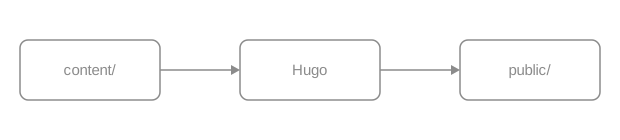
An export that carries an mxfile copy is wrapped in a .drawio container.
A pencil button appears at the bottom right on hover or keyboard focus, and
stays visible on touch devices and in forced-colors mode. Activating it lays a
full-screen iframe over the page and loads the editor the site configured.
When image zoom is enabled, Edit and Zoom are separate sibling buttons;
activating Edit does not open the zoom dialog.
The runtime looks at one thing: whether the file’s contents contain mxfile.
The filename is irrelevant. A hand-drawn SVG written exactly the same way — a
block image with the same attribute line — carries no copy, so it gets no
button.
Draw.io images go through the ordinary image render hook, so every
image attribute still applies. Add caption for a
captioned figure; the edit button still appears on the image.
Add {#id num=…} for a cross-referenceable numbered figure, which xref can
reach and which appears in the list of figures like any other.
The complete numbering and cross-reference rules are in publishing books.
Both are recognized. A Draw.io PNG export can carry the same copy in a text chunk, and the runtime’s test is identical.

Prefer SVG in documentation: it scales without loss, its text is real text (searchable, readable by screen readers) and its diffs are legible. Use PNG when the diagram is very complex or the target platform cannot take SVG. Only PNG can go through Hugo’s image processing; operations on SVG warn and leave the source unchanged, and strict builds reject the warning.
Three things, in order.
A full-screen div.drawioframe is inserted holding an iframe whose address is
the configured drawio_server plus a fixed query string
(embed=1&ui=atlas&proto=json&saveAndEdit=1&noSaveBtn=1).
Once the editor is ready, the runtime sends this image’s contents — the mxfile
copy included — into the iframe as a data URL. That step does not go through
your server.
Saving in the editor makes it export in the original format, SVG or PNG, and the
browser downloads it under the same name. The runtime never writes to the
repository: overwrite the file in content/ with what you downloaded and commit
it yourself.
The edit button is there so a reader can take the diagram away and change it. It is not online editing of the site.
enable: true without drawio_server warns and disables editing; strict
builds fail on that warning. The theme does not pick a public service.baseURL. Whitespace, control characters, raw
backslashes, protocol-relative URLs (//host/), and other schemes warn and
disable editing; strict builds reject the warning.https://embed.diagrams.net/ works, and the reader’s
diagram then travels to a third-party page.Both keys are defined in Configuration.
| Output | Shape |
|---|---|
| HTML | A plain <img> or <figure>; once enabled, the runtime wraps an image that carries a copy in <div class="drawio"> and adds the button |
| The image prints as usual; this output loads no Draw.io runtime and creates no edit button | |
| Markdown | Plain Markdown image syntax |
| RSS | A plain <img> with an absolute URL and no button |
The image itself exists in all four states; the edit button is an increment on top.
There are no fence or shortcode parameters of its own. The image attribute line
is the one from Images: caption, width, height,
link, #id, num, command, options.
Site parameters (hugo.yml):
params.drawio.enable
,
,
params.drawio.drawio_server
,
,
enable: true.svg or .png
candidates. It groups matching images by URL, then reads each URL once to
look for mxfile.none and use neutral greys for lines and text and it reads in
both modes.params.drawio.*echarts fence; Hugo validates them at build time and the browser draws a theme-aware chart with the local ECharts.The body of an echarts fence is an ECharts option object in YAML or JSON — not
code. Use it for quantitative charts that need axes, series and a legend. For
relationships and flows use Mermaid; for order and
hierarchy use Infographic. Hugo parses the
options at build time; invalid input warns and leaves its source readable in an
ordinary preview, while strict publishing rejects the warning. The browser
draws with the ECharts copy the theme ships, and only a page that uses it loads
the runtime.
A bar chart needs three parts: xAxis, yAxis, series. Below is how many
pages each of the six documentation sections has.
tooltip:
trigger: axis
xAxis:
type: category
data: [Introduction, Get started, Authoring, Components, Customization, Operations]
yAxis:
type: value
name: pages
series:
- name: pages
type: bar
data: [4, 4, 8, 22, 15, 7]Both formats are accepted; YAML needs no quotes or commas and is shorter to write. Broken indentation, or a body that parses to an array instead of a map, warns on that line and renders the source instead of a blank chart. Strict publishing rejects the warning.
series is an array, so another entry is another line, and legend lets the
reader hide one. Below are the release years of PostgreSQL major versions and
the end-of-support years implied by the community’s five-year policy.
tooltip:
trigger: axis
legend:
data: [Released, End of support]
grid:
left: 56
right: 24
top: 48
bottom: 40
xAxis:
type: category
name: major version
data: ["9.6", "10", "11", "12", "13", "14", "15", "16", "17", "18"]
yAxis:
type: value
min: 2015
max: 2031
name: year
series:
- name: Released
type: line
smooth: false
data: [2016, 2017, 2018, 2019, 2020, 2021, 2022, 2023, 2024, 2025]
- name: End of support
type: line
lineStyle:
type: dashed
data: [2021, 2022, 2023, 2024, 2025, 2026, 2027, 2028, 2029, 2030]Quote the version numbers: unquoted 10 is a number in YAML and so is 9.6,
but as category-axis labels they have to be strings.
Give radius two values for a doughnut. Below is how OINK’s 29 shortcodes break
down by purpose.
tooltip:
trigger: item
formatter: "{b}: {c} ({d}%)"
legend:
bottom: 0
series:
- type: pie
radius: [42%, 70%]
itemStyle:
borderRadius: 6
borderWidth: 2
label:
formatter: "{b} {c}"
data:
- { value: 14, name: Core components }
- { value: 10, name: Book numbering and indexes }
- { value: 3, name: Releases and downloads }
- { value: 2, name: OpenAPI }{b}, {c} and {d} are ECharts template placeholders — name, value,
percentage. Writing them in a string is enough; no function is needed.
height defaults to 400px and accepts px rem em vh vw %. full=true drops
the reading-column limit so the chart fills the content area, which suits charts
with many points or long labels.
tooltip:
trigger: axis
grid:
left: 40
right: 16
top: 24
bottom: 32
xAxis:
type: category
data: [i18n, taxonomy, font tokens, content contracts, navigation, runtime, sidebar icons, search, actions, palette, params, reading, release assets, download, landing, book, migrations, keyboard, shell, output, goldens]
yAxis:
type: value
name: scripts
series:
- type: bar
data: [1, 1, 1, 1, 1, 1, 1, 1, 1, 1, 1, 1, 1, 1, 1, 1, 1, 1, 1, 1, 1]An invalid height (360, 36pt) warns and uses the default in ordinary
preview; strict publishing rejects the warning.
Without theme, a chart initializes in the reader’s current colour scheme and
redraws in place when that changes — no page reload. It resizes automatically
when its container does. Switch this page to dark and the ground and text of
every chart above change with it.
A fixed theme pins the colours in both modes:
xAxis:
type: category
data: [HTML, Print, Markdown, RSS]
yAxis:
type: value
series:
- type: bar
data: [1, 1, 1, 1]dark is the only theme built into the runtime; any other ECharts theme has to
be registered with echarts.registerTheme() before it can be named here.
Without a branding requirement, leave theme out and let the chart follow the
site.
$fn:
A fence is data and cannot carry JavaScript. When an option needs a function — a
tooltip formatter, a data-driven colour — write the string "$fn:name" in the
options and register that name on window.OinkEchartsFunctions:
tooltip:
trigger: axis
formatter: "$fn:pageShare"
xAxis:
type: category
data: [Introduction, Get started, Authoring, Components, Customization, Operations]
yAxis:
type: value
series:
- type: bar
data: [4, 4, 8, 22, 15, 7]Hover any bar and the tooltip is the sentence that function builds. An
unregistered name resolves to undefined, the chart is drawn as if the option
were not set, and neither the build nor the runtime complains. Keep the script
next to the fence so they change together.
That script is site code and deserves code review. Formatting a string template
({b}, {c}, {d}) can express does not need a function.
A fence body is a literal. Hugo does not expand shortcodes, front matter
variables or files under data/ inside it — the numbers are written in the
fence. The cost is that data cannot be shared; the benefit is that the chart and
its data go into Git together and a diff shows which number moved.
Do not draw data that changes often (version matrices, asset lists). Use a
table or the data/-driven components on a
release page.
| Output | Shape |
|---|---|
| HTML | A canvas container inside <div class="td-echarts"> plus an application/json options block; the local ECharts draws it |
No chart; the fence source inside <pre class="td-echarts-source"> |
|
| Markdown | The echarts fence and its option source, kept as written |
| RSS | Same as print — source only |
Whatever the chart shows, say it in the prose too: print and RSS have no chart.
The fence attribute line (```echarts {…}):
height
,
,
px rem em vh vw %; anything else warns and uses the defaulttheme
,
,
dark is built infull
,
,
true drops the reading-column limit and fills the content areaclass
,
,
style, on*, and unknown attributes warn and are ignored. A fence body that
does not parse to a YAML/JSON map warns and renders as source. Strict publishing
rejects all these warnings. The option keys themselves are ECharts’, documented in the
official option manual.
There is no site-level parameter: ECharts needs no switch in hugo.yml and
loads only where it is used.
$fn: when a function is needed,
and remember an unregistered name resolves to undefined with no error.data/, front matter and shortcodes are all
out of reach; the numbers live in the fence.10, 9.6, on and yes on a category axis become
numbers or booleans and need quotes.infographic fence picks an AntV template and renders a title plus a list of items as a flow, timeline, funnel, grid or hierarchy.An infographic fence picks an AntV template and renders “a title plus a list
of items” as an infographic. Use it for structure: order, hierarchy, comparison.
When you need axes and numeric precision use
ECharts; when you need a flow with conditional
branches use Mermaid. The fence body is data, and
it stays readable text on GitHub.
The first line is infographic <template>, followed by a data block: title
is the title and every entry under items needs at least a label.
infographic list-row-simple-horizontal-arrow
data
title Three steps in one documentation change
items
- label Write
desc Start with the source language
- label Check
desc Zero build warnings, every example really rendered
- label Ship
desc Add the translated peer, open the PRIndentation decides the structure, two spaces per level. Keep labels short and
put the explanation in desc.
The sequence-timeline-* family lays the items out on a time axis, with label
as the point in time and desc as the event.
infographic sequence-timeline-simple
data
title The last five PostgreSQL major versions
items
- label 2021
desc 14: another round of parallel query and logical replication work
- label 2022
desc 15: the MERGE statement
- label 2023
desc 16: logical replication from a standby
- label 2024
desc 17: incremental backup and JSON_TABLE
- label 2025
desc 18: the asynchronous IO subsystemsequence-funnel-simple draws stages that narrow. Below are the theme’s five
release states: they are not interchangeable, and only the last one is live.
infographic sequence-funnel-simple
data
title The five states a theme release passes through
items
- label Source complete
desc The code is written, and that is all
- label Validated
desc Theme checks and the site suite are green
- label Published
desc An immutable signed tag, resolvable through the Go proxy
- label Documented
desc The documentation site pins that tag
- label Deployed
desc Production runs this versionWhen items have no order between them, list-grid-* arranges them in a grid
rather than a queue.
infographic list-grid-compact-card
data
title One page, four outputs
desc Every content component has to produce something usable in all four
items
- label HTML
desc Interactive, runtimes loaded on demand
- label Print
desc Disclosures expanded, zoom and copy removed
- label Markdown
desc Plain text, compared byte for byte against goldens
- label RSS
desc Static, from the same source as printAdd value to an item and templates that express proportion — pies, doughnuts,
progress — will use it.
infographic chart-pie-donut-plain-text
data
title How the 29 shortcodes break down
items
- label Core components
value 14
- label Book numbering and indexes
value 10
- label Releases and downloads
value 3
- label OpenAPI
value 2Items can nest through children, and hierarchy-mindmap-* draws two levels of
structure. A top-level theme block changes the whole look; type takes
light, dark or hand-drawn.
infographic hierarchy-mindmap-level-gradient-compact-card
theme
type hand-drawn
data
root
label Theme repository
children
- label layouts
desc templates
children
- label _markup
desc render hooks
- label _partials
desc shell and helpers
- label assets
desc resources
children
- label scss
desc tokens and component styles
- label js
desc browser runtimes
- label third_party
desc libraries shipped with the themetheme belongs to the DSL, not to the fence attributes, and it does not follow
the site’s colour scheme: a diagram with type dark stays dark on a light page.
Check contrast in both modes.
Template names are structure-variant, and one structure has several visual
variants. The common families:
| Structure prefix | What it expresses | Example |
|---|---|---|
list-row-* list-column-* |
Items in a row or a column | list-row-simple-horizontal-arrow |
list-grid-* |
A grid, no order between items | list-grid-compact-card list-grid-badge-card |
list-pyramid-* sequence-funnel-* |
Narrowing stages | sequence-funnel-simple |
sequence-timeline-* sequence-roadmap-vertical-* |
Timelines and roadmaps | sequence-timeline-simple |
sequence-steps-* sequence-snake-steps-* |
Ordered steps | sequence-steps-simple |
compare-binary-horizontal-* compare-quadrant-* |
Binary comparison and quadrants | compare-binary-horizontal-simple-vs |
hierarchy-mindmap-* hierarchy-structure-* |
Hierarchy, with children |
hierarchy-mindmap-level-gradient-compact-card |
chart-pie-* chart-bar-* chart-column-* |
Illustrative charts, with value |
chart-pie-donut-plain-text |
relation-network-* relation-dagre-flow |
Networks and flows, with relations |
relation-dagre-flow |
Choose the smallest form that makes the relationship clear. The full gallery is at AntV Infographic, and the template names match the version shipped with the theme.
| Output | Shape |
|---|---|
| HTML | A canvas container inside <div class="td-infographic"> plus the DSL; the local AntV runtime draws the SVG |
No diagram; the DSL source inside <pre class="td-infographic-source"> |
|
| Markdown | The infographic fence and its DSL, kept as written |
| RSS | Same as print — source only |
Whatever the diagram says, say it in the prose too: print and RSS carry the DSL and nothing else.
The fence attribute line (```infographic {…}):
height
,
,
px rem em vh vw %; anything else warns and uses autofull
,
,
true drops the reading-column limitclass
,
,
style, on*, and unknown attributes warn and are ignored. An empty DSL body
warns and renders nothing. Strict publishing rejects all these warnings.
The DSL’s top-level keys (AntV’s, not the theme’s):
infographic / template
data
title, desc, items (or sequences, compares, nodes, values, relations, root, depending on the structure), ordertheme
type (light / dark / hand-drawn), palette, colorPrimary, stylize …width / height
heightdesign
Each entry under items accepts label, desc, value, icon, children,
group and id. The DSL is defined by the
AntV Infographic documentation; the
version shipped with the theme and its checksum are recorded in the theme’s
VENDOR.json.
theme lives in the DSL, so check contrast in
both modes.gallery fence arranges related screenshots in a responsive grid, each with an optional description or link, reusing the page’s image zoom dialog.A gallery arranges related images in a responsive grid, one image per line inside the fence. It suits several views of one thing: a few screenshots, a few states, a few colour schemes. A single image is an image, and images with no order or comparison between them do not belong in one gallery.
One image per line, written as Markdown’s .
Alternative text is mandatory: it is the item’s title, the only text a screen reader gets, and what decides whether the image can zoom. There is no column parameter — the grid adapts to the container and drops columns on a narrow screen.
Start a description with # after the image and it appears underneath.
Descriptions are plain text, so Markdown inside them shows literally; for a
literal hash write \#.
The default shell: sidebar, article, table of contents
Docsy upstream — the content model is the same lineage
Release cards use release_url and date; checksums blocks list download assets
Descriptions need not be the same length: the grid aligns to the tallest item
and a wrapped description does not disturb its neighbours. The image is parsed
first, so a # inside the alt text or the path needs no escaping.
{link=…} at the end of a line turns that item into a link. Site paths,
relative paths and http(s): all work.
Opens the Images component page
Opens "Releases and downloads"
A linked item does not zoom, because clicking already means something else. Both kinds can share one gallery: linked items open a page, the rest open the full image.
Sources resolve exactly as for a plain image: page resource (a file next to the
page in its bundle) → global resource in assets/ → static path /images/… →
remote URL. A local resource carries its intrinsic size, so the page does not
shift while loading; a remote image is neither downloaded at build time nor
measured.

Under assets/images/…, eligible for build-time processing
Under static/images/…, published as is
An unresolved page/global resource is retained as a static path, just like an explicit static path; the theme does not check static or remote existence.
Empty alternative text marks a decorative image: no title, skipped by screen readers, and never a zoom candidate.
Image zoom is a site-level switch and is off by default. This page turns it on in its front matter, so every image above that has alt text and no link opens full size (Esc closes it and focus returns where it was).
Decorative, never zooms
Has alt text, so it opens
A gallery has no zoom runtime of its own; it reuses the one dialog the page shares. With no zoomable image on the page, that runtime is never loaded. The details are in Images · Zoom.
class can go on the whole fence (after the language) or on one item (at the
end of its line). The theme does not interpret it and passes it through for site
CSS. A fence carrying tab= (with group= / value=) becomes one panel of a
tab set.
Sidebar, article, table of contents
The same content-model lineage
| Output | Shape |
|---|---|
| HTML | <ul class="td-gallery"> with one <li> per item; eligible images carry data-td-image-zoom; everything is lazy-loaded |
| The same images stacked, without zoom markers | |
| Markdown | The gallery fence, emitted as written |
| RSS | The same static stack as print |
Galleries load no JavaScript of their own.
The line syntax  [# description] [{key=value …}]:

,
alt is the item’s title; empty means decorativesrc
,
# description
,
\# is a literal hash; must not be empty{link=…}
,
{class=…}
,
Fence attributes:
tab
,
,
group / value
,
,
tabclass
,
,
There is no columns, caption or title attribute. A malformed line or
attribute warns, drops only the invalid part or line, and names the line number
inside the fence. Strict publishing rejects the warning.
{.gallery} list marker and no
shortcode. The cost is that the source does not render as images on GitHub;
the benefit is that four-state output and zoom eligibility are guaranteed by
the theme.A badge is an inline status label that sits right after a name: Beta, deprecated, v0.5, needs a server. It suits a status of one or two words. The author picks a semantic tone and the theme picks the colour, with contrast guaranteed in light and dark. When the status needs an explanation, a procedure or a deadline, use prose or a callout.
text is the only required parameter and must be a non-empty string.
These five values, and no custom colours.
Default Info Supported Experimental Deprecated
Without tone the badge is neutral. Any other value warns and uses neutral
in ordinary preview; the warning names the source location and fails a strict
publishing build.
A badge is an inline element that follows a name; it never takes its own line.
With params.ui.image_zoom off by default enabled,
block images that have alt text open full size. PlantUML needs a server
and Draw.io needs a server warn and remain off when no
endpoint is configured, rather than reaching for a public service.
Never put a shortcode in a heading. Hugo builds the table of contents before it expands shortcodes, so the badge renders correctly on the heading while the table of contents is left with an internal Hugo placeholder. Put the status in the first paragraph under the heading instead:
new in 0.5 The badge sits just under the heading, the table of contents stays clean, and sharing the anchor link does not drag the badge text along.
Badges make a comparison table easier to scan than a column of “yes” and “no”.
| Component | Form | Status |
|---|---|---|
| Callouts | > [!NOTE] |
stable |
| Galleries | ```gallery fence |
stable |
| PlantUML | ```plantuml fence |
needs a server |
The image shortcode |
— | removed |
baseURL in hugo.yamlhugo server to preview port 1313A card has its own badge parameter — plain text, fixed to the right of the
title — and the card body can hold badge shortcodes.
One hugo mod get and you are done needs Go
Builds on a machine with no network manual upgrades
With link the badge becomes an <a>: site paths, relative paths, http(s):
and mailto: all work.
Current version v0.5; for the upgrade steps see Upgrading.
An illegal link warns and is dropped, leaving a plain badge in ordinary preview; strict publishing rejects the warning.
| Output | Shape |
|---|---|
| HTML | <span class="td-badge td-badge--<tone>">, or <a class="td-badge …"> when linked |
| Same as HTML, a static inline element | |
| Markdown | **Beta**, or [**Beta**](/…) when linked |
| RSS | Same as print |
No JavaScript. A badge is not a live region, so adding one does not announce anything to a screen reader.
text
,
,
tone
,
,
neutral info success warning dangerlink
,
,
Named parameters only. There is no icon, class, color, outline or size
parameter. Invalid input warns and takes the safe result: unknown parameters
are ignored, empty text renders nothing, bad tone becomes neutral, and an
unsafe link is dropped. Strict publishing rejects every such warning.
{{< badge text="🔴" >}} tells a screen reader nothing.card has a badge parameter of its owntone uses the same vocabularykbd — one shortcode, a list of key names, a semantic key sequence that stays readable in print and in Markdown output.Keys separate what the reader has to press from the prose. Use it for shortcuts and chords: one positional parameter per key, and the theme draws the caps, adds the separators, and gives screen readers a readable sequence. Command names, flags and text to type are inline code — they are not physical keys.
Press Ctrl with K to open the command palette.
Parameters must be quoted, one key per positional parameter. Missing, empty, or named parameters warn and render no invalid key in ordinary preview; strict publishing rejects the warning.
One parameter is one key, and symbol keys are written as they are.
Escape closes a dialog; / jumps to search; t toggles light and dark; l cycles through languages.
Several parameters render in order with + between them. That plus sign is
hidden from assistive technology, which hears a localized connector instead.
⌘ with Shift with P and Ctrl with Shift with P are the same action. For a literal plus, treat it as a key of its own: Ctrl with + zooms the page in.
Write the label printed on the reader’s keyboard: ⌘ on macOS, Ctrl on
Windows and Linux. Never merge two platforms into one sequence — a spelling like
Ctrl/⌘ cannot be read aloud correctly. Say which platform in the sentence, or
split into tabs.
On macOS press ⌘ with K; on Windows and Linux, Ctrl with K.
A cheatsheet is where keys most often live. Here are some of the global keys this site honours:
| Key | Action |
|---|---|
| Ctrl with K | Open the command palette (⌘ with K on macOS) |
| / | The palette’s full search state |
| t | Toggle light and dark |
| q / e | Previous / next page |
| w s a d | Move, collapse and expand in the sidebar tree |
| Escape | Leave the sidebar tree for the article |
The complete list of site-wide shortcuts is in keyboard navigation.
> for the command-only state, or type a keyword to search<kbd> tags
A raw <kbd> tag in Markdown gets the same styling, and GitHub renders it too.
The difference is that the separators and the accessible sequence are then yours
to maintain: either spelling works for a single key, but use the shortcode for
chords.
Press F5 to reload; in an editor, Ctrl+S saves.
| Output | Shape |
|---|---|
| HTML | <span class="td-kbd-sequence"> around one <kbd> per key; the visible + is hidden from screen readers, which get a localized connector |
| Same as HTML, static | |
| Markdown | Plain text: Ctrl + K, ⌘ + Shift + P |
| RSS | Same as print |
Without CSS or JavaScript the instruction is still readable.
Positional 1..n
,
,
Positional parameters only. There is no separator, label, platform,
class or size: Hugo does not allow positional and named parameters in one
shortcode call.
kbd
calls and a sentence — press Escape, then Enter.Ctrl for ⌘ based on the
visitor’s operating system.Ctrl in {{< kbd Ctrl K >}} is not a
string parameter.hugo server is inline code; Ctrl is a key.Three shortcodes, one job each: include puts another file’s contents into this
page, param prints a page or site parameter, and comment discards a passage.
They are for fragments reused across pages and constants scattered over many:
one set of install steps that appears on three pages is an include, a version
number that appears on dozens is a param, and either way you edit one place.
Content that appears on one page belongs on that page.
include takes one required parameter, file:
The file it pulls in is ordinary Markdown living under assets/:
The result is what you would get by writing it here: the code block has its copy button and the callout is a callout.
Installing OINK into an existing Hugo site takes three commands:
hugo mod get needs Go on the machine; an offline archive or a submodule does not.
The current release is v1.2.0.
The file that gets included is not a page of its own: it is absent from the sidebar, it takes no part in translation pairing, and it has no URL.
file resolves in this order, first match wins:
| Order | Looked up as | Written as |
|---|---|---|
| 1 | A page resource — a file in this page’s bundle | file="config.yaml" |
| 2 | A global resource under assets/ |
file="snippets/dsn.txt" |
| 3 | A file under content/: a leading / is the content root, otherwise relative to the page’s directory |
file="notes/caveat.md", file="/shared/notice.md" |
Missing in all three, or containing .., the include warns and emits nothing.
Strict publishing rejects the warning: include reads from content/ and
assets/ and nowhere else.
A Markdown fragment is read as source, so write the file’s real name on disk.
One trap belongs to step 1 alone: Hugo attaches a language-suffixed page
resource such as notice.zh.md under its stripped name, so asking a bundle for
notice.md hands include already-rendered HTML instead of the source, and
<div class="td-code"> turns up in the Markdown output. Under assets/ and
content/ the name you write is the file you get. Non-Markdown files
(.yaml, .sh, .txt) never have this distinction.
Each language of this page includes its own fragment: English pulls
assets/parts/install-oink.md, Chinese pulls assets/parts/install-oink.zh.md.
Keeping them under assets/ rather than in the page bundle is what lets both
languages fetch the source under the name they write.
code=true renders the file as a code block, and lang= sets the highlighting
language. Point it at a real file in the repository and the documentation cannot
drift from it.
Code blocks and fences share one pipeline: highlighting, line numbers and the
copy button all work. Fence attributes (title=, collapse, hl_lines=)
cannot be passed through; when you need them, write the content as an ordinary
code block.
A fragment is page-level Markdown rendered in the current page’s context:
callouts, tables, lists, images, steps and shortcodes all work. The last line of
the fragment above — “The current release is v0.8.1” — is its
{{< param version >}} expanded on this page.
When two pages include one fragment, each renders it separately and each generates its own heading anchors and code-block IDs. They do not collide.
Install commands, connection strings, support matrices, legal notices: content that changes, and that must change everywhere at once. Content that appears on one page belongs on that page.
param prints one parameter: this page’s front matter first, then the site
configuration — Hugo’s .Param rule.
This site publishes v1.2.0, copyright from 2026,
and this page’s front matter says pigsty_pg_major: 18, which reads back as 18.
Nested keys join with ., so copyright.from_year reads
params.copyright.from_year. A parameter that does not exist, or whose value is
a map or list rather than a scalar, warns and prints nothing; strict publishing
rejects the warning.
param emits escaped plain text, so it can sit in a code fence, a table cell or
a link target. A version number in an install command is the obvious case:
| Item | Value |
|---|---|
| Current version | v1.2.0 |
| Hugo floor | 0.160.1 |
Where site parameters are defined and which exist is in Configuration; page parameters are in front matter.
A comment body appears in none of the four outputs — HTML, print, Markdown,
RSS. An HTML comment is different: it stays in the page source and reaches
llms.txt.
Since PostgreSQL 18, pg_stat_io breaks out WAL statistics.
Verify the dashboards on a test database before upgrading.
There is a comment between those two paragraphs, and viewing the page source will not find it.
| Output | include (Markdown) |
include code=true |
param |
comment |
|---|---|---|---|---|
| HTML | The fragment renders as normal content | Highlighted code block + copy button | Escaped plain text | nothing |
| As HTML | As HTML, without the copy button | As HTML | nothing | |
| Markdown | The fragment’s source, as written | A source fence | The value itself | nothing |
| RSS | As HTML | As HTML | As HTML | nothing |
In Markdown output a fragment is source rather than HTML, and shortcodes inside
it stay as {{< param version >}}. That is consistent with “Markdown output
keeps the source”; it is not a missed render. None of the three shortcodes loads
a script.
include (named parameters only):
file
,
,
.., missing file, or empty value warns and emits nothingcode
,
,
true renders as a code block; quoted code="true" warns and includes ordinary contentlang
,
,
code=true it warns and is ignoredAny other parameter name warns and is ignored, with the file and line in the message; strict publishing rejects the warning.
param (one positional parameter):
parameter name
,
,
.; page front matter first, then site params; missing or non-scalar values warn and print nothingcomment takes no parameters. It is used in pairs, and everything between
{{< comment >}} and {{< /comment >}} is discarded.
include is not a template: you cannot pass variables to a fragment, include
conditionally, or give the included code block fence attributes (title=,
collapse). For per-platform variants, write two fragments and use
tabs.include does no language
fallback and takes the exact path you write. Share one fragment across
languages — this page’s Chinese translation includes the same English file —
or write one per language and point each page at its own.param prints scalars only: structured data — version matrices, download
lists — belongs in data/ and is rendered by the matching component.comment is not “unpublish for now”: the content is discarded on every build.
To take a whole page down temporarily, use draft: true.include to build an index page: a page that pulls in ten
fragments is a page where the reader wanted ten links.include code=true reusesparam can reachasciinema renders a .cast recording as a terminal player on the page. It
suits command-line walkthroughs: the text in the terminal is still text, it can
be selected and copied, and the six-minute install recording on this page is
about 196 KB. Graphical interfaces belong in screenshots or video — this
component plays terminal recordings only. The player and its styles ship with
the theme, nothing is downloaded at build time, no CDN is contacted at runtime,
and the runtime loads only on a page that uses it, and only in its HTML
output.
file is the only required parameter:
images/install.cast — /images/install.cast
The recording is a single-node Pigsty install on a Debian machine in a 120×36
terminal, lasting about 6 minutes and 42 seconds. Download the
sample recording to static/images/install.cast in your
site and write its path from the site root. A file under assets/ is written as a relative path: the theme looks in
resources first and falls back to treating the value as a site-root path.
Without title, the window title shows the value of file.
title sets the window title, theme the colours:
Pigsty single-node install — /images/install.cast
theme defaults to auto: it follows the site’s colour scheme, td-light in
light and td-dark in dark, remounting in place when the reader switches. To
pin a terminal palette, the values are the player’s own asciinema, dracula,
gruvbox-dark, monokai, nord, seti, solarized-dark, solarized-light,
tango, plus the theme’s td-light / td-dark. A pinned theme stops following
the colour scheme, and solarized-light on a dark site does not have workable
contrast. The terminal font needs no setting: the player uses the site’s code
font, the one the code blocks use.
Three parameters control where a long recording starts: speed sets the rate,
startAt skips the opening, poster decides the frame shown before playback.
From 60 seconds in, at double speed — /images/install.cast
speed and startAt are numbers (seconds) and poster uses the player’s
npt: notation for a point in time, so npt:1:30 is one minute thirty. The
player above rests on the frame at 90 seconds and starts playing from 60.
idleTimeLimit compresses silent stretches to at most N seconds. This recording
was already compressed while recording (idle_time_limit: 0.5 in the .cast
header), so it does not need it. Only files recorded without an idle limit do.
The player scales to the container width by default (fit="width"), and the
terminal’s rows and columns come from the .cast header. cols / rows
override that:
Only 16 rows tall — /images/install.cast
A size smaller than the recording clips it — the one above shows 16 of the 36
rows. cols / rows exist to correct a wrong size in the recording’s header;
they are not a layout tool. To make the player shorter, record again in a
smaller terminal.
fit takes four values: width (the default, scale to width), height (to
height), both (fit both axes) and none (no scaling — a wide terminal
overflows).
loop replays at the end, and preload fetches the .cast when the page
loads so pressing play does not wait:
Looping: the first minute after login — /images/install.cast
autoplay="true" starts playback as the page opens. It is not recommended: a
“reduce motion” preference only disables the transitions on the player’s
controls, it does not stop autoplay. When you really need it, pair it with
loop, keep the clip very short, and put only one on a page.
Put the recording next to the step: the text says what to do, the recording shows what it looks like.
Install the dependencies and fetch the installer:
Run the install; the recording plays the process at four times speed:
pig install — /images/install.cast
Open http://<node address>:3000 and sign in to Grafana with admin / pigsty.
A page can hold several players, and the script and styles load once.
The theme only plays. Record with
asciinema —
asciinema rec --idle-time-limit=2 --cols=100 --rows=28 install.cast — and
check it locally with asciinema play install.cast.
clear before you start..cast is plain text and every character in the
recording is greppable. Check before committing.static/images/install.cast and use
file="images/install.cast". assets/images/install.cast works with the same
value; page-bundle resources are not resolved. Commit the recording rather
than referencing a .cast URL on someone else’s site.| Output | Shape |
|---|---|
| HTML | A <div class="td-asciinema"> window frame plus the player; the player CSS/JS and the runtime load on demand, once per page, and only in this output |
| A labelled static link showing the recording’s address; no player, no runtime | |
| Markdown | A plain Markdown link, [title](/images/install.cast) — no component markup, no configuration block |
| RSS | The same plain link |
A recording must never be the only source of information. Write the key commands
and the key output beside it in text or a code block: offline readers, whatever
consumes llms.txt, and anyone printing the page get the link and your prose,
not the terminal session.
file
,
,
title
,
,
theme
,
,
auto follows the site’s colour scheme; or td-light td-dark asciinema dracula gruvbox-dark monokai nord seti solarized-dark solarized-light tangofit
,
,
width height both none; anything else warns and uses widthcols / rows
,
,
speed
,
,
startAt
,
,
idleTimeLimit
,
,
poster
,
,
npt:mm:ssautoplay
,
,
loop
,
,
preload
,
,
.cast when the page loadspauseOnMarkers
,
,
markers
,
,
The boolean-ish parameters compare against the text true: loop="true" and
loop=true both enable, anything else disables. Everything else warns and
carries on: an illegal fit uses width, a non-numeric speed uses 1, a
non-numeric startAt uses 0, and a cols, rows, idleTimeLimit or marker
time that is not a number is ignored. None of them stops an ordinary build,
and every one of them fails a publishing gate built with --panicOnWarning.
markers labels are lost: the theme flattens the time:label list into a
one-dimensional array, and the player accepts only pairs, so the timeline ends
up with unlabelled markers. A marker whose time is not a number warns and is
skipped. When you need chapters, write a list beside the recording..cast: http and https addresses are accepted,
and the page then depends on someone else’s site. Any other scheme, a
protocol-relative //host, or an empty value warns and the component renders
nothing.This section covers site-level configuration: the parameters in hugo.yml, the
data files under data/, and the style entry points under assets/. Writing an
individual page and its front matter is in Authoring.
| What you want to change | Page |
|---|---|
| Site name, logo, favicon | Brand and appearance |
| Colours, light and dark mode, fonts | Brand and appearance |
| The navbar menu and its dropdowns | Navigation and menus |
| Sidebar width, icon density, outline depth | Layouts and page types |
| The home page and landing pages | Home and landing pages |
| Full-text search and its index scope | Search |
| What appears in the command palette | Command palette |
| Keyboard shortcuts | Keyboard navigation |
| Adding a language | Languages |
| Multi-version sites and the archive banner | Versions |
| Tags and categories | Taxonomies |
| Edit this page, last modified, contributors | Repository links and page info |
| Print and whole-chapter export | |
llms.txt and the per-page .md output |
AI-agent support |
| A parameter’s type and default | Configuration |
Comments, analytics and deployment need an external service; they are in Operations.
This is the single home of site parameters. Every key the theme reads has a row in one of the tables below, giving its type, default and a one-line description, and linking to the guide that covers it. The guides give pasteable snippets and never repeat the definitions. Page-level parameters (front matter) are in Page parameters.
The tables are grouped by function, one ## each, and the anchors are
referenceable — for example /docs/customize/config/#sidebar. An empty
default column means the theme has no default: leave the key out and the
feature is off.
An OINK site’s configuration has four kinds of key, and which layer you change depends on what you are changing:
| Layer | Examples | Who defines it |
|---|---|---|
| Hugo’s own top-level keys | baseURL title languages markup outputs taxonomies module |
Hugo itself; the behaviour is on gohugo.io |
Top-level params |
logo offline_search github_repo version page_width comments |
Site-level options the theme reads |
params.ui.* |
navbar_enabled sidebar_width_min typography pager_types |
The shell, navigation and reading interface |
params.<runtime> |
mermaid plantuml drawio markmap |
Each content runtime’s own switch and endpoint |
A minimal working configuration needs only the first two layers:
The theme’s defaults are conservative; write only the keys you change. Interactive features (local search, image zoom, comments, feedback, the light/dark menu) are off by default, because the theme does not make policy for a site. Trimming a “complete configuration” leaves behind keys you never needed more readily than adding them as you go.
There is no theme master switch. There is no oink.enabled, no params.oink.* namespace, and no option that swaps between a “Docsy shell” and an “OINK shell”. A switch you cannot find on this page does not exist.
An invalid value warns and falls back to the documented default. params.ui.typography: solarized reports invalid params.ui.typography "solarized" (allowed: technical | system) -- using "technical" and the site still builds; footer_style: thin, page_width: huge and section_index: grid behave the same way. One typo therefore degrades one setting instead of serving HTTP 500 on every URL under hugo server. It cannot ship silently either: every publishing gate builds with --panicOnWarning, which turns the warning back into a hard failure.
One warning keeps the value instead of dropping it. A theme_color the theme reads as below AA body text (4.5:1) against its own canvas still ships — a custom canvas or a brand mandate is the author’s call — but says so, and prints the ignoreLogs id that silences it. Treat it as advice, not a rejection: the fix is either a darker color or one line of configuration, and the publishing gate stops the build until you choose. Only an unparseable hex is dropped outright, and that one falls back to the default palette like every other invalid value.
The theme itself never stops the build. Its templates contain no errorf at all: every invalid value takes the warn-and-fall-back path above. A feature needing an external endpoint — PlantUML, Draw.io, Algolia — warns and stays off when the endpoint is missing, because the theme never connects to a public service on your behalf. An incomplete upstream attribution warns and omits the whole notice, because a partial one reads exactly like a complete one. What does stop a build comes from Hugo rather than the theme: a content reference that resolves to nothing, and a Hugo older than module.hugoVersion.min.
Hugo’s .Param lookup lets most parameters be overridden per page, highest
precedence first:
cascade in an ancestor section’s _index.md (nearer wins);params.Drop the ui. prefix when writing it in front matter. The site’s
params.ui.reading_time is simply reading_time on a page. A ui: block in front
matter is read by nobody and reported by nobody, so a setting that seems to have
no effect is worth checking against
Page parameters first.
A cascade sets a whole subtree at once:
Overrides are for real differences in content. Rebuilding a visual system page by page tends to fall out of step at the next theme upgrade.
Hugo does not merge a theme module’s markup configuration into the site,
so these three must be in the site’s own hugo.yml, or attribute lines,
component HTML and mathematics all stop working:
Without attribute.block, {.fields}, {.steps} and {caption=…} render as
literal text; without passthrough, \(x\) never becomes a formula; without
unsafe, the structure of steps and cards is escaped away.
renderer.unsafe: true also lets raw HTML in Markdown through. It is meant for
trusted authors, not as a submission filter. Where content comes from untrusted
sources, the review belongs in the contribution process.
Hugo’s own top-level keys:
title
,
<title> and the footerbaseURL
,
copyright
,
params.copyright is unsetenableGitInfo
,
,
enableRobotsTXT
,
,
robots.txtenableEmoji
,
,
:smile: shortcodesTheme parameters:
params.logo
,
,
assets/ resource or a static/ path — see Brand and appearanceparams.wordmark
,
params.description
,
descriptionparams.copyright
,
authors, from_year and to_year (present means this year)params.footer_center_info
,
,
params.author
,
name and emailparams.ui.theme_color
,
#rgb/#rrggbb hex tinting the shell’s accent grounds; prose links and inline code are unaffected — see Brand and appearanceparams.ui.theme_color_dark
,
,
theme_color until it clears AA on the dark canvasThere is no favicon parameter: the theme scans static/ for conventional names
(favicon.ico, favicon.svg, favicon-NxN.png, apple-touch-icon.png,
apple-touch-icon-NxN.png) — see
Brand and appearance.
The shell follows the page type, not the path. Documentation can live in any
directory, with a cascade giving it type: docs.
params.ui.shell_types
,
,
params.ui.docs_section
,
,
params.ui.blog_section
,
,
params.ui.docs_sidebar_root
,
,
section, a docs page’s sidebar roots at the documentation section; with home, at the site home. An invalid value warns and falls backparams.ui.quick_links
,
,
params.ui.sidebar_root_enabled
,
,
sidebar_root_for: selfparams.ui.sidebar_root_menu
,
,
params.ui.section_index
,
,
list or cards, overridable per sectionparams.ui.section_index_columns
,
,
section_index: cardsSeven keys shape a blog section. They apply to the section named by
params.ui.blog_section, and each can be overridden per section through front
matter or a cascade on the blog root.
params.ui.featured_image
,
,
none renders nothing, banner frames it above the title in a 16:9 figure, wash lays it behind the article header at a tenth of its opacity, hero paints it as the shell’s own full-bleed backdrop and moves the opening down — on single pages and section indexes alike. The image is whichever one the page already shares in its card and og:image, so the two cannot disagree. An article with no image renders nothing in any modeparams.ui.blog_index
,
,
list shows rows, cards shows image cards with dates and summaries, and table shows compact rows. All sort by date, newest first, without year groups. Only a standalone table with blog_index_toggle: false shows the whole section without paginationparams.ui.blog_index_columns
,
,
blog_index: cards; two between the md and xl breakpoints, one below md, whatever this saysparams.ui.blog_index_size
,
,
list, cards, and all three views when the toggle is enabled. A standalone table ignores itparams.ui.blog_index_toggle
,
,
params.ui.toc_style
,
,
fixed is a panel pinned to the viewport, flow a wider panel in the content flow that starts where the article starts and pins only on scrollparams.ui.toc_taxonomies
,
,
Article authorship and series are taxonomies rather than parameters — see Taxonomies and Writing a blog.
params.ui.navbar_enabled
,
,
navbar_enabled on a page — see Navigation and menusparams.ui.navbar_autohide
,
,
params.ui.footer_style
,
,
fat is a multi-column grid plus the copyright line, slim is the copyright line only, none renders nothing. An invalid value warns and falls backparams.ui.dark_mode
,
,
true enables both the dark palette and the theme control; for the control alone write dark_mode: { show_menu: true }params.ui.breadcrumb
,
,
false turns them off. A top-level section already omits a one-level breadcrumbparams.ui.page_context_menu.enable
,
,
params.ui.page_context_menu.assistant_links
,
,
params.ui.page_context_menu.links
,
,
url supports the {url}, {title} and {markdown_url} placeholdersparams.ui.github_stars
,
params.ui.alt_site
,
label and an absolute http(s) url are both requiredThe fat footer’s column data comes from data/footer/<language>.yaml rather
than from a parameter — see
Navigation and menus.
params.ui.sidebar_menu_compact
,
,
params.ui.sidebar_menu_foldable
,
,
params.ui.sidebar_menu_truncate
,
,
params.ui.sidebar_cache_limit
,
,
params.ui.sidebar_width_min
,
,
params.ui.sidebar_width_max
,
,
params.ui.sidebar_item_overflow
,
,
ellipsis truncates a long title, wrap wraps itparams.ui.sidebar_icon_policy
,
,
all everywhere, groups only on the root and nodes with children, none nowhere. An invalid value warns and falls back to allparams.ui.sidebar_expand_levels
,
,
params.ui.sidebar_headings
,
,
type: book only: expands a heading branch under the current sidebar row; an integer from 2 to 4, and true means 2params.ui.sidebar_enabled
,
,
false turns it off, usually per page rather than per siteparams.ui.taxonomy_icons
,
tags: fa-solid fa-tagsHow to use the sidebar is in
Layouts and page types; the tree itself comes
from the shape of content/ — see
Organizing content.
The outline’s levels come from Hugo’s own configuration; the theme controls only the tracking behaviour:
markup.tableOfContents.startLevel
,
,
markup.tableOfContents.endLevel
,
,
params.ui.scroll_spy
,
,
Hide the outline on one page with the front matter notoc: true — see
Page parameters.
The page-end components are in a fixed order — share → feedback → page information → pager → comments — and each has its own switch; backlinks sit in the right rail beside the table of contents.
params.ui.share
,
,
x bluesky mastodon facebook linkedin reddit hackernews telegram whatsapp line pinterest weibo chatgpt claude email copy. Empty means no bar. Every target is a plain intent link — no SDK, no iframe, no third-party script, no share counts — see Writing a blog. An unknown target warns and is droppedparams.ui.pager_types
,
,
pager: false. An unknown type warns and is droppedparams.ui.annotation
,
,
upstream_link family — see Page parametersparams.ui.backlinks
,
,
params.ui.translation_notice
,
,
translation_notice: falseparams.ui.reading_time
,
,
params.ui.book_draft_banner
,
,
Local search is off by default, and the command palette appears only once it is
on (the navbar magnifier, Cmd/Ctrl with K, /, \).
params.offline_search
,
,
params.offline_search_on_serve
,
,
hugo server too, so the preview behaves like production; set false on a very large site to speed up local rebuildsparams.offline_search_index
,
,
title, heading, summary, content. An invalid value warns and uses contentparams.offline_search_summary_length
,
,
summary scope’s excerptparams.offline_search_max_results
,
,
params.ui.landing_search
,
,
layout: landing page keeps a search entry pointparams.ui.command_palette.commands
,
,
url or a built-in action — see Command paletteparams.gcs_engine_id
,
params.search.algolia
,
appId, apiKey and indexName must all be given explicitly, or it warns and DocSearch stays offA custom command record accepts seven keys only — id, title, description,
icon, keywords, url, action — and id must match ^[a-z][a-z0-9_-]*$
and must not collide with a built-in action ID. Per-language titles go under
languages.<lang>.params.ui.command_palette.commands.
params.ui.keyboard_nav
,
,
false the runtime never enters the bundle — see Keyboard navigationparams.ui.image_zoom
,
,
image_zoom. A non-boolean warns and falls backWhich images become zoom candidates is in Images.
params.ui.preset
,
,
paper, slate, or the explicit experiments ink, terminal. Available in 1.2.0; choose slate to retain the previous appearanceparams.ui.preset_menu
,
,
true offers Paper, Slate and the site default; a list explicitly opts into experiments and must include the site default. Independent of dark_modeparams.ui.typography
,
,
technical uses the selected preset’s local fonts (Paper: Plex Sans; Slate: Inter); system uses the platform stack only and requests no brand font. An invalid value warns and falls backparams.ui.fonts
,
ui, body, heading, code, display, meta, brand, and print roles. The theme validates names but never loads font files. End each list with a generic familyparams.page_width
,
,
normal, wide, full; overridable per pageparams.reading_width
,
,
slim, normal, wide; it does not affect the shellUse params.ui.fonts when the faces already exist on the reader’s system or the
site has declared them with @font-face. Bundling font files and changing
lower-level typography still use the SCSS/CSS entry points — see
Brand and appearance.
params.comments.enable
,
,
comments — see Commentsparams.comments.type
,
,
giscus actually renders todayparams.comments.giscus.repo
,
params.comments.giscus.repoId
,
params.comments.giscus.category
,
params.comments.giscus.categoryId
,
params.comments.giscus.mapping
,
,
params.comments.giscus.term
,
mapping is specific or number; the attribute is omitted when unsetparams.comments.giscus.strict
,
,
params.comments.giscus.reactionsEnabled
,
,
params.comments.giscus.emitMetadata
,
,
params.comments.giscus.inputPosition
,
,
params.comments.giscus.theme
,
,
auto follows the site’s light/dark stateparams.comments.giscus.lightTheme
,
,
params.comments.giscus.darkTheme
,
,
params.comments.giscus.loading
,
,
params.comments.giscus.lang
,
,
zh-CN / zh-TW / zh-HK, other languages take the base language code, and anything giscus does not support falls back to enparams.comments.giscus.ariaLabel
,
,
aria-label on the comment container; the default is English, so a multilingual site writes one per languageparams.comments.giscus.errorMessage
,
,
params.ui.feedback.enable
,
,
gtag is presentparams.ui.feedback.reasons
,
,
Missing any required giscus value produces a warning and skips the comment
section. Ordinary previews continue; builds with --panicOnWarning fail.
See Comments for the required fields.
params.github_repo
,
params.github_project_repo
,
,
params.github_branch
,
,
params.github_subdir
,
params.path_base_for_github_subdir
,
/ source paths; the map takes from and to. External mounts need an explicit mapping to a repository-relative result; see repository links.params.github_url
,
,
params.github_repo. The migration registry that used to name the replacement is gone, so an old key is now simply an unread keyparams.ui.lastmod_commit
,
,
subject the commit subject, hash the short hash, none nothing. An invalid value warns and falls backparams.images
,
,
og:image when a page has no image of its own. Metadata only; never rendered as a list thumbnailparams.upstream_source
,
,
data/upstreams record name for pages that declare upstream_link; page front matter can override itparams.upstream_modified
,
,
upstream_linkparams.default_featured
,
,
params.images, or a section cascade carrying images. As above, an old key is now simply an unread keyMermaid, KaTeX, ECharts, Infographic, Asciinema, Swagger UI and Redoc are detected from the content and load only where a page uses them, and only in that page’s HTML output; they have no site switch. Only these need a switch or an external endpoint:
params.markmap
,
,
params.mermaid
,
mermaid.initialize(); keys are lowercase, and dark mode overrides theme automaticallyparams.plantuml.enable
,
,
params.plantuml.svg_image_url
,
params.plantuml.svg
,
<img>params.drawio.enable
,
,
.drawio.svg images — see Draw.ioparams.drawio.drawio_server
,
params.highlight_classes
,
,
false returns to Hugo’s inline stylesparams.ui.code_copy
,
,
false removes it globally, and a fence’s own copy= still winsMathematics needs no parameter, only the
passthrough prerequisite.
The theme declares its custom output formats but does not enable them for a
site: request what you want under outputs. Expensive aggregate and
machine-readable outputs remain explicit opt-ins.
| Format | Output | Description |
|---|---|---|
HTML |
index.html |
The interactive form; required |
markdown |
index.md |
Each page’s plain Markdown twin, which “copy Markdown” and “view source” depend on — see AI-agent support |
LLMS |
llms.txt |
A plain-text format the theme declares, usually attached to home only |
LLMSFULL |
llms-full.txt |
A top-level section opt-in: the same per-page Markdown concatenated in sidebar reading order, one bundle per language |
NAVJSON |
navigation.json |
A home opt-in: the sidebar/pager navigation authority serialized once per language, validated by schema/nav.v1.schema.json |
print |
_print/index.html |
The whole-section print page the theme declares — see Print |
BookManifest |
book.json |
A Book-root opt-in JSON handoff for the EPUB/PDF packaging tools; it is not itself an ebook |
RSS |
index.xml |
Hugo’s own; attach it to section so every section has a feed |
LLMSFULL and BookManifest are enabled in the relevant top-level section’s
front matter rather than globally. NAVJSON belongs on outputs.home. The
complete examples and constraints are in AI-agent support
and Books.
Two parameters for print output:
params.print.toc
,
,
false omits itparams.print.section_break_wordcount
,
,
Languages are defined with Hugo’s own languages block, and the theme only
reads the translation relationships it establishes:
defaultContentLanguage
,
,
languages.<lang>.label
,
languages.<lang>.locale
,
<html lang> and SEOlanguages.<lang>.weight
,
languages.<lang>.title
,
languages.<lang>.direction
,
,
rtl for a right-to-left languagePaired files, anchor alignment and fallback for untranslated pages are in Languages.
Version parameters:
params.version
,
params.version_menu
,
,
params.version_menu_pagelinks
,
params.versions
,
version, url, kind; name: '---' is a dividerparams.archived_version
,
params.url_latest_version
,
params.time_format_blog
,
,
params.time_format_default
,
,
taxonomies
,
tag: tags / category: categories — see Taxonomiesparams.taxonomy.page_header
,
services.googleAnalytics.id
,
module.hugoVersion.min
,
,
module.hugoVersion.extended
,
,
The theme ships two generated JSON Schemas under its schema/ directory:
site-params.schema.json for a site’s hugo.yaml and
front-matter.schema.json for page front matter. They are projections of the
theme’s own hugo.yaml defaults (with the comment documentation as hover
text) and its parameter-scan registry; the theme’s CI regenerates them and
fails on drift. Use the schema from the same release tag as your theme pin.
With the VS Code YAML extension, map the site schema in your settings. This
example matches OINK v1.2.0; replace that tag with the one in your go.mod.
Both common YAML configuration filenames are covered:
To check the association, temporarily give a known boolean such as
params.offline_search a string value: the editor should flag the type mismatch.
Restore the valid value afterward. Front matter completion depends on your
Markdown tooling; point it at
front-matter.schema.json the same way. The front-matter schema deliberately
omits type constraints, because keys like share and theme_color accept a
bare-boolean opt-out beside their ordinary type.
Run a strict build after changing configuration:
It passes only when the output reads Total in … with no ERROR and no WARN.
Common errors and what they mean:
| Error fragment | Cause |
|---|---|
invalid params.ui.typography |
The presets are technical and system |
invalid footer_style … (allowed: fat | slim | none) |
A bad footer style; the error names the page |
invalid page_width … (allowed: normal | wide | full) |
A bad page width |
invalid params.ui.section_index … (allowed: list | cards) |
A bad section index style |
invalid params.offline_search_index |
The scopes are title, heading, summary, content |
params.plantuml.enable requires an explicit params.plantuml.svg_image_url |
PlantUML enabled with no endpoint |
params.drawio.enable requires an explicit params.drawio.drawio_server |
Draw.io enabled with no server address |
params.search.algolia requires explicit appId, apiKey, and indexName |
All three Algolia values are required |
params.ui.image_zoom must be a boolean |
Written as the string "true" |
theme_color … is not a #rgb or #rrggbb hex color |
The value is not a hex color; the default palette is kept |
theme_color … reads at about N:1 against the theme's … canvas |
Advisory: the color ships, and the message prints the id that silences it |
theme_color_dark … has no theme_color to pair with |
The dark half was set without a valid theme_color; it is ignored and the default palette is kept in both modes |
command … must define exactly one of url or action |
A custom command gave both url and action, or neither |
invalid params.ui.sidebar_icon_policy …; using all |
Only a warning, but the value is misspelled |
A configuration change also needs at least three checks: one page in each
language, a page with no translation to see the fallback, and the links under
the production baseURL (easy to miss on a subpath deployment).
The theme’s declared Hugo floor is 0.160.1. OINK’s continuous test toolchain
is pinned to Hugo Extended 0.165.0; configuration changes are tested once
with that pinned version instead of against a version matrix:
The floor is declared in the theme’s hugo.yaml and theme.toml, and a site’s
own module.hugoVersion.min should agree with it. It remains a consumer
compatibility declaration, not a second routine CI test leg.
This page assumes the site already builds (Quick start).
Start in hugo.yml for the name, logo, page width and footer. To select an
existing system or site font, use params.ui.fonts;
section accent colours also have configuration keys.
Add icons under static/. Use assets/scss/_variables_project.scss for
SCSS variables and assets/scss/_styles_project.scss for custom styles or new
@font-face declarations only when needed. Do not edit files inside the
theme directory: an upgrade replaces them.
OINK 1.2.0 defaults to Paper: warm paper backgrounds, ink text, blue links, Plex Sans, heading hairlines and framed tables. Slate keeps OINK’s existing cool blue-gray identity. Enable reader choice with:
The theme default for preset_menu is false. Choose preset: slate to keep
the previous appearance. Preset and mode are saved separately; selecting the
site default (identified in its tooltip) restores the site policy. All styles use one stylesheet
and local fonts.
Ink and Terminal are available as explicit opt-ins in OINK 1.2.0:
Ink uses black/white surfaces, red markers, square panels and underlined prose
links. Terminal uses mono controls/headings, teal links, amber accents and
compact desktop navigation; its long-form prose stays sans-serif. Both support
light/dark mode and reuse existing fonts. The menu shows four compact style
buttons in a two-column grid, each with a colored icon and no experiment badge.
preset_menu: true offers Paper, Slate and the site default; it does not opt
into every experiment. Set preset: ink or preset: terminal to make an
experiment the site default, even without a reader menu. See the
experiment record
for tested scope and remaining design work.
Custom dark brand rules using only [data-bs-theme='dark'] have lower
specificity than Paper’s dark palette. Retain Slate, or scope those rules to
[data-td-preset='paper'][data-bs-theme='dark']. Font configuration and section
theme_color overrides keep their precedence in every preset. Print remains
light on white paper.
The site name appears in the navbar, the browser title and the footer. A multilingual site writes one per language:
The top-level title is the fallback, and languages.<lang>.title wins.
The theme ships assets/icons/logo.svg and uses it by default. To replace it,
put the icon file in the site’s assets/ or static/ and point the
configuration at it.
params.logo is the square mark, shared by the navbar, the sidebar and the footer. Under assets/ it goes through Hugo’s resource pipeline (and can be fingerprinted); under static/ it is published as is. Either way the path is relative to the assets/ or static/ root.params.wordmark is the horizontal wordmark. Once set, the navbar uses it instead of “icon + site name”, falling back to params.logo when the screen is too narrow. Left unset, “icon + site name” stays.Crop the source SVG tight to the artwork, or the sizes will not line up. An SVG
needs a viewBox, and its colours should inherit currentColor or hold enough
contrast in both light and dark.
This site leaves both unset: the navbar pairs the theme’s own
assets/icons/logo.svg with the site title, drawn in the display font.
The favicon has no parameter. The theme scans the site’s static/ directory for
conventional filenames and emits the matching <link> on every page for
whichever it finds:
| File | Link generated |
|---|---|
static/favicon.ico |
rel="icon" |
static/favicon.svg |
rel="icon" type="image/svg+xml" |
static/favicon-32x32.png |
rel="icon" with sizes, emitted in ascending size order |
static/apple-touch-icon.png |
rel="apple-touch-icon" |
static/apple-touch-icon-180x180.png |
rel="apple-touch-icon" with sizes |
A sufficient minimum is favicon.ico plus favicon.svg plus
apple-touch-icon.png. A file with a size suffix has to be square (NxN) or it
is not recognized.
Generate these with any graphics tool. The theme needs no Node.js, and Hugo
simply publishes what is already in static/.
Extra head metadata such as a Web App Manifest is outside the scan; emit it
yourself through the layouts/_partials/hooks/head-end.html hook. To change the
discovery rules themselves (a different directory, more filenames), override
layouts/_partials/favicons.html in the site’s layouts/.
Colour comes in two layers: Bootstrap’s semantic colours (Sass variables, at compile time) and OINK’s brand layer (CSS custom properties, at run time).
Change the semantic colours first; they decide the tone of buttons, links and callouts:
This file is loaded before Bootstrap and the OINK defaults, which is where
Sass variables are overridden. To reference a variable or map Bootstrap has
already defined, use _variables_project_after_bs.scss instead.
The brand layer is a set of CSS custom properties, and light and dark must be overridden in pairs or one mode leaks the original colour:
The brand properties available are --td-brand-elev (overlay ground),
--td-brand-silk (secondary text), --td-brand-copper and
--td-brand-copper-dim (the accent and its muted form),
--td-brand-line-strong (rules), --td-brand-header-bg (navbar background),
--td-brand-shadow-sm / --td-brand-shadow-md (shadows), and
--td-brand-mark-from / --td-brand-mark-to / --td-brand-mark-gradient (the
brand gradient).
The brand palette above sets the colour of the whole site. theme_color is the
smaller instrument beside it: one hex that tints the accent grounds of the
shell, so a reader can tell which part of the site they are standing in without
being told.
It is more useful per section than site-wide. Written into a section root’s
cascade, it gives that whole section an identity — a navy Docs beside a
violet Blog and an orange Book — while the site default stays the brand colour:
Hugo resolves these cascade values on the section page as well as its descendants, so the pair is declared once. The same resolved pair drives the page’s accent and that section’s mark in the root switcher.
What it touches: the selected sidebar row and the greyed ground its neighbours take under the pointer, hover washes, the outline pill and its travelling rail and dot, a Book chapter’s headings under the pointer, tag and chip hovers, a content card’s hovered edge, a share button’s hover fill, text selection, focus rings, and each root’s mark in the sidebar switcher.
What it deliberately does not touch: prose links, external URLs, and inline code. Those are reading conventions, not brand surfaces — a page dense in identifiers should read as code and prose in every section, and a link should look like a link wherever it is. This is why the accent is its own custom property rather than a repaint of Bootstrap’s link colour.
The dark half is optional. Left out, it is derived by lightening the light
colour toward white until it clears AA body text on the dark canvas, so a
single-colour author cannot produce an unreadable dark palette. Name it
yourself when the derived value no longer matches the brand hue you want.
The light colour is the key: theme_color_dark on its own, or beside an
invalid theme_color, colours nothing in either mode — the theme warns and
keeps the default palette rather than tint dark mode alone.
A page inside a coloured section can decline the colour with the theme’s
bare-boolean idiom: theme_color: false in front matter opts that page out —
inherited dark half included — and reverts to the default palette without a
warning. Any other non-hex value (a number, true, a named colour) warns.
The theme reads your colour against its own canvases and warns when it falls
below AA body text (4.5:1). The colour still ships: a custom canvas or a
brand mandate is your call. The warning carries an ignoreLogs id that
silences it, and because publishing builds with --panicOnWarning, the gate
stops until you either darken the colour or silence the check.
The check reads the colour against the page canvas. Some interactive surfaces reuse it as both ink and a translucent wash — a linked solid badge, for example, uses accent ink over a 12% accent wash — and that pairing is tighter than the canvas check. If a colour only just passes, inspect those surfaces and go one step darker when needed.
Hugo merges params by key, so a page overriding theme_color inside a section
whose cascade also sets theme_color_dark inherits that dark value. Override
both, or neither.
The theme does not show a light/dark control by default. To enable it:
The sun/moon icon shows the current state: sun for light, moon for dark.
Click Appearance in the navbar or footer to open the Light / Dark / System
radio group. It supports touch and keyboard; on phones it opens a bottom
sheet. The preference is saved locally and synchronized across tabs. No saved
choice means follow prefers-color-scheme. The inline head script applies the
resolved mode before the stylesheet loads.
For the dark palette without the control, write
dark_mode: { show_menu: false, enable: true }; dark_mode: false (the
default) enables neither.
Custom components need readable hover, focus, disabled and selected states in both modes, with at least 4.5:1 contrast for body text and 3:1 for large text.
The typography policy is selected at build time; visual preset switching chooses its bundled faces:
technical (the default): Paper uses IBM Plex Sans for interface, body and display text; Slate uses Inter for interface/body and Chakra Petch for display. Both use Chakra Petch for the wordmark and IBM Plex Mono for code. Chinese and emoji use platform fallbacks. Plex Sans and Inter include local Latin, Cyrillic, Greek and Vietnamese subsets. No Google Fonts request is made.fonts.ui still supplies the main face; use fonts.body for a separate prose face.system: the interface, display, metadata, print and monospace roles all fall back to the platform stack, and the browser requests no brand font. The font files still ship with the theme; they are simply not referenced.An invalid value warns and falls back to technical, so an ordinary
hugo server stays usable; publishing gates run --panicOnWarning, which is
where that warning becomes a hard failure. The chosen value is written to
<html data-td-typography="…"> and can be confirmed in the browser.
The font roles are eight CSS custom properties. Override them rather than hunting for component selectors:
| Property | Config key | Where it is used |
|---|---|---|
--td-ui-font-family |
ui |
Navigation, controls and interface text |
--td-body-font-family |
body |
Body text and blog posts |
--td-heading-font-family |
heading |
Headings in the body |
--td-code-font-family |
code |
Code and terminals |
--td-display-font-family |
display |
Display headings |
--td-meta-font-family |
meta |
Technical labels and metadata |
--td-brand-font-family |
brand |
Wordmark |
--td-print-font-family |
print |
Print body text |
ui is the main face: body resolves through it and heading through body,
so a single line moves the interface, the prose and the headings together.
To swap font families and nothing else, skip SCSS and write
params.ui.fonts:
These are family names, not font files. The theme never downloads or loads
a font because of this key: a family here must be one the reader already has,
or one the site declared in an @font-face of its own. End every list with a
generic family (sans-serif, monospace, serif) — that is where a reader
without your face lands.
Values are gated to plain font family syntax: quoted names, bare identifiers,
a leading hyphen (-apple-system), and names spelled in any script (苹方 is
a family name). Semicolons, braces, parentheses, url() and angle brackets do
not pass. An unknown role or an unsafe value warns and is dropped on its
own; the rest of the map still ships. A site that sets nothing gets no style
element in <head> at all.
The block renders after the stylesheet, which is what lets an authored face
outrank the typography preset at equal specificity.
To ship a font file of your own, or to change the face for one kind of content
only, use a stylesheet. Put the .woff2 in the site’s static/webfonts/,
declare the face in the project stylesheet, then rewrite the roles:
Roles inherit by ordinary CSS rules, so changing the font for one kind of content needs no component selectors either:
A monospace stack needs a CJK fallback, or mixed code blocks fail to align:
A site migrating from Docsy need not change how it writes this. The old Sass
variables still feed the corresponding roles, still work from
_variables_project.scss, and take precedence over the preset defaults:
| Legacy Sass variable | Font role it feeds | Note |
|---|---|---|
$td-fonts-serif |
--td-ui-font-family / --td-body-font-family |
Docsy’s interface stack, assigned to $font-family-sans-serif |
$font-family-sans-serif |
--td-ui-font-family / --td-body-font-family |
If a project supplies its own stack, the technical preset no longer prepends the preset’s bundled sans face |
$font-family-base |
--td-ui-font-family / --td-body-font-family |
Bootstrap’s body variable, reaching the role through --bs-body-font-family |
$headings-font-family |
--td-heading-font-family |
Unset, headings inherit the body role |
$font-family-code |
--td-code-font-family |
Code, terminals and pre / code / kbd |
$td-font-family-monospace |
--bs-font-monospace |
Assigned to $font-family-monospace |
$font-family-monospace |
--bs-font-monospace |
Under the system preset, an explicit project value beats the platform monospace stack |
Docsy’s three Google Fonts variables — $td-enable-google-fonts,
$td-google-font-name and $td-web-font-path — are no longer read by the
theme. Leaving them in _variables_project.scss breaks nothing and does
nothing: what ships with the theme is IBM Plex Sans, Inter, Chakra Petch and IBM Plex Mono, and
no preset requests anything from Google Fonts. The print role
--td-print-font-family follows the body role, and the theme ships no separate
font for paper.
YAML accepts font family names only — neither a remote font URL nor arbitrary CSS. Font files and styles must both be auditable local inputs, and an ordinary build makes no network request for a font.
page_width controls the overall shell width and can be overridden per page or
per section by cascade. Book pages additionally have reading_width (slim /
normal / wide), which changes the reading measure of the body rather than
the shell. An invalid value in either key warns and falls back during ordinary
preview; the warning fails a publishing build with --panicOnWarning.
fat (the default): a multi-column link grid plus the copyright line;slim: the copyright line only;none: no footer at all.Page front matter (including a section cascade) can override it; this site’s
documentation section uses footer_style: slim. An unrecognized value warns
and falls back to fat in ordinary preview; strict publishing rejects the
warning.
The grid’s data lives in data/footer/<language>.yaml — see
Navigation and menus. With fat
configured but no data, it degrades to slim automatically, so it can be
enabled before the content exists.
params.copyright accepts a Markdown string, or a map of authors /
from_year / to_year (present means this year). footer_center_info is
inline Markdown in the centre of the footer, and setting it explicitly to an
empty string hides that region.
A site’s SCSS overrides join the theme’s single style bundle, and a production
build still emits one fingerprinted stylesheet with an integrity attribute.
Three entry files go under the site’s assets/scss/:
| File | When to use it |
|---|---|
_variables_project.scss |
Sass variables set before Bootstrap and the OINK defaults ($primary, the font variables) |
_variables_project_after_bs.scss |
Variables or maps that depend on Bootstrap’s own definitions |
_styles_project.scss |
Selectors and CSS custom properties written after the theme’s component styles |
The compilation order is: Bootstrap functions → project variables → OINK defaults and Bootstrap → post-Bootstrap project variables → OINK components and the brand layer → project styles.
The CSS interface has a defined boundary. The eight font roles in
Fonts and the --td-brand-* properties are public, and the theme
keeps their names and meanings across minor versions. Component aliases such as
--td-asciinema-font-family promise only to work within that component, and
undocumented variables such as the --td-shell-* family are implementation
detail that may be renamed or removed at any time.
What not to do:
hugo mod overwrites it);@import the theme’s internal partials individually — they are not a public Sass interface and their import order may change;baseof.html to change one colour. Use a design variable where one exists, and otherwise write the narrowest selector that works;For additional third-party CSS, publish a local resource through the
layouts/_partials/hooks/head-end.html hook rather than writing a <link> in
Markdown.
Total in … with no ERROR and no WARN;data-td-typography="technical" (or your chosen preset) on <html>;To verify the font change, inspect a paragraph’s font-family in the browser’s
developer tools. It should include your declared family. Check the rendered
font as well to confirm that the local file or system fallback is being used.
The home page is not a template but a data file: the sections list in
data/home/<language>.yaml decides which sections the page has from top to
bottom, and each section’s content is looked up by name in the same file. An
ordinary page with layout: landing uses the same sections.
Every section is rendered on the server. Prices, star counts, screenshots, avatars and download states all have to exist in the repository before Hugo starts; no section fetches data in the browser.
A site migrating from Docsy’s blocks/* home page has to rewrite it: the theme
has no blocks/cover, blocks/section or blocks/feature shortcodes, and
keeping them fails the build with
template for shortcode "blocks/cover" not found. The two ways forward are the
data/home/<language>.yaml described here, or layout: landing on an ordinary
page.
The home page’s content file keeps only a title and a description:
Section data is a file per language:
home page data
The lookup order is data/home/<current language>.yaml → data/home/en.yaml →
data/home.yaml for a single-language site.
The file has only two levels: a sections list, and the same-named keys that
list references.
That is how this site’s home page is written; the complete file is
data/home/en.yaml in the repository.
Create the data file below and replace the text and links with your own pages.
Put the two hero images in static/images/hero-light.webp and
static/images/hero-dark.webp, or omit the entire hero.image block for a
text-only opening. Write internal links as site paths without a leading slash;
the theme adds the current language prefix (docs/start/ → /docs/start/).
The hero is the first screen, and the only section with a large title and an illustration.
Without title_lines it uses title, and without either the site title. The
image is a CSS background: with an alt the container carries role="img", and
without one it is hidden from assistive technology.
align: center gives a text-only centred first screen: the text block widens
and centres, the title balances its line breaks, and note moves below the
buttons. When an image is present too, ordinary preview warns and falls back to
start so the image is preserved; a strict publishing build rejects the warning.
There are 22 section types, named with hyphens (underscores in older data are
normalized). Apart from the hero, each shares the three heading fields
eyebrow / title / desc (or text) plus a class.
| Type | What it holds |
|---|---|
hero |
The first screen: large title, buttons, a theme-following image |
metrics |
Numeric facts, with optional count animation and source links |
capabilities |
Alternating left-right capability narratives with a dedicated visual panel |
principles |
Numbered product principles |
cards |
A general card set: features, scenarios, entry points |
logo-wall |
Tools and partners, as a grid or a pure-CSS marquee |
gallery |
A wall of screenshots |
testimonials |
Quotations with attribution |
contributors |
People, roles, avatars and links |
faq |
Questions and answers, collapsible or flat |
markdown |
A stretch of free Markdown |
cta |
The closing call to action |
pricing |
Pricing tier cards |
pricing-compare |
A tier-by-feature comparison matrix |
command-box |
One copyable command |
steps |
An ordered procedure, optionally with commands |
timeline |
Dated milestones |
code-plate |
Code inside a presentation panel |
preview |
A stretch of Markdown source beside what it renders as |
case-study |
A case: metrics plus a quotation plus a source |
download |
One or more data/download/ records |
bar-chart |
Numeric comparison without any chart JS |
A misspelled type does not silently disappear: the build emits an
unknown section type warning and skips the section. Adding
--panicOnWarning in CI turns that into a build failure.
Cards and capability panels are the two used most. cards controls its column
count with columns:
capabilities is one capability per screen with a structured visual panel on
the right, and visual.type must be one of shell, components, code,
image or card:
These fragments come from the theme repository’s executable regression
fixture tests/site/data/landing/demo/en.yaml,
and the field names can be copied.
The download section consumes exactly the data/download/<key>.yaml from
Releases and downloads, introducing no second version
model.
Two lines of front matter make an ordinary content page a landing page: a full-width canvas that keeps the navbar, the command palette and the footer, and drops the sidebar and the outline.
The data lives in a directory parallel to the home page’s, likewise split by language:
landing page data
A non-home landing page looks for its data in this order. When nothing is found, ordinary preview warns and renders the landing shell with no sections; a strict publishing build rejects the warning:
sections in the page’s front matter;data/landing/<key>/<exact language>.yaml;data/landing/<key>.yaml;Small amounts of data can go in front matter, but landing: and sections: are
mutually exclusive:
Each item in sections is either a type-name string or a map:
| Key | What it does |
|---|---|
type |
The section type; omitted, key is used as the type |
key |
Which key to read data from, defaulting to the same name as type; use it to distinguish two uses of one section |
data |
Inline data, so no top-level key is looked up |
id |
The section’s anchor ID, generated from key / type by default |
enabled: false |
Disables the section while keeping its data |
partial |
Swaps in the site’s own partial. A local template convention, not portable landing data |
Narrative text belongs in per-language files (zh.yaml / en.yaml). A shared
record of facts can also fall back field by field: <field>_<exact language> →
<field>_<base language> → <field>, with - in a language tag normalized to
_. A Chinese site resolves title_zh_cn, then title_zh, then title.
camelCase suffixes are not accepted.
Display text inside a section is site data, not the theme’s i18n strings. Only the theme’s own controls — marquee pause, pricing states — use translation keys. Configuring a multilingual site as a whole is in Languages.
A few optional facts on the landing shell are local too, written in hugo.yml
and never fetched at runtime:
The footer is not home page data: it reads data/footer/<language>.yaml (or
data/footer.yaml on a single-language site), and this site has one per
language. A leftover footer key in data/home/<language>.yaml warns and is
ignored in ordinary preview; --panicOnWarning rejects it while naming the new
location. How to write it is in
Navigation and menus.
| Output | What appears |
|---|---|
| HTML | The full static section content, plus landing.js loaded on demand for reveal, counting, copying and theme image switching |
| Content kept; dynamic surfaces such as the marquee become a static grid, and controls are removed | |
| Markdown | Titles, prose, lists, tables and code, with no component classes |
| RSS | Landing sections are not emitted |
With JavaScript disabled or landing.js unavailable, all server-rendered
sections remain visible. Metrics already include their configured number formatting, prefix,
and suffix; a count animation finishes on the same display text.
The marquee’s duplicate track stays out of the accessibility tree, and pausing uses a
checkbox that needs no JavaScript; with the reader’s reduced-motion preference
on, movement and reveal are switched off.
hugo --printPathWarnings --panicOnWarning. A misspelled type, a missing data key, and landing alongside sections all surface here.image.light and image.dark are each correct.download sectionparams.ui.landing_search and the restThis page covers the ways a reader moves between pages: the navbar menu, the section switcher, breadcrumbs, page actions, previous / next, and the footer. The sidebar tree and the outline belong to Layouts and page types.
The navbar comes from Hugo’s menus.main. Docs and Book navigation defaults
to the content/ tree; sites importing an existing reading order may use
data/docs_nav.json. The sidebar, pager
and section index share the selected order.
Top-level entries go in each language’s menus.main:
A lower weight comes first. pageRef points at a site page and url at an
external one; an external link automatically gains target="_blank",
rel="noopener noreferrer" and an external-link mark. identifier is the
stable handle configuration uses to reference the entry (quick_links and
sidebar_root_menu match on it), name is translated per language, and the
identifier is not.
A menu entry can also hang off a page’s front matter, which suits “this page is itself a top-level entry”:
The GitHub entry at the right of the navbar is not a menu item: it comes
from params.github_project_repo (falling back to params.github_repo). A menu
entry identified as github is skipped by the menu area and never shows. To
change that entry’s target, change the repository parameters — see
Repository links and page info.
Use Hugo’s parent to establish a parent-child relationship. Only one level
of children is supported:
params.description is configuration
data only; the panel never renders it.params.columns parameter is retired: setting it emits a build
warning and the panel keeps its single column.Below lg a menu entry is reduced to its icon, so every top-level entry should
have one. Icons resolve in this order:
icon in the target page’s front matter;params.icon;docs, blog, examples, community, about, download, github and others);fa-solid fa-link when none matched.An icon is one Font Awesome class pair, with the free faces supplied locally by the theme:
A top-level entry pointing at a taxonomy page (/tags/, /categories/) needs
no hand-written submenu: the panel renders a grid of “term + count” chips,
ordered by descending count.
Enabling taxonomies is in Taxonomies.
The navbar is 50px tall and holds the brand (logo or wordmark), a centered menu, and utility controls at the end. When enabled, it appears across layouts; Home and Landing use a site-menu drawer on narrow screens, while shell pages with a sidebar open that sidebar’s drawer instead.
The navbar has a full desktop tier and a compact icon tier:
| Viewport | State |
|---|---|
lg and above |
Brand, centered menu entries with text, and search, version, language, theme and GitHub controls; no drawer button |
md to below lg |
Centered menu icons; utility controls remain at the end; no drawer button |
Below md |
Centered menu icons remain; the end keeps search and the appropriate drawer button; version, language, theme and keyboard help remain available in the footer’s bottom bar |
The individual controls are switched on elsewhere: the search icon needs
params.offline_search (see Search), the version
menu needs params.versions (see Versions), the
language menu appears automatically with two or more languages configured (see
Languages), and the theme control needs
params.ui.dark_mode (see
Brand and appearance).
With it on, the hidden navbar retains its 50px band. Entering the upper 60% of that band with the pointer, or focusing the navbar with the keyboard, fades it in at the same position. The layout does not move, and content at rest is not covered. The wake zone excludes 64px at each side, leaving the collapsed sidebar and outline restore controls usable.
It is disabled automatically below 768px, on a coarse pointer, and on a
touch-only device, where the navbar stays visible. Home ignores the site-wide
setting unless its own front matter enables it. Hero pages retain their
overlay navbar, which scrolls with the hero. A top-level navbar_autohide in
page front matter or a section cascade overrides the site setting.
It can also be turned off for one page or one section:
With it off, the theme restores the interface the navbar carried: mobile
subnavigation, a brand and search row at the top of the sidebar, and utility
buttons on the outline rail. The switch suits pages that must own the viewport;
it is not a general layout preference. This site’s documentation section keeps
the navbar enabled and disables its auto-hide behavior with
navbar_autohide: false, so section navigation stays visible.
The row at the top of the sidebar is the section switcher, deciding which tree
is shown. Its entries are built in order and deduplicated: eligible top-level
sections → eligible sections with sidebar_root_for: self → the currently
resolved root. Candidates need a permalink and cannot be divider groups.
To let a large subtree become a root of its own (a versioned API reference, a
self-contained handbook), in its _index.md:
self makes the section index and all its descendants use the new tree;
children leaves the index in the parent tree and binds only the descendants.
To exclude a top-level section or a nested self-root from the global choices,
set sidebar_root_menu: false in its front matter. The current resolved root is
still appended when absent: inside that section, it remains a location marker.
The 1.1 implementation applies the exclusion to nested self-roots as well as
top-level sections; 1.0 could still include a nested self-root despite false.
A root with build.render: never, or a divider root, never becomes a switcher
link.
With no entries nothing is rendered; one entry degrades to a borderless link; two or more make it a dropdown. The tree below it still has the section index as its first link: the switcher picks a tree, and the root link picks a document.
An ordinary content page has a breadcrumb row above its title, and that row’s right end carries the page actions. A top-level section omits a single-level breadcrumb that would only repeat the title, and the action buttons stay where they are.
Breadcrumb labels use the localized linkTitle, and the hierarchy matches the
sidebar.
Page actions are the split button at the end of the title row: the left half copies this page’s Markdown in one click (turning into a green tick on success), and the arrow on the right expands the full menu. The menu has two groups — taking the content away, and changing or producing it:
| Action | When it appears |
|---|---|
| Copy as Markdown | The site enabled the markdown output format |
| Open in ChatGPT | page_context_menu.assistant_links: true |
| Open in Claude | The same |
| View Markdown source | The markdown output format |
| View history | params.github_repo can resolve the source path |
| Edit this page | params.github_repo |
| Create child page | params.github_repo |
| Open a documentation issue | params.github_repo |
| Open a project issue | params.github_project_repo |
| Print the whole section | The section enabled the print output format |
The assistant entries are off by default: on a click the full current URL (query and fragment included) goes to a third party with a localized prompt, while the body is not uploaded. Before enabling it, confirm no sensitive information appears in URLs, and disclose the boundary in the privacy statement. A page can narrow the site policy with this front matter; it cannot enable assistant links on the site’s behalf:
Confirm that ChatGPT and Claude are absent from both the title menu and the command palette on that page. See AI-agent support for the handoff behavior.
Custom external actions come last in the menu, and url supports three
URL-encoded placeholders:
The placeholders are {url} (the page’s full address), {title} (the page
title) and {markdown_url} (the Markdown version’s address).
On the blog root section and its first-level subsections, the left half becomes the RSS subscription link while “copy as Markdown” stays in the menu. A page with no Markdown output loses the left half, and the arrow becomes an “Actions” button with a label.
These actions are also entries in the command palette.
Previous / next at the end of the body are two text links, ordered by the
sidebar’s visible tree: root page → first page → through to the last. The root
has no previous, and the last page has no next. Where a site provides
data/docs_nav.json, that explicit tree decides the paging order too — and the
section index on a docs or book section the file declares, so the sidebar, the
pager and the index can no longer show the same children in three different
orders. A section the file does not declare, and a site without the file, keep
walking the content tree. See
Layouts and page types.
pager_types accepts only docs, book and blog; any other value warns and
is dropped. A page opts out through front matter:
The same order is written into <head>: with a previous or next page, it emits
<link rel="prev"> and <link rel="next"> so browsers and crawlers can see the
reading sequence.
Paging applies to HTML output only. Print, Markdown and RSS have neither the
links nor the two rel relationships.
The pager is the third of the four page-end components (feedback → annotation → pager → comments), in a fixed order with four independent switches.
The pages that link to a page can be listed in the right rail, as a “Linked
from” group with a link icon below the table of contents and above the taxonomy
clouds, expanded by default; below the xl breakpoint it moves into the sidebar
drawer with the table of contents. A reader who arrived from search sees which
pages consider this one worth pointing at, and where it sits in the rest of the
site. It is off until a site asks for it:
A page overrides it in front matter, and a section cascades it to everything below:
The index is derived at build time from what authors already write: an ordinary
Markdown link, or a ref / relref shortcode, in the page source. There is no
new syntax to learn, nothing to migrate, and no JavaScript — the list is in the
HTML. Fenced and inline code are stripped before scanning, several links to one
target merge into a single entry, and self links, external links, mailto: and
same-page anchors never count. A fragment is dropped when identifying the target
page, and each language has its own graph, so a Chinese page never appears under
an English one. Entries are sorted by stable page path, so the same content
builds the same order every time, and the block is absent entirely — no heading,
no empty container — when nothing links in.
The first eight entries are visible and the rest fold behind a native “Show N more” disclosure, so a heavily referenced page cannot swallow the rail; no JavaScript is involved. Each entry carries its source page’s description, shown on hover.
Reading the source has a known limit: a URL inside a custom shortcode’s
parameters, or a raw <a href>, does not become an edge, and a destination that
cannot be resolved is dropped without a warning. This is a navigation
enhancement, not a link checker; keep using a link checker for broken links.
A non-boolean value warns, falls back to off and fails a build run with
--panicOnWarning, while hugo server keeps working.
The page’s Markdown output carries the same list, introduced by “Backlinks:”.
RSS omits it, and the print output format omits it with the rest of the rail.
This site enables it site-wide: look at this page’s right rail for the real thing, and the most-referenced page — Configuration — lists more than forty inbound links, most of them folded behind the disclosure.
The footer’s shape comes from params.ui.footer_style (fat / slim / none
— see Brand and appearance). The fat link
grid reads data/footer/<language>.yaml. It is not a menu, and the theme has no
menus.footer:
brand.name and brand.logo it falls back to the site’s own brand name, logo and wordmark; tagline and slogan render Markdown.url resolves against the current language root; external: true opens in a new tab with rel="noopener noreferrer".data/footer.yaml.fat configured but no data, it degrades to slim automatically, so it can be enabled before the content exists.The fat footer’s copyright row has a collapse arrow at its right end, hiding
or restoring the link grid above it. It starts expanded, and the reader’s choice
is kept in localStorage under td-footer-collapsed across pages. slim and
none have no such button, and it is unrelated to focused reading mode.
Every rendered bottom bar ends with the same icon dock: version, language,
theme, then keyboard help. Each configured menu opens upward; the version
trigger stays icon-only while its choices keep their full labels. The fat
footer’s collapse arrow follows those four controls. The sidebar has no second
copy of the dock, and footer_style: none removes the bar with the footer.
The copyright row and the centre note are parameters — see Configuration.
After changing navigation, check each of these:
Navbar menu … supports one interactive child level warning; one means the menu is three levels deep;lg: every top-level entry still has an icon, and one without an icon is blank at this width;md: Home and Landing navbars keep search and the drawer button on the right; version, language, theme and keyboard help stay in the persistent footer bottom bar;rel="prev" / rel="next";grep td-backlinks public/<a page that is linked to>/index.html finds the block, and a page nothing links to has no such markup at all;github_project_repo configured).type decide which shell a page uses, then adjust sidebar width and icons, outline depth, section index style and page width.This page covers a page’s skeleton: whether it has a sidebar, how wide that is, how deep the outline goes, and whether a section index is a list or cards. Where content goes is in Organizing content; this page is only about the shell.
The rule is that the shell follows type, not the path. Documentation can
live anywhere under content/ as long as it has type: docs.
params.ui.shell_types lists the types that use the reading shell with a
sidebar:
| type | Shell |
|---|---|
docs |
The documentation shell: left sidebar (section switcher + tree) + body + right-hand outline |
book |
The documentation shell, plus numbered targets, the reading_width measure and the draft banner |
blog |
The documentation shell, with the sidebar expanded by default and RSS as the left half of the title row |
swagger |
The documentation shell, with the body handed to Swagger UI or Redoc — see API reference pages |
| Any other type | An ordinary page: navbar + single-column body + footer, with no sidebar |
Taxonomy and term pages are not in this table but use the same shell.
Assigning a type to a subtree uses a cascade, which is how documentation ends up at an arbitrary path:
These two keys do not decide the shell. They tell the theme where the
documentation and blog trees are rooted, for resolving the sidebar root, quick
links and default icons. The content/handbook/ example above still has the
documentation shell, and leaving docs_section at docs does not affect it.
To make a docs page’s sidebar root the site home rather than the documentation section:
Those are the only two values. Anything else warns and uses section in
ordinary preview; --panicOnWarning rejects the warning during publishing.
A documentation-first site can publish the docs section at the URL root while
the source stays in content/docs/. Three pieces of configuration are needed
together.
The first uses Hugo’s own permalinks to drop the docs/ segment from URLs:
The second keeps the physical site root index usable as a link target while no
longer competing for the same output path. Every language’s site root index
(content/_index.md, content/_index.zh.md) needs it:
The third declares the sidebar root to be the site home, so the sidebar and the pager share one tree:
With docs_sidebar_root: home, every top-level section of the site home enters
that tree. Overview sections that are not part of the reading sequence — blog,
community, download — opt out with toc_root: true in their own _index.md,
which keeps them out of the tree and out of the paging order:
Documentation then shares the URL root with blog, community and the rest. Build
with --printPathWarnings and resolve every duplicate target before publishing.
Any page with layout: landing uses the landing layout: navbar + a body
assembled from sections + footer, with no sidebar. How to write the data is in
Home and landing pages.
landing_search: false removes the search entry point from the landing shell
and affects no other page.
The sidebar tree comes from the shape of content/, ordered by weight and
labelled with linkTitle where one exists. What is adjustable is density and
size:
sidebar_menu_compact expands only the current branch and its neighbours; false expands the whole tree.sidebar_menu_foldable lets the reader expand and collapse sections manually. Blog sections are expanded by default; to collapse one by default, write sidebar_expanded: false in its _index.md.sidebar_expand_levels is how many levels are expanded by default.sidebar_menu_truncate is the maximum entries rendered per section, so a thousand-page tree does not inflate the HTML past usability.sidebar_width_min / sidebar_width_max bound drag-resizing on the desktop, in pixels. The reader’s adjusted width is kept locally, and double-clicking the divider restores the default.sidebar_item_overflow defaults to ellipsis (long titles truncate); a site with many long titles can use wrap.At sidebar_cache_limit, pages with the same effective settings may share a
neutral rendered tree. It remains visible and navigable without JavaScript;
the shell runtime only adds the current path and opens its ancestors. Page or
cascade overrides select the matching cached variant. A Book page with
sidebar_headings enabled keeps its page-specific tree instead.
Fold state, width and scroll position are stored locally per language. Below
md the sidebar becomes a drawer with a backdrop.
To drop the sidebar on one page, use front matter:
The sidebar tree is derived from content/ by default. A site may also supply
an explicit navigation manifest, and the theme renders from it when three
conditions hold together:
data/docs_nav.json containing a sections key;docs or book;The file is a nested node tree. Each node’s page points at a content path,
url is its link, and children are its children; active_path_by_url records
the ancestor chain for each URL, used for highlighting the current entry:
Write these paths without a language prefix or the deployment subpath from
baseURL. Since OINK 1.1, both prefixes are stripped before comparison,
so the same /docs/start/ key works at /zh/docs/start/ and
/handbook/zh/docs/start/. Rendered links retain the real language and deployment
prefixes.
That tree also decides the paging order, so the sidebar and previous / next
never disagree. An empty sections array warns and falls back to the content
tree; a page that does not exist warns and skips that entry. Strict publishing
rejects either warning. Placeholder nodes with manual_link and
sidebar_divider rows stay in the sidebar without becoming paging targets.
In 1.1, a divider section retains its children in this explicit tree too; use
the same group-only front matter as for the
content-derived tree.
It suits a site whose navigation order is generated by an external tool — a
manual migrated from a Sphinx toctree that has to freeze its existing chapter
order, say. Where order is maintained by weight in content/, the file is not
needed.
An icon in a page’s front matter appears in the sidebar. Icons on every leaf
page reduce readability, so a density policy controls them:
| Value | Effect |
|---|---|
all |
Every entry with an icon shows it (the compatibility default when unset) |
groups |
Only the root and nodes with children show icons |
none |
No entry icons in the sidebar |
An invalid value only warns and falls back to all rather than failing the
build. This site uses groups.
Book pages can expand an h2–h4 branch under the current sidebar row, which helps navigation inside a long chapter:
An integer sets the deepest level expanded (2–4), true means 2 (h2 only), and
false turns it off. Out of range warns and disables the branch in ordinary
preview; strict publishing rejects the warning. It applies to type: book
pages only, and expands only under the current sidebar row.
The right-hand outline is generated by Hugo from the Markdown headings, and the levels collected are Hugo’s own configuration:
The normal shell runtime always tracks the active heading. It draws a continuous
rail, highlights the current section, and marks the position without a separate
switch. The reader can collapse the right column entirely, and that state is
kept locally. Below xl the right column is hidden and its content moves into
the sidebar drawer.
The 1.2.0 working implementation decodes valid URL fragments when tracking headings. A malformed percent sequence falls back to the literal heading ID, including when following a link to a heading near the page end.
The old params.ui.scroll_spy site key and scroll_spy page key remain accepted
as quiet compatibility no-ops throughout 1.x. Either boolean value produces the
same outline and loads no extra runtime; removing the keys is reserved for a
future breaking release.
To hide the outline on one page, use the front matter notoc: true.
Only headings that reach Hugo’s table of contents appear in the outline:
headings emitted by a Markdown-form shortcode ({{%/* … */%}}) do, and those
from an ordinary shortcode ({{</* … */>}}) usually do not. Structural headings
belong in the Markdown.
A section with an _index.md lists its child pages automatically, in one of two
styles:
list (the default): one title plus description paragraph per child page;cards: a grid of cards reading each child’s title (or linkTitle), description and icon.It can be overridden per section. An invalid value warns and falls back during
ordinary preview; --panicOnWarning rejects it at the publication gate:
Related page-level switches: no_list: true lists no children;
simple_list: true emits a bulleted list with no descriptions; and a child page
with hide_summary: true removes itself from the list. Do not hand-write a
child list: a hand-written one goes out of step with the sidebar.
normal is the usual reading width, wide widens the content column, and
full fills the viewport. It can be overridden per page or per section; wide
tables, large images and API reference pages often use wide:
Book pages additionally have reading_width (slim / normal / wide), which
changes the body’s own reading measure without touching the shell. An invalid
value in either key warns and falls back during ordinary preview; strict
publishing rejects the warning.
The navbar and footer are per-page layout decisions, written at the top
level of front matter (not under ui), and can be set once with a section
cascade:
The behaviour is in Navigation and menus and Brand and appearance, and the key definitions in Page parameters.
Total in … with no ERROR and no WARN;type: docs page has a left sidebar. If not, check whether the cascade reaches that page and whether shell_types contains the type;md the sidebar becomes a closable drawer, and below xl the outline moves into the drawer;page_width: wide is wider than its neighbours;hugo --printPathWarnings reports no duplicate output paths.weight and the sidebar treelayout: landingOINK’s search is local search: Hugo generates one JSON index per language at build time, the reader’s browser downloads it, and the search runs in the browser. No crawler, no account, no CDN, and no network access. The theme leaves it off, and one line of configuration turns it on.
The entry point to search is the command palette; how to open it and what else it holds are in Command palette.
This one key decides whether the index, the Lunr runtime and the search dialog reach a page. Three conditions must hold together:
params.offline_search is true;docs / book / blog / swagger — see Layouts and page types), or is a landing page with params.ui.landing_search on;If any one fails, the build puts no dialog, no index reference and no Lunr into that page. Those resources are not hidden; they are never generated.
Under hugo server the index is generated as well by default, so the
preview behaves like production. On a very large site, where rebuilding the
whole index on every change slows the preview noticeably, turn it off:
offline_search_index decides how much of each page goes into the index, and so
decides two things at once: whether a reader can find words from the body, and
how large the first search’s download is.
| Value | What is indexed | When to use it |
|---|---|---|
title |
Title, tags, categories, search_keywords |
A very large site where titles alone locate a page |
heading |
The above plus every heading in the page | When headings are specific enough |
summary |
The above plus description and summary | Sites in the thousands of pages; this site uses it |
content |
The above plus the full plain text | The default, suitable up to a few hundred pages |
Any other value warns and uses content during ordinary preview; a strict
publishing build fails on invalid params.offline_search_index.
offline_search_summary_length is where a result row’s excerpt is cut (default
70), and offline_search_max_results caps the number of results (default 10).
The full definitions are in Configuration.
The reader downloads the whole index before searching for a first word. Past
that size, step offline_search_index down from content to summary.
A page influences its own ranking from front matter:
search_keywords adds matching terms and takes either a string or an array. It
is the more useful of the two: a reader searching pg or GUC reaches a page
whose title only says “PostgreSQL parameters”. In ranking, keywords weigh less
than the title and more than the body.
search_boost is a positive multiplier on the final score, defaulting to 1.0
and applied on top of the text match score. 1.5 does not pin a page to first
place; it moves the page up among results it already matched. Zero, a negative
number and a non-number all warn and are treated as 1.0.
Set a section-wide default once with a cascade:
A page’s own value overrides the inherited one. Pages under this site’s docs/
use search_keywords in exactly this way: each lists the Chinese phrasing, the
English term and the configuration key name.
search_exclude is the only spelling. The removed exclude_search and
excludeSearch keys are not read and therefore do not protect a page; the
migration checker reports them. A page with an empty body is not indexed.
Do not put content that should stay private on the site, and do not use
search_exclude to protect it.
Lunr cannot reliably tokenize Chinese. When the palette detects a CJK character
in the query, the whole query switches to substring matching: it compares title,
keywords, in-page headings, description and body in turn, scores whichever layer
matched, and finally multiplies by search_boost as usual. Both paths rank by
the same rules.
In the 1.2.0 working implementation, a keyword-only match displays the page description or excerpt, keeping synonym lists out of result summaries. A body match still displays surrounding text as context.
Three things follow:
search_keywords therefore pays off most on a Chinese site: write in the synonyms, English terms and abbreviations a reader might use.When a Chinese query finds nothing, first confirm the Chinese page reached the Chinese index (see Verify below) before suspecting tokenization.
Besides local search, the theme keeps two hosted integrations, both off by
default. Enable only one at a time: with more than one configured the build
warns You have more than one site-search option configured.
Enabling hosted search means accepting that service’s crawling behaviour, availability and privacy boundary, all of which belong in the site’s privacy statement.
All three values must be written explicitly. A missing value produces a
warning and disables Algolia: ordinary previews continue, while a build with
--panicOnWarning fails. OINK never falls back to another project’s public index. The DocSearch JS and
CSS ship with the theme rather than loading from a CDN, but every query is a
request to Algolia. Real credentials and a real index are needed for it to work,
so nothing is rendered here.
A landing page for the results is needed too:
The search box submits the query to <baseURL>/search/?q=…, and Google’s script
renders the results on that page, which needs access to cse.google.com. It is
likewise an external service and is not rendered here.
Build, and confirm one index per language was generated:
In a development build the filename is offline-search-index.zh.json; a
production build fingerprints it, as in
offline-search-index.zh.7ab….json. One file per language, and a missing
one means that language’s pages never reached an index.
Look inside the index — the first step in diagnosing “Chinese finds nothing”:
The entry count should be close to the number of Chinese pages, and the
keywords and boost fields should show what the front matter set.
Open the site, press /, and search once with an English word and once with a Chinese one. Results are grouped by content root, each group named after the first breadcrumb segment.
On a subpath deployment (the site under something like https://example.com/docs/), open the browser’s network panel and confirm the index request carries the subpath. An index request hitting the domain root and returning 404, while the rest of the page works, is the most common cause of “search returns nothing”.
offline_search* keyssearch_keywords / search_boost / search_excludeThe command palette is the site’s one modal entry point: searching pages,
copying this page’s Markdown, switching language, switching version and jumping
to a site’s own links all happen in one dialog. It is assembled together with
local search: with params.offline_search off, the palette, the index and Lunr
all stay out of the page — see Search.
| How to open it | What opens |
|---|---|
| Click the search box in the navbar or sidebar | Full search mode |
| ⌘ / Ctrl + K | Full search mode; press again to close |
| / | Full search mode |
| The backslash key | Command-only mode (equivalent to a prefilled >) |
| f / c | The same two, provided by keyboard navigation |
Typing a query beginning with > in the box |
Command-only mode |
/, backslash, f and c are all bare single keys
and stand down for typing: while focus is in an input, textarea, select or
contenteditable, and while an input method is composing, they type an ordinary
character. The modified ⌘/Ctrl + K can open the
palette from a text box, but also stands down during input-method composition.
All opening shortcuts yield to another open native dialog or visible ARIA
dialog, including a fixed-position dialog; a hidden ARIA dialog does not block
them.
Inside the palette: ↑ ↓ select, Enter runs, and Esc closes and returns focus to whatever opened it.
With nothing typed, the palette lists four groups in a fixed order:
| Group | Contents | Decided by |
|---|---|---|
| Quick links | A few entry points chosen from the navbar’s top-level menu | params.ui.quick_links |
| Page actions | Copy Markdown, view Markdown source, edit this page, view history, create a child page, open an issue, print the section | Repository configuration and whether this page has a Markdown output |
| Preferences | Switch version → switch language → switch theme | Whether the site configures versions, languages and the light/dark menu |
| Commands | Open the GitHub repository, then the site’s own commands | params.github_project_repo (falling back to github_repo) and ui.command_palette.commands |
The three preferences follow the same order as the navbar controls (version, language, theme); palette and navbar share one ordering. Choosing something like “switch language” does not jump immediately — the palette expands the options in place for a second choice.
As soon as text is typed, page results come first, grouped by content root (the group name is the first breadcrumb segment, and the groups follow the navbar’s top-level menu order), with commands and actions merged into one group at the end.
A query starting with > lists commands and actions only and searches no pages.
Use it when you are unsure which menu holds a feature.
An unavailable item is still listed when the reason can be stated. With no repository configured, “edit this page” stays in the list with an “unavailable” note rather than disappearing.
Quick links are selected from Hugo’s main menu by identifier rather than written out a second time:
The values are the identifier of entries in menus.main. Left unset, it
defaults to the documentation and blog sections (params.ui.docs_section and
blog_section). Configuring the menu itself is in
Navigation and menus.
A site’s own commands go under params.ui.command_palette.commands, after the
built-in ones, in the order written:
That is the one this site uses. There are seven fields. An unsupported key or invalid record warns and drops that command during ordinary preview; strict publishing rejects the warning:
id is required, starts with a lowercase letter, and holds only lowercase letters, digits, underscores and hyphens; it must not collide with a built-in action ID.title is what the palette shows; description is the smaller line beneath it; icon is one Font Awesome class pair.keywords is an array that takes part in matching without being displayed, for the search terms a reader might type.url and action are mutually exclusive and one is required. url accepts a full http/https address, a site path, or an in-page anchor beginning with #; an address with a host opens in a new tab. action references a built-in action ID.action:Built-in actions are already in the palette, and wrapping one makes the same feature appear twice under two names.
A multilingual site writes the commands under
languages.<lang>.params.ui.command_palette.commands so titles and keywords can
be localized. The order comes from the default language’s list: an entry with
the same id in another language overrides fields only, and a new id is
appended at the end. Command order is therefore identical across languages, and
nothing moves when a reader switches.
Configuration can only supply a link or reference a built-in action; it cannot inject a JavaScript callback. What the palette reads is a plain data manifest.
The palette’s “page actions” and the split button beside a documentation title are one implementation: the same action descriptors, the same URL generation, the same executor. The button’s left half copies this page’s Markdown, and the arrow on the right expands every action.
To hide the button beside the title, set page_context_menu: false. The
corresponding actions stay in the palette:
To hide the button on just one page, use page_context_menu: false in that
page’s front matter instead.
assistant_links is off by default because clicking one sends the current
page’s full URL — including query string and anchor — to a third party, while
the body is never uploaded. Enable it site-wide through
params.ui.page_context_menu.assistant_links. A page can only narrow that
policy with the following front matter:
Check both the title menu and the palette: neither should offer the assistant links on that page. AI-agent support explains the handoff behavior.
links adds external actions that appear only in the menu beside the title, not
in the palette:
The three placeholders {url}, {title} and {markdown_url} are replaced with
the current page’s values.
Whether “edit this page”, “view history” and “open an issue” are available
depends on the repository configuration — see
Repository links and page info. “Copy Markdown”
and “view Markdown source” need the page to have the markdown output — see
AI-agent support.
One dialog, two independent data sources:
The palette is not assembled in print state, so print output has none of it.
With offline_search off there is likewise no palette, and f and
c stay silent without disturbing normal typing.
The runtime hook for trusted site JavaScript is available since OINK 1.1.
Feature-detect it: v1.0.0 and pages without local search do not provide it.
Load the integration after the theme scripts, for example through
layouts/_partials/hooks/body-end.html. This example assumes the site
implements openSiteAssistant and owns its provider settings:
Rows follow native results and actions, including empty/error searches. They
are absent in empty, command, choice, and loading states. Keep rows() pure
and synchronous; all strings render as text. Activation receives the query
used to create the row, not a newer input value. Use handoff() before opening
another coordinated surface; the site then owns its focus and failure UI.
For non-UI actions, return the operation without calling handoff.
The Shell contract defines fields, cancellation, validation, and lifecycle. YAML still cannot contain callbacks, and OINK adds no remote service or telemetry by default.
Run from your site’s root after a strict build. In the commands below, replace
public/docs/getting-started/index.html with an actual generated documentation
page in your site (including a language prefix if needed).
After a build, confirm the command manifest reached the page:
This confirms the action data reached the HTML; the remaining steps check the palette interface with local search enabled.
Open the site and press ⌘/Ctrl + K without typing: quick links, page actions, preferences and commands should appear in that order.
Type >: only commands and actions remain. A newly added command should sit after “open the GitHub repository”.
Repeat step 3 in another language, and confirm the command titles changed while the order did not.
A print preview (⌘/Ctrl + P) should show no trace of the palette.
ui.command_palette and ui.page_context_menuOINK’s interactive pages come with a set of single-key shortcuts: WASD moves through the sidebar tree, J K jump between headings, Q E page back and forward, and a few more toggle the theme, the language and the command palette. They are on by default, every binding stands down for typing, and they can be turned off per site or per page.
Keyboard navigation keeps no second copy of any state: expanding and collapsing reuses the sidebar’s own arrow buttons, section jumps read the right-hand outline, and switching language and theme reuse the command palette’s actions. Keyboard order and mouse order are therefore the same order.
| Key | Behaviour |
|---|---|
| W S ↑ ↓ | Move focus to the previous / next visible entry |
| A D ← → | Collapse / expand a group; on a leaf, A goes to the parent and D does nothing |
| Enter Space G | Activate the focused entry: open a page link or toggle a group button |
| Esc | Leave the tree; focus returns to the body |
The four letter keys need no prior entry into the tree: with focus still in the body, S takes the current page’s sidebar entry as its starting point, moves down one and takes focus. The focused row is shaded a step darker than the “current page” shading, so the two are distinguishable.
When the sidebar is in a drawer on a narrow screen, or collapsed on the desktop, the first press of one of these keys opens it first. On a page with no sidebar tree they are silent.
The arrow keys act on the tree only after focus has entered the sidebar; in the body they keep native browser scrolling. In a right-to-left language ← → swap with the reading direction, while A D always mean “collapse / expand”.
Since OINK 1.1, a group without its own page participates through its disclosure button. From a child, A first returns to that group; pressing it again folds the group. D opens a folded group, or moves into its first visible child if already open. Page navigation with Q / E skips group buttons.
| Key | Behaviour |
|---|---|
| J K | Jump to the next / previous section along the page outline |
| N | Home page only: jump to the next top-level section (a mnemonic alias for J there) |
| Q E | Previous / next page |
| H | Focused reading: hide / restore the navigation shell |
J K take their target sequence from the same source as the right-hand outline, so they land where clicking the outline lands. The jump is a fixed 100 ms ease regardless of distance, and successive presses need not wait for the previous animation. Once you have read some way into a section, K returns to that section’s start first and only jumps to the previous section on a second press. On a page with no headings it degrades to a short scroll.
Q E page in the sidebar tree’s visible order, not
by date. A section index is itself an entry in the tree, so a blog’s section
boundary reads as “last post of the previous section → next section’s index →
first post of the next section”. A collapsed branch is not in that order:
paging order and focus order are the same order. On a page with no sidebar tree
it falls back to the page-end pager, and without one to rel=prev/next in
<head>.
H hides only the navbar and footer on the home page, and on a documentation page hides the left and right columns and the floating buttons too. The state is kept in the tab’s session and restored before the first frame, so paging through with Q E neither loses it nor flickers. While the shell is hidden, WASD will not send focus into an invisible sidebar.
| Key | Behaviour |
|---|---|
| L Y | Cycle the language (the two keys are equivalent) |
| T | Toggle light and dark |
| R | Cycle among same-origin top-level navbar entries |
These three work on any interactive page, not only inside the documentation shell. L on a single-language site, T with the light/dark menu off, and R with only one top-level entry are all silent. R cycles only same-origin top-level menu items; external links and navbar utility controls take no part.
| Key | Behaviour |
|---|---|
| F or / | Open the command palette in full search mode |
| C or the backslash key | Open the command palette in command-only mode |
| ⌘ with K or Ctrl with K | Open the palette; press again to close |
/ and backslash belong to search itself and keep working with
keyboard navigation off; F C are aliases keyboard
navigation adds, pointing at the same palette instance. Backslash is awkward on
some non-US layouts, and typing a > prefix in the palette reaches command-only
mode just as well. What the palette holds is in
Command palette.
? is reserved and unbound. The cheatsheet hangs off the question mark button in the footer’s bottom bar, opens on hover, keyboard focus or touch, and lists the keys actually available on the current page: a single-language site never sees the language row.
G G, Shift with G and the digits are likewise reserved, as possible future jump sequences.
Every binding is a bare single key, and all of them are disabled wherever they could collide with typing or an overlay:
contenteditable region;The comment section lives in an iframe, where key events do not bubble to the page, so no extra isolation is needed.
Since OINK 1.1, hidden sidebar and drawer content is removed from keyboard focus. Clicking the article, a table viewport or a code block no longer produces a large outline after a later keypress. Keyboard focus remains visible: the skip link highlights the article title, and scrollable tables and code keep their own focus indication and keyboard scrolling.
forced-colors and degrades to a system highlight outline.prefers-reduced-motion on, section jumps and paging scroll become instant positioning rather than an ease.Site-wide:
For one page (interaction-heavy demonstration pages often need this), or for a whole section by cascade:
The key accepts a boolean only; "false" or any other value warns and uses the
site default during ordinary preview. A strict publishing build fails on
params.ui.keyboard_nav must be a boolean. The full definition is in
Configuration.
Turned off, the runtime never enters the JavaScript bundle rather than loading and then checking. /, backslash and ⌘ with K belong to search and keep working; the arrows on the footer’s collapsible link grid are unaffected.
Run from your site’s root after a strict build. In the commands below, replace
public/docs/getting-started/index.html with an actual generated documentation
page in your site (including a language prefix if needed).
After a build, confirm the cheatsheet button is in the page:
With keyboard navigation off and local search not enabled, the button is not generated at all.
Open a documentation page, leave the cursor in the body and press S repeatedly: the sidebar should step down from the current page’s entry while the body stays put.
Press E several times and check the paging order matches the sidebar top to bottom; collapse a group and page again — the collapsed pages should be skipped.
Click into the search box and press J: the page should not scroll, and the character should type normally. The same holds while typing with a Chinese input method.
Turn on “reduce motion” in the system and press J: it should position instantly with no glide.
For the 1.1 focus fixes, follow the skip link and check the title’s focus indication. Collapse the sidebar and use Tab: its hidden links should be skipped, while the restore control remains reachable.
ui.keyboard_navOINK uses Hugo’s multilingual model and adds no directory conventions of its
own: configure a languages block, and keep a translation beside its original
in the same directory, distinguished by a filename suffix. What follows covers
what a single-language site has to change to become bilingual, plus the two
things bilingual sites get wrong: resource ownership and heading anchors.
That is this site’s configuration. What the four fields do:
label is the name shown in the language picker, written in that language’s own script: 简体中文, not Chinese.locale is the standard language tag, and reaches <html lang>, the hreflang alternate links and the Open Graph metadata.weight decides both language order and the picker’s cycle order, lowest first.params is a per-language override: a key not written here inherits the global value of the same name. Date formats usually need one per language.The default language carries no path prefix (English at /docs/…), and each
other language takes one (Chinese at /zh/docs/…). To give the default language
a prefix too, add defaultContentLanguageInSubdir: true. That changes every URL
on the site, so a live site needs redirects arranged at the same time.
A translation sits beside its original, distinguished by suffix, and Hugo treats the shared base filename as making them two language versions of one page:
Page bundles work the same way: index.md and index.zh.md in one directory.
Resources in a page bundle follow one rule: a resource whose filename has no language suffix is shared by every language, and one with a suffix belongs only to that language.
When the body references a suffixed resource, write the name without the
suffix: , and Hugo resolves it for the current
language.
That rule has a corollary: in a page bundle holding only index.zh.md with no
English counterpart, unsuffixed resources are not handed to the Chinese page —
they belong to the default language, which has no page in that bundle. Every
resource then needs the .zh. suffix, which is how the Chinese page bundles
under this site’s docs/ are arranged.
What needs translating:
title, description, summaries, menu labels, tag names, image alt text, callout bodies, and reader-facing shortcode parameters.weight, aliases, and any metadata affecting routing. A mismatch makes the sidebar order differ between languages.Three things live outside content/ and need one copy per language.
Menus are written under their own language:
The identifier must match across languages: the command palette’s quick links
and the grouping order of search results both match on it. Configuring menus
fully is in Navigation and menus.
Home page data is chosen by language: data/home/en.yaml,
data/home/zh.yaml. Without a file for the current language it falls back to
en.yaml; a single-language site needs only one data/home.yaml. See
Home and landing pages.
Interface strings: the theme ships 32 complete interface catalogs: the 31
locale filenames supported by Docsy, plus generic zh. Every catalog contains
all 194 OINK messages in its native language; none relies on generated English
fallback blocks. zh and zh-cn use Simplified Chinese, while zh-tw uses
Traditional Chinese. The exact locale and placeholder contract is recorded in
Architecture. To change a
string, create a file of the same name under the site’s own i18n/ and write
only the keys you override:
Keep the concrete locale: zh-CN shown for the non-default language when
supporting Hugo 0.160.x with regional Chinese catalogs present. Bare
locale: zh is safe in the same configuration from Hugo 0.161 onward.
The language picker’s icon is itself a link: clicking it moves to the next
language by weight (wrapping at the end), while hovering or focusing it
expands a menu of every language. On a touch screen the menu does not expand and
a tap switches directly. A bilingual site therefore toggles back and forth in
one click.
The menu always lists every configured language, whether or not the current page is translated:
Falling back to the home page beats dropping the reader into a 404. The cost is that the reader may not notice being sent there, so a bilingual site should check “every page has a counterpart” as a constraint rather than relying on the fallback.
This fallback belongs to the language picker. The 1.2.0 implementation separates it from SEO: hreflang lists only the current page
and its actual translations, each blog pagination page has its own canonical,
and later pages omit language alternates. These corrections are not in the
published v1.1.0 tag; see SEO version behavior
before applying those expectations to a pinned release.
When a Chinese page does not exist, the Chinese site does not have that page at all: it is absent from the sidebar, the search index and the paging order.
Search indexes are also per language: searching from a Chinese page matches Chinese content only. CJK queries use substring matching, detailed in Search.
Hugo derives an ID from the heading text, so a Chinese heading yields a Chinese
ID: /docs/install/#prerequisites and /zh/docs/install/#前置条件 point at the
same place through two anchors that do not connect, and cross-language deep
links, contents and in-page jumps all break.
The remedy is to write the original’s ID explicitly on the translated heading:
Two disciplines:
This documentation site’s translation checker
compares source structure and rendered heading IDs. The following command runs
in the oink.pgsty.com checkout; the script is not part of a normal consumer site:
Before adapting it to your CI, change its fixed content scopes and EN/ZH file
conventions. It locates source files relative to the script itself; --public
only chooses the rendered output directory. For a manual check, compare the
heading IDs in a representative translated pair’s generated HTML.
Writing explicit English {#id} anchors from the moment a page is created costs
less than retrofitting them.
Declare the writing direction under the language:
<html dir> changes with it, and the theme additionally loads Bootstrap’s RTL
stylesheet. The theme’s own CSS uses logical properties throughout
(margin-inline-start rather than margin-left), so mirroring happens by
itself. A site’s own CSS needs logical properties too, or it will be misplaced
under RTL.
From your site’s root, build and confirm both languages’ output exists. These paths assume English at / and Chinese at /zh/; adjust them for your language settings. Check the indexes only if local search is enabled:
Inspect hreflang and canonical URLs against your pinned version’s SEO behavior. For the 1.2.0 implementation, expect only actual translations, a canonical for each blog pagination page, and no language alternates after page 1. The v1.1.0 tag retains the earlier behavior; these differences alone do not indicate a configuration error.
On a translated page, expand the language picker and choose the other language; confirm you stay on the same document. Repeat on an untranslated page and confirm you land on that language’s home page rather than a 404.
Search the same concept once in each language and confirm both return results.
Compare heading IDs in a translated pair. When adding this check to CI, adapt the documentation-site script as described above rather than running it unchanged against a different content tree.
data/home/<lang>.yamlhreflang and the sitemap are consumed by search enginesWhen a product has several supported versions, its documentation usually needs versions too. The theme provides two things: a version switcher in the navbar, and an archive banner on older sites. The deployment layout is the site’s decision — the theme does no cross-version build, and each version is its own Hugo build.
List the versions that should appear in the menu under params.versions. When
that list is non-empty, a branch-icon menu appears in the navbar’s utility area,
with the same content in an icon-only upward menu in the footer’s bottom bar.
A menu entry shows its version value by default, or name when one is given.
The current entry is marked selected, decided by either the entry’s version
equalling params.version or the entry’s url equalling the site’s baseURL.
An entry with no url renders as an unclickable grey item, usable as a group
heading; name: '---' is a divider (a url on a divider warns). name accepts
inline Markdown:
The same list feeds “switch version” in the command palette, so menu and palette never disagree.
version_menu_pagelinks: true appends the current page’s path to the target
version’s URL, so switching version keeps the reader on the same document.
The cost is that the target version may not have that page: documentation structure evolves between versions, an older version lacks a newly added page, and the reader who switches lands on a 404. This site leaves the option off.
A single entry can override the global setting:
Turn it on where structure is stable and off where it moved. One extra step to a version’s home page still beats a 404.
On the site of a version no longer maintained, tell the reader it is a snapshot:
With archived_version: true, a banner appears at the top of the body on every
documentation and book page, saying the current version is no longer actively
maintained and linking to url_latest_version. The wording is localized to the
site’s language and needs no authoring; version is the version number the
banner shows.
The banner appears on documentation and book pages only, not on blog or landing pages.
params.version versus params.versions
Two similar names with different jobs:
params.versions is a cross-site list: which versions the menu can reach and where each lives. It describes other sites.params.version is this build’s own version identifier. It decides which menu entry is marked selected and which version number the archive banner shows, and it is the fallback when data/download/*.yaml omits version (see Releases and downloads).It need not be a Git ref. Where a resolvable release tag is needed — the one an
install command references, say — declare a parameter of your own rather than
reusing params.version. The full definitions of both keys are in
Configuration.
| Layout | baseURL |
Characteristics |
|---|---|---|
| Subdomain | https://v1-9.docs.example.com/ |
Versions are fully independent; each needs its own DNS and certificate |
| Subpath | https://docs.example.com/v1.9/ |
One domain, SEO weight concentrated; the host must route by path to different artifacts |
Each version is an independent build: check the content out from its branch or
tag, build with that version’s own hugo.yml, and publish to the matching
address. The current version’s site lists every version; an older version’s site
lists them and adds the archive banner.
baseURL must include the path segmentOtherwise the search index, page actions and asset links all point at the domain root: the page looks fine and search returns nothing. This is the most common subpath failure; deployment details are in Deploy.
Run from your site’s root after a strict build. In the commands below, replace
public/docs/getting-started/index.html with an actual generated documentation
page in your site (including a language prefix if needed).
After a build, confirm the version menu reached the page:
With params.versions empty or unset, the menu is not generated at all.
Check whether the current version is marked selected:
None at all means params.version does not match any entry’s version
field, or baseURL does not match that entry’s url (mind the trailing
slash).
Visit each link in the menu. With version_menu_pagelinks on, try it once from a document an older version lacks and confirm the landing is acceptable.
On an archived site, open any documentation page: the banner should sit at the top of the body, in the site’s language, linking to the current version.
Press ⌘/Ctrl + K to open the command palette; “switch version” should list the same set.
baseURL, subpaths and multi-target publishingparams.versionversion / versions / archived_versionA directory tree gives a page one path; a taxonomy gives it a second. The same
PostgreSQL backup document sits under an “Operations” directory and is also
reachable from a “backup” tag page. Enabling it needs only Hugo’s taxonomies:
configuration: the term pages, term cards, rail cloud and navbar panel are all
generated by the theme, with no template to write.
This page carries a category. The “Categories: Customization” line under the title, and the counted chips under the outline in the right column, need no configuration on the page itself.
Taxonomies are Hugo’s, and the theme adds no switch of its own. Write
taxonomies: at the top level of hugo.yml, with the singular name as the
key and the plural as the value:
That is this site’s configuration. Three things to note:
taxonomies: makes it the complete list, not an addition. To keep tags / categories alongside a custom taxonomy, list them too./tags/, /categories/.disableKinds: [taxonomy, term].Adding one of your own, for instance grouping by product module:
Display names: the six keys tag, tags, category, categories, module,
modules have a localized title in every one of the theme’s language files. Any
other taxonomy uses the humanized plural (products → Products). To name one
yourself, write title / linkTitle in content/<plural>/_index.md and
_index.zh.md, and the theme prefers it:
The front matter key is the plural (the value column of taxonomies), and
the value is always a list, even with one entry:
Where a whole section shares one category, write it in the section index’s
cascade rather than repeating it on every page:
All six documentation sections on this site are configured that way. A page’s
own categories: replaces the cascade rather than merging with it: to add one
beside the section’s category, write both.
Documentation and blog pages render a line of assigned terms under the title and
summary, each linking to its term page — the “Categories: Customization” at the
top of this page. Its container is .taxonomy-terms-article, with an additional
.taxo-<plural> class per taxonomy; use those two selectors to style it.
By default it lists every taxonomy on the page, except the two reserved
plurals authors and series — each of those has a surface of its own (a
byline and a series strip), so repeating them as chips would say the same thing
twice. Naming one in page_header puts it back.
To show only some, in a fixed order:
The key is catalogued in Configuration. It cannot be used to hide the line — see Limits.
authors and series are ordinary Hugo taxonomies, declared the ordinary way —
the theme adds no parameter for either. What it adds is a rendering of each, so
the declaration alone is the whole switch:
| Plural | What the declaration turns on | The term page becomes |
|---|---|---|
authors |
Portraits and linked names in the article head, names on list rows, one <dc:creator> per author in the feed |
The author’s profile: the display name is the term page’s link title (linkTitle, else title), description the one-line introduction, the body the long one, and the avatar whatever the featured-image resolver picks |
series |
A strip above the article body naming the series, this article’s position, the next part, and the whole list behind a <details> |
The series introduction, listing its members in reading order rather than newest-first |
Both are covered in full, with the front matter each expects, in Writing a blog. Two things worth knowing here:
data/authors file. The profile is the term page, so nothing can disagree with it.series_weight come first in ascending order, the rest by ascending date. A term page cannot supply an order to Hugo, so the theme resolves it once and both surfaces read the result.Each taxonomy generates two levels of page:
| Page | URL | Contents |
|---|---|---|
| Taxonomy list | /categories/ |
Headed by the taxonomy’s glyph, its localized name (“Categories”) and a term count, then one card per term, most-used first: the term glyph (an author’s portrait), the term, and its page count |
| Term page | /categories/customization/ |
Headed by the term’s title and its page count (a “Categories” kicker links back to the list where the breadcrumb is off), then every page with that term newest first, styled like the blog list |
A Chinese term’s URL uses Chinese characters (the address bar shows 定制站点 and
the HTML is percent-encoded); Hugo does not transliterate. Where ASCII URLs are
wanted, use English terms and give each a display name with title in
content/categories/<term>/_index.zh.md — Hugo’s
term page content file
mechanism.
A term page has no fixed place in the content tree, so it borrows one: when every member of a term sits under one top-level section, the term page renders that section’s sidebar tree and root link, and a reader clicking a tag from the documentation stays inside the documentation navigation. Where members span sections, it falls back to the site-level tree.
Term cards appear on the taxonomy list page only; term pages carry the rail cloud instead.
Documentation, blog and term pages carry one group per taxonomy in the right
column (under the outline), with counted, collapsible chips. The group is
automatic by default: it appears wherever a taxonomy is defined and the
current scope has terms. Set toc_taxonomies: false in a page’s front matter
to hide its rail clouds and taxonomy switcher, or set
params.ui.toc_taxonomies: false in hugo.yml site-wide. These display settings
leave the page’s tags, byline, series and taxonomy membership intact.
Taxonomy list pages and term pages lead the column with a taxonomy switcher: one row per declared taxonomy with its glyph, name and term count, linking to its list page, the current one highlighted. A list page counts its clouds site-wide and leaves out its own taxonomy, whose terms are the cards beside it. A site with a single taxonomy shows no switcher.
The count is not site-wide but per top-level section: it first looks for a
section named after the page’s type (a type: docs page uses the /docs/
tree), and otherwise uses the top-level section the page is in. “Tags: release
4” on a blog page means four posts in the blog, not four on the site.
Icons are configured by plural name:
Those two are already the defaults for categories and tags; any other
taxonomy defaults to fa-solid fa-shapes. An icon is one Font Awesome class
pair, written as everywhere else on the site.
A main-menu entry pointing at a taxonomy list page automatically becomes a panel of term chips (by descending usage, with counts), needing no hand-written dropdown:
Both pageRef: /tags and the older url: /tags/ are recognized: a URL-form
menu entry is resolved to a site page before its kind is judged, so migrating
from an older configuration needs no rewrite. Other ways to write menus are in
Navigation and menus.
Hugo counts and links taxonomies per language: /categories/ and
/zh/categories/ are two unrelated trees, and a Chinese page enters only the
Chinese one. Terms are written once per language in each front matter:
Two things to watch:
release) still yields two term pages, /categories/release/ and /zh/categories/release/, each counting only its own language’s pages. Do not write English terms on Chinese pages for the sake of uniformity: the rail chips would then show English.高可用 on an English page and the English site’s chip reads 高可用.The rest of running a multilingual site is in Languages.
To retain the rail clouds on documentation but hide them on a blog section, set the display switch on that section index and its descendants:
Taxonomy membership is a separate choice: it comes from the terms assigned to pages. For example, this documentation site uses:
| Content | categories | tags | Effect |
|---|---|---|---|
content/docs/** |
Section-level cascade (the six sections) | none | The term line has one row, Categories |
content/blog/** |
Per post (release, oink) |
Per post (Oink, Release) |
Two rows in the term line, two chip groups in the rail |
To make a whole section disappear from the taxonomy, delete categories from
the section index’s cascade; nothing else is needed. To keep one page out, write
categories: [] in its own front matter — an empty list overrides the cascade.
Choose a page in your own site with taxonomy terms assigned, then check:
params.taxonomy.page_header;toc_taxonomies enabled, the right rail shows term groups and counts; disabling it hides the clouds without removing the page’s terms;/categories/) lists terms whose links open their member pages.Run from your site’s root, replacing both sample paths with your own page and taxonomy output paths, including language prefixes:
The theme’s bin/check-taxonomy.py is a maintainer regression check using
synthetic fixtures. It does not inspect your site’s content; use the checks
above to validate your configuration.
page_header: [] does not hide the term line: an empty list is treated as unset and falls back to “list every taxonomy”. To remove the line, stop tagging those pages, or hide .taxonomy-terms-article in assets/scss/_styles_project.scss.toc_taxonomies: false hides the rail clouds, but there is no configuration key to cap the number of terms in a visible cloud.categories / tags and the other front matter keysparams.taxonomy.* and params.ui.taxonomy_iconsThe repository-related entries in the action menu at the right of the
breadcrumb row are derived from a few github_* parameters, and the “last
modified” line at the page end comes from git history. Both assume the content
lives in a GitHub-style repository.
Every repository-related entry in the action menu derives from these keys:
That is this site’s real configuration. With it filled in, this page’s action menu points at:
| Menu entry | Target |
|---|---|
| Edit this page | …/edit/main/content/docs/customize/repository.md |
| View history | …/commits/main/content/docs/customize/repository.md |
| Create child page | …/new/main/content/docs/customize?filename=change-me.md&value=<template> |
| Open a documentation issue | …/issues/new?title=Repository links and page info |
| Open a project issue | https://github.com/pgsty/oink/issues/new |
A few conventions:
github_repo points at the repository holding the content, not the theme repository. Naming the theme repository sends a reader’s change to the wrong place. Without it, the four documentation actions above are unavailable; the project issue still depends only on github_project_repo.github_project_repo is a second repository, receiving product bugs rather than documentation errors. Do not configure it where readers cannot tell the two apart.github_branch defaults to main and names the content branch — not the deployment branch, and not the branch Pages generates.github_subdir is the path inside the repository. Leave it empty when the site source is at the repository root; set it to website when the source sits in a subdirectory (a repository holding both code and website/, say).All of these can be set at site level, per language, in a section cascade or in a page’s front matter, which matters when content comes from several repositories. The full definitions are in Configuration.
When content comes from an upstream repository, override the repository
parameters with a section cascade. path_base_for_github_subdir removes or
replaces the physical source path prefix before appending it to github_subdir.
For source files copied inside the site, the path is relative to the site root:
content/reference/api/client.md therefore maps to the upstream’s
docs/api/client.md.
In the 1.2.0 working implementation, Windows and Unix source paths are normalized
to / before matching; filename case is preserved. For a physical mount outside
the site, match its absolute source path, not Hugo’s virtual mount target:
With github_subdir: docs, /srv/upstream/docs/api/client.md therefore maps to
docs/api/client.md. After mapping and cleanup, the source must be a nonempty
repository-relative path. Unmapped external files, absolute or drive-qualified
results, . and parent-directory escapes suppress Edit, History, and Create
child actions. Documentation and project issue links retain their own
repository settings. Use / separators in Windows mapping expressions too.
The value of path_base_for_github_subdir is a regular expression. Where the
source filename differs from the local one, use a from / to mapping instead
— for example, matching each section’s _index.md to the upstream README.md:
OINK keeps .md and .zh.md side by side in one directory, so both languages
share a path prefix and the expression needs no language directory. After
changing it, click “edit this page” once from a leaf page, once from a section
index and once in each language: when the expression strips too much, the
generated URL looks plausible and is a 404.
Every menu entry carries a stable action ID:
| Menu entry | Action ID |
|---|---|
| Copy as Markdown | copy_markdown |
| View Markdown source | view_markdown |
| Open in ChatGPT / Claude | open_chatgpt / open_claude |
| View history | view_history |
| Edit this page | edit_page |
| Create child page | create_child_page |
| Open a documentation issue | create_issue |
| Open a project issue | create_project_issue |
| Print the whole section | print_section |
Where a host does not support one, hide it with CSS:
The command palette uses the same IDs, so hiding a menu entry does not remove it from the palette. A target the whole site cannot use should have its key omitted from the configuration rather than covered with CSS: CSS can hide a link, but it cannot make a wrong link right.
The whole menu can also be turned off per page with page_context_menu: false
in front matter — see Page parameters.
The new-page template that “create child page” prefills comes from the theme’s
assets/stubs/new-page-template.md; a site replaces it with its own skeleton by
placing a file of the same name at assets/stubs/new-page-template.md.
This line’s data comes from git, not from a file’s mtime. Turn on Hugo’s git support:
The page end then reads “Last modified August 17, 2026 · …/commit/<hash>. The three values
of lastmod_commit:
| Value | What is shown |
|---|---|
subject (default) |
The commit subject plus the abbreviated hash |
hash |
commit a1b2c3d |
none |
The date only, with no commit link |
Any other value warns and uses subject during ordinary preview; a strict
publishing build fails on invalid params.ui.lastmod_commit.
Two things to watch:
fetch-depth: 1) cannot reach a file’s last commit, and the date goes missing or wrong. Set fetch-depth: 0 in GitHub Actions.Where git history is unavailable, do not substitute the build time for “last modified”: build time is not when the content changed.
This line belongs to the annotation component, which is on by default and
sits after feedback and before the pager. Turn it off for a page with
annotation: false.
The line is not all the annotation block renders. The same block also carries two kinds of provenance, both driven by page front matter and needing no template override:
upstream_link plus the four required keys upstream_name, upstream_copyright, upstream_license and upstream_notice, and the page end gains an attribution line naming the work, the copyright holder, the licence and a link to the full notice. Adding upstream_modified: true appends a “modified downstream” line.params.ui.translation_notice holds the language code of the authoritative version, and a translated page then shows a line pointing back at the original; a page authored natively in this language opts out with translation_notice: false.Both families are defined in full in Page parameters.
Where customization really is needed, three override points cover one layer each:
| Partial to override | What it changes |
|---|---|
layouts/_partials/annotation-items.html |
Add, remove or reorder the lines, keeping the theme’s markup, icons, print rules and accessible label |
layouts/_partials/page-meta-lastmod.html |
Replace the markup those lines render as |
layouts/_partials/page-annotation.html |
Replace the block’s outer container |
The five components are in a fixed order, and every reading layout shares one implementation:
| Order | Component | Theme default | Page switch |
|---|---|---|---|
| 1 | Share | Off (params.ui.share is empty) |
share: false, or the page’s own list |
| 2 | Feedback | Off | feedback: true / false |
| 3 | Annotation | On | annotation: false |
| 4 | Pager | On for docs / book / blog | pager: false |
| 5 | Comments | On when fully configured | comments: false |
The order follows what a reader does after the last paragraph: hand the page on, say whether it helped, see where it came from, go to the next one, join the discussion. Share leads because it is the only block that points outward, and because a reader who has decided to pass a page on decided it before being asked how the page went. Configuring the bar is in Writing a blog.
Configuring comments is in Comments.
One question and two buttons: “Did this page solve your problem?” → yes / no. Choosing no expands four optional reasons. It is off by default:
To enable it for the documentation section only, use a cascade (a blog usually keeps just comments):
Where the boundaries are:
localStorage per page and language, so a returning reader sees and can change it.gtag), it sends a docs_feedback event with result (solved / not_solved), page_path and language; choosing a reason sends a second event carrying reason and refinement: true, distinguishing it from the first count. Without analytics the widget still works, simply reporting nothing — it needs no backend at all.This page sets feedback: true in its front matter (the docs section defaults
it off), so the real widget is visible at the page end.
The contributors shortcode renders a wall of GitHub avatars from a file under
the site’s data/ directory, and never contacts GitHub at build time:
The fields: github is required and validated as a GitHub username; a
duplicate warns and skips the repeated entry, and strict publishing rejects
the warning. name defaults to github; role is optional;
url defaults to https://github.com/<github>; avatar is optional, and
without it an initial placeholder block is rendered with no network request at
all, while a value must be http(s):// or a site-root-relative path.
Several lists mean several data files, selected with data=:
In Markdown and RSS output the wall degrades to a list of
- [@handle](url) — role.
data/contributors.yamlThe example above therefore does not render on this page. Drop a data file
into data/ to see it.
Run from your site’s root. Replace the example PAGE with an actual generated
page whose source belongs to the configured repository:
github.com/<your repository>/edit/<branch>/<source path>, matching the actual source path segment for segment. In the command output, inspect the anchor with data-td-action="edit_page"._index.md): it also needs the correct source path.annotation / feedback / pager / page_context_menu and the other page switchesgithub_*, ui.lastmod_commit and ui.feedbackPrinting one page needs no configuration: the shell (sidebar, outline, navbar,
buttons) all carries d-print-none, so the browser’s Cmd/Ctrl+P yields a
clean body. That is why the theme has no per-page “print this page” button.
What does need configuration is the other thing: assembling a whole section (or a whole book) and all its pages into one continuous document with a table of contents. What follows covers enabling it, the structure of the print view, and how to exclude pages.
print is a custom output format the theme declares and does not enable for a
site. Add it to section in the site’s own hugo.yml:
That is this site’s configuration. Each key under outputs is a wholesale
replacement rather than a merge: adding print means writing back every
format that kind already had (HTML, RSS, markdown), and omitting one loses
that output.
Once on, every section gains a URL. The _print segment comes first, after the
language prefix:
| Page | Print view |
|---|---|
/docs/customize/ |
/_print/docs/customize/ |
/docs/ |
/_print/docs/ |
/blog/release/ |
/_print/blog/release/ |
“Print the whole section” also appears in the page action menu, and the same
entry is searchable in the command palette (action ID print_section). It
prints the current section: clicking it on /docs/customize/print/ produces
the entire Customization section, not this one page.
Opening any of those links, from top to bottom:
d-print-none and appears on screen only, never on paper.1:, 2:, 2.1: by level, linking to in-document anchors.Page order is sidebar order (weight), with subsections expanded recursively.
Every page from the second onwards starts a new sheet; whether the first does
depends on whether the section index’s own body exceeds 50 words, so an index of
one sentence does not take a sheet to itself. The threshold is adjustable:
To drop the table of contents:
It can also be turned off for one section, in the section index’s front matter:
Link-only pages, pages that are one redirect note, and pages that are one
enormous screenshot are not worth paper. Give them no_print:
It affects the whole-section print view only; the page’s own HTML and the
browser’s Cmd/Ctrl+P are unaffected. Sidebar dividers (sidebar_divider) are
excluded automatically; when the divider is a section, its child documents
remain in the print sequence.
Print is one of the four outputs, and every component has a defined print shape. The whole-section print view and the browser printing one page follow the same rule: anything interactive degrades to static, and anything collapsible is expanded.
| Component | Print shape |
|---|---|
| Callouts | Static blocks, with every collapsible kind (- / + / DETAILS) expanded; borders go grey and backgrounds drop |
| Tabs | The tab bar disappears and every panel is expanded in turn, each with its own heading |
| Code Blocks | Copy and fold controls removed, max height and scrolling dropped, long lines wrapped |
| Tables | Full-width static tables with no horizontal scroll; headers repeat across pages |
| Images | Image and caption kept, zoom attributes stripped, width brought inside the measure |
| Gallery | The grid becomes a vertical stack |
| FileTree | A static panel with every directory expanded and the split frozen at its build-time width |
| Fields | A complete definition list, identical in both forms |
| Math | Statically rendered KaTeX / MathML |
| Mermaid · Markmap · PlantUML | Still rendered as diagrams: the print view is an HTML page, and these runtimes load as usual |
| ECharts · Infographic | Degrade to the fence source block; no chart is drawn |
| Asciinema · OpenAPI | A labelled static link showing the recording or specification address; none of the three runtimes loads |
| Cards / steps / badges / keys | Static, with content unchanged |
The page shell never reaches paper: sidebar, outline, navbar, the page action menu, the feedback widget, heading anchor links and inline copy buttons.
For the three diagram kinds above that a browser runtime draws (Mermaid, Markmap, PlantUML), confirm they have finished drawing before triggering print.
The theme ships a layer of @media print rules shared by single-page and
whole-section printing:
A4 paper with 18mm 16mm 20mm margins; 10.5pt body text; the light palette forced.--td-print-font-family typography token — see Brand and appearance.break-after: avoid-page), and paragraphs and list items keep three-line orphan and widow control.<details> is always expanded: collapsed callouts and file tree directories are complete on paper.Custom print styling goes in a @media print block in
assets/scss/_styles_project.scss and needs no template change.
To change the structure — adding a running header, or changing the numbering
format — override the narrowest partial. They are all under
layouts/_partials/print/:
| Partial | Responsibility |
|---|---|
print/render.html |
The whole-section skeleton: notice bar, contents, recursive content |
print/page-heading.html |
The title and standfirst at the top of the document |
print/content.html |
How one page appears inside the whole-section view |
print/toc-li.html |
One row of the table of contents |
The last three additionally support per content type: create
print/page-heading-blog.html or print/content-book.html and the theme
prefers the type-suffixed one.
Printing a whole book (type: book) takes a different path, where chapter
numbers, figure numbers and cross-references stay continuous across the book —
see Books.
In your site’s root, build and check the print output for a section where you
enabled print. Replace the example path with that section’s actual output,
including its language prefix if applicable:
Then open that section’s Print the whole section action on the running site:
no_print: true pages.Cmd/Ctrl+P: the print preview should show no notice bar, navbar or buttons.section_break_wordcount if needed.outputs and params.print.*.md twin, the site root an llms.txt, and the reader a way to hand the current page to ChatGPT or Claude.An HTML page carries a sidebar, scripts and styles, and a model has to strip
that shell before reading it. OINK emits the same content a second time as plain
Markdown: one .md per page, one llms.txt index at the site root, and a “copy
as Markdown” button on the page. All three are build-time artifacts, with no
runtime service and no content negotiation.
All three have to be declared by the site under outputs; the theme does not
turn them on. Two further artifacts, equally opt-in, serve an agent that wants
more than one page at a time: a full-text bundle per section and a navigation
tree per language.
.md per page
markdown is one of Hugo’s built-in output formats. Add it to the page kinds
that need it:
That is this site’s configuration. Each key under outputs is a wholesale
replacement rather than a merge: adding markdown means writing back every
format that kind already had (RSS, print), and omitting one loses that
output.
The URL rule is the page URL plus index.md:
| Page | Markdown |
|---|---|
/docs/customize/agents/ |
/docs/customize/agents/index.md |
/docs/customize/ (section index) |
/docs/customize/index.md |
/ (site home) |
/index.md |
Each HTML page’s <head> also carries a discovery link, so a crawler need not
guess the URL:
.md contains
It is not rendered HTML converted back to Markdown but the source you wrote: the front matter becomes an H1 and a blockquoted summary, and the body follows verbatim, with shortcodes expanded in place into their own Markdown forms.
Components in their native Markdown form (callouts, tables, field lists, image
attribute lines, code fences, data fences) keep their source in the .md, so
what the model reads is what you wrote. A section index additionally appends a
Section pages: list of child links after the body.
Shortcode forms each have a defined degradation: a
badge becomes emphasized text or a link, a
key becomes Ctrl + K,
tabs become a run of **Label** subsections, and
fields become an item list. Each component page’s
Output section states its own row.
Where the site has not enabled the LLMS output, that LLMS index: line does
not appear: the theme never points at a file it did not publish.
llms.txt
llms.txt is a plain-text manifest at the site root
telling a model what the site holds and where the machine-readable versions
are. Add the LLMS output format to the home page to generate it:
A multilingual site gets one per language: /llms.txt and
/zh/llms.txt. The content is a generated site index:
Where the three sections come from: Site index is this language’s home page
plus the site’s main menu (menus.main, linking the Markdown version where an
entry has one, and carrying description where present); Documentation index
is the docs section’s subsections and the level of pages beneath them, indented
by level, each row carrying that page’s description; Site locales is every
language in the site configuration. Menu entries pointing off-site (GitHub, an
issue tracker) are dropped: they belong to the navigation shell rather than to
this site’s content.
The way to improve llms.txt is through the main menu and each section index’s
description, not through this template.
One .md per page suits an agent that already knows which page it wants; an
agent that wants the whole manual has to crawl it page by page. The LLMSFULL
output collapses that into one file per top-level section: llms-full.txt,
holding every page of the section in reading order. It is new in OINK 0.8.0 and
stays off until a section asks for it.
The switch is the section index’s own front matter rather than the site configuration:
Front matter outputs replaces the site-level list for that page, so write back
the formats the section already had: omitting markdown or print here costs
the section index those outputs. Front matter is per language, so a bilingual
site repeats the line in _index.zh.md to get the Chinese bundle.
The result is one file per language at the section root — /docs/llms-full.txt
and /zh/docs/llms-full.txt. The order is the reading order the sidebar and the
pager present: the explicit data/docs_nav.json tree where a docs or book
section declares one, the weighted content tree otherwise. Pages held out of the
sidebar (toc_hide) stay out of the bundle too.
Each page is introduced by a separator carrying its source URL, and the body
that follows is byte-identical to that page’s own .md:
Source: points at the page’s Markdown output, falling back to its HTML URL
where the page publishes no .md.
Only a top-level section can carry a bundle. Listing LLMSFULL further down the
tree warns — “LLMSFULL output requires a top-level section” — and emits nothing,
so hugo server keeps working while a publishing build with --panicOnWarning
stops there.
Where at least one section has a bundle, llms.txt grows a ## Full-text bundles list of this language’s bundles: discovery stays in the file an agent
already fetches.
This site’s docs section has it enabled: https://oink.pgsty.com/docs/llms-full.txt is the entire English documentation in one fetch.
The sidebar is the site’s table of contents, and an agent that can read it plans
a route before fetching anything. The NAVJSON output publishes it as data:
navigation.json, one file per language at the language root. Like the bundle
it is new in OINK 0.8.0 and off by default; the site turns it on for the home
page:
That yields /navigation.json and /zh/navigation.json. The tree is the one
the sidebar and the pager already read — the explicit data/docs_nav.json tree
where a docs or book section declares one, the weighted content tree
everywhere else:
| Key | What it holds |
|---|---|
id |
The page’s path with the language prefix removed, so the same page carries the same id in every language |
url |
The absolute URL of this language’s HTML page |
markdown |
The absolute URL of the page’s .md, present only where the page publishes one |
title |
The navigation title (linkTitle, falling back to title) |
description |
The page’s description, where it has one |
kind |
home, section or page for real pages; external or link for placeholders |
children |
The ordered children, where the node has any |
Array order is the contract, and weight is never serialized: the ordering has
already been applied, and a consumer re-sorting the array would disagree with
the sidebar the array came from.
Placeholder rows keep the shape the sidebar gives them: a manual_link entry
becomes a node of kind external carrying the URL as authored, a
manual_link_relref entry becomes kind link with the reference resolved.
Neither has page identity, so neither carries an id or a markdown URL.
Sidebar dividers and pages Hugo never renders drop out, while their children
stay in place.
The contract is versioned: schemaVersion is 1, and the JSON Schema ships in
the theme repository as
schema/nav.v1.schema.json
— validate against it if you consume the file. Where the site publishes it,
llms.txt lists navigation.json for its own language in the site index.
This site has it enabled: https://oink.pgsty.com/navigation.json is a live instance of the tree.
Four entries in the action menu at the right of the breadcrumb row relate to agents:
| Entry | What it does | When it appears |
|---|---|---|
| Copy as Markdown | Fetches this page’s .md into the clipboard (prefetched on hover, so a click has no perceptible wait) |
This page has a markdown output |
| View Markdown source | Opens the .md in a new tab |
This page has a markdown output |
| Open in ChatGPT | Jumps to ChatGPT with a prompt | assistant_links: true |
| Open in Claude | The same, to Claude | assistant_links: true |
The first two exist as soon as the markdown output is on. “Copy” is the left
half of the split button (the clipboard icon), and shows a brief tick on
success.
The last two are off by default and must be enabled explicitly:
Where the boundary lies once enabled: on a click, the runtime composes a prompt
using the full URL from the address bar (real domain, query string and anchor
included) — in English, “Please read the contents of
A page may narrow the site policy but not reverse it: front matter
page_context_menu: { assistant_links: false } turns the assistant links off
for that page, while writing true where the site has not enabled them has no
effect. To turn the whole menu off for a page, use page_context_menu: false —
see Page parameters.
Both assistant actions are also searchable in the command palette, from the same action manifest — see Command palette.
.md output
Rewrite outputs in the page’s front matter. It is likewise a wholesale
replacement, so write only the formats you keep:
To keep RSS and drop only Markdown, list the rest:
The theme renders Markdown output with layouts/all.md, generates llms.txt
with layouts/index.llms.txt, and owns the two opt-in formats in
layouts/list.llmsfull.txt and layouts/index.navjson.json. A site replaces
any of them wholesale by placing a file of the same name under its own
layouts/, but consider a narrower approach first:
layouts/blog/single.md or layouts/docs/list.md affects only that kind of content, which is how the theme’s own print templates are specialized (layouts/blog/single.print.html). Check the template lookup order for your combination.The content of llms.txt follows the site’s structure, so before changing the
template, confirm the problem is not in the main menu or a description.
Replacing index.navjson.json also takes over the nav.v1 contract: whatever
you emit still has to satisfy schema/nav.v1.schema.json for a consumer that
validates.
Run from your site’s root, with Markdown and LLMS outputs enabled. Replace
PAGE_MD with an actual page’s generated Markdown file. The section paths below
assume a docs section; adjust them and any language prefix to your site.
Against a running local preview or production, use your own base URL and page
path. BASE_URL includes the deployment subpath and, when testing a translated
site, the language prefix:
Then check four things:
<head> has rel="alternate" type="text/markdown";llms.txt contains no off-site links;llms-full.txt opens with a Source: line, and the same page carries the same id in each language’s navigation.json..md per page, llms.txt, and — where you opt in — llms-full.txt per top-level section and navigation.json per language. The sitemap is still Hugo’s own sitemap.xml.llms-full.txt: an agent that wants everything reads one bundle per section, listed in llms.txt.LLMS, LLMSFULL and NAVJSON are all declared as non-alternative formats, so none of them appears in the <head> alternate links or gains a page action. They are discovered by their conventional paths and by the entries llms.txt carries for them.Accept: text/markdown) is outside the theme’s scope and belongs to the hosting layer..md as fence source, not as a diagram.outputs / assistant_links / page_context_menullms.txt’s site index comes from the main menuoutputs and params.ui.page_context_menu.*This section covers what happens after the content is written: previewing locally, building and deploying the output, wiring up comments and analytics, following theme versions, and locating faults. The previous five sections decide how the site looks and what it says; this one decides whether it builds, where it is deployed, and how a problem is diagnosed.
| What you want to do | Where to go |
|---|---|
| See a change on your own machine | Local preview |
Build a deployable public/ |
Local preview |
| Deploy to GitHub Pages / Cloudflare / Netlify | Deploy |
Deploy to a subpath such as example.com/docs/ |
Deploy |
| Let readers comment at the bottom of a page | Comments |
| Connect Google Analytics or a self-hosted alternative | Analytics and SEO |
| Get indexed correctly by search engines | Analytics and SEO |
| Upgrade the theme, or migrate from Docsy or 0.4 | Upgrade |
| A build error, no search results, a 404 | Troubleshooting |
Two commands cover the daily work: hugo server previews changes locally, and
hugo produces a public/ deployable to any static host. The prerequisite is
Hugo Extended (0.160.1 or newer) on the machine, plus Go
when the theme comes in as a Hugo Module. The build depends on no Node.js, npm
or PostCSS — those serve only this repository’s own regression checks.
From the site root (the directory holding hugo.yml):
Open http://localhost:1313/. Saving a file rebuilds and refreshes the browser, and switching Git branches triggers a rebuild too. The first start is slower: with the theme as a Hugo Module, Hugo has to download the module through Go into its cache, and every start after that reads the cache.
-D / --buildDrafts
,
draft: true-F / --buildFuture
,
date / publishDate is in the future-E / --buildExpired
,
expiryDate has passed--disableFastRender
,
-M / --renderToMemory
,
public/-N / --navigateToChanged
,
--bind
,
0.0.0.0 to reach it from a LAN or outside a container-p / --port
,
--minify
,
--printPathWarnings
,
The combination used while developing this site:
-DFE is shorthand for -D -F -E, building drafts, future and expired pages
together so a newly created page is visible while writing.
Hugo enables fast render by default, rebuilding only what it judges affected.
When editing layouts, configuration, data/, or a file pulled in by include,
that judgement can miss, and the page appears unchanged. Three steps:
--disableFastRender and see whether it comes back.Cmd/Ctrl + Shift + R) to rule out browser cache.hugo server listens on 127.0.0.1 only, so no other device can reach it. To
preview on a phone or another machine:
--baseURL must be an address the other device can reach, or the page opens
while CSS and the search index — anything using an absolute path — point at
localhost.
Build deployable output with hugo, not hugo server:
The output goes to public/, which can be deployed independently of the source
tree. Each of the four switches does one thing:
--gc
resources/_gen that are no longer referenced--minify
--printPathWarnings
--panicOnWarning
--panicOnWarning deserves its own note. Most of OINK’s degradation paths warn
rather than error: a missing required giscus key, an unsupported
params.comments.type, a configuration key Hugo has deprecated — each prints one
WARNING and moves on. CI logs are rarely read line by line, so those reach
production. Putting this switch in the build command makes zero warnings the
condition for a passing build.
This site’s CI build step (.github/workflows/site-checks.yml) is
hugo --cleanDestinationDir --gc --minify --environment production --printPathWarnings --panicOnWarning, so any warning stops the deployment at
the build stage.
baseURL lives in hugo.yml and can be overridden on the command line:
When deploying to a subpath, --baseURL must include that path segment; the
details are in Deploy.
The build environment is chosen with -e / --environment; hugo defaults to
production and hugo server to development. That choice has three visible
consequences in OINK:
production emits <meta name="robots" content="index, follow">; other environments emit noindex, nofollow.production robots.txt is Allow: /; elsewhere it is Disallow: /.production renders Hugo’s Google Analytics template, and only there are static assets fingerprinted with SRI.Build preview deployments (PR previews, staging) with a non-production environment, and the output declines indexing and analytics by itself:
A container is not required. Two situations suit one: a team that needs a pinned toolchain version, or one that would rather not install Hugo on every developer machine.
Go is in the image because Hugo needs it to resolve and download the module when the theme comes in as a Hugo Module. A site using a submodule, an offline archive or a plain clone can drop Go, and the image gets much smaller.
public/A container process is root by default, the generated public/ belongs to
root, and the host cannot delete it. In a shared environment, map the user ID
with --user "$(id -u):$(id -g)" (the production build command above already
does).
The image needs no Node.js, npm or PostCSS, and should have no step fetching remote browser assets. A network-isolated environment needs the base image and those two packages mirrored in advance.
Hugo’s intermediate output lives in three places; clear them lightest first:
public/
,
hugo --cleanDestinationDirresources/_gen/
,
hugo mod clean
,
--all to clear the whole module cacheBoth public/ and resources/ belong in .gitignore; generated output is
never committed.
This section applies only when changing the theme and the site together. Point
the module at a local checkout temporarily with HUGO_MODULE_REPLACEMENTS,
leaving go.mod untouched:
This site’s Makefile wraps those commands and expects the theme checkout at
the sibling ../oink:
CI and production builds can still inherit replacements or workspaces.
Do not commit a workspace containing developer-machine paths. To verify a
published tag, unset HUGO_MODULE_REPLACEMENTS and set both GOWORK=off and
HUGO_MODULE_WORKSPACE=off. Also inspect persistent replacements in go.mod
and Hugo configuration, and any _vendor/ copy; confirm the exact version in
hugo mod graph under the same environment before building.
Acceptance in a network-isolated environment has to cover both the build stage and the browser stage. Six steps:
hugo mod clean --all).hugo --gc --minify --printPathWarnings --panicOnWarning.For the last step, use the output checker from a theme checkout matching your pinned release. It needs Python 3, not this documentation site’s test framework. Replace both absolute paths below and use the same base URL as the build:
The script scans every href / src / srcset / poster and form action in
all four outputs, requiring each to be a site-relative path or http /
https / mailto / tel, and rejecting inline on* handlers and
javascript: URLs. An <iframe>, <script>, <link>, <img>, <video>,
<audio>, <embed>, <object> or <source> pointing at another host is an
error; where a site genuinely embeds third-party content, --third-party
permits it, and a multi-domain language configuration adds first-party hosts
with --allow-host.
One pass proves that commit in that environment. Run it again for every theme candidate and after every bundled-dependency update.
A clean production build should look like this:
It passes on Total in … with no ERROR and no WARNING. Then confirm:
public/ has sitemap.xml and robots.txt, and robots.txt reads Allow: /.public/: production filenames are offline-search-index.<language>.<hash>.json, while development omits the hash. Open search and confirm the actual data-td-index-src URL returns 200.hugo server: one documentation page, one blog page, the home page and the 404, in both languages and both colour schemes.For a failing build or a wrong result, see Troubleshooting.
public/ to GitHub Pages, Cloudflare or elsewherehugo.ymlAn OINK site’s output is a plain static directory, deployable anywhere that
hosts static files, with no Node runtime, no server-side rendering and no build
plugin. The host’s side is three things: run one command with the right Hugo
version, publish public/, and keep baseURL matching the final address.
The prerequisite is a warning-free production build locally.
baseURL is the commonest source of failure, and it fails quietly: the page
opens, but the search index 404s, page action links point at the wrong place,
and some assets do not load.
Deploying at a domain root:
Deploying to a subpath (https://example.com/docs/), the path must be in
baseURL:
It can also be overridden at build time, so one source deploys to several places:
canonifyURLsHugo’s canonifyURLs defaults to false; keep that default. OINK’s templates
and content links all resolve against baseURL: a wrong path means a wrong
baseURL, and turning canonifyURLs on rewrites the relative links that were
already correct, making the problem harder to locate.
With local search enabled, open search and inspect its index request in the
browser’s Network panel. It must use the correct language and deployment
subpath and return 200. The page’s data-td-index-src attribute supplies the
actual URL: production filenames are
offline-search-index.<language>.<hash>.json; development filenames have no
hash. Do not test a guessed filename.
With the source on GitHub, one Actions workflow is enough: the build runs in
Actions and the output is published through the Pages deployment API, with no
gh-pages branch to maintain. OINK Starter already includes the file below;
copy it only when assembling a site manually.
That is the workflow shipped by OINK Starter. Several pieces cannot be removed:
fetch-depth: 0 — with enableGitInfo on, “last modified” and contributor information need the full Git history, and a shallow clone leaves them empty.setup-go plus go mod download — with the theme as a Hugo Module, Hugo needs Go to resolve it. A site installing the theme as a submodule uses submodules: recursive instead, and one using an offline archive commits themes/oink/; either way both steps go.GOWORK: off and HUGO_MODULE_WORKSPACE: off — keep a local development go.work from taking part in the CI build, so CI verifies the published tag pinned in go.mod.--baseURL "${{ steps.pages.outputs.base_url }}/" — a project site’s URL is https://<OWNER>.github.io/<REPO>/, and configure-pages computes it, so it need not be hard-coded.--panicOnWarning — a warning means no publish.In the repository, set Settings → Pages → Build and deployment → Source to
GitHub Actions, push to main, and watch the first run on the Actions tab.
A custom domain goes in the Custom domain field on that same settings page, with
DNS configured as prompted, after which baseURL in hugo.yaml becomes that
domain. Where the publishing flow needs a CNAME file in the output, put it at
static/CNAME and Hugo copies it into public/ unchanged.
OINK Starter ships .github/workflows/cloudflare-pages.yaml, a Direct Upload
workflow. The strict build stays in GitHub Actions and Wrangler uploads the
same public/ artifact to a Cloudflare Pages project.
CLOUDFLARE_PROJECT_NAME.CLOUDFLARE_ACCOUNT_ID and
CLOUDFLARE_API_TOKEN. The token needs Account → Cloudflare Pages → Edit.CLOUDFLARE_PAGES_ENABLED=true to deploy every push to main.https://<project>.pages.dev/. Set
CLOUDFLARE_SITE_URL when a custom domain becomes production.The workflow pins Hugo Extended 0.165.0, reads Go from go.mod, disables local
module workspaces, and builds with --panicOnWarning before upload. It is the
recommended reproducible path for Starter users.
Cloudflare Git integration remains valid as a separate mode: configure build
command hugo --gc --minify --printPathWarnings --panicOnWarning, output
directory public, Hugo 0.165.0, and Go 1.27. Use Git integration or
the Direct Upload workflow for one project, not both. A preview deployment is
still not production proof; rebuild with its own URL and keep it unindexed.
Netlify — build command hugo --gc --minify, publish directory public,
environment variable HUGO_VERSION. The same settings can live in the
repository:
With the theme as a submodule, enable recursive submodule checkout; with a Hugo Module, the build environment needs Git and Go. Production and preview should use one Hugo version, unless the preview environment exists to test an upgrade.
Vercel — the same three things: build command hugo --gc --minify, output
directory public, environment variable HUGO_VERSION. It likewise needs no
npm install.
Any static server (Nginx / Caddy) — serve an unchanged copy of public/.
The example below uses a current symlink to a release directory; create it
with the offline packaging steps below. Set the host’s document root to that
link when configuring Nginx or Caddy:
The site is purely static; there is no path to forward to an application server.
Object storage — Hugo has a deploy command; put the target in the
configuration:
Run hugo deploy after a build: it compares the remote with public/, uploads
only what changed, and invalidates the CDN cache when given a
cloudFrontDistributionID. Without --target it uses the first target, and
--dryRun shows what would change first. Two prerequisites: a Hugo binary built
withdeploy (visible in hugo version), and cloud credentials supplied through
the standard environment variables or configuration file (on AWS, confirm with
aws s3 ls first).
Offline packaging — in a network-isolated environment, build on a connected
machine and carry the output across as one package. Choose your own archive path
and a new release name for every artifact. On the Linux host, these commands
require write access to /var/www/oink and GNU mv; current must be absent or
a symlink, and current.next must not already exist. Configure Nginx or Caddy to
serve current, as above; this is a host setting, not a Hugo option.
Only after the build and packaging succeed, transfer this archive to the Linux host and run the following there. Use a new release name for every artifact:
The command chain switches current only after a new directory is created,
extraction succeeds and index.html exists. Check the deployed pages afterward
and retain the previous release directory for rollback. Never unpack a release
over an existing release directory.
Build with the target environment’s baseURL from the start; changing it requires
a new build.
A host without Go — the Hugo Module method needs Go in the build
environment. Where a platform does not provide it, switch to a Git submodule
(running git submodule update --init before the build) or an offline archive
(committing themes/oink/) — see
From scratch and other install methods.
Hugo’s -e / --environment selects build-time behaviour and does not change
the site’s content, but three things in OINK follow it: only production emits
<meta name="robots" content="index, follow">, only it makes robots.txt read
Allow: /, and only it renders the Google Analytics template. Do not build PR
previews and staging with --environment production:
The output then carries noindex, nofollow and Disallow: /, and reports
nothing to an analytics service.
The shipped runtimes, fonts and icons are same-origin assets, but
script-src 'self'; style-src 'self' alone does not cover an ordinary OINK
page. The theme emits inline theme initialization and shell prepaint scripts,
inline styles for the initial canvas, theme colors and font roles, and style
attributes in some components. Markmap adds inline configuration and styles.
The theme provides neither a general policy nor automatic CSP hashes or nonce
injection; the deployment owns a policy derived from its actual built output.
Additional features change the directives needed:
renderer.unsafe: true.$fn: callbacks: the callback functions are registered by the site on window.OinkEchartsFunctions, and the registering script’s origin belongs in script-src.connect-src and img-src.script-src and frame-src must both permit it.Hash each permitted inline script/style block from the final deployed bytes,
or have the hosting layer inject a fresh nonce into both the response policy
and the corresponding tags. A nonce on a style tag does not authorize style
attributes; review those separately under style-src-attr. Recheck hashes when
content, configuration, minification, or the theme changes. Begin with
Content-Security-Policy-Report-Only and exercise light/dark startup, shell
state, menus, and every enabled component before enforcing it. An origin scan
alone cannot establish CSP compatibility.
Start from a minimal policy covering only reviewed features and permit things one at a time: keep ECharts options pure data where no callback is needed, review inline scripts written by authors, and add a remote origin only for an integration the site deliberately enabled. Subresource origins in the output can be swept first with the script in Verifying an offline build.
Walk this table after deploying. The first four are build-time; the rest have to be checked on the real URL.
A warning-free build
--printPathWarnings --panicOnWarning and the log has Total in …baseURL is correct<link rel="canonical"> in the page source points at the real production address, subpath includedSitemap
<baseURL>/sitemap.xml resolves; a multilingual site has an index pointing at /en/sitemap.xml and /zh/sitemap.xmlrobots
<baseURL>/robots.txt reads Allow: / with a Sitemap: line; a preview deployment should read Disallow: /Search index
data-td-index-src returns 200; production filenames contain a hash, and site search returns resultsMarkdown output
index.md to any page URL returns plain text (where the site enabled markdown under outputs.page)llms.txt
llms.txt where the site enabled LLMS under outputs.homeEnabled languages
Appearance and interaction
404
The switches for sitemap.xml, robots.txt, .md and llms.txt are in
Configuration, and the agent output details are in
AI-agent support.
Rolling back a static site means republishing the last known-good commit; never edit files by hand in production.
Deploy to GitHub Pages run in Actions and click Re-run all jobs; or git revert the offending commit and push again.current back to the previous release directory from offline packaging. Do not overlay the old archive on the new files: paths added by the newer release would remain live.On the Linux host, replace the example path with the retained known-good release.
The same symlink and GNU mv prerequisites apply:
Check a representative old page at the public URL and confirm that a path added only by the rejected release is no longer served.
Where the problem is a theme upgrade rather than the content, what rolls back is
the version pinned in go.mod — see
Upgrade.
baseURL, outputs and the other site keysOINK’s comments run on giscus: each page maps to one GitHub Discussion, readers sign in with a GitHub account to post, and maintainers moderate in GitHub Discussions. The theme provides no comment backend of its own and bundles no provider other than giscus.
The prerequisite is a public GitHub repository; a visitor cannot read a private repository’s Discussions.
A page with comments enabled loads a script and an iframe from
https://giscus.app, which does not work in a network-isolated environment.
It is off by default and loads only when explicitly enabled. Where a site has
a privacy policy, this external data boundary belongs in it.
Choose a public repository to hold the comment threads; the site’s source repository works.
In the repository’s Settings → General → Features, tick Discussions.
Install the giscus GitHub App for that repository. Without the App, visitors cannot comment or react.
Choose a Discussion category. giscus recommends the Announcements type: only maintainers and the giscus bot can open a Discussion there, so readers cannot start one by accident.
The repository ID and category ID are public identifiers, not credentials. Never put a personal access token, an OAuth secret or a password in Hugo configuration.
Open giscus.app, fill in the repository, mapping and
category, and the page generates a <script> block below. Copy four of its
attributes into the OINK configuration:
data-repo
repodata-repo-id
repoIddata-category
categorydata-category-id
categoryIdThe mapping decides which page corresponds to which Discussion. OINK defaults
to pathname, which suits a site with stable published paths and one repository
serving several domains or preview environments. Changing mapping or moving a
page after comments have accumulated makes giscus look for a different
Discussion: the existing comments are not deleted, but the page can no longer
find them. Settle the mapping before launch; where a URL really must change,
keep a redirect or rename the Discussion at the same time.
Copy all four repository/category fields from the configuration generated for your own repository; replace every placeholder below before enabling comments:
All four of repo, repoId, category and categoryId must describe the
same repository and its selected Discussion category. They are required: if any is missing or only whitespace,
Hugo prints one WARNING and skips giscus without failing the build — which is
why a production build carries --panicOnWarning. type accepts only giscus
today, and any other value likewise warns and skips. The params.comments key
names match Hextra’s, so a configuration migrated from Hextra transfers as it
stands.
The remaining keys (strict, reactionsEnabled, emitMetadata, term,
lang, lightTheme, darkTheme, ariaLabel, errorMessage) all have
defaults, defined fully in Configuration. A feature
switch takes either a YAML boolean or giscus-style 0 / 1.
comments in front matter overrides the site switch in either direction, and
the value nearest the page wins.
To enable comments on selected pages only, turn the site switch off while keeping the full repository configuration, then let chosen pages opt in:
To disable them on selected pages, leave the site switch on and let unsuitable pages opt out:
Use a cascade to set a whole section at once. This site writes comments: true
in the cascade of content/docs/_index.md, which is why a real giscus section
sits at the bottom of this page.
Where a site also configures services.disqus.shortname, giscus wins: an active
giscus suppresses Disqus, comments: false turns off both, and if a required
giscus key is missing it warns, skips, and lets Disqus take over.
giscus’s interface language follows the current Hugo language automatically:
Simplified, Traditional and Hong Kong Traditional Chinese each map to the
corresponding giscus locale, and an unsupported language falls back to English.
Set lang explicitly only where the automatic choice is wrong.
What does need translating is the two strings on OINK’s side: the comment section’s accessible label and the loading-failure message. They are configured per language and merged with the global repository configuration:
A language layer only needs the differences; repo / repoId / category /
categoryId stay in params.comments.
With theme: auto, the giscus iframe follows OINK’s light/dark control and the
browser’s prefers-color-scheme, so the comment section changes with the rest
of the page.
For a closer match to the site’s palette, give lightTheme / darkTheme two
giscus themes; each value is a built-in giscus theme name or CSS hosted by the
site. This site does the latter:
A fixed theme name in theme stops it following the toggle.
The giscus iframe loads from giscus.app, so reading a CSS file on your site
requires CORS to allow it. This site adds
Access-Control-Allow-Origin: '*' under server.headers in hugo.yml for
local preview; in production it is the host’s response header configuration.
loading: lazy, the iframe loads only as the reader scrolls near the comment section.script-src and frame-src must permit giscus — merged into the existing policy rather than replacing other directives (the general rules are in Content Security Policy):When the external script fails to load or no iframe is created, OINK ends the
loading state and shows errorMessage in a live status region rather than
leaving the page on “loading”.
Then confirm each of these:
theme: auto).comments: false and confirm there is neither giscus nor any other comment component.Before the first comment or reaction creates a Discussion, a browser console message saying the Discussion was not found is expected.
When something is wrong, check in this order: WARNINGs in the build log (the
four required keys) → params.comments.enable and type → the page’s
comments front matter → whether the repository is public, Discussions are
enabled and the giscus App is installed → the browser console and response
headers (whether a CSP blocked giscus.app). If existing threads have gone
missing, restore the original mapping and page path first.
params.comments.* keycomments in front matterThe theme loads no analytics, form or advertising script by default, and makes
no outbound request until configured. Connecting one takes explicit
configuration, and that external data boundary belongs in the site’s privacy
statement. SEO is the opposite: canonical, hreflang, the robots meta, Open
Graph and Twitter cards are generated per page by the theme, and what you have
to get right is baseURL and each page’s description.
Use Hugo’s built-in service configuration. Replace G-YOUR_MEASUREMENT_ID
with your own GA4 measurement ID before enabling this block:
The theme renders that script only in the production environment. A normal
hugo server uses development and does not report, but a hugo build defaults
to production even on a preview host. Select a non-production environment for
PR and staging deployments, with PREVIEW_URL set to their actual address:
See preview deployment settings.
Do not also set the deprecated top-level googleAnalytics key. Where analytics
is not wanted, delete the block rather than filling in a fake ID.
Once configured, page views and events go to Google. A strict same-origin Content Security Policy also has to permit it — see Content Security Policy. This is a site decision, not a theme default.
Plausible, Umami, Matomo and the like need only a script inserted. The theme provides two injection points; create a file of the same name in the site repository and no theme change is needed:
layouts/_partials/hooks/head-end.html
,
layouts/_partials/hooks/body-end.html
,
For Plausible, replace your-site.example with the domain registered in your
own account before adding this hook:
Do not omit the hugo.IsProduction guard: without it, everyone’s local preview
reports into your analytics.
That is deliberate: a cookie consent script has to run before the analytics script to actually hold it back.
The “was this page helpful?” feedback widget is a separate matter: off by default, making no network request, and configured in Repository links and page info.
<meta name="description"> takes the first non-empty value of:
description front matter.Summary)params.description in the site configurationWriting one description per page is the only SEO action an author has to take.
It serves three purposes at once: the search engine snippet, the card subtitle
on a section index, and the result preview in site search.
A multilingual site writes one per language; do not copy the English description onto a Chinese page. The site-level default is per language too:
The theme emits one canonical per page and hreflang alternates for actual
translations, with no configuration:
The hreflang codes come from each language’s locale (en-US / zh-CN on
this site), and the links from Hugo’s translation relationships. In the 1.2.0 implementation, a missing translation is omitted from both
hreflang and og:locale:alternate. The visible language switcher may still
lead to that language’s home page; that navigation fallback is not a translation.
Each paginated Blog index has its own canonical URL. From page 2 onward, language alternates are omitted because pagination does not establish matching translated pages. OINK 1.2.0 includes these corrections; 1.1.0 retains the earlier behavior.
The canonical is assembled from baseURL. A wrong baseURL points search
engines at addresses that do not exist, which is harder to notice than a build
failure. Run through the
deployment checklist before launching.
Full multilingual configuration is in Languages.
The theme calls Hugo’s built-in Open Graph and Twitter card templates, and the title, description, URL, language and site name are all automatic:
To give a shared link an image, set images in front matter:
For a site-wide fallback, write the same key under params:
With an image, twitter:card changes from summary to summary_large_image
and og:image and twitter:image appear. This site sets neither, which is why
the rendered output above has no image tags.
Hugo generates it automatically, and a multilingual site gets an index:
Both the site default and per-page overrides are Hugo’s own:
changefreq and priority are hints rather than promises, and a search engine
may ignore them. What is worth doing before publishing is confirming that
drafts, private content and non-canonical copies stayed out of the sitemap, and
that each language’s file was generated.
Hugo generates robots.txt only when the site configuration turns it on:
The template the theme supplies gives two results by build environment, with no content for you to write:
The robots meta in the page follows the same switch: index, follow in
production and outside print output, noindex, nofollow otherwise. Do not build
preview deployments with --environment production; a non-production build
declines indexing by itself.
The theme has no per-page noindex switch. Where a page should not be indexed,
the reliable answer is not to publish it (draft: true, or Hugo’s _build
options). To publish it and still keep it out, emit your own tag through the
head-end.html hook; the theme already emits one robots meta, and how a
search engine reconciles two is its own decision.
A week or two after launch, confirm in this order that what search engines see matches what you think:
<baseURL>/robots.txt and confirm Allow: / rather than Disallow: /.<baseURL>/sitemap.xml, follow into a language sitemap, and check the page count.site:yourdomain and check the order of magnitude; a page-by-page reconciliation is not needed.? parameter or an old domain.sitemap.xml address, which is faster than waiting to be crawled.Search metadata cannot compensate for the content itself: a thin, duplicated or
stale page stays that way however well its description is written.
Run from your site’s root. Replace PAGE with a generated page on your site,
including any language prefix:
In the browser’s Network panel, check that any configured analytics request uses
your own measurement ID or registered domain. Repeat on a deployment built with
--environment staging: it should make no analytics request. If no analytics
is configured, there should be no analytics request in either environment;
other explicitly enabled integrations may still use their own remote services.
baseURL, the checklist, and keeping preview deployments unindexedhreflang and translation pairing.md output and llms.txt written for modelsservices, sitemap, enableRobotsTXT and the restUpgrading OINK is changing one pinned module version and confirming the site still builds warning-free. Most content needs no change; where it does — 0.4 shortcodes becoming the current native Markdown forms — a dry-run-first migration tool does it, so hundreds of files need not be edited by hand.
An upgrade changes rendered output. Create an upgrade branch before starting, and the cost of backing out is discarding a branch.
Every version’s changes, breaking changes and upgrade notes are in its release notes; read the target version’s before upgrading:
The notes say whether content has to change, whether a configuration key was removed, and whether a default behaviour moved. Skipping this step means guessing afterwards why a page looks different.
A production site pins a published release tag or a deliberately selected
immutable commit, follows no branch, and does not use @latest. The example
below upgrades to the published v1.2.0 tag. For a later release, verify its
publication and module resolution before selecting that tag:
When selecting a tag, confirm that the module graph shows that exact version.
A deliberately selected immutable commit is normally recorded as a Go
pseudo-version; that is valid if it resolves to the intended commit, but it is
not evidence of a named release. Commit the resulting go.mod and go.sum.
For the published tag in this example, go.mod contains:
make dev and make check set HUGO_MODULE_REPLACEMENTS for that command
only, using the sibling theme checkout. To judge whether a release tag works,
remove that environment replacement and disable both GOWORK and
HUGO_MODULE_WORKSPACE. Inspect persistent replacements and _vendor/ too;
make build by itself does not prove which theme was resolved. See the
preview guide.
For a Git submodule, check that it has no local edits, fetch the tags, and check out the exact published version rather than following its remote branch:
Commit the updated submodule pointer after validation. For an offline archive
or clone, replace themes/oink/ with the selected version’s complete tree and
confirm that theme: still matches the directory name. The install-method
tradeoffs are in
From scratch and other install methods.
That does three things at once: clears possibly stale caches, rebuilds with the new version, and turns any warning into a failure.
--logLevel info includes informational diagnostics, while
--panicOnWarning treats warnings as failures. Review the deprecation messages
emitted by the pinned Hugo version before upgrading it; the severity and
removal schedule depend on the deprecated feature.
Once the build passes, look with your own eyes: the home page, a documentation page, a blog page, the 404, both languages, both colour schemes, the print view, and anywhere the site customized something.
This checklist covers the published v1.1.0 release. Each consumer still needs to update its dependency pin, rebuild and deploy; theme publication does not upgrade an existing site automatically.
No source migration is required from 1.0.0. Hugo Extended 0.160.1 remains the
floor; CI uses the pinned 0.165.0 toolchain. The module’s Go 1.27.0 directive is
unchanged from 1.0.0. On Hugo 0.160.x, a non-default generic zh language
alongside the regional Chinese catalogs needs locale: zh-CN.
Review the affected surfaces before choosing the new pin:
Languages
Taxonomies
Sidebars
Groups
sidebar_divider: true retains a section’s children. Add build.render: never only when that group’s own outputs are intentionally omitted; verify child navigation, breadcrumbs, paging, Print, and Book contents.Root menus
sidebar_root_menu: false now applies to self-root sections too. The current linkable root remains a location marker.Custom scripts
OinkSidebar and OinkCommandPalette.registerSearchTail if an integration must also support 1.0.0. Restore branch state through the API rather than changing classes or ARIA attributes directly.Copying articles
Print and Redoc
static/.params.ui.image_zoom and params.offline_search remain off by default. The
new search hook does not enable a remote provider or add query telemetry.
params.ui.scroll_spy and page-level scroll_spy remain accepted no-ops in
1.x; removing the obsolete patch does not disable normal outline tracking.
Update or remove affected site-level copies of theme code after comparing them with the new implementation. A copied old image-zoom script or sidebar partial will otherwise continue to hide the upstream fix.
To test local theme changes with the documentation site, use its sibling theme checkout without committing a filesystem replacement:
These commands validate the local checkout. For release acceptance, pin the published version, build without a module replacement, then validate the deployed pages. The authoring and API details live in content groups, the sidebar contract, search actions, and image zoom.
Paper is the default in OINK 1.2.0. Set params.ui.preset: slate before
adopting this change if the site must retain its existing appearance.
preset_menu: true enables reader choice; its default remains false.
Ink and Terminal require an explicit preset or menu list. Their buttons do
not carry experiment badges; the configuration opt-in remains unchanged.
Review custom dark brand selectors as described in Brand.
OINK 1.2.0 is available as a published tag. Apart from the default appearance change above, no content migration is required. Hugo Extended 0.160.1 remains the compatibility floor. Update the module, then verify the site:
false or an empty string.The Architecture, Components, Shell, and Migration contracts describe the published 1.2.0 behavior.
A batch of 0.4 shortcodes became the current native Markdown forms. The theme repository ships a tool for that, depending only on the Python standard library:
Four things to remember while using it:
--write touches disk. Dry-run, read the diff, then write.--write still reporting changes means a transformation is not converging; stop and look at those files.file:line and a reason, as a manual work list rather than a failure.To convert one class first, use --only with the keys in the table’s last
column:
Rebuild afterwards (with --panicOnWarning) and look at the rendered pages: the
tool guarantees correct syntax, not that the meaning is what you intended.
{{%/* alert color= title= */%}}, {{%/* details */%}}, {{%/* pageinfo */%}}, hand-written <details><summary>
,
callout{{</* tabpane */>}} + {{%/* tab header= */%}}, {{</* code-group */>}} + {{</* code-tab */>}}
,
tabs{{</* filetree */>}} with filetree/folder and filetree/file
,
filetree{{</* gallery */>}} with gallery/image
,
gallery{{</* echarts */>}}, {{</* infographic */>}}
,
datafencedoc-cards / doc-card, nav-cards / nav-card, card / cardpane, doc-carousel
,
cards{{</* imgproc */>}}, {{</* image */>}}
,
image{{</* readfile file= */>}}
,
includeThe fence attribute {filename="x"}
,
fencetitle{{</* badge outline= */>}}
,
badge{{</* example */>}} + a fence, {{</* book-figures kind="tbl" */>}}
,
eg{{%/* _param x */%}}, iframe, conditional-text, blocks/*, netlify, a kindless xref
,
reportonlyWhat each new form looks like and what parameters it takes is on its page under Components.
OINK is a hard fork of Docsy: the content model, the td- naming, the Sass
variables and most front matter are still there. The core of a migration is
deleting the copies of the shared shell in the site and letting the theme’s
implementation take over — not rewriting the prose.
Pin the target version. Change go.mod to an OINK release tag, or use a complete versioned archive. During evaluation, an uncommitted go.work can point at a local checkout.
Inventory the overrides. Sort every site-level file under layouts/, assets/ and static/ into four classes: copies of the shared shell (delete after verifying), components OINK already provides (delete or rename mechanically), brand customization (keep, reduced to the smallest hook), and business-specific data and interaction (stays in the site). Delete by reference order, and do not empty layouts/ at once: the home page and download page may still call a partial you are removing.
Move the configuration. title, languages.*, github_repo, github_branch, page_width and params.ui.* all stay in their existing semantic positions; OINK opens no namespace of its own. Search and the logo are just keys to turn on:
Docsy’s camelCase search keys have been renamed in OINK: offlineSearch,
offlineSearchIndex, offlineSearchMaxResults, offlineSearchOnServe and
offlineSearchSummaryLength all become their underscored forms. Rename them
deliberately — the migration registry that used to stop the build and name
the replacement has been removed, so an old key is now simply a key nobody
reads, and search stays off with no message at all.
Fonts and styling compatibility. The Docsy Sass variables in the site’s assets/scss/_variables_project.scss still work as the seed values for the font roles, and need not be deleted to upgrade: $td-fonts-serif, $font-family-sans-serif, $headings-font-family and $font-family-code each feed their role. Docsy’s Google Fonts switches $td-enable-google-fonts, $td-google-font-name and $td-web-font-path are no longer read by the theme; leaving them breaks nothing and does nothing, because OINK ships Inter, Chakra Petch and IBM Plex Mono and neither preset requests anything from Google Fonts. To change fonts, go through the token layer — see Brand and appearance.
Convert the shortcodes. Docsy’s alert, pageinfo, tabpane and card families all have a current counterpart; convert them in bulk with the migration toolkit above, one --only class at a time.
Delete one group at a time, building after each. Rehearse on a scratch copy, recording the theme commit, the Hugo version, which files were removed and how many HTML files came out; only after confirming equivalence, repeat it on the production branch.
The “delete after verifying” class in step two is usually these files:
layouts/baseof.html and the shared docs / blog baseof*.html;asciinema, echarts, infographic, doc-carousel, details, tab / tabpane, card and param shortcodes;Two kinds of problem surface after the deleting.
A site’s own script reports $ is not defined: the theme does not bundle
jQuery, which Docsy used to load in every page’s <head>. Nothing in the theme
needs it, and a site that still does loads it itself:
A home page built from Docsy’s blocks/* fails an OINK build with
template for shortcode "blocks/cover" not found: the theme has no such
shortcode family. Switch to home page sections in
data/home/<language>.yaml, or give the page layout: landing — see
Home and landing pages.
0.4 changed several defaults. If the page gained or lost something after the upgrade, check these first:
Sequential paging is on by default. docs, book and blog pages all have previous / next at the page end; documentation follows the sidebar tree and the blog follows time. A page deliberately outside any sequence opts out with pager: false.
The navbar shows on every layout. Its compact state is one row of icon navigation, with no second mobile accordion menu, so local scripts and tests that depend on the old mobile menu have to go. A whole section without a navbar uses navbar_enabled: false in a cascade.
The footer defaults to fat site-wide. Only fat / slim / none are accepted, and footer data must live in data/footer/<language>.yaml (or data/footer.yaml on a single-language site); a leftover footer key in data/home warns with the new location, and strict publishing rejects it.
Single-key navigation is on by default: / opens full search and \ command-only mode. Training material describing the old behaviour needs updating. Page actions have also moved to a split button beside the breadcrumbs.
The code block DOM changed. A .td-code wrapper now encloses the original .highlight (both .highlight and .chroma are kept), so a direct child selector such as .td-content > .highlight in site CSS becomes the descendant selector .td-content .highlight.
Two ICP footer parameters were removed: footer_icp and footer_icp_url became one string accepting inline Markdown.
Mathematics needs the site to enable passthrough. Hugo does not merge a theme’s markup configuration, so a site using \(…\), \[…\] or $$…$$ must enable the Goldmark passthrough extension in its own hugo.yml — see Math.
The complete configuration for all of these is in Configuration and Layouts and page types.
An upgrade is not finished at “the build passed”. Look at each surface:
Documentation / Book
Blog
Home / landing
Release pages
Components
Accessibility
Deployment
This site’s full gate is:
Another site runs the equivalent build, link, output and browser checks; the details are in Troubleshooting.
A validated source commit, a published tag that resolves through the module proxy, a consumer pin with its checksum, and a verified production deployment are separate states. One green local build does not prove the others.
The last step happens in the real environment: deploy a preview, verify the pages and the browser’s network requests on the real URL, merge once reviewed, and smoke-test production afterwards.
What rolls back is the version pin, not the working tree:
Three principles:
Rolling back the deployed output itself (republishing the previous deployment) is in Deploy.
go.work workspaceWhen something goes wrong, run a clean production build first and read from the first error; the ones after it are usually cascades:
An npm, PostCSS, Autoprefixer or browser-asset download step in the log means upstream Docsy’s process has crept into the configuration. A consuming OINK build is one Hugo command.
The four tables below are organized as symptom → cause → fix. Find the symptom row; there is no need to read from the top.
| Symptom | Cause | Fix |
|---|---|---|
| The build demands a newer Hugo | The standard build is installed rather than Extended, or the version is below 0.160.1 | hugo version output must contain extended. With several Hugos installed, check PATH and any version pinning before installing another |
module "github.com/pgsty/oink" not found |
The theme did not resolve | Hugo Module: check hugo mod graph, go.mod, go.sum, and any stray workspace or replace. Submodule: does CI run git submodule update --init before Hugo. Archive / clone: theme: must match the directory name under themes/ |
| Module download hangs or times out | The Go module proxy is unreachable | Hugo pulls modules through Go, so GOPROXY applies. In mainland China, export GOPROXY=https://goproxy.cn,direct; in an isolated environment, use an offline archive or commit themes/oink/ |
{.cards}, {.steps}, {caption=…} appear as literal text |
The site has not enabled Goldmark block attributes | The three settings below must be in the site’s own hugo.yml; Hugo does not merge a theme’s markup configuration |
An image with an attribute line is wrapped in <p> and the caption does nothing |
wrapStandAloneImageWithinParagraph: false is missing |
As above; add all three together |
| Inline HTML is escaped into text | renderer.unsafe: true is missing |
As above |
\(…\) $$…$$ display literally |
The site has not enabled Goldmark passthrough | See Math; math: true is not the switch |
shortcode "tabs" must be closed or self-closed |
A {{< tabs >}} has no matching {{< /tabs >}} |
The error carries file:line:column; add the closing marker there |
template for shortcode "tabs" not found |
The body calls a shortcode that does not exist, or quotes shortcode syntax without escaping it | Documentation that explains shortcode syntax must escape it: add /* and */ inside the opening and closing markers so Hugo treats it as text rather than a call. A misspelled name is simply corrected |
... attributes: unknown attribute "witdh" at ... |
An attribute-line key is misspelled or not permitted | The warning names the allowed keys and ignores the bad attribute; style and on* are likewise dropped. --panicOnWarning turns it into a publishing failure |
shortcode "field": unsupported parameter "colour" at ... |
A shortcode parameter name is wrong | The warning names the shortcode, parameter, file, and line, then ignores the unsupported parameter or component. Ordinary preview remains usable; strict publishing fails |
invalid params.ui.page_width "widee" (allowed: normal | wide | full) -- using "normal" |
A configuration or front matter value is not one of the accepted ones | Configuration degrades instead of stopping, so one typo does not serve HTTP 500 on every URL under hugo server. The message names the key, the value and the fallback used. Build with --panicOnWarning and it cannot ship |
| A page setting has no effect and nothing is reported | The key was written inside a ui: block in front matter |
Page keys sit at the top level of the front matter — the site key with ui. dropped. A ui: block there is read by nobody and reported by nobody; see Page parameters |
| The build passes but production is missing something | A WARNING nobody read | Add --panicOnWarning to the build command. An invalid configuration value, a missing required giscus key, an unsupported comments.type and Hugo’s deprecation notices are all warnings |
The three Goldmark settings:
The two commonest shortcode errors look like this; note the trailing
file:line:column:
| Symptom | Cause | Fix |
|---|---|---|
| A translated page does not appear | Four possibilities, in order | ① hugo.yml has languages.zh with a weight; ② the filename is page.zh.md, with zh lowercase; ③ the translation’s front matter has no draft: true and no future date; ④ routing metadata matches the source file |
| Switching language lands on the home page | Hugo found no translation | This is by design: with no translation it falls back to the target language’s home page. Landing on the corresponding page requires that translation file to exist |
| An anchor link opens the page but does not scroll | The translated heading text differs, so the generated ID does too | Write the English ID explicitly on the translated heading: ## 安装 {#installation}. Where a heading contains a shortcode or inline HTML, do not guess the ID from the text — read the English page’s rendered HTML |
| Menus / home page sections are untranslated | They are not in pages but in configuration and data files | Menus are in languages.<lang>.menus, home sections in data/home/<lang>.yaml, interface strings in i18n/<lang>.yaml — see Languages |
A page’s hreflang points at another language’s home page |
The published 1.1.0 behavior or a copied older SEO partial can reuse the language-switcher fallback | The 1.2.0 development implementation omits missing translations from SEO alternates. Check the resolved theme version and template overrides; add the corresponding page when a translation is intended. The visible language switcher’s home-page fallback remains valid |
| Symptom | Cause | Fix |
|---|---|---|
| A search box that never returns results | No index was generated | Check params.offline_search and open search. Inspect the page’s data-td-index-src URL in Network: production uses offline-search-index.<language>.<hash>.json, development omits the hash. If absent, also check offline_search_on_serve during hugo server |
| The index file 404s | A wrong baseURL |
On a subpath deployment, a wrong baseURL is the commonest cause of a 404 index. Look in the browser’s network panel to see where it fetches the index — see Deploy |
Search fails under hugo server but works in a build |
The site turned the preview index off | params.offline_search_on_serve defaults to true, so preview matches production; an explicit false skips index generation during preview — remove it or set it back to true |
| Chinese queries find nothing | Usually not a tokenization problem | A CJK query uses the theme’s substring fallback. First confirm the Chinese page’s content reached the Chinese index (open the Chinese page’s actual data-td-index-src URL), then consider tokenization |
| A new page is not found while old ones are | The index is build output | Rebuild. Under hugo server, wait for the rebuild after editing |
params.search.algolia requires explicit appId, apiKey, and indexName values |
The three Algolia keys are incomplete | All three must be given explicitly; the theme will not use another project’s DocSearch credentials. If Algolia is not wanted, delete the block |
| The command palette finds no content | It and full-text search are two things | With the index unavailable the palette still opens, saying so, while page actions and commands work as usual — see Command palette |
| Symptom | Cause | Fix |
|---|---|---|
| A 404 or missing styles on GitHub Pages | A project site’s URL carries the repository path and baseURL does not |
Use --baseURL "${{ steps.pages.outputs.base_url }}/" from the workflow rather than hard-coding it. The full workflow is in Deploy |
| “Last modified” and contributors are empty on GitHub Pages | The checkout is shallow | Add fetch-depth: 0 to actions/checkout: enableGitInfo needs the full history |
| A Cloudflare Pages build says Hugo is too old | The build image’s default Hugo is older than the theme requires | Set HUGO_VERSION in both the Production and Preview environments, and set SKIP_DEPENDENCY_INSTALL=1 |
| The host’s build cannot fetch the theme | The build environment has no Go | Hugo Modules need Go. Where a platform does not provide it, use a submodule or commit themes/oink/ |
| CI output differs from local | go.work took part in the CI build |
Set GOWORK: off and HUGO_MODULE_WORKSPACE: off in CI so it reads only the version pinned in go.mod |
| A preview deployment got indexed | The preview was built in the production environment too | Do not pass --environment production for previews; a non-production build carries noindex and Disallow: / — see Analytics and SEO |
| macOS reports too many open files | Live preview watches more files than the shell limit allows | Exclude generated and irrelevant directories from the watch first — usually the real cause — and only then consider ulimit -n |
| Slow, or missed changes, under WSL | Working across a Windows mount point | Let Hugo work on paths inside the Linux filesystem; cross-filesystem change notification and permission behaviour break live reload |
| Bootstrap / Font Awesome / Lunr / Mermaid assets are missing | An incomplete distribution | Do not paper over it with a CDN URL. Confirm assets/third_party/, assets/js/third_party/, static/webfonts/ and VENDOR.json are all present, and re-fetch the same pinned version if one really is missing |
Run the build in your site’s root. The output checker is a separate script
from a theme checkout matching your pinned release: replace /path/to/oink,
/path/to/my-site/public, and the base URL with your values. The remaining
commands are examples from this documentation repository’s test harness,
not commands supplied to every OINK consumer.
A zero-warning build
,
Output trust check
,
href / src in all four outputs is site-relative or http(s) / mailto / tel; no javascript: URL and no inline on* handler; a cross-site <iframe>, <script> or <img> needs an explicit --third-partyTranslation parity
,
The full gate
,
What each of the six covers:
test:base — builds once, then runs the Markdown style, translation parity, rendered Markdown and link checks.test:hugo-build — build assertions: blog metadata, RSS, content components, and a deprecation-free build.test:md-output — byte-level golden comparison of the Markdown and llms.txt output. Changing a component’s Markdown shape fails here.test:alt-site — builds once per alternate configuration in tests/fixtures/*.yml, confirming the combinations still come up.test:favicons — golden comparison of the head output.test:release-pin-contract — whether the version the site advertises matches the one pinned in go.mod.Browser behaviour is a separate suite: npm run test:browser runs the
Playwright accessibility (axe WCAG AA), responsive shell, keyboard navigation,
content component, code block and scenario component suites in turn.
check-output-security.py lives in the theme repositoryIt sits under the theme’s bin/, is a product-level trust check any OINK site
can run, and depends on no site test framework. Keep the theme-tool path and
your site’s output path distinct; the complete example is in
Verifying an offline build.
For problems the tables do not cover, dig along these lines:
public/ and resources/_gen and rebuild, to rule out stale caches.Opening an issue with these saves a round trip: the Hugo version (the full
hugo version output), the theme version (hugo mod graph | grep oink), the
first complete error, and a minimal page or site that reproduces it.
baseURL, the checklist and rollbackThis contract describes the v1.2.0 release. Its canonical bilingual sources
are in content/docs/design/.
Hugo Extended 0.160.1 remains the compatibility floor. CI uses 0.165.0;
the floor is not a second full CI matrix.
This section is the durable design record for OINK. It complements the task-oriented guides elsewhere on the site: use those guides to build a site, and use this section to understand current invariants, the reasons behind them, the evidence used to evaluate alternatives, and work that is still only a proposal.
| Layer | Meaning |
|---|---|
| Contracts | Normative behavior that compatible implementations must preserve |
| Decisions | Accepted rationale and boundaries that explain current behavior |
| Research | Dated, non-normative evidence that may need to be refreshed |
| Proposals | Draft PRDs and RFCs; publication here is not proof of implementation |
| Contract | Authority |
|---|---|
| Architecture | Build, configuration, diagnostics, localization, featured images, output, security, accessibility, and performance |
| Components | Component API, Book and release primitives, validation, and output degradation |
| Shell and navigation | Navigation, search, blog presentation, actions, taxonomies, and page-end composition |
| Landing pages | Landing data, the 22-section registry, runtime, accessibility, and outputs |
| Migration boundary | Supported 0.4-to-current content and configuration migrations |
| Collection | Contents |
|---|---|
| Decisions | Accepted diagnostic, configuration, and authoring rationale |
| Research | Goldmark probes and evidence from real OINK consumers |
| Proposals | Active PRDs for knowledge graphs, media convergence, and machine-readable indexes |
Create every new OINK PRD or RFC as an English and Chinese page pair under
content/docs/design/proposals/. Do not create another repository-local
plan/, plans/, or proposal/ tree. Once a proposal is accepted, update the
implementation, owning checker, and relevant contract; preserve the stable
rationale under Decisions and retire the draft through Git history and the
changelog.
This directory owns the maintainer design prose in English and Chinese. The theme
repository owns executable facts: hugo.yaml owns published defaults; owning
resolvers and checkers define optional shapes; layouts/ and assets/ own
rendered behavior; check scripts and tests/goldens/ own validation; and
VENDOR.json owns bundled versions, licenses, files, and checksums.
Whenever public behavior changes, update the implementation, its owning checker, and both language versions of the relevant contract in the same delivery. Tests should exercise behavior and output rather than pinning prose.
This contract describes the v1.2.0 release. Its canonical bilingual sources
are in content/docs/design/.
The repository root is a Hugo Module and complete theme, not a site or npm
workspace. Hugo Extended compiles SCSS and templates. Browser runtimes and
third-party assets are committed, so a normal build performs no network fetch.
Public bilingual documentation, examples, and browser tests live in the
sibling oink.pgsty.com repository; the theme repository keeps only narrow
internal regression fixtures under tests/site/ and has no separate public
example surface.
Generated public/ and resources/ trees are never source. Vendored runtimes,
font families, and Font Awesome glyph definitions are supported distributions,
not dead-code candidates; VENDOR.json and bin/check-vendor.py pin their
integrity. OINK ships the complete supported Font Awesome distribution because
consumer-authored content may use icons that theme templates do not.
The official compiled Font Awesome CSS is one stable, fingerprinted vendor
stylesheet loaded before the fingerprinted main.css produced from theme and
consumer SCSS. A site-style edit therefore does not invalidate the icon
distribution, while ordinary cascade order still lets the site override it.
Capability styles such as KaTeX, DocSearch, Swagger, and Asciinema remain
separate and load only when used. Fingerprints make immutable URLs possible;
the deployment host, not the Hugo theme, owns their HTTP cache headers.
Hugo types docs, book, blog, and swagger select the reading shells;
params.ui.shell_types may add types. Landing is layout: landing. There is no
article type or second blog shell: immersive pages are a blog presentation
described in the shell contract.
layouts/_partials/shell/config.html resolves shared shell facts. Layouts must
render through content/render.html before scripts.html, because render hooks
and shortcodes register capability flags in the Page Store. Override the
narrowest partial; superficially similar base templates remain separate where
merging would change Hugo lookup precedence.
Theme policy lives under params.ui.*; multi-setting integrations such as
comments.giscus, plantuml, and drawio stay top-level. Boolean features use
bare booleans unless they also have several settings. A page override drops the
ui. prefix: params.ui.image_zoom becomes image_zoom, never a front-matter
ui map. hugo.yaml declares published defaults; an owning resolver and its
checker define any optional configuration shape or range.
Invalid input follows one rule: warn with the value, allowed shape, and safe
fallback; then use that fallback or omit the unsafe feature. Ordinary
hugo server therefore remains usable, while every publishing gate uses
--panicOnWarning. The theme never calls errorf, and check-params.py
enforces that boundary. Do not add speculative validation for unreachable
states.
There is no generic renamed-key registry. A transition that still needs a migration diagnostic uses a targeted warning in its owning resolver plus a strict negative test; removed keys are never read as a compatibility path.
Network-capable features are explicit and degrade closed. PlantUML requires
plantuml.svg_image_url, Draw.io requires drawio.drawio_server, and Algolia
requires appId, apiKey, and indexName; incomplete configuration warns and
emits no request. Draw.io loads only when rendered content contains PNG or SVG
candidates, then inspects each distinct image URL once.
Diagram endpoints must be strings containing an HTTP(S) URL with a host or a
same-site path. Unsupported schemes, protocol-relative URLs, backslashes, whitespace, and
pathless same-site references warn and disable the integration before its runtime is selected.
OINK 1.1.0 expands the native interface catalogs to the complete locale set below. Consumer-authored content still needs its own translations.
OINK ships native interface catalogs for the 31 locale filenames present in
google/docsy@64f51c5,
plus generic zh as the Simplified Chinese default:
That is a compatibility scope, not a runtime dependency on Docsy and not a claim that a consumer’s authored content has been translated. A new Docsy locale does not enter OINK automatically: it needs a complete OINK catalog and the same review as every existing locale.
i18n/en.yaml owns the 194-message schema. Every one of the 32 OINK bundles has
exactly that key set and native UI text; an English value may remain only when
it is a reviewed product name, punctuation token, conventional abbreviation,
or genuine word shared by the target language. There are no generated English
fallback blocks. zh and zh-cn carry Simplified Chinese, while zh-tw
carries Traditional Chinese.
On the Hugo 0.160.x compatibility floor, a non-default generic zh language
key must set the concrete locale: zh-CN value when the regional Chinese
catalogs are also present. Bare locale: zh resolves in that configuration
from Hugo 0.161 onward. This affects language configuration, not the
i18n/zh.yaml catalog name.
Runtime placeholders such as %s, {count}, and {{ .Count }} may move to a
grammatically natural position but must remain byte-for-byte identical. Values
are strings or Hugo plural-message maps. Plural maps use the locale’s supported
categories (zero, one, two, few, many, other); other is required,
and every form is a string with the same placeholders. Catalogs contain no hidden bidirectional controls; Arabic,
Persian, and Hebrew direction still comes from the consumer language setting
(direction: rtl), not from characters injected into translations.
bin/check-i18n.py enforces the locale set, schema, value shape, placeholders,
directional controls, and the small reviewed set of English-identical terms.
Adding a visible string therefore means translating it in every bundle in the
same change, not running a fallback generator.
Hugo’s images is the single authored API; params.images is only the
site-wide social fallback.
| Source | Reader thumbnail | Social card |
|---|---|---|
Page images, or bundled **featured*, *feature*, {*cover*,*thumbnail*} |
yes | yes |
Section cascade.images |
yes | yes |
Site params.images |
no | yes |
images: [] clears an explicit or cascaded value but does not disable bundled
resource discovery. Only the first resolved image is representative. Local
processable rasters may be cropped; SVG, static, and remote resources remain
valid without Hugo image operations.
featured-image-resolve.html owns source ranking and relative/absolute URLs.
A page’s explicit images outranks its bundled resource, which outranks an
inherited cascade image, even when explicit and inherited values are identical.
For file-backed pages, authored presence is read from the source front matter;
Hugo parses its YAML, TOML, or JSON. For generated pages without a source file,
resolved images is treated as explicit. List thumbnails,
Open Graph/Twitter/schema helpers, author avatars, Pinterest media, and blog
presentation all consume that decision.
params.ui.featured_image is blog-only and defaults to none; front matter
overrides it per page or cascade. banner renders a figure above a single-page
title, wash colors its header, and hero paints the shell backdrop on single
pages and section indexes. Missing images and non-HTML output render no image.
Every base template sets Page.Store.tdOutputFormat:
| Output | Contract |
|---|---|
| HTML | Complete semantic content; local runtime only for used capabilities |
| Expanded content; no shell navigation, search, or zoom runtime; the shared action layer supports explicit print controls | |
| Markdown / LLMS | Source-shaped Markdown without td- component markup |
| LLMSFULL | Opt-in per top-level section: one llms-full.txt per enabled section per language, that same Markdown concatenated in reading order |
| RSS | Safe static summary or explicit omission |
| NAVJSON | Opt-in per site: one navigation.json per language, serializing the navigation authority the sidebar and pager already read |
| BookManifest | Opt-in ordered JSON handoff for a publication packager; never presented as an EPUB or PDF |
Output formats run in their defined order; the mutable-format concern is not a cross-format race. Within Print, however, Hugo may render a Book page and overlapping aggregates in parallel. One per-page cached coordinator therefore produces the plain and Book variants in a fixed order, and each caller selects the form it needs. Plain Print keeps page-local heading and routed xref URLs; Book aggregates keep namespaced headings and in-document xrefs.
Consumers opt into custom outputs; OINK does not force expensive Book aggregates. HTML gets the shared action and core layers plus stable first-party capability chunks selected by the page flags. Templated capabilities publish at most one chunk per language; flags choose script tags and never create a new combination bundle. Print keeps the action layer and only runtimes required by rendered print features. Large third-party UMD files stay separate; unused feature runtimes stay absent.
LLMSFULL is enabled by a top-level section listing it in its _index front
matter outputs; the theme never adds it to a site’s output set. One shared
renderer produces the per-page Markdown and the bundle, so a bundle is that same
semantic Markdown – no td- component markup – concatenated in the sidebar and
pager reading order. Enabling it below the top level warns and emits nothing, so
an ordinary build stays usable while --panicOnWarning blocks publication.
NAVJSON is enabled by the site’s outputs.home and publishes one
navigation.json per language at the language root. It serializes the same
authority chain the sidebar and pager read: an explicit data/docs_nav.json
tree when present, the weighted content tree otherwise. Array order is the
contract and weight is never serialized, and the output is notAlternative.
schema/nav.v1.schema.json versions the format as a hand-authored contract
artifact, edited with its templates and checker rather than by the generated
configuration schemas’ drift gate. Both outputs default off, so a site that
enables neither builds byte-identically; bin/check-agent-indexes.py owns them.
BookManifest is disabled unless a Book root explicitly lists it in outputs.
It references that Book’s existing per-page Markdown and records derived page
order, headings, numbered targets, and xrefs. It contains no publication
metadata guessed by the theme and is not a distributable ebook.
The theme repository ships bin/book-epub.py and bin/book-pdf.py as explicit
publication steps, with bin/check-book-epub.py and bin/check-book-pdf.py as
their artifact gates. The EPUB packager combines BookManifest with the same
whole-Book Print HTML and accepts consumer metadata separately. The PDF runner
serves that Print output only on a temporary loopback address, invokes an
explicit Chrome/Chromium binary behind a script-src 'none' Content Security
Policy, and emits A4 pages with CSS page numbers.
The PDF server also applies a CSP sandbox, rejects meta-refresh navigation,
and refuses symlinks escaping the build tree. Without the network opt-in,
image and media requests are limited to the loopback origin and data URLs,
including requests initiated by CSS or SVG.
Both tools refuse missing or out-of-tree resources; network resources and
output replacement each require a separate explicit flag. The network opt-in
allows passive HTTP(S) media only; remote scripts and local-file schemes remain
invalid. Relative assets in the EPUB metadata file resolve from that file’s
directory, not from the caller’s working directory. No publication work runs
during an ordinary Hugo build, and PDF remains Print-derived rather than
another template output.
Performance rules:
.Site.Pages per page when a site-level resource or
partialCached result can own the work;.Content once and read Page Store flags only after it;Sec-Purpose: prefetch requests, useful navigations, transferred
bytes, and CSP impact with a reversible moderate experiment;bin/measure-baseline.py measures build time, output weight, bundle count, and
shortcode density.
Authors may enable Goldmark unsafe; configuration and component parameters
are not raw HTML. The shared attribute policy consumes an allowlist, validates
class tokens, passes data-* and aria-*, and warns while dropping style,
srcdoc, on*, reserved, and unknown attributes. URL helpers reject dangerous
schemes and protocol-relative URLs where local or explicit absolute URLs are
required. Promised remote URLs remain supported but are never fetched at build
time.
Theme output uses td- classes, data-td-* attributes, and --td-* custom
properties; author markers such as .steps, .cards, and .full-width stay
unprefixed. CSS supports RTL, print, forced colors, reduced motion, long tokens,
and narrow viewports. Theme-owned decorative icons carry aria-hidden; pages
with task lists or raw authored Font Awesome elements alone load the authored
accessibility repair.
Reading-container focus distinguishes pointer origin from keyboard navigation.
A pointer-focused main region, table viewport, or code pre does not acquire
an outline merely because the reader presses another key. Tab, blur, or a new
non-pointer focus clears that exemption. Controls retain their own focus
styles, scrollable containers retain tabindex, and the skip-link destination
shows a local outline around its title instead of the entire article. Forced
colors preserve the keyboard indication; no global focus-outline reset is used.
Font roles are ui, body, heading, code, display, meta, brand, and
print, exposed as --td-*-font-family. ui is the main face: body
resolves through it, and heading through body, so one assignment moves
chrome, prose, and headings together. params.ui.typography is technical or
system; both compile into one stylesheet with no runtime. Legacy
Bootstrap/Docsy Sass variables continue to seed these roles.
params.ui.fonts reaches the same roles from configuration, for a site that
would rather not mount SCSS or add a stylesheet. It names faces and never
loads them: a family must be one the reader has or one the site declared in an
@font-face of its own, which keeps the key outside the network contract.
Values are gated to plain font family syntax and the emitted :root block is
rebuilt from the matched parts; an unknown role or an unsafe value warns and is
dropped alone. The block renders after the stylesheet, which is what lets an
authored face outrank the preset at equal specificity. A shell reads in the
site’s faces and owns none of its own: a Book sets its numbers and captions in
the prose face, not in a technical one.
The accent family splits by role. Accent text – links, external URLs, inline
code – follows the Bootstrap link family and --bs-code-color, which a theme
color never redeclares. Inline code follows the visual preset: Slate retains
the crimson pair, while Paper uses ink text on a quiet chip. Accent
grounds – selected rows, the greyed ground a navigation row takes under the
pointer, hover washes, the outline pill, rail and dot, chip hovers, a card’s
hovered edge, a share button’s hover fill, selection, focus rings – follow
--td-accent, --td-accent-rgb and --td-accent-hover, which default to the
link family and are the only properties params.ui.theme_color emits. Ink that
belongs to the shell rather than to the prose follows them too: the outline
anchors the viewport is standing over, and a Book chapter’s headings under the
pointer or keyboard focus, light in the section’s color, not in the link blue.
theme_color and theme_color_dark take #rgb/#rrggbb; front matter and
section cascades override the site value. An unconfigured site emits nothing.
An unparseable value warns and keeps the default palette. A resolved color below 4.5:1 against the site default preset
canvas warns with a suppressible id and still ships: the check is advisory, and
only a parse failure drops a color. The light color is the key: a
theme_color_dark with no valid theme_color warns and is ignored, so a page
is colored in both modes or in neither. An omitted dark half lightens toward
white in 4% steps until it clears 4.5:1 on the dark canvas. Every emitted byte is
formatted from parsed integer channels, never from author text. One resolver
answers “what color is this page” for the head block and the sidebar root
switcher alike.
OINK 1.2.0 defaults to Paper. params.ui.preset accepts
paper, slate, and the explicit experimental presets ink, terminal.
Invalid and reserved names (folio, canvas) warn and fall back to paper.
params.ui.preset_menu defaults to false; true offers Paper, Slate and the
site default. A list selects available choices, including experiments. A list must include the site default; missing it
warns and adds it. There is no page-level preset override.
Hugo renders data-td-preset and data-td-site-preset on every document root,
including 404 and print output. With reader choice enabled, an inline head
script validates td-preset before CSS loads. Selecting the default removes
that storage key. Invalid saved values are removed; blocked storage leaves
in-page controls usable and shows a non-persistence note. The storage event
synchronizes tabs. td-preset-change carries {preset, previous, stored}.
Mode remains independent: data-bs-theme, td-color-theme, and
td-theme-change retain their meaning. The browser chrome color follows the
resolved mode and preset. Without JavaScript, the site default light palette
renders; appearance controls require JavaScript.
All four presets compile into one stylesheet. Slate retains the v1.1.0 base
palette selectors and values. Paper changes palette and selected component
rules without changing shell columns, breakpoints, or global spacing. Dark
Paper redeclares every light palette token, including nested dark islands.
Font roles have equal selector specificity: preset, then typography: system,
then head-emitted params.ui.fonts. Site _styles_project.scss remains last.
brand controls the wordmark independently from display headings. Paper uses
local IBM Plex Sans; Slate keeps Inter; both retain Chakra Petch for the
wordmark and IBM Plex Mono for code. System typography requests no bundled
text face unless the site explicitly overrides a role. No external font is
introduced. Ink uses Inter throughout, with red markers, underlined prose
links, square geometry and no shadows. Terminal uses mono chrome/headings,
Plex Sans prose, teal links, amber accents, 2 px corners and no shadows. Its
navigation density changes only on desktop; prose measure and mobile targets
remain unchanged. CSS heading marks have empty accessible alternatives and
are omitted in unsupported browsers. Explicit fonts.ui still supplies the
main face unless a valid fonts.body overrides it. See the
experiment record.
Giscus auto palettes follow both dimensions; explicit Giscus theme or light/dark stylesheet overrides remain authoritative. Print uses a light preset palette on white paper even when the screen is dark. Mermaid and ECharts continue to follow mode only; API widgets retain vendor palettes. See the accepted decision and local acceptance record.
Source complete, locally validated, committed, tagged, pushed, pinned by a consumer, deployed, and production-identical are distinct states. A local Hugo build proves only local validation.
This contract describes the v1.2.0 release. Its canonical bilingual sources
are in content/docs/design/.
Tutorials and exhaustive examples belong in the reader-facing Components section. This page defines the API and behavior that those guides rely on.
Use ordinary Markdown when one block plus attributes can express a component. Use shortcodes for compound bodies or facts Markdown cannot carry. There is no parallel component registry. Native forms require:
Only {{%/* steps */%}} uses percent delimiters because its body belongs to the
page outline; every other shortcode uses angle delimiters. Compound bodies pass
through content/render-block.html with a unique ID scope. Shortcode and
component parameter captions, labels, titles, and names are plain text;
Markdown belongs in bodies. Landing narrative fields follow their own contract.
An icon is one Font Awesome class pair. Components expose safe classes and
attributes, not arbitrary color or inline style.
OINK has 29 shortcodes:
tabs, tab, steps, cards, card, fields, field, include,
kbd, badge, param, comment, contributors, asciinema;fig, tbl, eq, eg, xref, book-toc, book-figures,
book-tables, book-equations, book-examples;release-card, release-assets, download;swagger, redoc.| Component | Native form | Shortcode form | HTML runtime |
|---|---|---|---|
| Callout | > [!TYPE], fold, {icon=} |
none | none |
| Tabs | adjacent fences/tables with {tab= group= value=} |
tabs / tab |
tabs on used pages |
| Steps | ordered list + {.steps} |
steps |
none |
| Cards | link list + {.cards} |
cards / card |
none |
| Fields | table + {.fields} |
fields / field |
none |
| FileTree | filetree data fence |
none | divider only with comments |
| Gallery | gallery data fence |
none | shared Image Zoom when eligible |
| Image | Markdown image + block attributes | none | Image Zoom when eligible |
| Table | attributes, caption, number, or tabs | tbl for compound Book tables |
tabs when tabbed |
| Book target | image/table/passthrough/fence + {num=} |
fig, tbl, eq, eg |
none |
| Release assets | checksums data fence |
release-assets |
copy in HTML |
| Math and chemistry | passthrough, math, chem fences |
eq |
none; build-time rendering and local styles |
| Diagram/data | mermaid, plantuml, markmap, echarts, infographic fences |
none | selected local runtime only |
Invalid author input follows the architecture contract:
warn, use the documented safe fallback or omit the component, and let
--panicOnWarning make the same diagnostic fatal at publication gates. Named
and positional forms are not mixed. Book target IDs match
[A-Za-z][A-Za-z0-9_.:-]*; Book numbers match [0-9A-Za-z.-]+; classes are
token-validated. Hook and shortcode targets share one page registry, so
collisions cannot produce duplicate output IDs.
URLs use content/url.html; raw backslashes are invalid because browsers may
interpret them as URL separators. Images resolve through page resources, section
resources, global assets, then static or explicit remote URLs. Local rasters
carry intrinsic dimensions; SVG, static, and remote sources remain valid but
cannot use Hugo image operations.
Resource metadata alt must be a string; an invalid value warns and is ignored,
preserving the image’s authored alt text.
Callout types are note, tip, important, warning, caution, success,
danger, question, example, quote, and details; - starts folded and
+ expanded. Unknown types render as plain blockquotes with their markers preserved, without JS.
Adjacent tabs group only when consecutive and of the same block kind. group
enables hash #<group>-<value> and storage td-tabs:v1:<group>; ungrouped tabs
use neither. HTML exposes every panel before JS, print expands them, Markdown
retains authored source, and RSS receives the rendered text summary. The full
form supports arbitrary Markdown; tab.label is required, value is required
exactly with a parent group, and an orphan tab warns and renders nothing.
Native steps accept ordinary block content. Use the shortcode only when a step
must contain a percent-delimited container. Native cards are link lists; the
full form adds bodies, badges, icons, and images. Native fields map the first
column to the name, the last to the description, and middle columns through
meta= or headings; the full form allows block descriptions. card and
field are valid only inside their parents.
Field anchors are field-<name> with lowercase punctuation runs collapsed to
hyphens, so params.ui.typography becomes field-params-ui-typography.
Duplicate anchors receive positional suffixes.
The table hook owns responsive wrapping and captions. .matrix makes the first
column row headers; .full-width widens normal or matrix tables. .fields
cannot combine with matrix, full-width, numbering, or tabs; numbering and tabs
are also mutually exclusive.
The Markdown image hook is the ordinary image API. Inline images stay inline;
block images become figures with caption or num. Image processing belongs
to this native form alone: the full fig source form is a numbered container
whose parameter list deliberately excludes command/options, so a processed
numbered image is written as a native block image with num. Allowed image attributes
are id, num, caption, width, height, link, command, and options
plus shared safe attributes. command and options appear together and use
Hugo Fit, Resize, Fill, or Crop on processable local resources. A plain
linked image uses Markdown syntax; the link attribute therefore requires a
caption or number. Linked and decorative images do not load Zoom.
Zoom triggers keep the image’s alt text and localized preview action in their ARIA accessible name, without inserting helper text into the article. Copying content as plain text or rich HTML must not add preview instructions, even when an editor discards the theme’s styles. Authored images and captions are preserved. When Draw.io and Image Zoom share an image, Edit and Zoom remain separate sibling buttons. The editor entry supports keyboard access and stays visible on touch devices and in forced-colors mode.
Gallery accepts one Markdown image per line with optional description, link,
and class. FileTree accepts indentation, - name, optional /, comments, and
validated icon/tone/open/type attributes. Markdown preserves authored source;
print renders expanded static figures and trees.
All code highlighting uses Chroma. Common fence attributes include title,
copy, wrap, collapse, label, id, line options, tabs, and Book
num/caption. Copy returns authored source. Mermaid palettes follow mode independently
of visual presets. The default dark edge-label background is #404040 for
AA text contrast; authored params.mermaid.themeVariables remain authoritative.
ECharts input is declarative
JSON/YAML; callbacks use $fn:<name> from window.OinkEchartsFunctions, never
embedded script execution.
Mathematics uses Hugo’s build-time KaTeX output and local CSS, without a browser math runtime. The shared renderer normalizes pre-0.18 KaTeX class names to the vendored stylesheet in HTML and Print, preserving the Hugo 0.160.1 floor, MathML, and authored TeX. Markmap uses the matching vendored KaTeX runtime. On narrow screens, numbered-equation captions wrap within the reading column; a long caption must not widen the page.
Swagger and Redoc accept an HTTP(S) specification URL or a path rooted under
static/; neither resolves page resources. Redoc treats leading and
non-leading slashes equivalently and joins local paths to baseURL. Only HTML
is interactive; Print, Markdown, and RSS render a static specification link.
The book type extends the docs shell and follows the content tree or
data/docs_nav.json. book_number, book_part, book_kind, and book_status
are presentation metadata; they do not change Hugo publication state.
Numbered kinds are fig, tbl, eq, and eg, with default ID
<kind>-<num>. eg needs a caption; eq without num is an unnumbered display
formula. xref names exactly one kind plus optional page/anchor, or an
anchor with explicit text. A numbered example is one framed body and caption.
Footnotes belong to the page document. Native numbered tables and fences keep
them there. A shortcode body is a separate Goldmark document, so footnote
references in tbl, eg, fig, card, tab, field, or include warn and
remain literal; code-shaped text is ignored by that check.
book-toc follows navigation order at depth 1–3; the four book-* indexes
collect one target kind each. Single-page Print preserves the page’s ordinary
heading and footnote IDs exactly as regular HTML renders them. Multi-page
section Print and whole-Book Print rewrite cross-page links and namespace those
page-local headings and footnotes to avoid aggregate collisions, while
preserving explicit target IDs. Consumers opt into those potentially expensive
aggregate outputs.
Release front matter is one release_url in the form
https://github.com/<owner>/<repo>/releases/tag/<tag>; owner, project, and tag
come from the URL and date from the page. No remote release state is fetched.
The removed release map, release_products, and
release_group_by_product warn with their replacement and are not compatibility
paths. The section index lists every page, using parsed project tag when
available and the page title otherwise.
Checksums accept canonical lines or one source resource, never both; filenames cannot be paths. HTML adds local copy, while static outputs expose full hashes.
Downloads use data/download/<key>.yaml. Channels are rolling or pinned;
only pinned URLs and commands interpolate ${version} and ${tag}. Before
publication, rolling channels remain usable and pinned channels show pending.
Markdown renders the complete channel list; RSS omits the component.
Shared output rules live in the architecture contract; exceptions are defined with their components above. Markdown and RSS set no browser runtime flags; Print retains only flags required by rendered print features. Source checks cover parameters, hook policy, runtime isolation, and migration; output checks compare HTML, print, Markdown, RSS, and LLMS goldens; browser tests cover interactive surfaces. Migration is documented in the migration contract.
This contract describes the v1.2.0 release. Its canonical bilingual sources
are in content/docs/design/.
| Concern | Authority |
|---|---|
| Global navigation | Hugo menus.main |
| Docs / Book sidebar and pager | content tree or data/docs_nav.json |
| Root switcher | resolved top-level content roots |
| Discovery | per-language local search index |
| Page and Palette actions | shared action registry |
No feature introduces another menu or page tree. One menu child level is
interactive; deeper levels warn and flatten beneath linked group headings.
External links use target="_blank" rel="noopener noreferrer"; internal links
remain language- and subpath-aware.
Navbar desktop and drawer views project one tree, and every dropdown panel is
one moderate column of icon-and-title rows — the mega panel and its columns
menu parameter are retired, and a configured columns warns while keeping the
single column. Menu descriptions are configuration data only. The link tree
stays
true-centered at every width: text links from lg, icon links below. Between lg
and md the end edge keeps search, version, language, theme, and GitHub with no
menu button. Below md appearance stays beside search and the drawer entry; version,
language, and GitHub move to the footline dock. Home or
explicit Landing pages add one drawer entry beside search that opens the full
labelled tree. Shell pages with a sidebar open its drawer in that position
instead; no drawer button is shown from md upward. Language
links target the
page translation or that language’s home, stay relative when languages share a
host/base path, and become absolute only for language-specific baseURLs;
hreflang stays absolute and lists only actual translations, never the
language-home fallback offered by the switcher. Paginated blog indexes use
their own canonical URL; later pages omit cross-language alternates because
translated archives need not have matching page boundaries.
navbar_autohide applies to fine pointers from
768px, never touch or drawer widths, and the hidden bar keeps its slot: the
layout reserves the navbar band in both states, a pinned bar occupies exactly
that band with its rule inside it, revealing fades the bar in place without
covering resting content, and hero pages ignore the policy in favour of their
overlay bar. The home page owns the same soft boundary a hero page does: its
navbar carries no bottom rule and no scrolled shadow, resolving into a short
wash below the bar instead.
Sidebar and pager share root and order. manual_link, build.render: link,
dividers, hidden nodes, and placeholders retain their documented semantics.
sidebar_icon_policy is all (default), groups, or none; icons are one
Font Awesome class pair. Invalid policies follow the shared warning/fallback
contract. At sidebar_cache_limit, the two walkers may reuse neutral markup
only for the same language, navigation root, and output-affecting effective
settings. That markup remains visible without JavaScript; the normal shell
runtime adds the active path. A Book page that emits sidebar_headings stays
page-specific and bypasses the shared tree cache.
Root candidates are linkable, non-divider top-level sections followed by sidebar_root_for: self
sections, deduplicated by URL. Both sources honor explicit
sidebar_root_menu: false; absent/true preserves inclusion. The current
resolved root is appended even when excluded from global choices. Zero entries
emit no control; one emits a static link. Language and deployment prefixes stay
on every URL. A divider or a section with build.render: never cannot become a
switcher link.
A sidebar_divider leaf retains its static heading. A divider section retains
its children in both sidebar walkers, with a non-link label and a real
disclosure button when folding is enabled. It never becomes a pager target;
its children retain their positions. Pair it with build.render: never to
omit the section’s own outputs without hiding its descendants. Breadcrumbs
render its label without a link, search omits it, navigation JSON hoists its
children, and Print keeps the child documents. Book TOCs retain the group label
and child links, but omit headings from the unpublished group body. toc_hide still hides the
whole subtree and is not a grouping option. Explicit navigation keys are
language- and deployment-independent paths; rendered links retain both prefixes.
An explicitly empty navigation sections array warns and falls back to the
content tree in every navigation output. Both authorities prune toc_hide
subtrees, and navigation JSON preserves manual_link_relref as an internal
link to its resolved destination rather than a page identity.
OINK 1.1.0 provides this disclosure API and explicit hidden-content isolation. Version 1.0.0 does not provide the API.
window.OinkSidebar owns registered tree disclosures and movable TOC,
backlink, and taxonomy groups, independent of their current DOM parent.
setExpanded(id, boolean, {source}) returns true for a valid target and false
for unknown IDs or non-boolean values. getState(id) returns a fresh
{id, expanded} snapshot or null. IDs are the existing aria-controls region
IDs; arbitrary elements outside the registered OINK groups cannot be changed.
Sources are user, active-path, responsive, and api (default). Every
writer commits aria-expanded, td-is-open, the localized label, and the
region’s inert state before one oink:sidebar-disclosure document event with
detail: {id, expanded, source}. Repeated state writes emit no event. API
restoration keeps current-path ancestors expanded; explicit user disclosure
can still collapse them. Closing a region containing focus returns it to the
toggle before isolation.
ready is a Promise resolving to the API after initial hydration and responsive
placement; isReady and oink:sidebar-ready also expose completion to late
consumers. Optional persistence belongs to the site: await ready, read storage
inside a try/catch, and restore valid region IDs through the setter. OINK owns
whole-column collapse, width, and scroll persistence, not a version/locale
schema for reader-selected branches.
Desktop collapse and a closed mobile drawer make panel content inert and mark
the panel aria-hidden. Focus leaves before isolation; opening clears it
before focus enters. The panel itself remains the 16px pointer sensor, and the
external restore control remains active. Hover, Escape, backdrop dismissal,
breakpoint cleanup, and scroll unlocking retain their existing behavior.
These runtime attributes are not emitted into the no-JavaScript fallback.
Whole-column TOC collapse also isolates its hidden panel. If the collapsing control held focus, focus moves to the visible floating restore button; restoring the column returns focus to its visible column control. When the aside moves into the mobile sidebar, its former column isolation is cleared before the drawer owns interaction. The drawer’s Tab trap includes only rendered, non-inert controls, excluding hidden or collapsed descendants.
There is no article type or second shell. Immersive reading is four independent keys on the ordinary blog shell, set on a page or section cascade; the section index repeats values it also needs:
The blog shell renders no breadcrumb by default—an article reads as a
standalone piece—so the recipe needs no key for it. breadcrumb remains an
ordinary key a page or cascade may still set either way, on any shell.
hero uses the shared featured image as a decorative full-bleed backdrop on
single pages and section indexes. With no image it renders the normal opening;
banner and wash remain single-page modes. The navbar overlays a hero on a
contrast scrim and scrolls with it.
toc_style is fixed or flow; flow places a wider rail beside the article
and pins it only after scrolling. Its resting place aligns with the article’s
info line, or its description where a page has no info line. docs-shell.js
measures the offset because a title wraps to an unknown number of lines;
without JavaScript the rail starts where the article starts.
toc_taxonomies: false removes term clouds; a rail with neither TOC nor clouds
renders nothing. notoc remains the page-level TOC opt-out. These switches do
not change bylines, tags, series, pager order, feeds, or page-end composition,
and the rail disappears below the xl breakpoint.
params.offline_search opts into a local per-language index. When enabled it
also builds under hugo server by default; set offline_search_on_serve: false
for large edit loops. HTML search appears on Home, shell pages, and Landing when
landing_search is enabled. Other non-shell pages and Print omit the dialog,
Lunr, and Palette.
Search metadata is search_keywords, search_boost (default 1), and
search_exclude. The index carries URL, title, taxonomies, excerpt, headings,
description, body/summary, root, section, type, keywords, boost, breadcrumb,
and icon. Fixture budget is 2 MiB raw / 512 KiB gzip. Sites may return extra
strings from hooks/search-keywords-extra.html. Keywords affect matching and
ranking; CJK keyword-only matches display the page description or excerpt, not
the keyword list. Body matches retain their surrounding text as context.
Built-in action IDs are copy_markdown, copy_link, open_chatgpt,
open_claude, view_markdown, view_history, edit_page,
create_child_page, create_issue, create_project_issue, print_section,
print, switch_preset, switch_theme, switch_language, switch_version, and
open_github. copy_link is Palette-only outside the share bar. Site commands
under languages.<lang>.params.ui.command_palette.commands may open a safe URL
or invoke a built-in ID, never inject JavaScript. The legacy clipboard fallback
restores the previous focus and selection, including its direction, without taking focus back if another
control acquired it during the copy operation.
Edit, history, and create-child actions require a repository-relative source
file. Physical filenames and the site working directory use normalized /
separators before containment checks. path_base_for_github_subdir matches
that normalized path: relative to the working directory for local content,
absolute for an external mount. A string regex removes its matches; a
{from, to} mapping may replace it. External sources require an explicit
match. After mapping and path cleanup, empty paths, ., absolute or
drive-qualified paths, and paths starting with .. as a segment suppress
these three actions. Docs and project issue actions remain available under
their existing repository settings. Windows mappings must match / rather
than \; normalization does not change filename case.
The Palette has empty, text-search, and > command modes; quick links derive
from navigation. It has no history, semantic search, personalization, or remote
fallback. Search queries stay in-browser and no default telemetry is sent.
OinkSurfaceCoordinator arbitrates Palette, drawer, root, language, and version
menus. Surfaces own focus restoration and Escape. Keyboard navigation ignores
editable controls and modals; Ctrl/Cmd+K also yields to another open dialog,
including fixed-position ARIA dialogs.
/, \, f, c open search/commands; j/k
move headings; q/e move pages; h changes presentation; l/y, t, and
r open language, theme, and root choices. Sidebar WASD/Arrow navigation uses
real focus without rewriting Tab order.
Non-link divider buttons participate in this tree navigation. Left/a from a
child first focuses its parent group, then a second press folds it; Right/d
opens a closed group or enters its first visible child when already open.
Previous/next page navigation still considers links only, never group buttons.
The outline derives cursor and visible-heading range from one heading model and
the scroller’s computed scroll-padding-top; its SVG line and dot share the
same animated values so they cannot drift. URL fragments are decoded when
valid; malformed percent sequences fall back to the literal heading ID, both
when indexing links and when selecting a requested heading near the page end.
No speculative DOM repair pass is
allowed. This tracking is always owned by the normal shell runtime.
params.ui.scroll_spy and the page key scroll_spy are quiet compatibility
no-ops throughout 1.x, emit no separate runtime, and may be removed only in a
future breaking release.
This API is included in OINK 1.1.0 and absent from version 1.0.0.
Trusted site JavaScript may call
OinkCommandPalette.registerSearchTail({id, rows, activate}); YAML and the
action manifest remain data-only. The bundle stays conditional on local search.
Registration requires a unique ID matching [A-Za-z0-9][A-Za-z0-9_-]* and two
functions; invalid or duplicate registrations throw. The returned unregister
function is idempotent and cannot remove a later registration reusing the ID.
Live changes schedule one owned render; removal cancels that provider’s pending action.
rows(context) synchronously returns descriptors. Context is a frozen snapshot
{query, locale, phase, pageResultCount}: query is trimmed; locale is the HTML
language tag; phase is results, empty, or error; count covers only local
page results after the limit. Providers run only for settled, non-empty text
search, never empty, command, choice, or loading states. Rows follow all native
results and actions in the localized Actions group, in registration order.
Native empty/error messages and input-triggered index retry remain available.
Each descriptor requires a unique per-provider id with the same ID syntax and
a non-empty string title. Optional description, icon, and disabledReason
are strings; available is boolean, default true. OINK copies and freezes these
fields and renders display strings as text. Invalid descriptors, duplicate IDs,
an asynchronous return, or a thrown callback discard that provider for the
render without affecting other providers. No callback-count promise is made.
activate(row, context) runs only through ordinary row activation. It receives
the copied descriptor and its original context plus an AbortSignal and a
handoff() function. Pending activation blocks all other row activations,
including entry into native choice menus. Synchronous throws
and rejected promises release pending state, keep the Palette open, and announce
the localized action-failed message. Fulfillment values are ignored; success
closes the Palette without stealing focus from another surface. Closing,
reopening, changing the rendered query, or unregistering cancels pending work;
late settlement cannot modify a newer session.
Before opening another coordinated surface, call context.handoff(). It closes
the Palette without returning focus or aborting that activation. The consumer
then owns the new surface’s focus and error UI. A later Palette session or
unregistration can still cancel unfinished work; successful completion does not
abort a handed-off operation. OINK imposes no timeout.
rows() must remain pure. This is a trusted-code contract, not a sandbox. The
default query remains local, with no remote provider or telemetry bundled.
Any extension network behavior and provider consent belong to the site.
params.ui.share is empty by default and accepts any ordered subset of 16
targets: x, bluesky, mastodon, facebook, linkedin, reddit,
hackernews, telegram, whatsapp, line, pinterest, weibo, chatgpt,
claude, email, and copy. A page list replaces its inherited list;
share: false opts out. Unknown entries warn and are dropped. Only regular
pages render the bar; print, Markdown, and RSS omit it.
Targets are plain intent links carrying the page permalink/title, plus the
local copy_link button. Pinterest media comes from the shared featured-image
resolver. ChatGPT and Claude receive build-time permalink prompts and are
independent of page-menu assistant actions. Discord has no public intent target
and is deliberately absent.
The bar loads no platform SDK, iframe, script, stylesheet, counter, or campaign
parameter and makes no request until a reader activates a link. It is one
accessible labeled glyph row. share/items.html resolves targets and
share/bar.html renders them.
Page annotation resolves descriptors in annotation-items.html and renders
them through page-meta-lastmod.html; either may be overridden narrowly. Lines
appear in this order:
| Line | Condition |
|---|---|
| Last modified | Lastmod is set |
| Upstream | front matter upstream_link is non-empty |
| Translation | configured authoritative language has a translation and this page has authored text |
upstream_link is per-page; a cascade counts, and upstream_link: "" opts out.
Other upstream facts resolve site params → data/upstreams[upstream_source] →
front matter: upstream_name, upstream_copyright, upstream_license,
upstream_notice, optional upstream_ref, and upstream_modified. The first
four are required with a link. Invalid or incomplete attribution warns and
emits no legal notice; unsupported URLs are refused. Publication gates reject
the warning with --panicOnWarning.
upstream_modified changes the credit verb and links commit history; it adds no
line. The notice page carries full license/warranty text. Translation notice is
opt-in through params.ui.translation_notice, cascades as the page key
translation_notice, skips generated or bodyless pages, and can be disabled on
a natively authored page with translation_notice: false.
A blog article head is title, info line, term badges, byline, then the series
strip; the description leads the body below them. The info line
(article-info.html) always carries the date; with reading_time on it adds
the word count and the minutes. Front matter upstream_link—the same per-page
fact the annotation attributes—adds a localized link to the original, gated by
the shared URL policy. Term rows are bare badge runs whose taxonomy name lives
on the group label, not as a visible prefix. At rest a term badge is a pale
neutral chip with muted ink, led by the taxonomy’s term glyph; a linked badge
picks up the current section’s accent wash, border, and ink on hover or focus.
taxonomy-icon.html owns the vocabulary—each taxonomy pairs a whole-taxonomy
glyph with a term glyph (folder-open/folder, tags/tag, cubes/cube,
users/user-pen, book-bookmark/book for series, generic shapes)—and
params.ui.taxonomy_icons overrides a pair with one string for both surfaces
or a taxonomy/term map; unusable input warns and keeps the built-in. The
right-rail cloud wears the whole-taxonomy glyph on its head alone: cloud chips
stay text plus count, because repeating the glyph beside an announced taxonomy
is noise. A standalone taxonomy directory card carries one term glyph; the
byline carries the people
alone—portrait, name, and the profile’s one-line bio—with no label and no date.
List rows, cards, and term archives share one metadata line of the same shape:
date, one localized author-and-section phrase, then word count and minutes
behind the same reading_time switch. Under that sentence sits one wrapping
badge line with every taxonomy’s terms, taxonomies in alphabetical order, each
badge wearing its term glyph; cards leave out authors, whom their sentence
already names.
Authors activate only through taxonomies: {author: authors}. The profile term
page owns display name, summary, body, and featured-image avatar; an absent
profile falls back to link title, initial, and archive. authors-resolve.html
preserves front-matter order for article heads, list rows, and one RSS
dc:creator per author. Legacy author remains unchanged when authors is
absent; when both exist, authors wins without warning. Custom author taxonomy
plurals behave as ordinary taxonomies.
Series activate only through taxonomies: {series: series}. Term pages own the
introduction; no parameter, data file, cover model, or runtime is added. A page
uses series: [name] and optional series_weight. series-pages.html orders
weighted members first by weight, then unweighted members by ascending date,
with Path tie-breaks; strip and term page share it. The first named series gets
one HTML/print strip. The panel is translucent over a blur rather than an opaque
card, because a hero article paints its featured image behind this band and an
opaque ground would punch a hole through the picture; on a plain article the tint
resolves to the page’s own ground, so one treatment serves both. Its summary owns
the full bar and trailing caret, while the series name – its taxonomy icon
included – remains a sibling link laid over a hidden width reservation so the
summary never contains a nested interactive control. Opening the bar rules a
hairline under it and places the reading order in one adaptive grid on the same
surface, preserving DOM order. Every member link owns its ordinal, set at the end
of a fixed square track so the titles hold one edge at any list length; equal
cells stay one column when narrow and add columns only while each title retains a
readable measure, so a desktop panel uses its width without stretching one
selected row across it. Hover and the reader’s own place borrow the two grounds
sidebar navigation already uses for those states, and the current member adds a
filled ordinal and a heavier title, so the cue is never colour alone. Print shows the same list expanded in one column. Singleton
series and non-HTML outputs omit it. Numbering, cross-references, and aggregate
output remain Book concerns.
The default article taxonomy chips omit reserved authors and series because
their dedicated surfaces already carry them. Explicit
params.taxonomy.page_header restores either.
Blog section indexes use params.ui.blog_index: list (default) and cards
are one flat run, newest first, sharing blog_index_size pagination—the
metadata line’s dates make year headings redundant; table shows the whole
section as date/title/tag rows without pagination. Cards use the shared lead
image, localized date/author/section metadata, tags, and a three-line summary.
A taxonomy page (/tags/, /authors/) and its term pages share one head,
shell/taxonomy-head.html. The taxonomy page opens with the whole-taxonomy
glyph in a tinted tile, the localized name, and a count of terms. A term page
opens with the term’s title and its page count from ui_taxonomy_pages, using
the current locale’s CLDR plural form; where no breadcrumb is rendered, a kicker above the
title names the taxonomy and links back to it, since an enabled trail already
does both one line higher: a crumb standing for a generated taxonomy page
borrows the same localized label the head renders, not Hugo’s plural title.
Under the head the taxonomy page lays its terms out as a grid of one-line
cards, shell/taxonomy-cards.html, most-used first with alphabetical ties—the
order the rail cloud already uses—filling equal columns by auto-fill so a
short taxonomy never stretches two cards across the page. A card is the term
glyph, the term, and its page count, and the whole card is the link; authors
alone lead with the byline’s small portrait through the same avatar partial.
No card carries a description or a newest page: a term has nothing to say
that its title and count do not, and the extra line only blurred the grid.
There is no filter chip row and no “All” chip: the section root already lives
in the sidebar and the navbar. Term pages stay row lists, and author profiles
keep their own head.
The rail on a taxonomy or term page leads with shell/taxonomy-switcher.html:
one row per declared taxonomy—whole-taxonomy glyph, localized name, term
count—linking to its index page, the current taxonomy on the selected ground.
It is the way from one taxonomy’s pages to another’s, because cloud chips jump
to terms and cloud heads only collapse; a site with one taxonomy renders no
switcher. The group sits behind the same toc_taxonomies switch as the clouds.
A taxonomy page scopes its clouds to the whole site (taxonomy-root.html
returns no root for that kind) and omits its own cloud, whose terms are the
cards beside it; term pages keep the section scope and the full set.
params.ui.blog_index_toggle renders all three forms for the current paginator
slice and lets readers cycle them. The configured form controls first paint and
hidden forms load no images. A reader’s stored choice is scoped to indexes that
publish all three forms: a section whose toggle is off publishes one form and
always shows it. A front-matter value or cascade overrides the site mode per
section. A table published without the toggle remains a complete, unpaginated
archive.
params.logo is always the brand mark; params.wordmark, or the site title, is
the text half hidden at compact widths. Docs, Book, Blog, and Swagger share one
shell model. Page-end order is Share, Feedback, Annotation, Pager, Comments.
Docs/Book pager follows sidebar preorder; Blog uses weight then reverse date;
pager: false opts out. Static outputs omit pager UI.
Every rendered footer style keeps an icon-only utility dock at the end of its
bottom line: version, language, theme, then keyboard help. Its menus open upward;
the version trigger never exposes the current branch or release label. The fat
footer’s collapse chevron follows the dock. Below lg the bottom line gives up
its copyright/center/dock columns and stacks them as three centered full-width
rows, the dock last. These global controls do not render in the sidebar footer,
and footer_style: none removes the whole bottom line.
There is no archive shell, arbitrary-depth flyout, second navigation authority,
query upload, or browser compatibility shim for removed config. Feedback emits
only docs_feedback through an existing gtag, stores the choice locally, and
does not replace Giscus.
bin/check-navigation-contract.py, bin/check-shell.py, JS tests, output
goldens, and the consumer browser suite cover navigation, language/subpath
links, blog variants, page-end order, keyboard behavior, accessibility, and
responsive layout.
The navbar and footer dock share one click/keyboard disclosure. The Landing
mobile drawer also provides a labeled Appearance row. The panel offers native
Style radios when preset_menu allows a choice and native Light/Dark/System
radios when dark_mode.show_menu is enabled. Selection is immediate and keeps
the panel open. Enter, Space, or ArrowDown opens it; arrow keys select within
a group; Tab moves between groups; Escape closes and returns focus. Sun/moon
trigger icons show the resolved current state: sun for light and moon for
dark, including changes while following the system.
The English group labels are Style and Light. Style options are independent buttons in a two-column grid, with a colored page, layers, pen-nib or terminal icon and the preset name. There are no Aa previews or experiment badges. The site default is identified in its tooltip and accessible name; selecting it clears the saved preset. A tinted background and border show selection, and keyboard focus has a separate outline.
Desktop uses a non-modal dialog anchored to the trigger; outside press or
focus leaving closes it. Below 768 px and inside the Landing drawer,
showModal() opens a bottom sheet in the browser top layer with a close
button and 44 px option targets. Closing the sheet preserves the underlying
drawer. The surface coordinator closes unrelated popovers before opening.
The t shortcut still toggles light/dark through switch_theme;
switch_preset is the separate command-palette choice.
The local Ink/Terminal experiments require explicit configuration;
preset_menu: true continues
to offer Paper/Slate plus the site default. Both reuse the same state, keyboard,
command-palette and bottom-sheet mechanisms. Terminal compacts desktop
navigation rows, while prose and mobile touch targets retain their sizes.
This contract describes the v1.2.0 release. Its canonical bilingual sources
are in content/docs/design/.
Shared rules live in the architecture and component contracts; migration belongs in the migration contract.
Any regular page may declare layout: landing. It renders navbar, full-width
canvas, and footer without docs sidebars or TOC rails. The homepage keeps
data/home/<lang>.yaml as a compatible authoring path through the same renderer.
A non-home page resolves sections from inline front matter,
data/landing/<key>/<lang>.yaml, an exact-language entry in one
data/landing/<key>.yaml, then English or unsuffixed local data. Landing never
fetches mutable facts; stars, prices, screenshots, and avatars are committed or
generated before Hugo runs.
params.ui.landing_search defaults to true and enables the existing local
Palette only when offline_search is enabled. params.ui.github_stars and
params.ui.alt_site are optional local chrome facts.
The registry has exactly 22 built-ins:
hero, metrics, capabilities, principles, cards, logo-wall,
gallery, testimonials, contributors, faq, markdown, cta;pricing, pricing-compare, command-box, steps, timeline,
code-plate, preview, case-study, download, bar-chart.An entry is a type string or a map with type, key, id, enabled, inline
data, or a deliberate local partial. Authors provide unique IDs; OINK
normalizes them to anchor-safe values. Unknown types follow the shared
warn-and-safe-fallback policy; they never vanish silently, and
--panicOnWarning rejects them at publication. landing/ partials own
built-ins; removed home/ partial names are not an API.
preview places Markdown source beside RenderString output through the
site’s hooks, so its content registers the same runtimes as docs content. The
source pane uses Chroma and a file name, default page.md. Markdown output
uses a four-backtick markdown fence; RSS omits it. Pane labels are theme i18n.
hero.align is start or center. Center is text-only; combining it with an
image warns and falls back to start, preserving the image. download
consumes the same data/download/<key>.yaml schema as the shortcode and
introduces no second channel, version, publication, or interpolation model.
Narrative files may be language-specific. Shared fact fields resolve
<field>_<exact language> with - normalized to _, then
<field>_<primary language>, then the unsuffixed field. camelCase aliases are
not accepted. Narrative fields render inline or block Markdown through the
site’s hooks; values reused as accessible names are plainified. Section copy is
site data; only theme controls use OINK i18n.
Interactive HTML sets hasLanding, which conditionally adds only landing.js.
The runtime reuses OinkSurfaceCoordinator and owns reveal, count-up, copy,
compact-menu, and theme-image enhancement. Server output remains complete
without JavaScript or when the Landing script fails to load. Reveal candidates
are visible by default; only an installed observer may mark one pending its
entrance animation. Metrics render their configured number formatting, prefix, and
suffix on the server, and the count-up’s final frame uses that same display.
Marquee duplication is CSS-only; the duplicate is aria-hidden and inert,
and a localized checkbox persists pause without JS. Reduced motion disables
motion, forced colors preserves controls, and theme images follow the shared
theme event. The navbar mega panel and its columns parameter are retired: a
menu that still sets columns warns and keeps the single column. The compact menu uses real
links/buttons, traps no focus, and does not duplicate the desktop tree.
| Output | Contract |
|---|---|
| HTML | Full static sections plus progressive enhancement |
| Static grids and content; controls removed | |
| Markdown | Headings, prose, lists, tables, and code without theme classes |
| RSS | Landing sections omitted |
Non-HTML output sets no Landing flag or runtime. Root-relative links and assets honor deployment subpaths; normal builds download no images.
Removed 0.4 component forms belong to the migration toolkit, not parallel Landing implementations. OINK adds no pricing-period toggle, remote-fact API, hotspot editor, visual builder, or second registry. Existing homepage data and explicit custom section partials remain valid.
Paper removes the hero grid and glow, uses warm shadows, Plex Sans display headings, and a link-colored primary action. Slate retains its technical grid, glow, Chakra Petch headings, and original primary-action colors. Shared section geometry and density remain unchanged. The mobile drawer includes the shared Appearance sheet; see the shell contract.
The explicit Ink/Terminal experiments also remove the grid, glow and shadows. Ink uses heavy Inter headings, square cards and a red primary action. Terminal uses mono headings, 2 px corners and an amber primary action with a static cursor-shaped decoration. Neither adds animation or changes section columns.
This contract describes the v1.2.0 release. Its canonical bilingual sources
are in content/docs/design/.
This is source and configuration guidance, not a release ledger. Local source, commit, tag, push, consumer pin, deployment, and production parity remain separate states. For the reader-facing upgrade procedure, see Upgrade.
bin/migrations/oink06.py only scans and automatically rewrites Markdown files
under a site’s content directory, including supported YAML front matter. It
does not rewrite Hugo configuration, data files, layouts, assets, modules, or
generated output. TOML/JSON front matter and ambiguous Markdown are reported
with positions for manual review.
Dry-run is the default and a completed migration is idempotent:
Code-fence contents are not rewritten, including fences that begin on the
same line as an ordered or unordered list marker, with optional blockquotes.
An extra literal quote prefix inside a code example does not close that fence.
book_figures.py retains narrow TPME, DDIA
v1/v2, and pg-internal profiles; it is not a generic parser.
The isolated validation tools bin/measure-baseline.py and
bin/sites/build-all.py reject snapshot destinations that overlap any input
site, the running tools checkout, the selected theme checkout, or another
snapshot before deleting existing output. This includes --keep destinations
reached through symlink aliases and an alternate --theme checkout.
After publishing a theme release, inventory maintained consumer checkouts and
upgrade their exact pins. The theme’s bin/update-consumers.py scans immediate
project directories under the supplied roots; it does not recurse into
archives, generated sites, caches, or theme fixtures.
The tool ships with OINK 1.2.0. Run it from the theme checkout to inventory consumers and upgrade them to the published tag.
The first command only reports adoption. The second updates go.mod and
OINK’s go.sum entries, verifies the exact module graph, and builds each
selected site with warnings fatal. It disables GOWORK, Hugo’s module
workspace, and environment module replacements. Logs and original module
files go to a temporary report directory, or an explicit --report-dir.
The tool restores module files if the update fails; a build failure leaves
the new pin available for diagnosis and returns a failing status.
An unreadable scan root or malformed consumer module is recorded as a failed
entry; the inventory continues through the remaining sites and exits nonzero.
An explicitly selected missing or non-consumer directory also fails visibly.
Linked worktrees, hidden copies, and non-default branches are skipped. Review
all skipped and blocked entries: --sites <path>... explicitly selects a
reviewed checkout, including one with existing module edits. OINK replacements
in go.mod require manual resolution. Vendored themes require a separate
review before --refresh-vendor, which backs up and regenerates _vendor/;
changing a module pin alone does not update a vendored theme.
Preserve unrelated work, update current theme-version references in site READMEs and configuration, and run each site’s owning checks and visual review. The tool does not edit content, commit, push, or deploy. Record those completion states separately, including consumers already on the target tag.
| Removed form | Current form | Toolkit key |
|---|---|---|
alert, details, pageinfo, raw disclosure |
> [!TYPE] callout |
callout |
tabpane, legacy tab, code-group, code-tab |
adjacent {tab=} blocks or tabs / tab |
tabs |
FileTree shortcodes or {.filetree} list |
filetree fence |
filetree |
Gallery shortcodes or {.gallery} list |
gallery fence |
gallery |
| ECharts / infographic shortcode | same-named data fence | datafence |
| Docsy card families | .cards list or cards / card |
cards |
imgproc, image |
Markdown image + attributes | image |
readfile |
include |
include |
fence filename= |
title= |
fencetitle |
badge outline= |
remove outline |
badge |
leaf example, book-figures kind= |
eg, explicit book-* index |
eg |
| percent-delimited fields | angle-delimited fields / field |
fieldsdelim |
Docsy _param placeholders and card header= highlights |
Font Awesome / badge / param or callout |
param_placeholders |
| unsupported legacy shortcodes | manual review with source position | reportonly |
The following configuration changes are manual; the toolkit may report matching front-matter keys but never edits site configuration.
| Old | Current |
|---|---|
offlineSearch* |
offline_search* |
disable_click2copy_chroma |
ui.code_copy (inverted) |
content_width |
`reading_width: slim |
github_url |
github_repo |
ui.no_left_sidebar |
ui.sidebar_enabled (inverted) |
| breadcrumb aliases | ui.breadcrumb |
ui.scrollSpy |
No behavioral replacement; ui.scroll_spy remains a quiet 1.x compatibility no-op |
ui.showLightDarkModeMenu |
ui.dark_mode.show_menu |
ui.readingtime |
ui.reading_time |
ui.ul_show |
ui.sidebar_expand_levels |
ui.docs_root |
ui.docs_sidebar_root |
ui.pager |
ui.pager_types |
{ enable: bool } annotation/zoom/keyboard/reading maps |
bare booleans |
ui.typography.preset |
ui.typography |
print.disable_toc |
print.toc (inverted) |
Prism, rss_sections, and algolia_docsearch are removed. Chroma is the only
highlighter; Algolia configuration is search.algolia. Page overrides drop the
ui. prefix. Legacy hide_feedback, hide_readingtime, exclude_search,
content_width, camelCase manual links, and nested front-matter ui maps are
reported with replacements.
upstream_attribution with upstream_link plus
upstream_name, upstream_copyright, upstream_license, and
upstream_notice; rename downstream_modified to upstream_modified.release map with one GitHub release_url; remove
release_products and release_group_by_product from release indexes.2006-01-02; retain explicit
time_format_blog or time_format_default for prose dates.Removed names warn and take the documented safe fallback or render nothing;
ordinary previews continue, while --panicOnWarning rejects them at a strict
gate. blog_index_toggle, featured_image: hero, toc_style, and
toc_taxonomies are additive opt-ins. They introduce no content type;
immersive reading stays on the ordinary blog shell.
Enable Goldmark unsafe rendering, block attributes, and standalone block images
as shown in the component contract. Enable
passthrough explicitly for \(...\), \[...\], or $$...$$; Hugo does not
merge theme markup config.
Run the smallest source and output checks for the changed contract with the pinned Hugo Extended 0.165.0 toolchain, JS tests when runtime changes, and strict root and subpath builds. For maintained sites, inspect representative EN/ZH Docs and Blog routes at desktop and narrow widths, then record pin, deployment, and hosted parity separately.
A decision explains why OINK chose one compatible design over another. The five contracts above it remain the normative description of current behaviour; implementation and owning checkers remain the executable facts.
OINK used to keep reviews, PRDs, and execution notes in a local plan/
directory. That made useful reasoning hard to discover and allowed abandoned
designs to look authoritative. Accepted reasoning now lives here, in the same
bilingual, versioned site as the contracts it supports.
| Decision | What it settles |
|---|---|
| Warnings and safe fallbacks | Why ordinary preview survives invalid input while publication remains strict |
| Configuration model | Where configuration belongs, how pages override it, and why OINK has no parallel configuration namespace |
| Markdown-first authoring | Why native Markdown is preferred and Docs, Blog, Book, and Landing extend shared systems |
| Generated configuration schema | Why the editor schemas are a generated projection, and how the drift gate keeps a third configuration authority from appearing |
| Optional CLI and result contract | Independent Go executable, versioned diagnostics, coverage, and explicit write boundaries for the local CLI candidate |
| Visual presets | Paper default, Slate compatibility, opt-in Appearance menu, independent mode and font boundaries |
An accepted decision records context, the choice, consequences, and the proof that makes the choice current. It does not reproduce a parameter reference or a tutorial. Every decision links to its owning contract and verification surface, and its English and Simplified Chinese pages change together.
When a decision changes, update the implementation, checker, affected contract, and decision record in one delivery. Preserve the old answer in Git history and the release changelog instead of leaving two active answers in the navigation tree.
OINK does not call Hugo’s errorf. Invalid author or site input emits a
warning and either uses a documented safe fallback or omits the invalid
fragment. Release and deployment builds use --panicOnWarning, so the same
warning remains a hard publishing failure.
Hugo builds the whole site as one transaction. An errorf raised while one
page is being edited makes every URL served by that rebuild return an error,
including unrelated pages and the home page. The server process survives and
recovers after the input is fixed, but collaborative preview is unavailable in
the meantime.
A warning has a different development cost. The affected value can fall back,
the rest of the site remains inspectable, and the author receives a precise
message. A publication build still fails because OINK’s CI and integration
gates add --panicOnWarning.
Validation follows four rules:
The shared enum, boolean, CSS-length, and number shapes live in
layouts/_partials/validate.html. Domain resolvers may add narrower checks,
but they preserve the same warning/fallback contract.
Continuing a build never means continuing with unsafe output. A rejected CSS length falls back before it reaches a style attribute. An incomplete remote service configuration omits the component before the browser can make a request. An unsafe action URL is dropped. The protection is the absence of the bad output, not the act of terminating Hugo.
This also separates editing from publication cleanly:
| Stage | Invalid input |
|---|---|
hugo server or an ordinary local build |
Warn, fall back or omit, keep other pages available |
| CI, release validation, deployment | The same warning becomes a non-zero build under --panicOnWarning |
errorf and for
narrow topology invariants that output cannot prove, such as one authority,
one resolver, or an intentionally restricted caller set.The owning references are the
architecture contract,
bin/check-params.py, and strict builds of both the theme fixture and this
integration site.
OINK keeps Hugo’s native keys and useful Docsy-compatible keys in place,
places theme presentation and behaviour under params.ui.*, and exposes a
matching top-level front-matter key for a page override. It does not add a
params.oink.* tree or a registry that shadows Hugo’s configuration model.
OINK inherits a mature configuration surface and adds shells, content output, and local interaction. Earlier designs attempted to move every theme-owned key under a new namespace and resolve a complete configuration dictionary once per page. That produced a second language beside Hugo’s own keys, complicated section cascades, and made migration larger than the behaviour it was meant to control.
The current model keeps ownership visible instead:
| Layer | Responsibility | Examples |
|---|---|---|
| Hugo | Site identity, languages, menus, outputs, taxonomies, markup, modules | baseURL, languages, outputs |
| Site facts and integrations | Repository, version, author, local search, comments, external services | params.github_repo, params.version, params.comments |
| OINK interface | Shell, navigation, presentation, and local interaction | params.ui.sidebar_*, params.ui.typography, params.ui.share |
| Page or section | A narrow override of an eligible site default | sidebar_enabled, featured_image, share |
| Data files | Structured facts and ordered content that are not switches | data/landing, data/download, data/docs_nav.json |
The configuration API follows these rules:
params.ui.*.ui. prefix and otherwise keeps the same name.
A section cascade can apply that top-level key to its descendants.hugo.yaml. Templates may add a
derived default only when one static value would erase a deliberate
shell-specific distinction.The complete current key list, types, and defaults live in the configuration reference. This decision records the placement rules; it is not a second parameter catalogue.
Public renames receive a targeted warning from the owning resolver, a migration note, and a negative test. Removed or misspelled keys do not justify a permanent alias layer. Hugo and third-party camelCase keys remain camelCase where changing them would break their native API; OINK-owned additions use snake_case.
Page values resolve through Hugo’s ordinary front-matter and cascade model.
OINK does not ask authors to put a nested ui: tree in front matter and does
not promise to merge arbitrary nested page maps.
bin/check-params.py audits declared defaults, page aliases, warning
behaviour, and the no-errorf invariant. The public reference and its Chinese
peer are checked in the integration site’s bilingual and rendered-link suites.
Prefer a native Markdown form when Goldmark can preserve the intended semantics. Keep a shortcode only when it provides a capability the native form cannot express. Add a content scenario by extending an existing shell and data model, not by creating a parallel rendering system.
OINK serves short manuals, large references, release archives, landing pages, and books. A survey of eleven consumer sites covered more than five thousand Markdown files and exposed both extremes: pages with almost no theme syntax and pages assembled from many nested shortcodes and local layout overrides.
A component API optimized only for the second group becomes a private DSL. An API optimized only for plain Markdown leaves books, rich figures, tab groups, and structured releases to site-local HTML. The useful boundary is capability, not novelty.
OINK applies the following order:
An authoring form is complete only when its semantic content has a deliberate result in every enabled output:
| Output | Requirement |
|---|---|
| HTML | Semantic server-rendered content; JavaScript only enhances it |
| Static, expanded, and free of controls that require interaction | |
| Markdown / LLMS | Source-shaped prose, links, lists, tables, and fences; no component HTML |
| RSS | Safe static content or an explicit omission |
This requirement prevents an attractive HTML-only component from silently damaging agent output, feeds, or a printable book.
Render hooks and shortcodes consume explicit allowlists. Unsafe URL schemes, inline event handlers, and arbitrary style input are dropped. Author-provided classes are accepted only on the documented surfaces where downstream site CSS is part of the established authoring contract. Icons use one Font Awesome class pair; OINK does not invent a second icon-ID language.
The authoring contract is exercised by theme component, Book, output, and golden checkers, then by this site’s bilingual examples and browser suites. The Goldmark facts behind the native forms are recorded in block-attribute research.
The two JSON Schemas under schema/ are projected by
bin/generate-config-schema.py from the theme’s hugo.yaml and the
template read-point scan; hand edits cannot survive CI. The schema is a
read-only projection of the existing authorities, never a third one.
The theme already has two configuration authorities: hugo.yaml, which
declares every default beside a comment explaining it, and
check-params.py, whose read-point scan knows every key the templates
actually consume. Editors know neither, so authors type params.ui.* keys
and front matter from memory.
A JSON Schema gives editors completion and hover documentation. The danger is the schema quietly becoming a third authority that drifts from the other two. A hand-maintained schema always ends up out of step with the implementation, and stale completion is worse than none.
bin/generate-config-schema.py generates two files under schema/:
site-params.schema.json validates a site’s hugo.yaml (types and defaults
from the theme’s own hugo.yaml, descriptions from its comment blocks), and
front-matter.schema.json validates page front matter (every key the
templates read as authoring surface, descriptions inherited from the matching
site key). Keys read only to warn that they were renamed or removed are
excluded by name.
Two deliberate restraints are part of the decision:
share: false,
theme_color: false); a wrong red squiggle under valid input would be
worse than no squiggle at all.hugo.yaml reader is a small parser for exactly the shapes that file
uses – nested maps, scalars, inline lists. Anything it cannot read is a
hard error, so outgrowing it breaks the drift gate loudly instead of
mis-generating.The only way to change a schema is to change hugo.yaml or the templates the
scan reads: when the public configuration surface moves, the schemas
regenerate in the same commit, and there is no second inventory anyone must
remember to maintain. The cost is that the generator and the read-point scan
become an implicit gate on the public surface – a new parameter key must be
something they can understand, or CI fails outright.
python3 bin/generate-config-schema.py --check regenerates in memory and
fails when schema/ is stale or missing; the theme’s CI runs it beside the
parameter contract checker. Editor wiring and the behaviour itself are
documented normatively in Configuration.
Visual preset enum values are also derived from preset-config.html. The
preset_menu union accepts a boolean or a list of those resolver-owned values;
the schema does not maintain its own list.
This contract describes the reduced local 0.1.0-dev command surface on
2026-10-04. Keep site diagnosis, real Hugo checks, initialization, builds,
upgrades, and guarded maintenance plans. Cobra provides command help;
colored English text is the default, with JSON/YAML results available.
Studio, general editing, context, snippets, editor setup, and CI generation
are retired. Historical R1–R8 acceptance applies only to its recorded source
and binaries; it does not replace validation of the current implementation.
No public CLI release, Homebrew distribution, or deployment is established.
The theme is a Hugo module; consumer tooling is an optional executable with a
different installation and release lifecycle. pgsty/oink-cli owns that
executable, named oink, and its Go tests. It invokes an external Hugo binary
without importing Hugo’s private runtime or depending on a sibling checkout,
Python, Node.js, or unpublished theme scripts at runtime.
Hugo owns configuration resolution, rendering, routes, and anchors. The CLI inspects Hugo’s effective configuration, module graph, mounts, and rendered files. It does not create a second route resolver, navigation authority, or configuration namespace. Theme-only regression scripts remain maintainer tools. Configuration preprocessing relocates workspace, replacement, and cache paths only in the temporary copy. Hugo still owns defaults, configuration merging, language selection, validation, and rendering semantics. The public architecture contract continues to own theme behavior; this page owns the initial CLI boundary and result envelope.
The usage guide contains installation and command examples. The dated acceptance record separates executed checks from open limitations and release states. The maintenance acceptance record preserves the earlier R1–R8 program and its source-bound evidence. The roadmap retains future proposals and adoption hypotheses rather than duplicating the current command reference.
Help groups commands by daily, maintenance, and release work. Run
oink COMMAND --help for the exact options.
| Command | Behavior and mutation boundary |
|---|---|
doctor |
Read-only toolchain, configuration, module source, workspace/replacement/vendor diagnosis |
check [links|translations|style] |
Actual Hugo output and declared source/translation policy in isolated copies |
init DIRECTORY |
Validate the fixed Starter before creating a new or empty site |
dev, build |
Ordinary Hugo processes; Hugo owns normal output/cache writes |
upgrade --to TAG |
Preview by default; only --write applies verified module changes |
translations status, translations diff PAGE |
Read-only relationships, hash-review states, and differences |
translations review SOURCE TARGET, baseline capture |
Explicit reviewer/reason; preview with optional new --plan |
new BUNDLE --title TEXT, move SOURCE TARGET |
Validate a candidate and preview its full diff; optional new --plan |
plans apply FILE |
Revalidate supported saved plans; write only selected files in the selected site |
inspect PAGE, impact --since REF |
Read-only actual page and historical/current impact facts |
workspace list, workspace check [GROUP] |
Select only explicitly registered sites |
build --check |
Check, seal, and export the same isolated production render |
artifacts verify |
Compare local artifacts with a manifest offline |
verify |
Compare deployed HTTP responses with a manifest after explicit --network |
Network access is off by default. All commands are non-interactive. Only
dev and build accept Hugo arguments after --. Removed commands and their
old plans cannot apply. Supported plan kinds are authoring.new,
translations.review, baseline.capture, and content.move.
| Option | Output |
|---|---|
| Default | Concise colored English text |
--json, -J |
One JSON oink.result/v1 object |
--yaml, -Y |
One YAML document with the same result fields and types |
--verbose, -v |
All findings, coverage details, and tool logs |
--no-color |
Plain English text |
Choose one structured format. Nonempty NO_COLOR or TERM=dumb also disables
text colors. Structured output adds no terminal colors. Tool logs go to
stderr. --format json|yaml and --non-interactive remain hidden compatibility
options. Every command is non-interactive.
Default text shows status, counts, up to eight active findings, and explicit coverage omissions. Detailed facts and reviewed findings remain available in structured results. Plan and upgrade previews retain their complete diffs. Cobra owns command dispatch and focused help. CLI messages use short, active English sentences inspired by ASD-STE100; this does not assert certification. User content and external tool evidence retain their original language.
| Field | Type and meaning |
|---|---|
schema_version |
String; oink.result/v1 for this contract |
version |
String; CLI build version, including a development suffix when applicable |
command |
String; requested command, or help / version |
site |
Optional string; selected source or generated target directory when available |
exit_code |
Integer; the CLI result code defined below |
diagnostics |
Array of findings; an empty array means no recorded findings |
coverage |
Array of scoped coverage statements; callers must inspect these alongside findings |
evidence |
Array of subprocess records; empty when no subprocess ran |
data |
Optional command-specific JSON value; current commands return objects such as inspected facts, initialization provenance, or an upgrade plan |
The JSON Schema describes this envelope.
The first version permits additive fields and new rule IDs. Consumers should ignore unknown fields and treat IDs as opaque strings, not parse their spelling. A change to the meaning or type of an existing envelope field requires a new schema version. Command-specific facts and raw tool output are evidence, not an SDK for importing internal Go packages.
The machine-readable schema is shipped in the CLI repository as
schema/result.v1.schema.json. Its identifier is not evidence that a schema
endpoint or public CLI release has been deployed.
Each evidence record has command (an argument array), optional directory,
stdout, stderr, and the subprocess’s exit_code. Captured inspection and
build output remains available in the result. Directly streamed dev/build
output is sent to the logging stream rather than buffered again in evidence.
The subprocess status remains distinct from the CLI’s 0/1/2 result; a
negative subprocess status can indicate that no normal exit code was obtained.
Every diagnostic has rule_id, severity, message, and action, plus an
optional location. Stable rule IDs identify the condition. Raw Hugo wording,
translated messages, paths, and build-specific details are not stable IDs.
Existing IDs must not be reassigned to a different condition.
The optional incomplete: true identifies a required-work failure that policy
cannot downgrade. Reviewed exclusions and baseline acknowledgements retain the
finding in diagnostics with disposition: "excluded" or "baseline" and
review containing reason,
reviewed_by, and RFC 3339 reviewed_at. An excluded finding remains visible
with its recorded severity; it does not block the completed policy check.
Any uncompleted required coverage, including not_checked, determines exit
2; only complete or not_applicable satisfies required coverage.
The severity vocabulary is info, warning, and error. error is blocking.
info and warning are advisory unless the underlying required Hugo
build fails under --panicOnWarning, in which case required work is incomplete.
Informational completion and scope explanations belong in coverage details.
Automation must use the result exit code and coverage, not only count severities.
When present, location contains file, with optional kind, line, and
pointer. kind distinguishes source from output. A rendered finding
points to the actual artifact and may include an element, attribute, or JSON
location hint in pointer; that field does not universally claim RFC 6901
syntax. A line number is included only when known. A rendered link failure
does not justify inventing a Markdown source line.
The CLI does not reject unknown valid front matter merely because a generated editor schema omits it. Configuration validity continues to follow Hugo and the owning theme resolver/checker; see the generated schema decision.
Each coverage entry contains id, status, required (boolean), and detail.
Entries describe the scope that actually ran. A report may contain several
statements about the same broad area; inspect all of them.
| Status | Meaning |
|---|---|
complete |
The stated operation, inspection, or artifact-check scope completed |
not_checked |
This run did not inspect the stated scope |
not_applicable |
The stated check is unnecessary for these inputs |
unsupported |
The stated contract or required input shape is unsupported |
incomplete |
The stated work was required but could not finish |
| CLI exit code | Meaning |
|---|---|
0 |
Requested required work completed without blocking findings |
1 |
Completed checks identified a policy violation, such as a broken local link or an unsafe requested write |
2 |
Required work is incomplete, including argument, tool, build, I/O, cancellation, or required unsupported-contract failures |
Incomplete work takes precedence over policy findings. Required coverage that
has not completed cannot produce success; only complete or not_applicable
can satisfy it. Hugo build failure preserves the
raw evidence and stops output acceptance; the CLI does not report stale or
partial output as a passing check. Disabled optional machine outputs do not
become missing-output errors.
The rendered-reference scope includes supported HTML URLs and anchors and supported emitted machine contracts. Coverage explicitly excludes browser interaction, accessibility, visual presentation, external URL availability, hosting redirects, and production deployment. It also identifies uninspected dynamic resources and content semantics. Static output evidence does not prove undeclared translation coverage, semantic translation equivalence or browser execution.
Hugo’s public Page.OutputFormats supplies expected artifact names and URLs
per page and per enabled language. The isolated copy adds an unlisted probe
with a unique per-run identifier; each enabled language must emit its own
verified manifest. Identified probe files are removed before artifact checks.
Existing authored pages retain their output selections. Static content hidden
from ordinary page lists is resolved through Hugo’s GetPage, without
deriving its route or output filename from source syntax. Effective per-language
base URLs and local-search settings accompany that enumeration. Enabled
supported machine artifacts are checked against these exact expectations;
optional disabled outputs remain optional.
The same Hugo probe supplies data.pages through public Page.Path,
Page.File, Page.Translations, Page.Aliases, and Page.OutputFormats.
Facts retain language, actual URLs, publication settings, translation
relationships and declared outputs. sourceKnown: false and
sourceScope: "unknown" identify pages without proven source provenance;
generated sections do not receive invented source files. Site-owned known
paths are relative to the selected site. Known copied dependency inputs have
explicit dependency scope. These facts describe the production view; a separate
internal analysis view can include drafts, future and expired pages without
changing production artifacts or claiming they are published.
data.references records observed HTML and machine-output references, their
actual resolved URL, output file/pointer, local target when present, and anchor
status when checked. It does not infer a Markdown source line. Page and
reference data remain additive command evidence, not a public Go SDK.
An optional regular oink.yaml at the selected site’s root uses
schema_version: oink.policy/v1. It owns check selection, severity overrides,
reviewed finding exclusions, reviewed external URL scopes, translation scopes,
protected prose declarations and the optional baseline file path. Hugo inputs
continue to own languages, titles, URLs, menus and configuration; module files
own dependency versions. A symlink, unknown key/group, unsupported version,
invalid review metadata or multiple YAML documents is required input failure
(exit 2). Diagnosis and checks only read this policy.
Without a policy, links, translations and style are enabled and required.
check links, check translations, or check style explicitly selects one
required group, regardless of its policy selection. Unselected or disabled
optional groups report not_checked. Every check invocation retains the
required strict Hugo build and output-enumeration prerequisites. Standalone
translation/source checks also use an explicit nonpublishable draft/future/expired
analysis view; it never replaces production artifacts. Managed build --check
renders only the production view and returns 2 for unknown required scope identities.
The rules mapping assigns error, warning or info to exact opaque rule
IDs. A reviewed exclusions entry requires rule_id, a clean relative file
glob, reason, reviewed_by and RFC 3339 reviewed_at; ** patterns and path
escape forms are unsupported. Findings remain visible with review metadata.
Site-local source locations match against their relative site path; source
paths outside the selected site cannot match an exclusion.
Required build, input, tool or coverage failure cannot become success through
severity changes or exclusions.
Same-origin HTML references outside the configured base path are policy
findings unless a reviewed external_scopes URL declares a separately deployed
path scope. Each scope needs the same review metadata and an absolute HTTP(S)
URL without credentials, query or fragment. Matching uses complete path
segments. The scope cannot exempt missing targets inside the project or required
local machine-output targets. Different-origin references remain explicitly
unverified by offline static checks.
translations.scopes selects source pages using clean absolute Hugo
Page.Path prefixes, then finds targets through Hugo’s translation identity.
It does not infer a public route or language from a filename. Each scope has
path, source_language, required_languages, mode and drafts.
mode defaults to localized; strict is also supported. drafts defaults
to include; ignore excludes draft sources/targets, and require-published
requires the selected source and required targets to exist in production.
Known disabled Hugo languages are not_applicable; unknown languages are
invalid policy. The most specific matching path owns a source page.
Without scopes, existing pairs rooted in Hugo’s enabled default language and
duplicate relationships are inspected. Universal localization is not required;
translations.coverage records the unconfigured language scope as optional
not_checked. Missing required targets and duplicate selected relationships
are policy findings. Draft/publication state is independent of review state.
Constraints are opt-in: explicit_ids compares the full recognized explicit-ID
map in strict mode; localized mode requires a selected ids list. ids requires
each named ID in both files, placeholders compares exact declared prose-literal
counts, and code_labels protects fenced blocks with each named language/info
token. required_fields requires nonempty dotted front matter fields in both
files; equal_fields compares their actual values. No rule requires matching
heading counts, translated prose or all code blocks by default.
.oink/translations.json uses oink.translations/v1. Explicit review records
bind Hugo source/target IDs, source language, complete source/translation byte
SHA-256 values, reviewer, reason and RFC 3339 time. An absent record is unknown;
equal hashes are current; source-only, target-only or both changes are
source_changed, translation_changed or both_changed. These are evidence
of changes since review, not semantic judgments. File modification time never
establishes review. Unproven sources stay unknown; a recorded review or protected
constraint that cannot be verified produces required incompletion.
Source rules extract evidence from Markdown structure and independent enabled Hugo attributes, preserving original UTF-8 bytes, CRLF/BOM, source offsets and YAML/TOML/JSON front matter with unknown fields. Actual effective Hugo attribute switches and configured math passthrough delimiters control recognition. Fenced/inline code, shortcode bodies, raw HTML and passthrough contents do not become prose or invented headings. Unsupported body syntax remains visible; required source coverage cannot silently pass.
Generic rules detect duplicate recognized explicit IDs and evaluate declared
style.protected entries with file, exact prose literal and expected count.
The bounded OINK v1.1.0 catalog adds advisory code/table attribute, deprecated
front matter and dropped unsafe-attribute findings. Each rule records module,
version, immutable revision, module sum, license and exact source-file SHA-256
provenance in data.native_rule_provenance.
The catalog runs only when the actual mounted public v1.1.0 module-cache inputs
match those hashes. A replacement, vendor copy, other version or unknown source
does not select a latest-theme fallback: native-theme-rules is optional
not_checked, while generic syntax checks still run. This catalog does not
certify every custom component or theme feature.
baseline selects a clean relative file, default .oink/baseline.json, using
oink.baseline/v1. Capture requires completed work and explicit review metadata.
The fingerprint binds exact rule ID, normalized location/pointer and condition
message; it excludes severity. Acknowledged findings stay visible with
disposition: "baseline" and original severity; new conditions still block
according to policy. Required incomplete findings/coverage cannot be acknowledged.
Review and capture preview oink.plan/v1 with selected edits, readable diffs,
base existence/bytes/modes, after bytes and read guards. The plan ID excludes
mutable validated/applied/recovery state. --plan FILE exclusively saves the
plan; these commands do not accept --write. plans apply FILE --site DIR
requires that exact selected site, fresh isolated candidate validation through
the same checks and rechecked source guards before any write. Escapes, .git,
symlinks and nonregular files are protected; overlapping candidate/source trees
are refused. Stale plans fail safely. Optional external_inputs_hash binds
captured non-site input bytes, full modes and inventory into the plan ID. This
opaque SHA-256 grants no external paths or permission to read them. The owning
validator compares fresh proven inputs; trusted original external guards are
rechecked around selected writes.
Exclusive installation preserves a file created during commit. Partial failures restore owned unchanged writes; subsequent editor bytes, modes or deletions remain intact. The reported recovery directory keeps original bytes/modes and actual concurrent captured evidence. Unrelated files and new editor children are preserved. No file content authorizes shell execution or publication.
inspect PAGE selects an actual Hugo page by exact language:path ID, Hugo
Path, permalink or proven site-owned source file. A known default language
resolves a multilingual Path; remaining ambiguity or an unknown selector is
required incomplete (2). data.inspection exposes source byte hash/full
mode, actual output identities, observed inbound/outbound references,
translations and physical bundle attachments. Physical attachments are
distinguished from observed published resources.
impact --since REF compares captured current inputs and an isolated committed
Git tree rendered by the same Hugo engine. It retains deleted prior pages and
their inbound edges, unchanged referring pages, translation peers, attachments
and actual derived outputs. Global or uncertain inputs expand causal scope;
an unowned actual HTML output such as an alias also forces conservative full
scope. Alias declarations never create guessed route ownership. Historical
inputs in proven Git mode scopes compare only Git’s executable bit; other
module/foreign inputs and current facts retain full modes.
Historical materialization reads bounded Git objects without checkout hooks, filters, smudge execution or document execution. The limits are 10,000 files, 16 MiB per file and 128 MiB per tree; required private history is bounded at 256 MiB. Symlinks, submodules, capped or missing objects, required incomplete history and unsupported monorepo GitInfo are explicit incomplete states. Committed site-owned dependencies can be proven. Current external local replacement/workspace bytes cannot substitute for historical evidence.
data.impact.baseline_state is complete, incomplete or unavailable.
When the required baseline is unavailable, the result returns 2, retains all
known current pages/attachments/references/outputs and expands full scope. It
creates no prior pages or invented changes; only an actually resolved commit
is recorded. check [GROUP] --since REF deliberately performs the full
current check and declares data.check_scope: full; no incremental speed or
partial validation claim is made. data.impact.full_scope describes causal
uncertainty separately from that validation scope.
Completed inspect and impact fact queries return 0 even when
their separately reported data.current_check has completed quality findings
(1). Required capture failures remain top-level 2. check --since keeps
the current policy’s quality exit code and required completion precedence.
context is removed. Read page facts through the JSON/YAML report from inspect.
move SOURCE TARGET [--plan FILE] previews a physical site-relative file or
bundle relocation. Actual Hugo identities determine translation peers and
old/new outputs. The plan includes byte/full-mode-preserved files and binary
attachments, readable diffs, proven Markdown destination rewrites, observed
route changes and alias advice. Front matter is not rewritten to install
aliases. Raw HTML, shortcode output, transformed destinations and ambiguous
source/output ownership stay visible manual actions; opaque source spans are
not changed. Repeated ordinary Markdown destinations can also lack a unique
source/output occurrence proof, including aggregate/print appearances. Matching
URLs alone do not authorize rewriting those occurrences. A relocated physical
attachment does not prove its new published URL. Resource URL changes require
paired actual rendered edges and equal emitted bytes; a proven processed image
URL does not prove an absolute original-resource URL. Unproven original URLs
stay manual and are not constructed from the directory move.
The original before check and provisional route_probe are separate from
the final candidate check. The provisional relocation may expose findings
1 from stale inbound links. A plan is validated or saved only after the
final isolated candidate and reference proof pass. Unsupported identity or
required capture failure returns 2; an actual final quality failure remains
1 and cannot save an applicable plan.
Content move plans must be saved outside the selected site. Their additive
oink.plan/v1 move selectors and source_inputs_hash bind the complete raw
source inventory, bytes and full modes; external-input and fresh-directory
guards also apply. Saved apply regenerates the original/relocated Hugo proof
and requires exact expected plan ID and files before final reference
verification. It rechecks current guards before writes, restores raw original
modes rather than private-copy modes, and preserves later editor bytes/modes
on refusal or guarded recovery. Stale inputs or an occupied fresh target lack
the required proof and return 2. Only explicit plans apply writes selected
files; previews never stage or commit Git changes.
Initial full validation supports materialized files in a normal checkout or
without Git metadata, including supported local module replacements copied
into the isolated tree. It does not follow mounted symlinks or external mounts
back into the user’s workspace. Auxiliary symlinks outside effective mounts
are omitted rather than validated. Linked Git worktrees with a .git file
need a materialized review copy; Git-dependent behavior needs a copy with its
own Git metadata.
The snapshot excludes top-level public, resources, node_modules, tmp,
and the Hugo build lock. A mount that needs excluded input cannot silently
pass. Root configuration and the standard config tree are supported;
explicit configuration files must be inside the selected site, and custom
HUGO_CONFIGDIR locations are refused. Supported configuration relocation is
not a second implementation of Hugo validation.
Content adapters (_content.gotmpl) can create unlisted pages that cannot be
enumerated completely through the supported public Hugo APIs. Full output
validation therefore reports incomplete work for those inputs. A disabled
page kind or render segment that omits an enabled language’s probe is also
incomplete. Multihost language configuration is outside the first full-check
scope and returns incomplete work; multilingual paths on a single host remain
supported. These cases must not be presented as a successful partial check.
new BUNDLE --title TEXT [--language LANG] [--translations LANGS]
[--kind page|docs|blog|book] [--plan FILE] previews an ordinary Hugo leaf
bundle through captured site-owned content mounts. The primary language
falls back to the effective default; selected peers must be distinct enabled
languages. Shared filename and language-directory layouts follow actual Hugo
mounts, including observed sites.matrix.languages selection rather than an
assumed legacy lang field. Ambiguous, filtered or unsupported mappings require
manual authoring.
Existing bundles or sibling files owning that page are refused.
The primary index has draft: false; selected peer indexes have draft: true.
The title is a supplied literal, not translated text. No review record is
created. Full quality analysis and isolated candidate validation precede the
shared guarded plan. Every proposed new file must map to exactly one actual
site-owned Hugo source page with actual rendered outputs, including translation
drafts in the explicit analysis view. Link-only/no-output, ignored, hidden or
build-never content cannot
pass merely because the existing site renders cleanly; required identity is
checked even when ordinary source-check groups are disabled. Saving --plan creates only a new plan file; explicit
plans apply FILE --site DIR revalidates and checks source bytes/modes,
existence, fresh directories and later attachment conflicts before applying.
Fresh-directory state is bound into the plan identity and checked before/after
validation, between writes and at completion. Rollback preserves later editor
attachments and reports recovery; it does not delete unrelated directory entries.
Editor settings and Markdown snippets belong to the site editor.
editor and snippets are removed.
init DIR [--profile project|docs|blog|book] [--languages en|en,zh|all]
composes one embedded MIT-licensed Starter archive. The default project
retains the previous complete language projection byte-for-byte. The language
selection is independent of the content profile: all means English,
Chinese and French.
Explicit docs, blog, and book retain their corresponding archived content
section and shared home, assets, examples, workflows and license. Native
section front matter defines their documentation, blog or sequential book
model and navigation. Each language’s site title/description comes from its
archived section; existing localized home cards/actions/CTA are projected to
that section. Only their generated hugo.yaml and data/home YAML files are
serialized; retained content/license bytes stay unchanged. There are no four
copied Starter trees or runtime template downloads.
Unknown profiles are policy refusals (1) before candidate validation or
writes. Missing/failed required Hugo validation remains incomplete (2). New
and empty-target, candidate-before-publication, exclusive creation and
concurrent-edit recovery protections apply to every profile. Ordinary Hugo
builds each generated site with provisioned dependencies. Archived workflows
remain source examples; init does not generate or execute the checksum-bound
R3 CI templates.
upgrade --to TAG now captures baseline and candidate views from the same
original site inputs and returns a readable module diff with full mode changes.
Its comparison records actual Hugo pages/outputs/language settings, emitted
file hashes/sizes/modes, raw alias declarations and separately observed alias
redirect files. It reports removed/added URLs, proven redirects, alias target/
byte changes and enabled language/output/search changes. A clean candidate
build alone does not prove route or capability preservation.
A previous URL is preserved only when an observed redirect at its exact old
output file targets the corresponding actual candidate page. Unknown/relative
custom alias identity remains required incomplete (2). Removed previously
emitted routes or outputs are blocking findings (1). Both resolved theme
versions must match the explicitly selected pins; unknown/substituted pins,
unknown/different normalized Hugo versions or environments, or unexpected
other input changes remain incomplete. Comparison supports one HTTP(S) base
origin/path; multihost inputs stay incomplete. No configuration migration
transform or universal browser/theme compatibility is claimed; manual review
remains explicit optional unchecked coverage. Observed aliases that retarget a different
unique Hugo page are blocking independently of same-page URL moves.
The v2 upgrade plan ID binds the selected module plan, copied source bytes/full
modes/file inventory and normalized actual comparison. --expect-plan ID
checks a fresh capture/comparison, not a previously saved successful build.
Because emitted file hashes are bound, nondeterministic templates can require
a refreshed preview even when source files appear unchanged. Guards are rechecked before returning a preview, before each write and after
writes, including proven local dependency/workspace inputs read-only. Only
selected module files are written; rollback restores only unchanged files
owned by the operation and preserves later editor bytes. Existing dirty target,
replacement and vendor safeguards remain in force.
Initialization embeds the complete Starter commit and preserves its license. The provenance records its hash and every projection: independent content/language selection, the exact public theme pin/checksums, and disabling Git metadata for a fresh directory. The default project retains prior bytes; selected content profiles share the same archived source and license. Candidate validation precedes target writes. Exclusive creation refuses existing files; rollback removes only unchanged files created by that invocation and preserves concurrent user edits with recovery evidence.
Upgrade owns only a single site’s selected go.mod and go.sum changes. It
preserves unrelated dependencies and directives, refuses dirty target files
for --write, checks the reviewed plan ID when provided, rechecks targets
before writing, and records backups/recovery. Unrelated dirty source files do
not block read-only diagnosis or justify overwriting them.
check --release disables GOWORK and HUGO_MODULE_WORKSPACE and removes
the environment replacement for the subprocess. It preserves go.mod
replacements, reports conflicting local OINK replacement policy, and keeps
vendor evidence separate from the public requirement. Upgrade refuses an OINK
replacement and refuses _vendor; vendor refresh remains a separate explicit
workflow. No module pin change is described as updating vendor bytes. If Hugo
actually selects vendored OINK, --release reports required public-source
verification as incomplete (exit 2); matching version metadata is not proof
that the vendor bytes match the public tag. Ordinary check still validates
the actual vendor build.
Configured Hugo module replacements are also disabled only in the release snapshot. If Hugo changes module files in that snapshot during resolution or build, the CLI reports that dependency inputs need explicit preparation and review. It preserves the original bytes rather than silently accepting a build that depended on an unreviewed generated module-file change.
build --check --destination DIR --manifest FILE uses an isolated,
warning-strict production build. Hugo renders once; the check engines inspect
that output, then seal and export those same bytes. It never invokes a second
renderer to create the publication tree. The source checkout remains unchanged.
Only an outcome of 0 with complete or inapplicable required coverage can be
sealed. Blocked or incomplete checks do not create a verified export.
This production view does not include the separate nonpublishable maintenance
render. An explicit scoped translation policy whose required Hugo identities
are unknown because publication excludes their sources returns 2. It does
not infer missing translations from filenames or silently skip the scope.
Standalone check and translations retain the full maintenance view.
The destination must be new or empty, with an existing parent; the local manifest must be a new file outside that tree. Export uses exclusive creation, preserves exact bytes and full regular-file modes regardless of umask, and rechecks source and destination against the manifest. Existing entries, symlinks and overlapping trees are refused. Failed partial exports remain unverified evidence and are preserved. Empty directories and directory modes are outside the published file inventory.
--marker is optional and off by default. It adds
.well-known/oink-build.json with only oink.build-marker/v1 and the artifact
ID. That file’s entry is excluded from artifact-ID calculation to avoid a
circular hash, then its exact digest is included in the final inventory.
An existing marker path is refused. The manifest is never copied into the
public tree automatically.
The separately saved oink.artifact/v1 manifest records the source-input hash,
known source Git revision and dirty state, actual resolved theme identity,
CLI/Hugo versions, effective environment/base URL/release settings, required
coverage, actual Hugo route contexts and each file’s relative path, size, full
mode and SHA-256. Canonical URLs and HTML language values come from emitted
HTML; Hugo language keys remain separate. Unknown Git state stays unknown.
Original input bytes and modes are captured before temporary probe overlays
or workspace/replacement path rebasing. The public manifest omits absolute
local paths, arbitrary arguments, process logs and free-form coverage details.
Hashes prove byte identity, not a signature or publication of a local checkout.
Managed builds accept only the boolean Hugo flags --minify, --gc,
--ignoreCache and --noTimes after --, including =true/=false forms.
Other passthrough flags are unsupported inputs. Ordinary build keeps its
existing transparent passthrough behavior. Effective example/local addresses
are warnings during ordinary diagnosis and errors for checked release builds.
--release still requires separate evidence for actual public theme resolution;
a local Git revision or declared pin does not attest to vendor/replacement bytes.
artifacts verify --artifact DIR --manifest FILE is read-only and offline.
It compares the exact file set, bytes, sizes and full modes. Changed, missing,
additional, unsafe or mode-changed files invalidate identity (1). Invalid
manifests, unreadable inputs and unsupported or interrupted inspection return
2. Verify the export again immediately before an uploader consumes it; later
edits cannot inherit a previous successful result.
verify --site URL --manifest FILE --network explicitly authorizes HTTP reads.
It checks every declared file and distinct actual Hugo route URL, including
all language/subpath contexts, against the manifest’s bounded response size
and decoded-byte digest. Recorded HTML canonical/language values and an enabled marker are
checked when available. Shared URL/file requests may be coalesced without
removing their recorded contexts. HTTP cannot verify local file-mode bits.
A wrong body, soft-404, wrong route, changed captured canonical/language value
or wrong marker is a conclusive finding (1). Timeouts, authentication failures,
rate limiting, server unavailability and an absent required marker leave work
incomplete (2). Redirects outside the selected origin/base path are blocked;
the command does not discover or send credentials. Static build checks do not
perform this deployment check. Network permission for a build does not authorize
a later verification request or an upload.
ci init is removed. Keep CI configuration in the site or Starter.
Local CLI validation does not execute hosted CI or deploy a site. Previously
saved CI plans are rejected by plans apply.
The registry and optional-tool boundaries passed frozen owning/runtime, actual protocol, four-consumer parity/preservation and canonical source/render gates. A07 adapter and A15 workspace supported scope is accepted locally in the maintenance record. The recorded R1–R8 and A18 scope passed for its historical source and binaries; changes to the current CLI require new evidence.
A workspace is one explicitly supplied YAML registry, independently versioned
as oink.workspace/v1. It contains only site names and directories:
The registry must be a regular nonsymlink file containing exactly one YAML
document with known fields, 1–64 entries and at most 256 KiB. Names match
[A-Za-z][A-Za-z0-9_-]{0,63} and are case sensitive. Directories are literal
relative paths from the registry’s actual parent, or absolute paths; variables,
globs and sibling discovery are not evaluated. Explicit directory symlinks and
operating-system aliases resolve to their canonical identity. Duplicate names,
duplicate or overlapping actual roots, filesystem roots, dangling symlinks
and nondirectory ancestors are rejected. Missing directories with a proven
existing ancestor remain listed; checking one returns that site’s 2 without
preventing later selected sites from being checked.
workspace list|check [GROUP] --workspace FILE [--sites NAME,NAME] selects all
registered sites when --sites is omitted. Explicit selections require exact,
nonempty, distinct registered names and retain registry order, including when
the names were supplied in another order. list needs no Hugo renderer.
check reuses the single-site engine and each site’s own Hugo inputs and
oink.policy/v1 policy. It never duplicates Hugo configuration in the registry.
The existing oink.result/v1 envelope contains data.registry,
selected_sites, sites: [{name, path, result}], completed_sites,
finding_sites and incomplete_sites. Each child is a full single-site result.
Completed sites include exits 0 and 1; finding sites are the 1 subset.
The aggregate exit is 2 if any selected site is incomplete, otherwise 1 if
any has blocking findings, otherwise 0. Human output includes each site’s
result and findings. This aggregation does not infer completion for unselected
sites.
Supported single-site commands accept --workspace FILE --site NAME, with one
explicit registered name and no default site. init, artifacts and verify
do not accept this selection. A saved plans apply FILE must bind to
the selected canonical directory; selecting another registered site returns
2 before source writes. There is no automatic multi-site apply or upgrade.
Existing candidate validation and source/dependency byte and mode guards still
apply. Registry listing/checking neither provisions missing sites nor installs
tools, commits or writes consumer configuration.
Explicit tools entries in each site’s oink.yaml select already provisioned
executables. These entries extend oink.policy/v1; they are not a second Hugo
configuration or an installer. Each kind has enabled (default true),
required (default false), command (default the kind’s name), config
(a clean site-relative regular file when supplied) and timeout_seconds
(default 60 seconds; bounded nondefault values 1–300). Commands are one
executable name or absolute path, not shell expressions.
| Kind | Owning check group | Current supported protocol | Configuration boundary |
|---|---|---|---|
markdownlint |
style |
markdownlint-cli 0.49.1 |
Optional declarative JSON/YAML/TOML; no JS, JSONC, custom rules or extends |
vale |
style |
Vale 3.24.0 |
Explicit INI plus captured styles from the supported declarative subset |
lychee |
links |
lychee 0.24.2 |
Optional bounded request settings; explicit network consent |
Unconfigured tools are not discovered. A tool outside the selected check group
is visibly not_checked. A configured optional tool that is unavailable,
unsupported or cannot complete leaves an omission; required incompletion
returns 2 and cannot be downgraded by rule severity, exclusions or a problem
baseline. Required and disabled cannot be combined. Completed typed findings
still follow policy: blocking findings return 1. An unrecognized tool version
or invalid protocol output does not count as a completed check.
data.adapters records each kind, requirement, status, typed diagnostics,
adapter.KIND coverage, raw process evidence, omissions and provenance.
Provenance includes the observed supported version, executable SHA-256,
captured configuration/style paths with SHA-256 and full mode, and pinned
public protocol sources. Tool logs stay in stderr and evidence; JSON stdout
remains one result. Per-process time and output are bounded, and changed
executables, captured configurations or tool-modified private inputs invalidate
their evidence.
Prose tools receive private masked copies of proven site-owned Markdown. Front matter, BOM/CRLF and UTF-8 offsets, code, shortcodes, raw HTML, configured math and attributes retain their source boundaries. Code prose is outside source attribution; Markdown structure and fence/inline code boundaries remain available to markdownlint, while Vale receives the prose-only mask. Findings touching excluded or synthetic mask text are not attributed to original source. Source locations are emitted only for proven original lines/ranges; unsupported syntax and suppressed findings remain visible omissions. These adapters do not format or rewrite original content.
Markdownlint uses an unpredictable generated JSON pointer to isolate the
captured rule object after upstream rc merging. Executable configs, custom
rule loaders and recursive extends are refused. Vale uses an explicit
captured INI, --no-global and copied declarative styles; sync, packages,
actions, scripts, conversions and style pipelines are unsupported. Lychee
accepts bounded timeout, max_retries and max_concurrency settings, plus
the literal cache = false; caching remains disabled and cache = true is
refused. Preprocessors and arbitrary command options are refused.
Offline is the default. Lychee is not invoked, including its version probe,
unless --network is explicit: optional coverage is not_checked, required
coverage is incomplete 2. It receives only observed external HTTP(S)
references from actual Hugo output; local links remain the native check’s
responsibility. Definitive failed 4xx responses are policy findings, except
401, 403, 408, 425 and 429; those, 5xx, DNS/TLS failures and timeouts
are inconclusive, returning 2 when required and an omission when optional.
External fragments, browser behavior and remote content identity are not
verified. Findings retain the rendered output file and DOM pointer; no Markdown
line is invented from an external URL.
Child processes do not receive caller proxy-URL/credential settings or Node
preload variables. Literal NO_PROXY/no_proxy host-list data may be forwarded
for the qualified runtime. This is not a promise that every operating-system
proxy route is disabled, or an OS network sandbox. Tool preparation and any
network operation remain separate explicit actions; no tool is installed by
these commands.
Offline is the default for managed subprocesses. Dependency misses are
incomplete work. --network explicitly enables network use for the current
operation; it conflicts with --offline. Isolated checks may seed disposable
caches from already provisioned local modules. Downloading into a disposable
cache does not promise a persistent cache for the next invocation.
Only module download artifacts are seeded; isolated resource caches start
fresh. The CLI does not reuse a global GetRemote cache to promise offline
remote-resource builds. Required resources must be available as local inputs,
or that operation must explicitly enable network access.
The CLI does not download a Go toolchain, install packages, alter global configuration, or enable telemetry. Its process policy is not an operating system network sandbox. Qualification records distinguish ordinary offline execution from tests that actually deny outbound access at the OS boundary.
Compatibility is declared from executed evidence, not inferred from a successful cross compilation. The local candidate has an exercised macOS arm64 path with Hugo Extended 0.166.0 and public OINK v1.1.0; the version gate accepts Hugo Extended 0.160.1 or newer without claiming all such versions were tested. Initialized sites retain normal Hugo inputs and require only their documented dependencies after removing the CLI.
studio is removed from the CLI. Use an ordinary editor and oink dev for
a site preview. Read maintenance facts through inspect and structured reports.
The dated R7 acceptance remains historical evidence for its identified inputs.
The CLI no longer serves a management API. Earlier Studio API acceptance does not describe the current executable.
Historical R7 limits belong to the dated acceptance record. Current command coverage and supported inputs are defined in this contract.
edit and Studio editing are removed. Edit source with an ordinary editor,
then run check. new, move, review records, and baseline plans retain
candidate validation and byte/mode guards. Previously saved editing plans
are rejected. The dated R8 record remains historical evidence.
The CLI no longer owns general text or front matter editing forms.
Write Markdown and add attachments with the site editor. The CLI no longer provides a snippet catalog or general attachment editing command.
The CLI does not serve an editor or accept browser Apply requests.
Use make test for offline Go tests and vet. Use make test-hugo for actual
Hugo integration and make test-tools for configured optional tools.
Skipped integration cases are not passing runtime evidence. Current changes
need new source/binary-bound evidence; an older record does not qualify them.
On 2026-10-04, make test passed on macOS arm64 with Go 1.27.1 and Hugo
Extended 0.166.0. The make test-hugo run failed
TestPublicR5CachedPublicModuleMovePreviewApplyAndOrdinaryHugo: module-collection
text preceded the configuration JSON, and the move returned 2 with
Hugo config did not return JSON. Candidate validation refused the operation
and reported the source unchanged. An immediate targeted rerun passed.
The intermittent failure remains unexplained; the rerun does not establish
a passing full integration gate for the current candidate.
The dated maintenance acceptance record preserves earlier R1–R8 and A18 evidence. Declared targets are macOS arm64 and Linux arm64/amd64. Darwin amd64 is experimental and unqualified; Windows is unsupported. Archive creation, signing, distribution, consumer adoption, and deployment are separate states. This contract authorizes no automatic commit, push, publication, or deployment.
Paper and Slate ship in 1.2.0. Ink and Terminal are included as explicit opt-ins; their remaining design work is recorded below.
Paper is the default, with warm paper/ink colors, blue links, IBM Plex Sans,
heading hairlines and framed tables. Slate retains the v1.1.0 palette,
Inter/Chakra/Plex Mono roles and Landing grid/glow. This gives reading sites a
quieter default while preserving an explicit compatibility choice. The cost is
a visible default change: existing sites can set params.ui.preset: slate.
The 1.2.0 release notes and upgrade guide call out this default change.
The reader menu is opt-in (preset_menu: false). The docs site enables it.
One Appearance disclosure combines native Style and Light radio groups;
mobile uses a modal dialog in the browser top layer. It is reachable by touch
and keyboard without relying on hover. The cost is replacing the old one-click
mode toggle with a selection panel; the t shortcut still toggles mode.
Style and mode use separate attributes and storage keys. Choosing the site default preset clears the style key. Hugo renders the default without JavaScript; an allowlisted inline script restores reader state before CSS. This prevents the common initial preset mismatch, while keeping blocked storage usable. Presets ship in one stylesheet, at the cost of additional CSS bytes.
brand separates the wordmark from display headings. Paper adds the local
OFL IBM Plex Sans variable font, including normal/italic and the six supported
small writing-system subsets. Font files download on use; system typography
and explicit role overrides retain priority. Chinese uses the system stack.
Phase 1 includes no serif face and no external font request.
Page task determines density: Landing keeps display scale, long articles keep their reading measure, and navigation/configuration tables remain compact. No global spacing increase, new shell, or geometry abstraction is introduced. Giscus and print follow the preset; API vendors and charts retain their current mode-only behavior. This keeps the first implementation bounded.
A subsequent October 5 experiment implements Ink and Terminal behind explicit
configuration; see the experiment record.
They are not stable defaults. preset_menu: true offers Paper/Slate and the site
default; an explicit list can expose either experiment. The menu uses the same
compact icon-and-name buttons for all four, without experiment badges.
This gives reviewers actual theme output without changing ordinary menu choices.
The cost is additional scoped CSS and a larger menu when experiments are enabled.
The experiment uses owned component rules for square/2 px geometry and compact desktop navigation instead of introducing a global density framework. It reuses existing local fonts, state handling and accessibility controls. Charts and API vendors stay mode-only; comment palettes and print follow the experiments. Remaining work is visual acceptance, wider device review and any decision to promote them into the stable set.
The architecture contract and
shell contract own behavior.
check-presets.py owns token parity, AA palette checks, the frozen Slate
v1.1.0 palette and strict configuration output. Font, parameter, vendor,
namespace, action and runtime checkers retain their existing ownership.
The documentation site’s appearance.spec.mjs tests real output; the
dated acceptance record
distinguishes executed checks from remaining experiments.
Research records what was measured, with which inputs and tool versions. Results may explain a decision, but they do not override the current contracts or implementation.
Research belongs in the public Design tree when another maintainer can inspect its method, understand its limits, and repeat the relevant check. Raw agent transcripts, temporary build logs, and local absolute paths do not meet that standard.
| Record | Evidence |
|---|---|
| Goldmark block attributes | Render-hook visibility and CommonMark container limits on the supported Hugo floor |
| Consumer and migration evidence | A dated corpus survey plus deterministic Book migration results |
| Comprehensive review, 2026-08-26 | Implementation, configuration, output, security, test, performance, and doc audit |
| Community issue and PR review, 2026-09-19 | Reproductions, PR acceptance advice, and remedies for sidebar, focus, and search feedback |
| OINK 1.1 release review, 2026-09-20 | Five runtime repairs, documentation readiness, validation evidence and publication boundaries |
| CLI acceptance snapshot, 2026-09-29 | Executed Starter, real-site, offline, upgrade, and reproducible-archive checks; final local acceptance and public release remain separate |
| Visual preset acceptance, 2026-10-05 | Paper/Slate local implementation, actual output and bounded browser evidence |
| Ink and Terminal experiment, 2026-10-05 | Explicit experimental presets, design tradeoffs and real-site verification |
| OINK 1.2 pre-release review, 2026-10-05 | Final local candidate checks, cleanup, local resources, compatibility and publication boundaries |
A research record states its date, inputs, relevant versions, method, result, and known limits. Volatile counts are labeled as snapshots. External framework comparisons are refreshed from primary sources before publication and distilled into OINK-relevant conclusions rather than copied as a competitor catalogue.
When a result becomes a stable product choice, link it from an accepted decision. When it proposes behaviour that does not exist, move the design question to Proposals.
These probes produced byte-identical relevant output on Hugo Extended 0.160.1 and 0.164.0. They explain OINK’s native component forms; the current component contract remains authoritative.
The probe used a minimal Hugo site without OINK templates. Render hooks printed
their context fields and .Attributes as visible markers. The site enabled
Goldmark block attributes, passthrough delimiters for inline and block math,
unsafe rendering for the deliberately inspected raw HTML, and
wrapStandAloneImageWithinParagraph: false.
Each source shape was rendered with the compatibility-floor Hugo and the then current Hugo version. Relevant output was compared byte for byte. The findings below record platform behaviour, not visual styling.
| Source shape | Hook result | Design consequence |
|---|---|---|
Ordered list with paragraphs, fences, callouts, nested lists, and {.steps} |
The class attaches to the outer <ol> and rich list-item blocks survive |
A Markdown list is the native Steps form |
| Heading inside a list item | The heading remains inside <li> and enters .TableOfContents |
Native Steps can carry navigable headings |
Nested list with {.filetree} |
The class attaches to the outer <ul> |
FileTree needs no wrapper merely to preserve hierarchy |
Standalone image plus {#id num= caption= .class} |
render-image receives IsBlock=true and all attributes |
A Book figure can have a native image form |
| Inline image inside a paragraph | IsBlock=false; the image receives no block attributes |
Inline images cannot use the block-figure contract |
Block math plus {#id num=} |
render-passthrough receives block type and attributes |
A numbered equation can use the native passthrough form |
Table plus {.fields #id num= caption=} |
render-table receives the class and named attributes |
Field tables, matrix markers, captions, and Book numbering can share one hook |
Fenced code plus {#id num= caption=} |
The code-block hook receives the attributes | A numbered example can be the fence itself |
Callout plus {icon= tab=} |
The blockquote hook receives callout metadata and attributes | Folding, inline title markup, icon, and tab metadata can coexist |
| Attribute line separated from its block by a blank line | The attribute silently disappears | Source checks must reject orphan attribute lines |
Adjacent tables with tab= |
Each table hook receives its own tab label | Adjacent-block tabs can extend beyond code fences |
Hugo’s % shortcode delimiter renders .Inner as Markdown, but its template
must put a blank line before and after that inner Markdown. Without both blank
lines, a following list may be treated as literal HTML-block content instead of
Markdown.
A multi-line % container inside a CommonMark list item has a harder limit:
the generated HTML is not indented as list content, so the list closes before
the container and restarts afterwards. This is why OINK keeps a full Steps form
for steps that must contain another full container. Ordinary rich blocks,
fences, and < shortcodes do not have that limitation.
Nested % shortcodes also receive already rendered inner HTML in the relevant
collector shape. A collector that requires the child’s original Markdown uses
< delimiters and renders the captured body through the shared scoped block
renderer.
An available attribute is not automatically a public attribute. Every hook
owns a documented allowlist. style and inline on* handlers are rejected;
URL-bearing values pass the shared URL policy. A site class is retained only on
the surfaces where downstream CSS is an established extension mechanism.
The experiment also showed that gallery images inside list items can be block images while still receiving no knowledge of their parent list’s marker. A runtime may therefore need either a theme-emitted marker or a narrow structural fallback; it cannot assume the image hook sees arbitrary ancestors.
These results cover Hugo 0.160.1 and 0.164.0 with the stated Goldmark settings. They do not promise identical behaviour for a site that changes those settings or for a later Hugo release. A Hugo-floor change reruns the focused component, Book, table, gallery, and Markdown-output checks before this snapshot is updated.
Ink and Terminal now compile into the actual theme stylesheet and use the existing Appearance control. These are not injected screenshot styles. They remain explicitly enabled experiments, pending design acceptance.
This extends the Paper/Slate implementation on the October 5 working trees. Tools: Hugo Extended 0.166.0, Go 1.27.1, Node 26.9.0 and Playwright 1.62.1 on macOS ARM64. The documentation site’s local sibling-theme build is the integration surface; its published pin remains v1.1.0. This is not compatibility-floor, pinned-CI-toolchain or hosted acceptance.
The same Home, configuration, callout and tab content is compared across four presets, EN/ZH, 390/1440 px and light/dark mode. Checks inspect real rendered fonts, overflow, appearance controls and local font requests. Further component checks cover code, parameter fields, Blog, Book, API, Mermaid, ECharts, search and print. API vendor DOM is excluded from axe under the site’s existing policy.
| Choice | Improvement | Cost / limit |
|---|---|---|
| Ink: black/white canvas, Inter, red markers, underlined prose links, strong heading rules | Clear hierarchy and link affordance with little decoration | Heavier headings and repeated rules need long-page editorial review |
| Terminal: mono controls/headings, sans prose/tables, teal links and amber emphasis | A recognizable technical interface while retaining paragraph readability | Long Latin navigation labels wrap sooner; CJK uses platform fallback faces |
| Square Ink geometry, 2 px Terminal geometry, no component shadows | Visibly different surfaces using the same content and layout | Scoped component rules add CSS; this is not a global spacing/radius API |
| Compact Terminal desktop navigation only | More useful navigation rows without shrinking article text | Density is a preset decision, not a new reader preference |
| Existing local fonts and state handling | No new font files, external font service, framework or persistence mechanism | All preset CSS remains in one stylesheet |
| Explicit experimental menu entries | Reviewers can switch immediately without changing ordinary menu choices | Four cards make the enabled menu taller |
Ink uses #ffffff / #0b0b0b canvases, #141414 / #ededed text and
#c8102e / #ff5c4d accent. Terminal uses #f4f5f2 / #0c0f0e canvases,
#1d211f / #d3dbd6 text, #0a6560 / #4cc9bd links and
#935400 / #f0a73a accent. Site/section accent overrides still win.
Terminal’s heading markers use empty accessible alternatives; unsupported
engines omit them. Its hero cursor is a static shape, with no typing, blinking,
scanlines or glow.
The local docs site enables this list. Select Ink or Terminal in Appearance,
then choose light, dark or system independently. Following the October 5 menu
revision, all four options use icon-and-name buttons without experiment badges.
A site may set either as preset without enabling reader choice.
preset_menu: true remains Paper/Slate plus the site default; it does not
include every experiment. Selecting the site’s default preset clears the saved preset.
Font overrides, system typography and pre-CSS initialization use the same
contracts as Paper/Slate.
| Executed check | Result and scope |
|---|---|
check-presets.py |
AA text/link/accent contrast on three surfaces, light/dark token parity, advisory canvas luminance, frozen Slate v1.1.0 palette; seven strict builds and 28 document roots |
| Theme checks | Parameters, font roles, 32 catalogs with 205 keys, generated schemas, component/output contracts, runtime isolation and namespace passed; 52 existing output goldens unchanged |
| Runtime tests | 49 Node tests passed |
make check |
57 non-browser tests passed; EN/ZH coverage 142/142, Markdown, rendered content and internal links checked |
| Standard browser suites | Eight suites passed 170 tests; the appearance suite passed all 49 after fixing the default-Terminal build issue below. The nine suites total 219 checks; this records the initial run plus the focused rerun, not one uninterrupted successful make browser invocation |
| Appearance coverage | Four presets × EN/ZH × 390/1440 px × light/dark on Home, configuration, callouts and tabs; local font requests and menu axe checks; state, keyboard, print and Giscus asset checks; four experiment/mode checks over 11 page types plus search, and shared Mermaid contrast |
| Font/configuration builds | Actual docs site rebuilt with Terminal as default: system fonts with/without explicit overrides, plus explicit technical-font overrides; all three passed |
| Browser engines | Six checks passed on Chromium, Firefox and WebKit at 390/1440 px, including pre-CSS state, keyboard selection through Ink/Terminal, persistence and focus return; desktop Chromium also used 4× CPU throttling |
| Visual review | 96 actual-output viewport captures; representative Home, Docs and mobile menu images inspected. The local comparison gallery selects content, language, size and mode without injecting styles |
The standard sitemap axe pass used 15 routes: EN/ZH Home, configuration,
callouts, tabs and OpenAPI; English search, Mermaid, ECharts, Blog and
/book/04-design/. The existing responsive axe matrix also ran. This was not
an exhaustive sitemap scan. Standard browser checks used the established
4173 fixture server; the engine gate used the identified sibling-theme dev
server at port 1313. No external font request was observed in the appearance matrix.
The first default-Terminal font build found an omitted entry in the advisory canvas-luminance map, causing false accent-contrast warnings. Both experimental canvases now participate, with checker assertions and authored-accent fixtures. Only the affected appearance suite was rerun after this correction. The added research index entry and updated proposal description were reviewed before refreshing the corresponding two changes in the LLMS golden.
The experiment exposed two new styling faults: the global underline suppression
hid Ink’s links, and Terminal’s selected search row retained dim summary text.
Both received scoped fixes. A separate inherited Mermaid dark-label pair
(#cccccc on #585858, 4.43:1) reproduced in Paper and Slate. The shared
mode-only default label background is now #404040; authored Mermaid values
retain priority. This does not introduce preset-specific chart palettes.
Before stable promotion, review the look on real Windows and Android devices, including CJK fallback faces, underlines, mono heading wraps and long parameter tables. Manual screen-reader speech and first-paint filmstrips remain unverified. CSS initialization-order checks are not a guarantee about every painted frame.
Mermaid/ECharts keep mode-only palettes, API widgets keep vendor styling, and Giscus coverage checks generated palette assets rather than the remote iframe. The experiment does not introduce a complete geometry/density token framework. The decision to promote Ink/Terminal or redesign chart palettes remains open. No commit, push, release, consumer upgrade or deployment is part of this record.
This review covers the October 5 working trees, including uncommitted changes. It does not certify an immutable release commit or a published 1.2.0 module. The public theme tag and the documentation site’s consumer pin remain v1.1.0.
The theme starts at a1979a4 and the documentation site at ed2d0e3.
The reviewed working trees also contain the CJK keyword-summary, literal-percent
outline and repository-source-path fixes, the site’s existing English editorial
changes, and the cleanup below. The separate optional CLI is not part of this
theme release. No tag, push, consumer upgrade or deployment was performed.
Most checks used Hugo Extended 0.166.0, Go 1.27.1, Node 26.9.0 and Playwright 1.62.1 on macOS ARM64. Official, checksum-verified Hugo Extended 0.160.1 and 0.165.0 binaries were used for selected compatibility checks. These are local results, not a replay of the full Linux CI toolchain.
| Finding | Correction | Impact |
|---|---|---|
| The 1.2 release draft omitted the new default and appearance controls | Update both release drafts and upgrade guidance with Paper, the Slate compatibility setting, independent persistence, current-state icons and experimental preset selection | Readers can identify the visible upgrade change before adoption |
| Current proposal, decision, experiment and source comments still described preview letters, experimental badges, a separate Default card or an undecided release target | Align current descriptions with compact icon/name buttons, site-default reset and 1.2 release preparation; preserve dated test evidence | Guidance agrees with the accepted interface without rewriting historical results |
A working-tree ignore rule hid all site tests/ except two files |
Remove that broad rule; retain existing generated-output exclusions | New regression tests remain visible to Git; no test or build output was deleted |
| Development previews do not expose production-only analytics | Inspect strict production output and distinguish core local resources from explicitly configured services | The local-first claim has an observable boundary |
These cleanup findings required no runtime change. Earlier working-tree runtime fixes are covered by their owning checks and the final integration run.
The local candidate passed the following technical pre-release checks. No release-blocking theme defect was found within this scope. Counts are dated snapshots of this working-tree review.
| Check | Result and scope |
|---|---|
| Preset checker | Passed: seven warning-strict configuration builds, 28 document roots, light/dark token parity, AA text/link/accent checks on three surfaces and the frozen Slate v1.1.0 base palette |
| Runtime tests | 49 Node tests passed, including current-state icons, search summaries, outline tracking, clipboard and dialog focus |
| Theme regression and tooling checks | 40 checker/tool commands passed, including 90 migration tests, snapshot/consumer safety and current output goldens; the PDF browser case was then rerun with an explicit browser, with all three isolation tests passing |
| Documentation checks | Final make check: 57 tests passed; 143/143 bilingual files, 1,197 source headings, 228 rendered content pages and internal links checked; only the new research index entry and changed release title/description required reviewed Markdown-golden updates |
| Standard browser suites | One complete make browser run passed all 219 checks across nine suites, including the full 372-route sitemap axe scan; no failed, flaky or skipped cases |
| Documentation follow-up | A fresh build passed a separate axe scan of 14 updated EN/ZH routes, including this new report pair; this supplements the original full sitemap scan |
| Browser engines | Six appearance checks passed on Chromium, Firefox and WebKit at 390/1440 px; pre-CSS restoration, keyboard selection, persistence and focus return; desktop Chromium also used 4× CPU throttling |
| Visual spot checks | Current-output captures inspected for the Chinese mobile Paper menu, English desktop dark Paper menu and Chinese Terminal reading on mobile/desktop; two-column icon/name options, current-state icons and reading layout confirmed |
| Hugo compatibility floor | 0.160.1 passed preset and reading/math checkers plus a strict minified production build of the actual documentation site |
| CI Hugo version | 0.165.0 passed a strict minified production build of the actual site, Hugo Module/include/static/print checks, system typography, legacy Sass font overrides and expected rejection of invalid typography |
| Production resources | 28 page visits across four presets and seven routes; core fonts and scripts served from the site’s origin; configured external services recorded separately |
| Production output security | Passed on 921 files in the final strict production build with the documented third-party integration policy |
| Book publication | Root and subpath EPUBs passed the theme checker and EPUBCheck 5.3.0 with zero errors/warnings; both PDFs passed the 23-page, five-chapter structure checks; the root PDF script-isolation probe passed |
| Published consumer pin | Existing v1.1.0 resolved and passed the site’s release-pin check with environment replacements and both workspaces disabled; this is not validation of a published v1.2.0 |
The full sitemap scan follows the site’s existing axe policy: OINK-maintained surfaces are checked, Giscus requests are blocked, and Swagger UI/Redoc vendor DOM is excluded. It does not establish accessibility of those widgets. Responsive checks cover 360, 768, 820, 1024, 1200 and 1440 px in English/Chinese and light/dark mode.
Appearance checks use the same Home, configuration, callout and tab content in four presets, both languages, 390/1440 px and light/dark mode. They also cover search, code, tables, input/focus states, Blog, Book, API, diagrams and print. Ink and Terminal remain explicitly selected experiments; passing these checks does not promote them to stable presets.
Publication used local Pandoc 3.11, Java 26 and Chrome headless-shell 151.0.7922.34. The first attempt with the full Chrome for Testing application timed out on this Mac. Selecting headless-shell explicitly, as CI does, produced the verified PDFs. This does not claim compatibility with every Chrome installation. CI pins Pandoc 3.10 and Java 21 on Linux.
IBM Plex Sans, Inter, IBM Plex Mono, Chakra Petch, icons, KaTeX fonts and core browser libraries are bundled locally. Preset switching introduces no runtime font-service or CDN-script dependency. System typography and explicit font-role overrides retain their documented precedence.
The production audit loaded Home, Chinese configuration, math, Mermaid, Markmap, ECharts and OpenAPI under each preset, then switched dark/light mode. The production base origin was preserved while built files were served locally. Request tracing recorded and blocked off-origin requests; local fonts and diagrams still loaded without uncaught JavaScript or local HTTP errors.
Two configured services requested external scripts: Giscus and Google Analytics. Giscus is an accepted optional comments integration; its OINK palette files are local. This documentation site already configures an analytics ID, so production output includes Google Tag Manager’s script. Neither service is required by the new presets. They were left configured; the documentation site therefore does not have a zero-external-request claim. Authored remote media and explicitly selected diagram services retain their existing opt-in boundaries.
Run owning theme checks before the real-site checks. These commands use the sibling theme through the documented Make targets; do not commit a filesystem module replacement:
The full theme checker set and publication commands are defined in
.github/workflows/ci.yml. Run all owning checkers with fresh fixtures,
including parameters/schema, vendored assets/fonts, navigation/search/actions,
components, output/namespace/goldens, migrations, snapshot protection,
consumer tooling and PDF isolation. The engine suite is
npm run test:appearance:engines in the site repository.
For compatibility checks, put the selected Hugo binary on PATH, disable
inherited Go/Hugo workspaces, and identify the sibling replacement explicitly.
Build the real site with --environment production --minify --printPathWarnings --panicOnWarning into a separate output directory. For published-pin checks,
disable the replacement as well. These are different validation targets.
Local technical pre-release acceptance passed. A release still needs reviewed changes assembled into commits, CI on those exact commits, a published tag and module archive, consumer adoption and hosted verification. Changing a version label cannot complete those steps. Release notes remain drafts and existing consumer pins were not changed.
Real Windows/Android font rendering, manual screen-reader speech and first-paint filmstrips were not verified. Windows source-path behavior was checked through deterministic fixtures rather than a Windows host. Ink/Terminal design follow-up remains in the experiment record.
This record concerns sibling-checkout theme output, with no injected prototype styles. It is not a release, a consumer upgrade, or hosted-site acceptance.
Theme and documentation working trees on 2026-10-05; Hugo Extended 0.166.0,
Go 1.27.1, Node 26.9.0 and Playwright 1.62.1 on macOS ARM64. The ordinary
browser suite uses Chromium; the additional engine gate uses Chromium, Firefox
and WebKit.
The site still pins v1.1.0; make check, make browser, and make dev select
the local sibling theme. The published pin was not changed. This run is not a
Hugo 0.160.1 compatibility-floor or pinned-CI-toolchain test.
| Evidence | Result and scope |
|---|---|
check-presets.py |
Paper light/dark token parity and AA text/link/code/copper contrast; frozen v1.1.0 Slate base palette; four strict configuration builds and 16 HTML roots including 404 and print |
| Existing theme checkers | Parameters, font roles, vendor inventory, 32 locale catalogs, actions, shell, output, namespace, Landing and runtime isolation passed; generated schemas match their sources |
check-goldens.py |
52 surfaces passed after reviewing and updating the 34 HTML/print expectations affected by root attributes, prepaint colors, the menu and its action/runtime; other output formats were unchanged |
| Strict site build | Real sibling-theme EN/ZH site built with --panicOnWarning; translations, rendered Markdown and internal links passed |
node --test 'tests/js/**/*.test.js' |
49 runtime tests passed |
appearance.spec.mjs |
25 tests passed: Paper/Slate × EN/ZH × 390/1440 px × light/dark on Home, configuration, callouts and tabs; menu axe checks; keyboard, persistence, default reset, language navigation, cross-tab sync, blocked storage, invalid values, no JS, print, command palette, reading-anchor/breakpoint handling and generated comment stylesheets |
appearance-engines.spec.mjs |
Six checks passed: Chromium, Firefox and WebKit at 390/1440 px; stored state and browser chrome color restored before CSS, native keyboard selection, focus return and language navigation. Desktop Chromium also used 4× CPU throttling |
| Font requests | All observed fonts were local. Paper requested no Inter; Slate requested no Plex Sans. Two real-site overlay builds proved system typography requests no bundled text face and explicit font roles override both presets |
make check |
Complete non-browser suite passed: 57 tests, 141/141 translated pages and the existing Markdown/rendered-content/internal-link checks |
make browser |
197 tests passed across all nine standard suites; sitemap axe scan scoped to the 15 routes below |
| Visual inspection | Actual Paper desktop Home, mobile long-form Docs, English/Chinese light/dark Appearance panels and Slate dark Home reviewed; screenshots come from browser tests, not injected styles |
The browser suite’s sitemap axe pass is deliberately scoped with A11Y_PATHS
to 15 representative routes: EN/ZH Home, configuration, callouts, tabs and
OpenAPI; English search, Mermaid, ECharts, Blog and a Book chapter. The existing
responsive axe matrix runs in addition. Cross-origin Giscus and vendor API
widget DOM retain the suite’s established exclusions. This is not an exhaustive
sitemap scan.
The integration run found and fixed Paper dark highlighted-line gutter contrast and smooth-scroll interference with reading-anchor restoration. Theme-color checks now assert both presets: Paper’s opaque warm selection surface and Slate’s existing translucent selection surface.
Manual screen-reader speech and visual filmstrip/paint traces remain unverified. The blocked-stylesheet and throttled-CPU assertions verify initialization order, not every browser’s first painted frame. Slate comparison freezes base palette values and verifies rendered font behavior; it does not claim pixel identity for all 1.1.0 components after unrelated 1.2 work.
Mermaid/ECharts retain mode-only palettes. Ink and Terminal remain research; serif display headings, full geometry/density tokens and preset-colored charts remain later work. No release tag, push, cross-site upgrade or deployment was performed for this work.
These counts describe the repositories inspected in August 2026. They are evidence for design choices, not live product metrics or compatibility promises.
The authoring survey scanned the content/ trees of eleven OINK consumer sites:
5,325 Markdown files, of which 5,293 had YAML front matter. The set included
single-language English and Chinese references, bilingual product sites,
release archives, custom landing pages, and separate Book consumers.
The survey deliberately measured source Markdown rather than generated HTML. It counted shortcode calls, fenced-code attributes, callouts, table markers, raw HTML, front-matter keys, content types, and site-local layouts. A later Book-focused pass added five long-form consumers.
| Evidence | Resulting choice |
|---|---|
| Content ranged from nearly plain Markdown to pages with many nested components | Native Markdown is the default form; a full form survives only for a named capability gap |
| Documentation, Blog, Landing, releases, and books repeatedly reimplemented navigation or cards locally | Extend the shared shell, registry, and primitive rather than adding a parallel system |
| Site-specific table classes were common, while canonical Field-table headings were rare | Hook attributes use an allowlist but preserve documented site-class extension points; Fields cannot be inferred from arbitrary two-column tables |
| Book sites carried private figure, table, equation, example, and cross-reference conventions | Numbered primitives and migration profiles need deterministic classification, stable IDs, and rendered-target verification |
| Sites mixed single-language, peer-file bilingual, and generated-language content | Language authority and generation boundaries must be explicit; a migration never treats an untracked generated tree as source |
| Rich HTML pages still needed print, Markdown, feeds, and agent output | Every component declares its output degradation before its interactive HTML is accepted |
The evidence also rejected several attractive additions. Documentation sites did not justify a second Landing system; Book sites did not need a new cover component; a serial archive did not justify a new shell type; and remote API collection belonged to site-side CI rather than a Hugo theme that promises local builds.
A focused pass over eleven sites plus Book consumers found 11,484 pipe tables.
Only eleven already matched the strict Field-table heading vocabulary, while
roughly 874 were reference-style tables and about 1,300 were compatibility
matrices. The result was explicit .fields and .matrix markers rather than
shape guessing.
The same pass found eighteen Steps blocks in the eleven-site corpus. They all
used the full form with headings and rich content. Platform probes showed that
a native ordered list could carry most of that content, while another full %
container inside a list item could not. OINK therefore keeps both forms for a
technical capability boundary, not merely for stylistic preference.
Three dated dry-run profiles tested whether the migration rules could account for every recognized source without inventing semantics:
| Profile snapshot | Classified result | Manual boundary |
|---|---|---|
| DDIA v2 | 106 figures, 3 tables, 22 code examples, and all 304 relevant links accounted for | One caption link flattened to visible text; no unaccounted skip |
| DDIA v1 | 90 numbered figures and 203 matching references | 14 decorative or unnumbered images deliberately left alone |
| TPME | 31 figures, 10 tables, 44 numbered references, and 1,018 generic stable references | No skipped recognized item |
| Private Book profile | 119 figures, 5 tables, and 136 numbered references | 3 ambiguous images retained for manual review |
Each profile was dry-run first, wrote only after its ambiguity boundary was understood, produced zero changes on a second run, built with warnings fatal, and passed rendered kind/number/anchor checks. The public migration toolkit and current profile boundaries are documented in Writing a book and the migration contract.
An isolated 2026-08-24 pass exercised the released generic Book publication path against two consumers:
| Consumer | Generic publication evidence | Downstream status |
|---|---|---|
| DDIA | 23 ordered pages, 131 typed targets, and 292 resolved cross-references; EPUBCheck, internal, and PDF checks passed | At this snapshot it still retained a semantic preprocessor pending independent acceptance of the new gate |
| TPME | 18 ordered pages, 41 typed targets, and 1,062 resolved cross-references; the same generic checks passed | A second consumer confirmed portability; it created no upstream migration gate |
This is downstream adoption evidence, not an open upstream design boundary.
These counts should not be copied into product marketing or used as a current site inventory. Repeating the research requires a fresh repository list and a new dated report. Paths, uncommitted content, private repository names, raw agent transcripts, and generated build artifacts are intentionally excluded from this public record.
This page records evidence collected against github.com/pgsty/oink and its integration site on 2026-08-26.
It changes no API and does not mean that any recommendation below is implemented. Current Design contracts,
implementation, and owning checkers remain authoritative.
Superseded in part by OINK 0.7.1. The code findings F01–F06 were fixed in that release — see the 0.7.1 release notes. Read the findings below as the evidence that motivated the fix, not as the current state of the theme.
OINK’s main-line quality is substantially above that of a typical Hugo theme. The default path builds, bilingual coverage is strong, component tests are broad, and the project treats output and trust boundaries seriously. The real site showed no general breakage across desktop, mobile, light/dark, and the primary accessibility paths. Theme and site worktrees were clean, their current remote checks were green, and every locally rerun first-party suite passed.
Green checks do not prove that every published invariant holds. This review found 4 P1, 9 P2, and 5 P3 findings. The recurring pattern is that OINK has a strong modern contract, while several early or peripheral surfaces have not joined it; the current gates are excellent at preserving selected positive scenarios but do not systematically cover configuration space, static-output degradation, or the semantic accuracy of public documentation.
Before the next release tag, at minimum:
| Item | Snapshot |
|---|---|
| Theme repository | clean main at fe439fdb1d7c2df745088c9bfcbb8c350403ee63, equal to origin/main |
| Current stable tag | v0.7.0 at cbb6f4e0bfe47e17ba7aa41d04b8651c943cf858 |
| Documentation site | clean main at fd5fcde, publicly pinned to github.com/pgsty/oink v0.7.0 |
| Local tools | Hugo Extended 0.164.0, Python 3.14.6, Node 26.4.0, npm 11.17.0 |
| Remote CI | theme HEAD GitHub Actions run 32792753866 succeeded |
tests/site Hugo build passed;npm test passed: 121/121 page pairs, 886 heading IDs, 24,860 internal links, and
3,172 fragments;npm audit reported no advisory among the site’s 79 npm dependencies; an
OSV Query API batch for the 26 exact versions in VENDOR.json
returned no known advisory;measure-baseline.py assets --fixture-site passed its isolated strict build.| Level | Meaning |
|---|---|
| P1 | Breaks a core product, security/privacy, or ordinary-editing invariant; fix before the next tag |
| P2 | Material behavior, contract, or compatibility defect; fix soon with a behavior gate |
| P3 | Maintainability, performance, process, or documentation-governance debt |
| ID | Level | Finding | Default-site impact |
|---|---|---|---|
| F01 | P1 | Swagger UI enables its online validator on production URLs | Pages using swagger only |
| F02 | P1 | Invalid configuration can crash ordinary Hugo or silently emit bad output | Depends on authored configuration |
| F03 | P1 | Swagger/Redoc/Asciinema violate static-output and runtime-isolation contracts | Pages using those shortcodes |
| F04 | P1 | Landing sends unvalidated data to safeCSS and lets other bad values pass silently |
Related Landing fields |
| F05 | P2 | Custom page-action and archived-version URLs bypass the shared URL policy | Sites configuring those options |
| F06 | P2 | Generated JSON Schemas contain wrong defaults, types, descriptions, and candidate keys | Authors using editor schemas |
| F07 | P2 | The supposedly complete configuration/front-matter references lag v0.7 behavior | All maintainers and consumers |
| F08 | P2 | Design contracts and proposal lifecycle present conflicting authorities | Maintainers |
| F09 | P2 | OpenAPI accessibility defects are excluded while Redoc is presented as an alternative | OpenAPI readers |
| F10 | P2 | Strict-CSP guidance omits theme-owned inline script and style | Strict-CSP consumers |
| F11 | P2 | No browser support baseline; automation is Chromium-only | Firefox, Safari, RTL, forced-color users |
| F12 | P2 | Output-security and rendered-Markdown gates have systematic blind spots | Consumers relying on those verdicts |
| F13 | P2 | Real cross-repository candidate integration is manual and non-atomic | Every public behavior change |
| F14 | P3 | Checker duplication and source-string coupling are high | Maintainers and isolated worktrees |
| F15 | P3 | Baseline CSS and fonts remain the main first-visit payload | Every HTML page |
| F16 | P3 | Vendor integrity is strong, but vulnerability/SBOM and CI supply-chain gates are manual | Release maintainers |
| F17 | P3 | Changelog, implemented proposals, and behaviorless metadata reduce signal | Maintainers and upgraders |
| F18 | P3 | The Print isHTML FIXME no longer explains the real dependency |
Print-template maintainers |
layouts/_shortcodes/swagger.html initializes SwaggerUIBundle without validatorUrl: null. The vendored
swagger-ui-bundle.js defaults that option to https://validator.swagger.io/validator and suppresses the badge only when
the specification URL contains localhost or 127.0.0.1. On a deployed host it creates an online-validator badge whose
request includes the specification URL.
This violates the promises that theme-owned network features are off by default, that same-origin specifications remain local, and that OINK is local-first. An intranet deployment can disclose its internal hostname/specification URL. The localhost exemption is also why every current local browser test misses the request.
Set validatorUrl: null explicitly. Any future online validator should be an explicit opt-in URL, pass the shared URL policy,
and be documented as a privacy/CSP integration. Test a production-like non-localhost origin while intercepting every request
and require same-origin specifications to fetch first-party resources only.
ui-param.html says callers validate types; several do not. Minimal builds produced the following results:
| Input | Actual result |
|---|---|
ui.blog_index_size: nope |
ordinary build fails because .Paginate requires a positive integer |
ui.sidebar_expand_levels: nope |
ordinary build fails in add |
ui.sidebar_menu_truncate: nope |
ordinary build fails while first casts the value |
offline_search_summary_length: nope |
ordinary build fails while truncate casts the value |
ui.sidebar_width_min: "1; color: red" |
warning-free build emits --td-shell-sidebar-min: ZgotmplZpx |
ui.sidebar_width_min: -50 |
warning-free build emits -50px |
blog_index_columns: 2.5 / section_index_columns: 2.5 |
warning-free build feeds 2.5 to CSS repeat() |
ui.sidebar_item_overflow: clip |
warning-free build silently behaves as ellipsis |
ui.sidebar_menu_foldable: definitely |
the non-boolean string is truthy and enables folding |
ui.blog_index_size: 0 |
Hugo default silently converts it back to 12 |
Landing marquee.rows/capabilities.columns and Asciinema numeric parameters also call int/float directly. Other bad
types, such as print.toc or offline_search_max_results, silently change behavior.
This directly contradicts the Diagnostics decision: ordinary hugo server may become unusable, while some bad input reaches
a strict publishing gate without any warning. Add shared integer, positive-integer, range, paired-range, and grid-count
validators. Normalize before arithmetic or output. Every public key needs legal site and page cases plus illegal ordinary
(warn/fallback) and strict (failure) cases. Cross-field invariants such as min <= max, pager size >= 1, and integer grid
counts belong in domain resolvers.
Architecture and Components require Markdown/LLMS without theme component markup, static Print, and safe static RSS or explicit omission. Current behavior disagrees:
<style>, <div class="td-redoc">, and <redoc spec-url=...> into generated .md;.md contains the full td-asciinema tree and JSON script;Agent output contains theme HTML, paper/EPUB readers receive empty shells, Print carries useless runtime, and Swagger breaks a strict CSP. Reader-facing guides currently document these defects as output behavior, contradicting the normative contracts.
Make all three branch on tdOutputFormat: full behavior in interactive HTML; a titled static link and spec/cast address in
Print/Markdown/RSS, or explicit omission. Only interactive HTML should set capability flags. Move Swagger initialization into
a stable chunk and Redoc styles into a stylesheet; add four-output goldens and runtime-absence assertions.
hero.html validates title_size but concatenates media.ratio and media.max_width verbatim before marking the complete
string safeCSS. This input:
builds strictly with no warning and emits:
Landing permits inline sections in page front matter, so this is not merely an internal repository constant. Other section
columns, rules, dimensions, styles, icons, and URLs are handled ad hoc. A javascript: URL often becomes #ZgotmplZ
without warning; bad columns become ZgotmplZ; some direct integer casts abort the build.
Add a section normalization layer with common class, icon, URL, CSS-length, grid-count, boolean, and enum handling.
hero.media.ratio should be two constrained track values rather than arbitrary CSS; max_width should use the length
validator. All Landing actions should reuse content/url.html, and each built-in section needs negative tests.
params.ui.page_context_menu.links passes through url-template.html and directly into safeURL; url_latest_version is
also treated as trusted configuration and marked safeURL. Neither path validates scheme, host, whitespace, or
protocol-relative URLs. A warning-free build can produce:
Clicking executes JavaScript. Site configuration is high-trust input, so this is not a default remote exploit, but it violates the published safe-URL model and gives copied configuration unnecessary execution power.
Allow only HTTP(S) and explicitly supported first-party relative URLs, using the shared resolver. Validate archived-version URLs too. The browser action registry’s second check is good defense, but the progressive-enhancement anchor must not bypass it.
The small parser in generate-config-schema.py does not strip inline comments. At least 11 defaults become strings, including
print.toc ("true # ..." instead of boolean), print.section_break_wordcount, both index column counts, and enum defaults
such as footer_style, blog_index, and typography.
Comment association also drifts: breadcrumb commentary is attached to section_index; quick-link commentary to
sidebar_icon_policy; taxonomy-icon commentary to pager_types; and local-chrome commentary to image_zoom.
The front-matter schema advertises removed detector keys (release, upstream_attribution, downstream_modified) and
misclassifies navbar-menu Params.columns as page front matter. The drift check compares the same buggy generator with its
committed output, so it reliably preserves the error.
Use a real comment-preserving parser or explicit machine metadata markers rather than extending the ad-hoc parser. The scanner must distinguish page, menu, shortcode, and legacy-detector contexts. Tests should compare each schema default to Hugo’s actual parsed value and keep removed keys out of completion.
Both reference pages claim to list every key the theme reads. Material drift includes:
hugo.yaml now uses ISO 2006-01-02;hero, table, toggle, size, toc_style, and toc_taxonomies;release map and release filters presented as current, while release_url is absent;images: [] described as disabling featured images even though bundle discovery continues;upstream_modified described as adding a line, while current behavior changes the attribution verb;English and Chinese usually agree on the stale answer, so translation parity cannot detect the error. Treat the two references as a focused contract migration. Derive a comparable key inventory from implementation/schema, keep semantics reviewed by hand, and gate current-key coverage, removed-key placement, enums, and defaults.
The clearest contradiction is that Shell retires navbar columns/mega panels and promises a warning plus one column, while
Landing still says navbar mega-menu columns accept 1–4. Implementation and tests follow Shell.
Lifecycle is also incomplete. config-schema is marked implemented but remains an Active proposal. Book publication has shipped
manifest, EPUB, PDF, and most CI work while a Draft proposal duplicates the Architecture contract. Media convergence retains
implemented milestones and the open M4 in one original design record.
Correct Landing, move stable config-schema facts into Architecture/Decision and retire the proposal, and reduce Book publication to the remaining consumer-migration question or replace it with a narrow follow-up. Active proposals should not contain a second current API.
The axe suite excludes both .td-swagger-ui and .td-redoc. Its comments name Swagger’s unnamed server selector and
non-keyboard scrollable version stamp, plus Redoc operation-description contrast. The guide discloses only Swagger’s defects and
presents the rendered Redoc as the alternative, implying that Redoc meets the site’s zero-violation gate.
Publish the real boundary in both languages. Fix Redoc contrast in theme CSS where possible; use a narrow post-render adapter for fixable Swagger DOM. Remaining upstream defects should have versioned waivers, upstream issue links, and a separate axe report instead of excluding the whole supported surface while claiming a site-wide zero.
Deployment guidance says strict CSP is workable but lists only author scripts, ECharts callbacks, analytics, remote specs or diagram services, and Giscus. A normal Docs page already emits two theme-owned executable inline scripts (theme first paint and shell prepaint) plus inline style. Markmap, Swagger, Algolia, and Google CSE add more theme-owned inline initializers. There is no nonce API, hash manifest, or complete sample policy.
script-src 'self' blocks theme first paint and shell-state restoration; style-src 'self' blocks theme color, font roles,
Landing, and several inline custom properties. Consumers must add 'unsafe-inline', maintain hashes, or override templates,
none of which the guide states.
Move stable initializers into same-origin chunks with data/JSON configuration. For unavoidable inline content, provide a
generated hash manifest or one nonce hook. Publish minimal-core, Markmap/OpenAPI, and third-party-integration policies and state
the style-src requirements.
CI installs Chromium only, and product documentation names no minimum Chrome, Firefox, or Safari version. The implementation
uses or enhances with :has(), dialog, inert, color-mix(), @property, logical properties, and discrete display
transitions. Some paths have fallbacks, but there is no engine matrix.
RTL assurance is mostly source markers, small JS tests, and one element-level geometry mutation rather than a full RTL-language site. Most forced-color assurance only checks that strings exist in SCSS rather than computed behavior.
Publish a small support matrix and run core shell/navigation/content/dialog cases on Chromium, Firefox, and WebKit. Add a real
languageDirection: rtl integration configuration plus forced-colors, reduced-motion, 320 px, and 200% zoom scenarios.
For .md, check-output-security.py scans only Markdown-link syntax; it does not feed raw HTML through the HTML scanner, so
Redoc/Asciinema scripts, spec-url, and raw href are invisible. It also ignores URLs in CSS and JSON configuration, while the
fixture runs with a broad --third-party allowance.
check-rendered-markdown.mjs is also misleadingly named: it scans generated HTML text nodes for leftover Markdown syntax; it
does not read generated .md. The actual Markdown golden set covers 15 pages and omits OpenAPI/Asciinema.
Separate HTML trust, machine-output purity, and rendered-text residue into clearly named gates. Give generated Markdown a very narrow raw-HTML allowlist; parse CSS URLs, form actions, JSON URLs, and non-executable JSON scripts deliberately. Every public shortcode should enter at least one Markdown/Print/RSS behavior case.
Theme CI tests only synthetic tests/site; documentation-site CI tests only the public tag pinned by go.mod. Real EN/ZH and
Playwright validation of a theme PR depends on a maintainer’s local HUGO_MODULE_REPLACEMENTS, and changes in the two
repositories cannot be committed atomically.
Both repositories can therefore be green while public references drift from implementation, as this review demonstrates. The written release-state separation is correct, but automation does not enforce the same-delivery rule for implementation, owning checker, and paired contract.
Add a read-only candidate workflow that checks out a theme PR SHA and a declared documentation-site SHA, applies a temporary
module replacement, and runs npm test plus the critical browser suites. Allow a Design-contract PR to identify the candidate
theme SHA too. Tag, pin, and deployment remain distinct, but the candidate pair gains one traceable joint verdict.
The coverage is valuable, but 34 check-*.py files contain 546 read_text() calls. Many repeat require, temporary-site
creation, file writes, Hugo invocation, and error aggregation. Numerous assertions freeze template/SCSS spelling, nearby
comments, or whole-file equality instead of observable behavior.
Some helpers hard-code theme: oink with --themesDir <repo-parent>, making the checkout/worktree basename an implicit
precondition. There is no unified Python lint/type gate. This makes checkers quick to add but encourages shared blind spots.
Create a common fixture builder and assertion library; move negative cases into table-driven data. Keep source checks for true topology invariants only and move the rest to parsed output or computed styles. Load the theme through an explicit symlink or module replacement rather than repository basename.
The isolated strict fixture baseline was:
| Metric | Value |
|---|---|
| Cold/warm build | 1.256 s / 1.273 s |
| Pages | 249 |
| Stable JS chunks | 18 |
| Main + Font Awesome CSS | 549.8 KB raw / 91.1 KB gzip |
| Fonts total (FA portion) | 999.7 KB raw / 248.5 KB gzip |
| Median Docs-page JS | 176.9 KB raw / 55.3 KB gzip |
| Generated public | 26.2 MB |
| v0.7.0 Go module zip | 7.8 MB (about 20.5 MB and 1,140 files expanded) |
Stable first-party capability chunks correctly removed combinatorial bundles, and large third-party runtimes are page-local. The remaining common cost is Bootstrap/theme/Landing CSS and the complete Font Awesome distribution.
Do not prune Font Awesome by observed template usage; that would violate the authoring contract. Instead measure whether Landing, Book, or Swagger CSS can become independently cached/surface-local, inspect fonts actually requested on first visit, and maintain a trend report rather than an arbitrary hard threshold.
Positive evidence: VENDOR.json pins 26 packages, 56 artifacts, 31 license files, and tree hashes; check-vendor.py passed;
OSV and npm audit reported no known advisory in this snapshot.
The custom manifest is not part of a common SBOM/advisory gate, and npm audit cannot see vendored browser packages.
Two documentation-site workflows download a Hugo .deb and immediately install it with sudo dpkg -i without a checksum.
Actions use movable major tags, and theme CI floats Python at 3.x.
Generate CycloneDX/SPDX from VENDOR.json, schedule OSV scanning, pin Hugo archive/deb SHA-256, pin high-trust release actions
to commit SHAs, and choose a specific Python version or matrix.
CHANGELOG.md has 1,768 lines; the v0.7.0 section alone is about 300 lines, and Unreleased spends about 20 lines on one checker
retry. The narratives are useful engineering history but make breaking changes, migrations, and observable behavior harder for
upgraders to find.
book_kind and book_part are acknowledged by contract and repeated in content front matter while templates explicitly do not
read them. They impose API-like authoring cost without behavior. Implemented proposals remaining active add another duplicate
answer.
Keep the changelog to observable changes, breaking/migration notes, and concise fixes; move long design stories to Blog/Research and link them. Give behaviorless metadata a consumer/schema or demote it to site-owned fields.
isHTML FIXME is no longer accurate (P3)
hugo.yaml says to leave isHTML unset until Hugo fixes issue #14381. Hugo closed that issue on 2026-01-17, and the fix shipped
before OINK’s 0.160.1 floor. Simply enabling isHTML: true still produces missing page/section/landing Print-layout warnings in
the current theme, causing a strict build to fail.
The actual dependency has shifted from “waiting for an alias fix” to “the current Print template names rely on non-HTML lookup rules.” Do not simply delete the workaround. First complete the HTML-classified Print lookup matrix and alias/subpath tests; if false remains intentional, update the comment to the real reason and add a test that prevents cleanup based on a closed issue.
validatorUrl: null and add a production-origin no-network test.ZgotmplZ..md contains no td-*, theme script/style, or empty interactive container.This pass did not individually audit every consumer repository, production response headers/CDN caches, real Firefox/Safari, or screen readers, and it did not manually reverse-engineer 13 MB of minified third-party source. Advisory checks are a 2026-08-26 snapshot and may change. Existing CI/contract evidence was used for DDIA/TPME EPUB/PDF consumers; no site was republished or deployed during this review.
This research records source inspection, live GitHub status, local builds, and targeted browser observations on 2026-09-19. At the initial review checkpoint, the recommendations were not yet accepted contracts or implemented features, and no PR had been merged, release published, or contributor reply posted. The implementation follow-up at the end records the subsequent changes.
The initial review is preserved below. The maintainer subsequently authorized merging PR #43 and implementing the remaining items directly on main; see the same-day implementation and acceptance follow-up.
The reports identify useful problems, but they are not all defects of the same kind. Fix hidden navigation focus first. Accept the direction of PR #43 as a small correctness fix, after clarifying its boundary and adding coverage. Treat search-tail registration and public sidebar state as additive APIs with their own acceptance work.
| Item | Finding | Recommendation |
|---|---|---|
| PR #43, MagicFollower | Self-root collection ignores an explicit sidebar_root_menu: false. Reproduced. |
Conditional acceptance: the patch is correct for the global candidate list; document the current-root exception, add regression tests, and obtain successful CI. |
| #41, imbajin | Hidden whole-sidebar content remains focusable; disclosure state has several writers and no public API. | Split a correctness repair from an optional API. The former has higher priority. |
| #44, lloydsun | Pointer focus followed by a key produces the reported outlines. Reproduced on another platform. | Improve the main-content focus treatment; retain useful keyboard cues for scrollable content. The browser heuristic itself is expected. |
| #42, aucru | Existing hiding and divider options do not provide a complete non-link section group with its children. | Explain the options separately, obtain the author’s exact minimal example, and implement the missing group behavior if confirmed. |
| #40, imbajin | There is no supported way to append a query-dependent action to local search. | A reasonable small extension proposal, not a failure of existing local search. Lower priority than correctness repairs. |
GitHub API reads found four open external issues and one open external PR. The other open issue, #37, is the maintainer’s release tracker. The reviewed external items had no discussion comments or submitted PR reviews at the snapshot time.
| Input | Verified snapshot |
|---|---|
Remote theme main |
93ac292014a3cd81f7c41caec4df98ed9d2dc45a |
| Local theme | 75ddc95; its only difference from remote main is release text in CHANGELOG.md |
| PR #43 head | 8eeb8ecaf525097cc56572fe22234db381bfc16a, one changed template line |
| Local documentation | ff0ba39; go.mod still requires OINK v1.0.0 |
| Published release | GitHub’s latest release is v1.0.0; no remote v1.1.0 tag was returned |
| Build tools | Hugo Extended 0.166.0, Node 26.9.0, npm 11.19.1 |
| Browser observation | macOS, Chromium 153.0.0.0, light theme, real sibling documentation site using a command-scoped module replacement |
The Design section’s released-v1.1.0 labels and the local release-preparation
commits do not establish that version’s publication. A source change, tag,
consumer pin, and hosted deployment remain separate facts. The public consumer
was not upgraded as part of this review.
The method combined the complete issue/PR bodies and comments, the exact diff,
the bilingual Design contracts, owning templates and JavaScript, a temporary
bilingual site under a /sub/ base path, and targeted browser interactions on
the documentation site. No theme implementation was changed in the shared
checkout.
The first pass in
root-menu-roots.html
filters top-level sections by sidebar_root_menu. The second pass collects
sections whose sidebar_root_for is self, but omits that filter. A section
excluded by the first pass can therefore re-enter through the second pass.
The PR adds the same explicit-false predicate to the second pass:
This preserves the existing default for an absent or true value, retains the section constraint and URL deduplication, and does not change navigation-tree or pager ordering. It also preserves language-specific caching. There is no reason to replace this with a broad navigation refactor.
However, root-menu-entries.html subsequently appends the current resolved root when absent. That behavior already exists and is described in the navigation guide. It is not a new PR regression, but it prevents the broad claim that false now hides the root on every page.
The local probe used a top-level Blog root and a nested Docs root, both with
sidebar_root_for: self and sidebar_root_menu: false, plus a visible Docs
root and a self-root with no visibility override. Results were identical for
English and Chinese, retaining the /sub/ language-aware URLs:
| Viewed page | Before the PR | With the PR |
|---|---|---|
| An unrelated Docs page | Both hidden self-roots appear | Both disappear |
| A page inside the hidden Blog root | Blog appears | Blog still appears through current-root fallback |
| A page inside the hidden nested root | Nested root appears | Nested root still appears through current-root fallback |
| A visible self-root | Appears | Still appears; no duplicate |
Recommended contract: false removes a root from the site-wide selectable candidate set, while the current root may remain available for orientation. Keeping that existing exception is the smallest compatible interpretation. State it explicitly in both languages. If the intended contract instead means absolute exclusion, the current-root fallback and switcher trigger need a separate, coordinated change; adding one more predicate without checking zero and one-entry states is insufficient.
Before merging:
bin/check-shell.py for hidden top-level and
nested self-roots, absent/true values, deduplication, and current-root
behavior. Cover one-entry degradation and EN/ZH subpaths.// to # so its example is pasteable.MERGEABLE and UNSTABLE; neither is evidence that tests passed.The maintainer can add these small finishing changes while preserving the contribution. Do not make acceptance depend on implementing #40 or all of #41.
There are two separate findings.
First, whole-sidebar hiding uses transforms and, on desktop, opacity. The
drawer and collapse controllers do not remove hidden controls from keyboard
navigation. In the browser probe, clicking Collapse sidebar left focus on the
now-transparent collapse button; pressing Tab moved focus to the hidden root
switcher. The panel had opacity zero and no effective inert or
aria-hidden ancestor. This is a reproducible usability defect, not merely a
missing integration hook. The mobile closed-panel implementation uses the same
kind of off-screen positioning without explicit isolation.
Second, disclosure writes are duplicated across the click controller and responsive relocation and cached active-path hydration. There is no public setter, getter, or committed-state event. Existing storage for overall collapse, width, and scroll position does not persist each branch’s disclosure state across navigation. The authoring guide’s statement that reader expansion state is stored locally needs this distinction.
Recommended repair:
inert to that pointer
sensor would break the existing hover interaction. aria-hidden alone
does not prevent keyboard focus; the
HTML inert contract
addresses interaction as well as accessibility exposure.aria-expanded, the open class, and localized label before emitting one
event. Repeated writes of the current value should be no-ops.The proposal needs one scope correction: the responsive TOC/backlink/taxonomy groups can move out of the sidebar into the right rail. A controller that only looks up descendants of the current sidebar cannot also own those wide-layout writes. Register OINK-owned targets independently of their current DOM parent, and keep the public sidebar API restricted to its intended registered subset.
Acceptance must check real Tab order and the accessibility tree in hidden states, restored desktop collapse on first load, hover entry/exit, focus return, Escape, backdrop close, scroll unlock, and the 768/1200 breakpoints. Preserve the visible no-JavaScript fallback from #24. Static axe scans and assertions that a drawer can open do not establish these state-transition properties.
On the documentation configuration page, clicking the article heading, a table
header cell, or a code block focused main#td-main-content,
div.td-table-scroll, or pre.chroma, respectively. In each case,
:focus-visible was false after the click and true after pressing the unbound
letter z. The main/code outline changed from none to the browser’s auto
outline; the table used the theme’s solid outline. This reproduces the
mechanism without the reporter’s Linux compositor or Super key.
The Selectors specification explicitly describes keyboard activity changing focus indication even when the focused element does not change. Therefore the report is useful UX feedback, but the expectation that a mouse-focused element must never acquire a ring after keyboard activity is not a browser correctness requirement.
Recommended treatment:
outline: none, remove all tabindex attributes, or
blur the active element on arbitrary key presses.This review supports a focused presentation improvement. It does not support removing the table/code keyboard cues simply to make the symptom disappear.
The question names _index.json and relies on screenshots rather than a source
fixture. The original screenshots were not successfully visually inspected in
this review; the author’s exact intended first change remains unresolved.
Request a small directory tree and its actual index/front matter when replying.
Do not assume _index.json is either a supported page source or a typo without
that evidence.
The existing options have different meanings:
| Option | Current behavior and limitation |
|---|---|
no_list: true |
Removes the child list from the section’s content body; does not hide its sidebar row. |
hide_summary: true |
Removes an item from a parent section’s body list; does not change sidebar grouping. |
toc_hide: true |
In the content-tree walker, filters out the node before recursion, also removing its subtree from that tree. |
sidebar_root_menu: false |
Controls root-switcher candidates, not the node’s row in the reading tree; see PR #43. |
sidebar_root_link_self: false |
Redirects a self-root’s row to its parent; does not turn it into a non-link group. |
sidebar_divider: true |
Emits a non-link heading, but the shared renderer does not emit the supplied children in that branch. |
build.render: link |
Suppresses the section HTML while retaining its permalink; the current sidebar still emits a link to it. It is not sufficient by itself. |
The temporary site confirmed that a divider section’s child HTML still exists
while its sidebar link disappears. A section with only build.render: link
has no section HTML but keeps a clickable sidebar row and its child. This
matches Hugo’s documented
build-option semantics
and the theme’s
shared node renderer.
For a real “group label with child links, but no directory-page navigation”
requirement, first consider completing sidebar_divider for section nodes:
retain the existing leaf divider, preserve children for a section, and use a
real disclosure button when folding is enabled. Check existing consumers before
settling that interpretation; introduce a separate node-level switch only if
the divider contract cannot express it compatibly. Keep publishing a section
page separate from whether its navigation label is a link.
The change must preserve hierarchy and active-path expansion in both walkers, keep children in the pager, and avoid dead targets in breadcrumbs, search, root switching, Print, and machine-readable navigation when the section page is intentionally unpublished. Hiding a whole node with CSS is not a solution.
Source inspection confirms the stated gap: groupsFor only composes built-in page/action groups, the public Palette object exposes no provider registration, and registerExecutor accepts only built-in action IDs. Static URL commands cannot substitute for a row that carries the current query. The existing Palette/model tests pass; that is evidence that the present feature works, not that this extension exists.
The proposed search-tail slot is a useful upstream boundary if kept small: synchronous data-only row creation, asynchronous activation, local results first, and OINK-owned rendering, selection, keyboard handling, and ARIA. It does not require OINK to bundle an AI provider, credentials, remote search, or a generic plugin system.
Before adopting the proposed API, settle and test:
Promote the accepted API shape into a bilingual Design proposal before implementation. A downstream Ask AI wrapper can continue operating until a tagged release provides the hook. This is not a prerequisite for shipping the small correctness fixes.
| Order | Delivery | Owning checks and documentation |
|---|---|---|
| First | PR #43 completion and hidden-sidebar isolation as separate small changes | check-shell.py; site responsive/keyboard/accessibility cases; EN/ZH Shell contract and navigation guide |
| Next | Main-content focus styling and clarified grouping behavior | Content/reading and navigation checkers as appropriate; browser focus/scroll/skip tests; EN/ZH architecture, shell, and authoring guidance |
| Later | Public disclosure controller, then search-tail API | Theme JS tests and check-navigation-contract.py / check-palette.py; real site fixtures; accepted bilingual API contracts |
For every behavior change, first run its owning checker, then use the sibling
site’s make check, make browser, and make dev workflow for the relevant
integration and visual review. Do not make these unrelated proposals into one
large sidebar/search rewrite or delay small fixes until every feature exists.
Suggested response content, not posted: acknowledge #43’s filter bug while explaining the current-root exception; accept #41’s isolation defect and split its API request; acknowledge #44’s reproduction with the standard focus explanation; give #42 the option distinctions and request its minimal input; mark #40 as a scoped enhancement rather than a local-search failure.
Historical external issues are already closed. #22 was resolved by enabling Goldmark passthrough, with confirmation from its reporter. #21 received the Mermaid viewer and fixed centered presentation; arbitrary right alignment was explicitly not included. Neither should be silently counted as a new open bug.
Executed for this review:
python3 bin/check-shell.py passed on the local baseline and in
an isolated checkout of PR #43’s exact head./sub/; the same fixture
demonstrated the grouping limitations.--panicOnWarning using
the local theme. Targeted Chromium interactions reproduced all three focus
outlines and the desktop hidden-focus defect.make check stopped at the
llms.txt snapshot because this report added an index entry. After verifying
that one-line addition and updating the golden, the affected and remaining
test groups were rerun successfully.The new bug assertions are investigative probes, not committed regression tests. This was not a full release certification or an all-browser matrix. The local Hugo version was 0.166.0, not the CI-pinned 0.165.0 or the declared 0.160.1 floor. Linux Super-key behavior, mobile accessibility-tree isolation, dark/forced-colors cases, and the author’s exact #42 screenshots still need the acceptance coverage described above. No hosted deployment, release, consumer upgrade, or upstream discussion was changed.
The maintainer chose to merge the contributor’s patch first, then complete the
repairs and extensions directly on main without another pull request.
PR #43 merged as
6e814089.
The merge was pulled while preserving the existing local release-note commit.
The implementation follow-up is
56bfe37.
| Item | Implemented behavior | Owning acceptance |
|---|---|---|
| #43 | Both root collectors honor explicit false. Current-root orientation remains compatible; dividers and unpublished sections do not become switcher links. | Strict EN/ZH subpath fixtures cover hidden top-level/nested roots, absent/true values, deduplication, current-root fallback, zero and one entry. |
| #41 | One disclosure controller commits ARIA, classes, labels and inert state. A late-safe API supports downstream persistence. Hidden whole-sidebar content is isolated while hover and drawer restoration remain usable. | Runtime tests plus browser checks for atomic events, no-op writes, scope, active paths, blocked storage, responsive relocation, focus return, real Tab traversal, Escape, backdrop and breakpoints. |
| #44 | A pointer-origin mark suppresses later incidental container outlines. Tab and fresh programmatic focus retain visible cues; the skip destination outlines the title. | Browser checks for article/table/code in light, dark and forced-colors modes, plus keyboard and skip-link regression coverage. |
| #42 | Divider sections keep their children under a non-link label. build.render: never suppresses their own page. Breadcrumb, search, pager, navigation JSON, Book TOC/Markdown and Print agree. Explicit navigation also works under bilingual subpaths. |
Strict generic/data-tree fixtures, Book depth-three heading checks, EN/ZH browser fixtures and no-JavaScript traversal. |
| #40 | Trusted site scripts can register synchronous data-only search-tail rows and asynchronous activation. Native ordering, ARIA, validation, error isolation, cancellation, unregistering and focus handoff remain OINK-owned. | Runtime lifecycle tests and a Chinese browser scenario covering pointer/keyboard selection, literal display text, context snapshots, external-dialog focus and unregistering. |
Acceptance against the sibling theme checkout completed on macOS with Hugo Extended 0.166.0, Node 26.9.0 and Chromium:
check-shell.py, check-reading.py, check-palette.py and
check-keyboard.py passed. A broader run passed 29 of the other 31 commands
from the theme CI configuration. The two local failures were the media
checker’s version-specific processed-image hashes and four goldens containing
Hugo 0.166’s changed KaTeX output; ordinary navigation markup matched after
preserving its existing whitespace. The fixed CI toolchain is verified
separately below, rather than rewriting unrelated expected output.make -C ../oink.pgsty.com check passed: bilingual source/rendered/link
checks and all 57 non-browser tests.make -C ../oink.pgsty.com browser passed all 141 tests: 30 accessibility,
45 responsive/blog/palette, 16 keyboard, 10 content, 18 code-block, 4 scenario,
5 theme-color and 13 community regressions. The accessibility suite included
the complete multilingual sitemap scan.make dev served the real documentation site for visual inspection of desktop
light, Chinese dark, collapsed-sidebar restore and a 375px mobile drawer.
Escape returned focus to the visible drawer opener. The temporary browser
viewport and development server were cleaned up afterwards.The accepted contracts are in Shell and Architecture, with matching Chinese sources and updated navigation, organization, palette and Print guides. The regression suite belongs to the documentation repository; the theme keeps only its focused checkers and synthetic inputs.
The merged PR’s
fixed-toolchain CI
passed all three jobs. The final implementation’s
CI run also passed on
exact revision 56bfe37092a43fc12c0e16f865d3d3407c55cbde: Hugo 0.165.0, browser
runtime tests and Book publication all succeeded. This includes the media and
four-state golden checks that differed locally on Hugo 0.166.0, plus publication
under root and subpath URLs. The supported 0.160.1 floor was not separately
retested; the declared continuous-test toolchain remains 0.165.0.
This is source and integration acceptance, not a new release. No new tag was
created, the documentation consumer still pins v1.0.0, and production was not
upgraded. The sibling documentation changes are prepared on local main for the
next theme publication; pushing their new browser gate against the old public
pin would test the wrong implementation. No contributor reply was sent, and issues #40, #41, #42 and #44 remain open. The exact original #42 screenshots and the reported Linux
Super-key setup were not independently reproduced; the explicit grouping
requirement and equivalent pointer-plus-key behavior were tested as described.
The maintainer also reported preview instructions appearing below images after
copying a blog article into a rich-text editor. The blog pins OINK v1.0.0 and
enables params.ui.image_zoom. That release and the reviewed main revision
inserted a visually hidden text span after each eligible image. Native Chromium
copy reproduced the extra Open image preview and Chinese equivalent in the
clipboard; this is a theme defect independent of the destination editor.
Theme commit 75052f8 moves the
image description and localized action into the button’s aria-label. No helper
text node is added to the article. The image alt text, authored captions, native
button operation and dialog focus return are preserved. The
component contract
and image guide document the copy behavior.
check-image-zoom.py passed, as did all 57 non-browser site tests. The focused
browser run passed 16 tests: the 14 content-component cases, including four new
EN/ZH image/gallery clipboard regressions, and two desktop-light/mobile-dark
dialog accessibility cases. The regressions read both plain-text and HTML
clipboard data, check text after removing its styling context, and verify
retained image URLs, alt text and captions. They also check accessible names.
No live Zhihu editor was used for acceptance. The blog dependency and hosted deployment were not changed; the fix reaches that published consumer after its theme dependency is upgraded and the site is rebuilt.
This record separates the reviewed baseline, committed fixes, completed validation, and remaining publication steps. A passing baseline CI run does not certify the later fixes. The sections through Limits preserve that pre-publication snapshot; later release evidence is appended under Publication follow-up.
The review starts at theme commit
75052f8a3106d13ef313644836a5ad545135f484,
after the community fixes and image-copy repair. It examines the v1.0.0..main
change set, the behavior requested by issues
#40,
#41,
#42,
#44, and merged
PR #43, plus the bilingual documentation
and release boundary. The
previous review
records those original reports and their implementation.
Method: inspect owning JavaScript, templates and contracts; exercise transition boundaries with focused regressions; compare failing assertions before a fix with the repaired implementation; then run the theme checkers and the real sibling documentation site’s integration and browser suites. The review does not add another feature program or claim a comprehensive security audit.
At this snapshot, the public release, documentation go.mod pin and configured
public version are still v1.0.0. The blog consumer’s theme pin is unchanged.
Five P2 correctness defects were reproduced and repaired in theme commit
08f6563,
pushed to main. They concern the new
APIs’ ordering and existing focus/navigation behavior; they do not require a
new configuration format or a content migration.
| Finding | Trigger and observed failure | Minimal repair |
|---|---|---|
| P2: sidebar readiness fires before hydration | A consumer awaits OinkSidebar.ready or handles oink:sidebar-ready. The readiness microtask can run between DOMContentLoaded listeners, before the cached sidebar’s active path is hydrated. Consumers see incomplete initial state. |
Resolve readiness in the next task, after all initialization listeners and aside placement finish; preserve the existing ready Promise and event contract. |
| P2: a pending action can enter a native choice menu | Start an asynchronous search-tail action, then activate a native choice such as theme selection. The pending guard ran after the choice branch, allowing that menu to replace the pending action’s rows. | Check pending activation before any row-type branch. After completion, ordinary choice activation is available again. |
| P2: a collapsed right TOC rail remains focusable | Collapse the desktop right rail. Its hidden control and links remain keyboard targets; focus can stay inside the hidden panel. | Apply inert and aria-hidden to the rail panel, move focus to the visible restore control, and return it to the column control on restoration. Keep the movable aside outside that isolation when relocated. |
| P2: arrow navigation skips non-link groups | From a child of a divider-only group, Left/a cannot consistently return to the parent disclosure and fold it; the group button is absent from the tree’s focus sequence. |
Include group disclosure buttons in tree focus navigation and direct-parent traversal. Right/d opens or enters the group; previous/next page navigation still uses links only. |
| P2: drawer focus wrapping counts inert descendants | In the mobile drawer, collapse an aside group and wrap with Shift+Tab. Hidden descendants still counted as focusable can make the wrap fail or leave focus stuck. | Exclude controls under inert or hidden, and controls with hidden/collapsed visibility, from the drawer’s focusable set. |
Implementation and regression ownership:
| Finding | Theme implementation | Owning regression |
|---|---|---|
| Readiness | assets/js/sidebar-state.js |
tests/js/sidebar-state.test.js; site tests/browser/community-feedback.spec.mjs snapshots the active path from both readiness signals in EN/ZH |
| Pending choice | assets/js/command-palette.js |
tests/js/command-palette.test.js exercises pending extension → native choice → completion → available choice |
| Right rail | assets/js/docs-shell.js |
Site tests/browser/community-feedback.spec.mjs covers EN/ZH collapse, Tab traversal, restoration, reload and aside relocation across desktop/tablet/mobile |
| Group keys | assets/js/keyboard-nav.js |
tests/js/keyboard-nav.test.js covers LTR/RTL, arrows/WASD and link-only paging; site community tests exercise real EN/ZH groups |
| Drawer trap | assets/js/docs-shell.js |
Site community tests collapse the relocated groups, wrap Shift+Tab and Tab, and assert focus never enters an inert or hidden subtree |
The readiness and pending-choice regressions failed against the previous implementation before their fixes. The right-rail browser assertions also failed in both English and Chinese before isolation was added. The repaired code is kept small: timing, one earlier pending guard, explicit rail isolation, tree focus targets and the drawer’s visibility filter.
These changes preserve the already accepted behavior: both root collectors
honor sidebar_root_menu: false; non-link groups retain their children; pointer
focus avoids incidental article outlines while keyboard cues remain visible;
search-tail callbacks retain their cancellation and handoff contract. The image
preview fix continues to use an accessible name without inserting helper text
into copied article content. Final regression results are recorded separately
below rather than inferred from code inspection.
The current documentation update covers 28 files in 14 EN/ZH pairs:
candidate-v1.1.0 and describe implemented
main behavior without announcing a published release.The two 1.1.0 release-note files and two upgrade-guide files are also prepared. The release note remains a draft/candidate. Both home-page release entries point back to the published 1.0 version. These source edits neither update the site’s module dependency nor deploy new behavior. Historical research remains a dated record and is not rewritten to erase its earlier release-state observations.
Counts below are the 2026-09-20 snapshot for theme 08f6563. Site acceptance
uses the sibling checkout through a command-scoped module replacement; it does
not certify an unpublished module tag or a production deployment.
Local site checks used Hugo Extended 0.166.0, Node 26.9.0 and Playwright 1.62.1;
the candidate CI used the pinned Hugo 0.165.0 toolchain. The 0.160.1 floor was
checked separately with the official binary.
| Check | Result and scope |
|---|---|
Baseline 75052f8 CI |
Passed all three jobs: pinned Hugo toolchain, browser runtime tests and Book publication. Exact baseline run. |
| JavaScript unit suite after the fixes | Passed: 44 tests. |
| Official Hugo Extended 0.160.1 | Passed the focused i18n and shell checkers; i18n covers 32 catalogs × 194 messages. The real documentation site also passed a production build with --panicOnWarning against the local candidate: 376 pages per language. The draft release is absent and both home-page links point to 1.0.0. This is selected compatibility-floor evidence, not a second complete CI matrix. |
| Bilingual source and style checks | Passed including this report: 129/129 page pairs, 988 source headings, Markdown style and git diff --check. |
| Final focused theme checkers | Passed: shell, palette, keyboard and image zoom. |
| Final real-site non-browser suite | make check passed all 57 tests; 200 rendered content pages, 331 linked HTML pages, 39,803 internal links and 3,863 fragment links were checked. Only the two expected Markdown goldens changed, for the release summary and documentation index. The floor production build also passed links: 327 pages, 39,059 internal links and 3,833 fragments. |
| Final browser suite | make browser passed all 149 Chromium tests in eight suites: 30 accessibility, 45 responsive/blog/palette, 16 keyboard, 14 content components, 18 code blocks, 4 scenarios, 5 theme-color and 17 community regressions. Includes the full multilingual sitemap, six viewport widths, light/dark, forced colors, clipboard and no-script cases. |
| Agent documentation sample | 93/100 (A) across 50 same-origin sampled pages. Sampled links resolve; 49 provide Markdown and all 270 sampled code fences close correctly. The checker warns that the HTML llms.txt discovery hint is missing or too deep. |
| Rendered review | Reviewed the Chinese release note in a desktop dark view and English in a narrow light view. Right-rail collapse removes its descendants from the accessibility tree and moves focus to the restore button; restoring returns focus to the visible rail button. |
| Final theme revision and its CI | 08f6563 passed all three jobs: Hugo 0.165.0, browser runtime tests and Book publication. Exact candidate run. |
| Public v1.1.0 tag, consumer upgrade and deployment | Not performed. |
Within this review’s scope, no unresolved implementation blocker remains. The candidate is ready for the publication steps below.
Repeat the checks from sibling checkouts, keeping the published dependency pin intact during development:
Publication has not been executed. After the final revision passes acceptance:
CHANGELOG.md, release date and the release record; publish the
v1.1.0 tag and GitHub Release from the verified theme revision.draft: false state.HUGO_MODULE_REPLACEMENTS; deploy it and verify the public routes.The final sign-off must identify the tested theme revision and distinguish local source acceptance, public module availability and deployed output.
The remaining optional improvement is an earlier, consistent llms.txt
discovery hint for agents entering through HTML. This scorecard warning does
not invalidate the current Markdown outputs or require a new feature before
1.1. A Safari/Firefox pass and a real Zhihu paste check are useful follow-ups;
neither is claimed by this Chromium acceptance run.
Browser evidence is from Chromium, not a Safari/Firefox matrix. The automated accessibility gate covers theme-owned surfaces and retains its existing exclusions for vendored Redoc and Swagger UI. The native clipboard regressions cover plain text and rich-text HTML, image descriptions and authored captions; they do not certify the live Zhihu editor’s paste behavior. Neither the blog’s dependency pin nor its hosted output was changed or accepted in this review. The focused Hugo floor checks do not establish that every publication path was exercised on that version.
This is a release-readiness review of the named source and behavior. It does not claim unbounded security coverage, production rollout, or support for additional requested features.
After this review, the v1.1.0 release
was published on 2026-09-20 from
3a18234.
This revision changes only the changelog from the accepted 08f6563
implementation. All three release-commit CI jobs
passed before the annotated tag and stable GitHub Release were published.
A fresh-cache download using only the official Go module proxy resolved the
tag to that exact commit. Its .info, .mod, .zip, version-list entry and
signed checksum record were verified. The module checksum is
h1:121L5g57ChRCPyidzEBBcln2Co+0zYRQ+XDDXjymd0Q=; the go.mod checksum is
h1:pHvbUhJCfseB41n5RGwsF7abT3i32VSTpofLQoq4b7Y=.
The public records are the proxy version
and checksum entry.
The documentation publication update pins v1.1.0 in go.mod and go.sum,
aligns the advertised version and both home-page release entries, publishes
both release notes, and promotes the six contract pairs to released-v1.1.0.
The historical acceptance tables above continue to describe the earlier
sibling-checkout run. Published-dependency validation is tracked separately by
the site’s Site checks
and Browser quality
workflows, with both Go and Hugo module workspaces disabled.
Local validation of this published module passed all 57 non-browser tests,
26 focused Palette/community browser tests, and the strict production build
(378 pages per language). The checks ran with GOWORK=off,
HUGO_MODULE_WORKSPACE=off, and no HUGO_MODULE_REPLACEMENTS. The complete
149-test browser suite is also run by the publication commit’s Browser quality
workflow; its result is separate from the earlier local candidate run.
This record preserves earlier R1–R8/A18 acceptance. Command changes do not rewrite those results. The reduced CLI and its Cobra/text/JSON/YAML interface on 2026-10-04 are defined by the current contract and guide. Earlier runtime qualification does not qualify a changed binary automatically.
The initial audit is retained below. R1 implementation and owning checks have passed their local scope, including refreshed consumer reports and scoped rendered EN/ZH acceptance. R2’s scoped local gate is also accepted, with a separately tested numeric-equality supplement. R3’s runtime and paired documentation gates have passed and its local stage is accepted. R4 supported implementation and read-only corpus gates have passed locally; guarded canonical documentation validation is recorded separately below. R5 corrected implementation/read-only corpus and guarded canonical documentation gates have passed; its supported local scope is accepted. R6 explicit workspace and optional adapters passed frozen owning/runtime, exact-binary consumer and guarded canonical source/render gates; supported R6/A07/A15 scope is accepted locally. R7 read-only Studio/A16 also passed its browser, four-consumer and guarded canonical rendered gates. R8 reviewed editing/A17 passed its corrected frozen owning/browser, exact-binary consumer and guarded canonical source/render gates. R1–R8 supported scope is accepted locally. The 2026-10-04 supplement refreshes the changed backend and closes current A18 runtime/archive qualification for the three declared targets. Canonical lifecycle promotion/render has a separate exact-byte receipt boundary; public release, adoption and deployment have not occurred.
The maintenance roadmap defines the authorized R1–R8 scope. The current CLI contract defines its compatibility baseline; the original roadmap does not add Docsy migration, version lifecycle, OpenAPI, theme publication, or the conditional E1–E4 extensions to this program. Hugo remains an external renderer and generated sites remain ordinary Hugo projects.
Stages are accepted in dependency order. Every stage needs a complete usable flow, its owning tests, relevant actual Hugo integration, known limits, a reviewable diff, and accepted EN/ZH contract and guide updates. Passing an aggregate command alone does not close a case. New public behavior moves from the proposal into the owning contract only after its implementation and acceptance evidence exist.
In the tables below, existing, not rerun means code or a named test was inspected but its current runtime outcome was not established. Partial means the first candidate provides a reusable part of the required behavior. Open means new implementation or decisive acceptance evidence is missing. Passed, failed, unverified, and unsupported must describe a specific executed input and scope when later runs are recorded. No historical result is relabeled as a current pass.
The initial 2026-10-03 audit read both repositories’ instructions, the documentation README and translation rules, both maintenance PRD languages, the original proposal, the current CLI contract, and existing Go packages and test names. It executed version and Git inspection commands only; it did not run the owning suites or write consumer sources.
| Input | Observed initial state |
|---|---|
| Host and Go | darwin/arm64; go version go1.27.1 darwin/arm64 |
| Hugo | hugo v0.166.0+extended+withdeploy darwin/arm64, Homebrew build dated 2026-09-09 |
| Node and npm | v26.9.0; 11.19.1; contributor/documentation tools, not CLI consumer requirements |
| Git | 2.54.0 (Apple Git-157) |
| CLI source | e623d93d589c49e5c58b8fae1bd5db720fc904cb, main; clean initial tracked/untracked status; generated bin/, dist/, tmp/ ignored |
| Documentation source | 907d873eb05cfc2e194f492462dfa94849e93474, main; 184 initial porcelain entries, including existing proposals, contracts, guides, and unrelated content changes |
| Embedded Starter | 137843b25bacd76ddd1f7ce71330bf2e3155b954; provenance and license already recorded by internal/starter |
| Declared theme baseline | github.com/pgsty/oink v1.1.0 in Starter and the three selected sites; effective resolved bytes still require each acceptance run |
The 2026-09-29 acceptance record contains historical first-candidate checks. It supplies useful reproduction inputs, but does not prove the new maintenance scope. Existing dirty files are preserved; this initial research addition does not accept or overwrite them.
| Stage | Required complete flow and invariants | Initial implementation evidence | Acceptance evidence still needed |
|---|---|---|---|
| R1 | Shared page identity, languages, publication state, source provenance, actual outputs, translations and observed references from Hugo; oink.yaml owns check policy only; links/translations/style share analysis; severity and exclusions cannot hide required incompletion; trustworthy locations |
Partial: internal/site isolated snapshots and Page.OutputFormats probe, internal/outputcheck, internal/report; no shared translation/page facts or policy commands at initial audit |
Real Hugo routes, aliases, mounts, unlisted/generated-source cases and language relationships; public focused-check/policy cases; required unknown/tool/build/input failures remain 2; source locations only when reliable |
| R2 | Three language layouts; strict/manual and localized policies; duplicate, missing and draft states; explicit versioned review records bind source language and source/translation hashes; bounded native syntax rules; effective-theme coverage; visible versioned baseline; reviewed fixes validate before narrow apply | Open: no translation/review/native-rule/baseline public command at initial audit; rendered-reference checks remain reusable | A04–A07; valid/invalid reviewed content corpus; no mtime review inference; disabled/localized languages handled; acknowledged findings stay visible; missing required checks stay incomplete; fix preservation |
| R3 | Preserve thin default build/dev; build --check checks and manifests one strict Hugo output, exports only to new/empty target; digest/provenance manifest and optional minimal public identity; both local CI templates upload the same tree; release diagnosis; explicit-network public verification |
Partial: direct wrappers, strict isolated checks and licensed workflow inputs exist; managed build/export, digest verification, CI plans and public verify are absent at initial audit | A08–A10; exactly one Hugo build; stale-byte rejection; revision/dirty/input/theme/tool/settings/coverage provenance without secrets or machine paths; workflow customization/conflicts/provenance and immutable source input; example address policy; fallback/language/resource/canonical/timeout/auth/rate-limit HTTP fixtures |
| R4 | new, snippets and editor setup create ordinary inputs without overwrite; docs/blog/book/project profiles compose one licensed Starter; upgrades provide readable diff and old/new routes, aliases and enabled outputs; unsupported migrations give manual action; existing protections survive |
Partial: fixed archive language profiles and hash-bound single-site module upgrade with candidate validation, backups, dirty/workspace/replacement/vendor protection | A11–A12; all new profile/language combinations build with ordinary Hugo; unknown editor settings retained; upgrade route/capability regression and readable diff; source provenance and licenses retained |
| R5 | inspect, impact --since, bounded context, preview move; shared plans include touched files, diff, base hashes, translations, attachments, output/route changes and alias advice; candidate validation and stale/concurrent-safe recovery; ambiguous references require review |
Partial: module-specific upgrade plan/apply primitives; no shared content plans or inspect/impact/context/move flow at initial audit | A13–A15; deleting B includes unchanged inbound A; translation/attachment/derived-output impact; uncertain/global changes force full checks; no content execution; candidate/stale/failed-write preservation and ambiguous-link handling |
| R6 | Explicit versioned site registry reuses single-site engine; per-site and aggregate completion; writes only to selected sites; configured preinstalled markdownlint/Vale/lychee adapters normalize findings and declare syntax/network coverage | Open: no workspace/adapter public command at initial audit | A07/A15/A18; direct/per-site parity; no sibling discovery, implicit installation or default formatting writes; required missing tool 2, optional omission visible, external network uncertainty distinct |
| R7 | Read-only loopback Studio with overview, issues, translation comparison, page relationships and publication views; filters, known sources, actual Hugo preview, comparisons and copied actions; CLI parity; prebuilt assets; explicit allowlist, separate preview origin, Host/Origin/session protection | Open: no Studio server or assets at initial audit | A16; browser/keyboard/screen-reader/mobile/light/dark/long-list flows; same underlying results as CLI; unauthorized hosts/origins/sessions and preview-to-management requests rejected; Node unnecessary for consumer runtime |
| R8 | Markdown/text and front matter forms, selected components and collision-safe attachments reuse plans; authorized allowed writes with visible diff, hashes and candidate validation; no-op bytes and unknown fields/comments/order/encoding/whitespace retained; unsupported form syntax stays text | Open: editing follows accepted read-only R7; no editor API at initial audit | A17/A14; byte-identical no-op, surgical YAML field updates and text fallbacks; stale external-editor saves, traversal/symlink escapes and preview requests fail safely; attachments never overwrite; no management API in static publication |
R1 now provides shared Hugo page/translation/source facts, rendered reference
and anchor evidence, strict oink.policy/v1 input, check links,
--format json, visible reviewed exclusions/external scopes and required-work
precedence. Translation and style selections explicitly return required
unsupported coverage; they are not implemented engines. Default build/dev
remain direct Hugo operations. The following evidence accepts the tested
shared-facts/policy scope without closing R2–R8 or the full A01–A18 cases.
| Requirement | Executed evidence | Current outcome |
|---|---|---|
| Public result/policy and incomplete precedence | make test: all packages and vet; public severity/exclusion/unimplemented-group/JSON-alias tests; TestEveryRequiredUncompletedCoverageFails |
Passed R1 scope; any required uncompleted status, including not_checked, remains 2 |
| One build and shared facts | TestPublicCheckSharesOneBuildAndRenderedFacts |
Passed; one strict Hugo build supplies page and observed target/anchor facts |
| Hugo authority and source mapping | Actual TestPageFacts* fixtures: translationKey, actual routes/aliases, unknown generated nodes, custom mounts, excluded-page analysis and failure preservation |
Passed; separate analysis preserves production facts/artifact bytes and source bytes/modes |
| Repeatable real Hugo gate | Corrected make test-hugo includes TestPageFacts* and TestHugoRendered*, alongside Starter and manifest fixtures |
Passed; scoped route/reference, reviewed external-scope and original-output preservation cases |
| Fresh Starter | Bilingual init, check links, ordinary strict Hugo using isolated provisioned v1.1.0 module archives |
Exit 0; 223 files, 4,461 references, 66 page facts; dependency preparation remains explicit |
| R1 documentation source and schema | Markdown style under content/docs; bilingual source checker; JSON parse and equality of CLI/docs result schemas; scoped diff whitespace check |
Passed: 88 Chinese docs, 137/137 source pairs and 1,085 headings; schemas remain additive oink.result/v1 with exits 0/1/2 |
| Final candidate reports and rendered EN/ZH | Refreshed current-binary consumer reports; actual rendered source/Markdown/link owning checks below | R1 scoped gate passed; existing draft-release omission in production is recorded separately |
Earlier offline R1 trials returned 0 without diagnostics on three consumers:
| Earlier trial | Source files | Built files | HTML files | References | Page facts | Bytes/modes/Git inventory |
|---|---|---|---|---|---|---|
| OINK documentation | 421 | 1,139 | 512 | 74,689 | 341 | Exact before/after equality |
| PIG project site | 858 | 1,392 | 424 | 64,440 | 248 | Exact before/after equality |
| Repository catalog | 2,294 | 3,287 | 1,635 | 851,535 | 1,572 | Exact before/after equality |
These earlier reports spell optional unselected coverage not_selected,
outside the existing result-schema enum. The final code corrects it to
not_checked and includes project.pages coverage. Their measured counts and
exact inventories remain valid earlier-binary observations; final JSON
conformance is established by the final reports below. Raw evidence stays in task-named local
acceptance directories outside consumer sources. These trials do not prove
external availability, deployment, Linux runtime or translation/style acceptance.
The final R1 binary was rebuilt from the dirty CLI working tree based on
e623d93d589c49e5c58b8fae1bd5db720fc904cb. The recorded input inventory includes
file hashes, modes and Git-status identity. Its SHA-256, computed over sorted
JSON serialization, is
518260f07f3c916468ee3d56c4eeca03c131514155aa82539564ccd2f3c1f664.
The exercised binary SHA-256 is
3deb7e357fc86f6907df60da0769d93f2d41ba5e01949b641548a67d7f459d12.
This identifies local inputs and an executed binary, not a maintenance commit,
public archive or published module.
| Final current-binary trial | Source files | Built files | HTML files | References | Page facts | Acceptance |
|---|---|---|---|---|---|---|
| OINK documentation | 421 | 1,139 | 512 | 74,755 | 341 | Exit 0, valid result, complete page facts, exact source bytes/modes/Git preservation |
| PIG project site | 858 | 1,392 | 424 | 64,440 | 248 | Exit 0, valid result, complete page facts, exact source bytes/modes/Git preservation |
| Repository catalog | 2,294 | 3,287 | 1,635 | 851,535 | 1,572 | Exit 0, valid result, complete page facts, exact source bytes/modes/Git preservation |
Each final result has check.links: complete and project.pages: complete,
both required. Unselected translation/style coverage is not_checked, optional.
The final offline make test and vet passed; the corrected actual-Hugo owning
target also passed. The recorded tools remain Go 1.27.1, Hugo Extended 0.166.0,
Git 2.54.0 on macOS arm64. The three exact before/after inventories were
independently compared while preparing this record.
Production output passed rendered Markdown and link checks. Its global
translation checker returned 1 solely because the pre-existing draft
content/blog/release/1.2.0.md / .zh.md pair is correctly absent from
production. The changed R1 pages rendered in both languages. A separate explicit
analysis build with HUGO_BUILDDRAFTS, HUGO_BUILDFUTURE and
HUGO_BUILDEXPIRED set to true passed all three owning checks: 137/137 paired
sources, 1,085 headings, rendered Markdown and rendered links. That view is
nonpublishable evidence for excluded sources; it never replaces production
output and does not change or publish the draft. No existing draft file was
modified to make the global production checker green.
The local candidate now implements translation policy/status/diff/hash review,
syntax-bounded native content rules, visible reviewed baselines and shared
oink.plan/v1 preview/validate/apply. Default check requires links,
translations and style. Production output and the explicit draft/future/expired
analysis are separate; the latter is not publishable. Stable behavior and
examples are in the contract and
guide. The R2 local gate passed owning checks,
final frozen-input consumer reports and rendered bilingual documentation.
The exact exercised binary and the subsequent narrow equality fix are recorded
separately below; no public release or consumer write is implied.
| Requirement | Executed owning evidence | Outcome and limit |
|---|---|---|
| A04 translation relationships/policy | Actual TestHugoFilenameDirectoryAndTranslationKeyLayouts; scope, duplicate/missing/disabled-language, draft, strict/localized and selected-constraint tests |
Passed owning tests; no universal heading/code/localization parity |
| A05 explicit review and diff | Full byte hash/current/source/translation/both-changed, mtime-independent, unknown/unreadable/ambiguous and malformed-record tests; public status/diff/review preview/apply fixtures | Passed owning tests; review state is change evidence, not semantic judgment |
| A06 source boundary and provenance | Actual Hugo enabled/disabled canonical title/block attributes and configured passthrough fixtures; front matter/CRLF/BOM/shortcode/code/HTML tests; every public v1.1.0 source/license SHA verified |
Passed owning tests; unsupported syntax remains incomplete and custom hooks remain outside catalog attestation |
| A07 baseline scope | Capture/visible acknowledgement/new finding/incomplete precedence and malformed-record tests; public baseline preview/apply fixtures | Passed R2 baseline scope; external tool adapter acceptance belongs to R6 |
| A14 shared metadata plans | Stale bytes/modes/existence/guards; edits during validation; exclusive commit collision; partial restore; later editor bytes/modes/deletion; old open inode write; new-directory children; confinement/identity/diff tests | Passed owning tests and vet; candidate/source overlap refused; later move/reference ambiguity remains R5 scope |
| Frozen runtime gates | macOS arm64 make test/vet, owning actual Hugo and focused race runs |
Passed; logs /tmp/oink-r2-frozen-go-gate.log, /tmp/oink-r2-frozen-hugo-gate.log, /tmp/oink-r2-frozen-race-gate.log; final all-owning-package Hugo gate /tmp/oink-r2-owning-hugo-final.log explicitly includes configured passthrough |
| Bilingual documentation | Narrow source style/pairing/IDs, equal result schemas, scoped whitespace and actual production/analysis node checks | Passed scoped gate: 88 Chinese docs, 137/137 source pairs and 1,092 headings; production draft omission separately recorded below |
The frozen parser corpus at
/var/folders/df/bfm8q07d7bv3kpjf1fjchq4m0000gn/T/oink-r2-source-corpus-lqx25kwr/summary.json
records parser input SHA-256
a601200ec4fe275d2bd4baf11d4db7d46a2cc6f1674900c1fd801769e55d12de.
Each scope parsed completely with zero findings. The core uses actual Hugo
site-source identities from the recorded configuration; supplemental Markdown
includes disabled/unpublished files and does not invent routes or relationships.
These captures precede the authorized R2 documentation edits.
| Corpus | Unique actual Hugo source files | Supplemental local Markdown | Source inventory files | Bytes/modes/Git |
|---|---|---|---|---|
| Starter | 52 | 78 | 97 | Exact before/after equality |
| OINK documentation | 272 | 274 | 421 | Exact before/after equality |
| PIG | 212 | 212 | 858 | Exact before/after equality |
| Repository catalog | 1,568 | 1,572 | 2,294 | Exact before/after equality |
Preliminary public-command reports at
/var/folders/df/bfm8q07d7bv3kpjf1fjchq4m0000gn/T/oink-r2-final-qu_zprps/summary.json
used binary c8d87e6d73d3101fefcb62c5d6845518573c02c400f474dc9f4603afafc774d5
and CLI input inventory d8a75be0e074365a4164b7aaaa27d82a1e844e04406a36c3dd6d39ff2b6e873f.
They precede the final parser/doc freeze and are not final acceptance evidence.
The initial Starter invocation selected the enclosing evidence folder and
returned 2; it was a validation setup error. Selecting its actual site child
returned 0, with evidence in
/var/folders/df/bfm8q07d7bv3kpjf1fjchq4m0000gn/T/oink-r2-starter-27vmi0w5.
| Preliminary check | Exit | Page facts | Built files | References | Translation statuses | Outcome |
|---|---|---|---|---|---|---|
| Correct Starter child | 0 | 66 | 223 | 4,461 | 28 | Complete; 97 source files/inventory unchanged |
| Documentation | 0 | 341 | 1,139 | 74,755 | 144 | Complete; 421 source files/inventory unchanged |
| PIG | 0 | 248 | 1,392 | 64,440 | 120 | Complete; 858 source files/inventory unchanged |
| Repository catalog | 1 | 1,572 | 3,287 | 851,535 | 788 | Completed policy check: 10,462 actual HTML_ID_DUPLICATE findings in existing merged-print output; 2,294 source files/inventory unchanged |
The repository catalog result is a completed finding outcome, not a passing site or implementation failure. No policy was weakened and no consumer source was changed. Informational review states remain visible.
The final frozen-input reports at
/var/folders/df/bfm8q07d7bv3kpjf1fjchq4m0000gn/T/oink-r2-candidate-6xzcs7fk/summary.json
exercise binary SHA-256
ff88b407a6cddb9007f94275c65a80ed4c9c4fd13f5e821f9b7a4a8973abaa56
from CLI input inventory
bd8c71b55250a89dc15c7534924bb82a5447d6f2628eba23c8cb3d864309ee9f.
All four exact source byte/mode/Git inventories were independently compared
equal before/after. These reports supersede preliminary public-command trials:
| Final check | Exit | Source files | Page facts | Built files | References | Translation statuses |
|---|---|---|---|---|---|---|
| Starter | 0 | 97 | 66 | 223 | 4,461 | 28 |
| Documentation | 0 | 421 | 341 | 1,139 | 74,825 | 144 |
| PIG | 0 | 858 | 248 | 1,392 | 64,440 | 120 |
| Repository catalog | 1 | 2,294 | 1,572 | 3,287 | 851,535 | 788 |
No final report has incomplete diagnostics. The repository catalog retains
10,462 actual merged-print HTML_ID_DUPLICATE findings and 788 informational
review states; the other sites retain informational unknown review states.
This accepts the tested checking behavior and source preservation, without
calling that catalog a passing publication.
Kept production docs at
/private/var/folders/df/bfm8q07d7bv3kpjf1fjchq4m0000gn/T/oink-site-2201601475/public
passed rendered Markdown and links. Global translation checking returned 1
only for the existing draft release 1.2.0 pair absent from production. The
separate explicitly nonpublishable draft/future/expired analysis at
/private/var/folders/df/bfm8q07d7bv3kpjf1fjchq4m0000gn/T/oink-site-3698773232/public
passed all three node checks: 137 pairs/1,092 headings, 216 content pages/41,586
text nodes, and 347 pages/48,682 internal links/4,171 fragments. Evidence logs
are /tmp/oink-r2-docs-production-{translations,markdown,links}.log and
/tmp/oink-r2-docs-analysis-{translations,markdown,links}.log. Neither analysis
output nor authored draft replaced production or was published.
A final review identified optional equal_fields comparing JSON 7.0 with
YAML/TOML numeric 7 by representation. The narrow supplement now normalizes
decoded numeric values recursively to an exact rational number tag, preserving
strings versus numbers, map keys and array order. Tests cover decimals/exponents,
negative zero, integers beyond float64 precision, nested differences, source
byte preservation and required incompletion for unrepresentable values.
Actual-Hugo translation tests passed in /tmp/oink-r2-numeric-translations-gate.log;
all public maintenance actual-Hugo cases passed in
/tmp/oink-r2-numeric-public-gate.log; owning vet and whitespace checks passed.
Supplemental source SHA-256 values are:
| Source | SHA-256 |
|---|---|
internal/translations/check.go |
24664377e14b4ae2fc554d0d7fde2ec33cc987707250e130fd88d9a25d5e1637 |
internal/translations/translations_test.go |
f58f4a305fe9fe3f5500ddfcf85faf3cfa37d72f8c220a1cb16ce4ccfbddb74d |
The frozen real-site reports and Linux qualification above/below predate this supplement. Those sites configured no numeric equality constraint, so their recorded outputs are unaffected and were not rerun for this narrow fix. Later full runtime and archive qualification must refresh the subsequent source. The evidence amendments here are authorized documentation writes after the acceptance runs; their before/after preservation scope ends before this amendment.
A18 remains open. macOS arm64 is exercised; an attempted Darwin amd64 runtime
on this host failed with arch -x86_64 / posix_spawn: Bad CPU type in executable
(/tmp/oink-r2-darwin-amd64-gate.log). This is unavailable host runtime support,
not a code failure or Darwin amd64 acceptance. No system installation was made.
Native Linux arm64 and Docker Desktop Rosetta-emulated Linux amd64 were both
actually executed with the same runtime/schema/license input SHA-256
0f786df68ef3c4844c983a51595f79242d1cb1d2bf6c5b5eb7f2c6415fb8d861.
Evidence is retained at
/var/folders/df/bfm8q07d7bv3kpjf1fjchq4m0000gn/T/oink-a18-linux-ajbbnvki
in arm64-results, amd64-results, commands.json, candidate-inputs.json,
preparation.json and qualify.sh. Each target passed 270 test/subtest cases,
with no failures and two optional external corpus/provenance skips: full
actual-Hugo go test ./..., vet, built CLI version/bilingual init/doctor/full
check/translation status and missing-Hugo exit 2 smoke. JSON stdout and source
byte/mode inventories were verified. Go 1.27.1 ran on Linux arm64; Hugo Extended
0.166.0 architecture assets were SHA-verified. This qualifies those source
runtime paths, not final archives or hosted CI. Darwin amd64 remains open;
cross compilation does not close it. Later stages and future command/adapter/browser
acceptance remain open.
R3 adds managed build --check, oink.artifact/v1 sealing/export/local
verification, explicit-network HTTP verification, release diagnosis and
guarded local CI generation. The default build/dev path remains ordinary Hugo.
The executed runtime and paired contract/guide gates passed; R3 is locally
accepted. Hosted CI and deployment were not executed.
| Requirement | Executed owning evidence | Outcome and limit |
|---|---|---|
| A08 one checked artifact | Public fake/actual Hugo one-renderer tests; exact export, manifest/marker, post-check byte/mode/missing/extra/symlink tampering, failure/concurrency and source-preservation tests | Passed local scope; a failed/incomplete check cannot seal/export; local artifact verification does not rebuild |
| A09 both CI providers | Offline deterministic generation, pinned source/Hugo archives and action revisions; safe bootstrap archives; guarded public preview/apply/stale-input cases; actual-Hugo original-input binding | Passed local configuration scope; every existing generated target is refused and custom workflows remain unchanged |
| A09 upload identity | Both local provider rehearsals and TestProviderUploadRehearsalPreservesActualSealedManifestIdentity |
Passed: one managed build, separate verification, then the same tree; GitHub tar includes the hidden marker, Cloudflare rehearsal receives that verified directory; no provider upload executed |
| A09 custom workflow diagnosis | Generated-plus-other-custom and standalone-custom/no-metadata public tests, actual-Hugo preview and owning vet | Passed supplement in /tmp/oink-r3-ci-custom-owning-gate.log and /tmp/oink-r3-ci-custom-vet-gate.log; each unrepresented workflow stays unknown, informational and optional release.ci: not_checked, including beside valid generated metadata |
| A10 deployed identity | Local HTTP fixtures for all recorded files/routes/languages, marker, canonical/base/inert-template behavior, HTTP 200 fallback, wrong bytes/language/build, missing resources/Markdown/search JSON | Passed local fixture scope; definite mismatches return 1; browser JavaScript is explicitly unchecked |
| A10 unknown network state | Explicit network/credential refusal, timeout before headers/during body, authentication/rate-limit/server errors, required marker absence, bounded body/gzip and redirect/no-cookie fixtures | Passed local fixture scope; incomplete states return 2 with remaining requests unknown; no public deployment was contacted |
| Frozen runtime gates | Full tests/vet, owning actual Hugo and focused race checks | Passed on macOS arm64 in /tmp/oink-r3-frozen-go-gate.log, /tmp/oink-r3-frozen-hugo-gate.log, /tmp/oink-r3-frozen-race-gate.log; the subsequent custom-CI change has the focused supplement above |
The latest single-binary corpus is retained at
/var/folders/df/bfm8q07d7bv3kpjf1fjchq4m0000gn/T/oink-r3-ci-final-ahc4csjk/summary.json.
It compiled an exact captured CLI input copy, with binary SHA-256
425845c1d2db7b1cd3c3cdb5f28475cb06ba6f656054909759e2359a39925dd2,
67 runtime/schema/license inputs SHA-256
6789a3a0235ff8d81453b9bfde37824979eac7d56af3710da390e4d2ef8479dc,
and 108 broader CLI inputs SHA-256
4ca473a4cb586d232baeb4cee029b281469c5bb03c831cc199b95451e6832c60.
Runtime inputs remained exactly equal after all runs. Live tools were Go
1.27.1 and Hugo Extended 0.166.0 on Darwin arm64. The manifest’s normalized
Hugo version excludes vendor build text and private paths.
Each run used offline build --check with fresh external destination/manifest
paths, the optional marker and retained isolated work. These existing local
consumer inputs were checked without --release; their configured workspaces
were preserved. Every raw report records exactly one strict Hugo renderer,
zero incomplete diagnostics and zero required unfinished coverage.
| Final managed build | Exit | Source files | Copied source inputs | Page facts | Built files | References | Exported files | Local artifact verify |
|---|---|---|---|---|---|---|---|---|
| Starter | 0 | 97 | 94 | 66 | 223 | 4,461 | 224 | 0 |
| Documentation | 0 | 421 | 427 | 341 | 1,139 | 74,825 | 1,140 | 0 |
| PIG | 0 | 858 | 861 | 248 | 1,392 | 64,440 | 1,393 | 0 |
| Repository catalog | 1 | 2,294 | 2,299 | 1,572 | 3,287 | 851,535 | None | Not exported |
Both inventories compare exact bytes, modes and file types before/after; the primary inventory also compares logical Git state. Git sites include tracked and non-ignored untracked sources; the non-Git Starter includes its existing generated files and lock. The supplemental copied-source inventory also includes ignored workspace/editor metadata read by snapshots, excluding existing generated output/cache trees. Counts alone are not the proof. All four comparisons were exactly equal.
The repository catalog retains 10,462 existing merged-print
HTML_ID_DUPLICATE findings, so neither destination nor manifest was created.
This is a complete policy finding, not a passing publication or implementation
failure. Production review states number 28/143/120/786; analysis includes
unpublished pages, explaining the earlier R2 144/788 counts. Existing custom
workflow information remains visible, and Starter’s example address is a
warning in this non-release run.
The three fresh exports match the retained independent ordinary-Hugo trees
in every original file’s SHA-256, size and mode. The sole extra file is
.well-known/oink-build.json. Their original source inventories and complete
manifest input hashes match the earlier capture, so reusing those ordinary
trees does not substitute different inputs. The helper source SHA-256 is
13e4957a3d7847eb28c8b1eeba3588a4f4a9982c2bfca2ebc729ab2827159607;
its binary SHA-256 is
b2699fe7a7aa3a34c41f9e4aba4b22d39cf8d0c156a369f3dfc4ca8c8c0fbce5.
Raw helper and ordinary evidence are in
/var/folders/df/bfm8q07d7bv3kpjf1fjchq4m0000gn/T/oink-r3-candidate-wb643dhh;
the temporary compilation source was removed after building the helper.
Earlier R3 captures remain historical: the first capture preceded runtime
freeze; the first frozen capture at oink-r3-final-pisrr21h preceded custom-CI
diagnosis. An initial /Users/vonng/pgsty/PIG selection returned 2 because
that different repository is not the intended site; corrected
pig.pgsty.com passed. Those setup trials are retained, not relabeled as
candidate failures. This latest corpus supersedes their managed-build results.
The CI templates/bootstrap are independently authored from recorded primary
provider contracts; no provider implementation code was incorporated.
The scoped R3 documentation gate passed at
/var/folders/df/bfm8q07d7bv3kpjf1fjchq4m0000gn/T/oink-r3-docs-render-pljj5aqd/summary.json.
Ten paired contract/guide/roadmap/index/overview edits were installed only after
matching their original bytes/modes; recorded hashes are at
/var/folders/df/bfm8q07d7bv3kpjf1fjchq4m0000gn/T/oink-r3-doc-drafts-s0b3g48l/applied-files.json.
Source style passed 88 Chinese docs; translation coverage passed 137 pairs and
1,099 headings; schemas remained equal and scoped whitespace passed. Actual
production Markdown passed 214 pages/41,871 text nodes; links passed 345
pages/48,344 internal links/4,171 fragments. Production translations returned
1 only for the unchanged draft release 1.2.0 absent from production. A
separate explicitly nonpublishable draft/future/expired analysis passed Hugo
and all three owning checks: 137 pairs/1,099 headings, 216 pages/42,177 text
nodes and 347 pages/48,720 links/4,199 fragments. All 421 canonical and 488
copied source files retained exact bytes/modes throughout these rendered
checks. Analysis was not published and did not replace production. This
acceptance amendment follows that frozen preservation boundary.
This gate does not claim hosted workflow execution, uploads, publication, minimum-version combinations, browser behavior or current Linux/Darwin amd64 qualification. A18 remains open; historical Linux R2 results retain their original source hash. Authorized bilingual evidence/contract/guide writes occur after these preservation inventories and are outside their no-write scope.
The supported R4 implementation and read-only corpus scope are locally accepted after frozen owning/full gates. This record covers profiles, ordinary authoring/editor/snippets and bounded upgrade views. Guarded canonical documentation promotion and fresh scoped rendered validation also passed as recorded below; R5–R8 and final A18 qualification stay open.
| Executed profile evidence | Outcome and limit |
|---|---|
| One fixed licensed archive | Snapshot verification against commit 137843b25bacd76ddd1f7ce71330bf2e3155b954 passed without --write; archive SHA e55bde279715f6d8d19d3d88671a2cf7561b515be46915b0f12c640d0ce1d958 and MIT license unchanged; projection metadata/script match |
| Composition and preservation | Default/explicit project byte parity; selected archived model/localized home, invalid profile, nonempty target, concurrent validation/publication and cancellation recovery tests passed; unit/vet/race gates passed |
| Ordinary Hugo | All four profiles × three language choices × root/subpath passed 24 actual warning-strict offline builds using provisioned public OINK v1.1.0; complete source byte/mode/no-extra-file and rendered-reference checks passed |
| Public init workflow | Four profiles with en/en,zh, actual subsequent root/subpath Hugo URL facts/checks, workflow/license preservation and default parity passed; unknown/nonempty refusals 1, missing/failed Hugo 2, empty/absent targets and pure JSON/separate logs verified |
| Public authoring and source identity | Actual candidate/apply/ordinary Hugo, review-unknown and source preservation passed in /tmp/oink-r4-authoring-public-gate.log; fresh-directory/site guards and vet passed in /tmp/oink-r4-new-input-race.log and /tmp/oink-r4-public-core-vet.log. Actual ignored input refuses 2 without a saved plan or source writes even when source groups are disabled; selected draft peers still force analysis identity in /tmp/oink-r4-authoring-sourceproof-gate.log. Supported owning scope passed |
| Bounded upgrade owning gate | Seven actual-Hugo synthetic pinned module-fixture cases, observed-stream digest/inventory fidelity, independent cross-page alias-retarget blocking, source/concurrency/exclusive installation and later-edit rollback protection passed under race; vet passed. Final hardening logs /tmp/oink-r4-hardening-owning-gate.log, /tmp/oink-r4-hardening-final-focused.log, /tmp/oink-r4-hardening-vet.log; final public/full frozen gates passed |
| Integrated authoring/editor hardening | Actual-Hugo language-directory plan/apply/ordinary builds, link/never new-source refusal, external schema/license/full-mode/module identity and legacy schema reproof, shared translation/baseline/CI regression and full Starter docs→new draft peer→editor→check→ordinary Hugo flow passed. /tmp/oink-r4-app-authoring-hardening-gate.log (58.241s), focused race and vet passed; post-candidate external mutation proof /tmp/oink-r4-app-external-during-validation.log passed. Opaque saved external-input hashes and canonical workspace-origin guards passed /tmp/oink-r4-external-plan-binding-final.log, /tmp/oink-r4-workspace-origin-gate.log and their vet logs. Frozen full-stage, corpus and scoped canonical rendered documentation gates passed |
| Actual language mounts | Standalone ordinary per-language contentDir and explicit site-matrix fixtures each passed config/mounts/strict-render with source bytes/modes unchanged; Hugo0.166 emits sites.matrix.languages and distinct physical files with reciprocal public translations. /var/folders/df/bfm8q07d7bv3kpjf1fjchq4m0000gn/T/oink-r4-language-mounts-lgmve1sk/summary.json; public actual language-directory plan/apply/ordinary-Hugo integration passed |
Owning evidence is retained at
/var/folders/df/bfm8q07d7bv3kpjf1fjchq4m0000gn/T/oink-r4-starter-owning-0pv41lw5/summary.json.
Logs are /tmp/oink-r4-starter-{unit,hugo,vet,snapshot,race}-gate.log and
/tmp/oink-r4-public-init-gate.log, /tmp/oink-r4-public-init-vet-gate.log.
Generated source counts are project 94, docs 58, blog 40 and book 34. No Starter
checkout edits, release, consumer adoption or deployment occurred.
Final frozen gates all returned 0: make test/vet
/tmp/oink-r4-frozen-go-gate.log, make test-hugo
/tmp/oink-r4-frozen-hugo-gate.log and actual-Hugo core race
/tmp/oink-r4-frozen-core-race-gate.log. The final public flow includes
Starter docs → primary/translation draft → editor → check → ordinary Hugo;
post-candidate external schema mutation still refuses before source writes.
Seventeen owning and three final gate logs are retained verbatim with hashes
in the final corpus’s owning-gates.json.
The exact four-site evidence is
/var/folders/df/bfm8q07d7bv3kpjf1fjchq4m0000gn/T/oink-r4-corpus-lw2cjyq6/summary.json
with bounded summary.compact.json, raw JSON/logs and per-command inventories.
Binary SHA is c169b3d4d046c811dca80867068b86fb66ada5c8ce6910dd5cda7353c406f377;
82 runtime-input files bind SHA
fdff7f50d49b44f03fa1db79eec6b6c9b9bd5e52f8967a88aed84b3207a7b3c6,
which equals the final root inventory with no runtime changes. The broader
139 CLI inputs bind SHA
562e838d9eccb628eac86ae59b9b9587c1e23ad52991ec50eafb1e604e3924da.
Driver SHA is d3ac41dc2e18295bfb26134d1a696935c8174913e2801a5766dbf7a1139d89f8.
Actual tools were Go 1.27.1 and Hugo 0.166.0 Extended on macOS arm64.
| Frozen consumer | Primary/copied source files | Pages; output files; references | Managed build / artifact verify | Read-only upgrade / new / editor |
|---|---|---|---|---|
| Starter | 97 / 94 | 66; 223; 4,461 | 0 / 0; 224 exported files including marker |
0 / 0 / 0 |
| Documentation | 421 / 427 | 341; 1,139; 74,937 | 0 / 0; 1,140 exported files including marker |
0 / 0 / 0 |
| PIG | 858 / 861 | 248; 1,392; 64,440 | 0 / 0; 1,393 exported files including marker |
0 / 0 / 0 |
| Repository | 2,294 / 2,299 | 1,572; 3,287; 851,535 | Completed finding 1; no export/manifest |
Completed finding 1; new/editor not attempted after blockers |
Each managed build used exactly one strict production Hugo render and had no
required incompletion or uncompleted required coverage. Primary Git-visible
source bytes/full modes/logical Git state, supplemental copied inputs and
source directory modes matched exactly before/after every command and each
complete site flow. Repo’s 10,462 existing merged_print duplicate HTML IDs
remain visible; its completed finding is neither a passing artifact nor an
implementation failure. No policy or consumer inputs were adjusted.
Consumer upgrade previews selected the available public v1.1.0 pin and did not apply writes. Cross-version route/alias/output regressions use explicit synthetic fixture pins, not an invented published theme release. New/editor plans were validated previews; no consumer plan was saved or applied. Multi-host and unknown relative-alias identities stay incomplete. Nondeterministic output may require a fresh v2 plan preview; browser/universal compatibility, configuration migration and current cross-platform/archive qualification remain outside this scoped result. The prior Linux R2 source hash remains historical; Darwin amd64 and final A18 refresh are still unverified. Authorized bilingual canonical writes occur only after this frozen no-write evidence boundary.
Fresh canonical documentation acceptance passed after the parent applied the
ten guarded files. Evidence is
/var/folders/df/bfm8q07d7bv3kpjf1fjchq4m0000gn/T/oink-r4-docs-render-v01eima0/summary.json;
the promotion manifest is
/var/folders/df/bfm8q07d7bv3kpjf1fjchq4m0000gn/T/oink-r4-doc-drafts-3i8bw994/applied-files.json.
The frozen c169b3… CLI performed one strict production render and its focused
link check returned 0.
| Fresh canonical documentation gate | Executed result |
|---|---|
| Source owners | Translations 0: 137/137 pairs and 1,104 headings; complete canonical style 0: 137 Chinese files, 181 strong spans, no emphasis; ten-file whitespace check and public JSON schema equality passed |
| Production rendered Markdown/links | Both 0: 214 content pages / 42,214 text nodes; 345 pages / 48,360 internal links / 4,187 fragments |
| Production translations | 1 solely for the pre-existing draft content/blog/release/1.2.0.md absent from production; no new pairing/heading finding |
| Separate nonpublishable analysis | Fresh ordinary Hugo with the actual original snapshot environment/rebased paths and explicit draft/future/expired flags returned 0; all three owners 0: Markdown 216 pages / 42,520 nodes, links 347 pages / 48,736 links / 4,215 fragments, translations 137/137 pairs / 1,104 headings |
| Source preservation | Canonical 421 Git-inventoried files and 427 copied inputs retained exact bytes, modes, Git state and directory modes; production copied 428 and analysis copied 427 files remained unchanged through their checks; analysis build also retained copied full modes |
Production output remained separate and was never replaced by the analysis
tree; the analysis is not publishable. The temporary helper copied the frozen
core without modifying it: helper source SHA
7faea7e726a6c6fb2e0747be1a4428f4c5fb5734fa52b6f981157a5fe37d9989
and helper binary SHA
532638e76f96f8b173c122e512b3bf5fc2c4d4a7130f59c99c2c69e135e87073
are retained with raw logs. This authorized bilingual research amendment
occurs after the exact no-write capture boundary and receives narrow source
checks separately. R4’s scoped local documentation gate is accepted; this
result does not claim publication, deployment, R5–R8 completion or final A18
qualification.
R5’s supported local scope is accepted after focused public/core, corrected frozen full-stage, exact-binary read-only consumer and guarded canonical source/rendered documentation gates. The bounded outcomes remain explicit below. R6–R8, workspace A15 and final A18 qualification stay open. The first promotion and separately authorized post-render status/evidence amendment retain distinct preservation boundaries.
The actual public Git/Hugo flow at /tmp/oink-r5-public-final-flow.log passed
in 53.963 seconds. Its committed synthetic site owns its local theme, bilingual
pages and binary attachment; ordinary modes 0640 and 0600 remain full
current facts while historic Git comparison uses executable bits only.
Deleting B selects unchanged inbound A, the remaining translation, removed
attachment and actual RSS output. Actual alias-inbound uncertainty, global
configuration/template/data and unknown-input changes expand full scope.
Completed inspect/impact/context returns 0 with separate current-check
findings 1; check-since retains current quality 1 and full validation scope.
Missing/unborn/foreign history returns 2, retaining every known current
page/attachment/reference/output with no fabricated prior identity or change.
Malformed selectors/limits, missing tools and failed renderer logs are tested.
Bounded context gives reasons/versions/source and excerpt hashes, visible
omission/truncation and no execution of literal document instructions.
Saved move preview/apply and subsequent ordinary Hugo passed, retaining
binary bytes, raw full modes, unrelated files and Git index/revision. Actual
opaque HTML/shortcode references remain manual; inline/fenced/opaque spans
stay unchanged. Their broken final candidate returns 1, with no saved plan
or source writes. Source/config/attachment/mode/fresh-target drift returns 2
and preserves the later edit. A deterministic mutation after the actual
candidate renderer also refuses before writes and preserves editor bytes/mode.
Focused actual move race passed in 8.286 seconds at
/tmp/oink-r5-public-move-race.log; app vet passed at
/tmp/oink-r5-public-vet.log.
Before the cached-module supplement, frozen parent make test/vet and
make test-hugo both passed at
/tmp/oink-r5-frozen-go-gate.log and /tmp/oink-r5-frozen-hugo-gate.log
(actual app fixtures 185.709 seconds). Actual move/source race and vet passed
/tmp/oink-r5-move-hugo-gate.log, /tmp/oink-r5-source-move-race-gate.log
and its vet counterpart; full inventory/mode/selector plan safety passed
/tmp/oink-r5-plan-owning-final.log.
A first frozen consumer trial exposed an actual cached-public-module guard
gap: resolved module inputs present in the original graph were absent from a
fresh outer candidate hash. It returned false incomplete 2, without source
writes. Content plans now resolve/capture the same module inputs before
comparison, retaining legacy metadata/authoring plan scopes. The separate
checksum-verified public OINK v1.1.0 regression passed preview, fresh saved
apply and ordinary bilingual Hugo in 27.42 seconds (package 28.220) at
/tmp/oink-r5-public-cached-module-move.log, including raw modes, binary bytes,
unrelated inputs and Git preservation. Corrected current-binary corpus and
supplemental race evidence remain separate from the earlier unaccepted trial.
The corrected current candidate passed full make test/vet at
/tmp/oink-r5-corrected-frozen-go-gate.log and actual make test-hugo at
/tmp/oink-r5-corrected-frozen-hugo-gate.log (app 278.787 seconds). The
cached/public and committed/in-site move safety race passed in 38.578 seconds
at /tmp/oink-r5-public-cached-seam-race.log; its app vet also passed.
/tmp/oink-r5-corrected-runtime-freeze.json records 96 runtime inputs with
SHA-256 e5b6e0eda972116dbb94a8086668e6ef34bfaa56138cf31f1f71f4832c477842
and 165 broader CLI inputs with SHA-256
4965a0c92cb6126f67a6dabd548c7c25ee5d7c9c57e14cce5e55ebb7a22fca2d.
The corrected binary SHA-256 is
d7675aecca2f77b1eb37bb4f664c3314cf5207149e6abbb86523686c5c50bff0.
These are local working-input/executable identities, not a new commit or
published archive. The corrected four-consumer capture completed 16 commands
in 831.825 seconds at
/private/var/folders/df/bfm8q07d7bv3kpjf1fjchq4m0000gn/T/oink-r5-corpus-corrected-y2eue81h.
Its bounded final-receipt.json has SHA-256
b86e0e6c7dbfbaed62c845c03a55d963068f7d9a16771de5ff3b0974e76fce3b;
the receipt retains 12 copied owning gate logs, all 20 observed move routes
and links to the complete raw JSON/logs and per-move classifications.
| Site | Primary/copied inputs/directories | Inspect/context | Current check | Impact | Move preview |
|---|---|---|---|---|---|
| Starter | 97/94/21 | 0/0 |
0 |
2: no Git baseline |
0: validated, unapplied |
| Documentation | 421/427/109 | 0/0 |
0 |
0: complete historical comparison |
1: six candidate missing references |
| PIG | 858/861/52 | 0/0 |
0 |
2: historical foreign-input provenance incomplete |
1: 32 candidate missing references |
| Repository | 2294/2299/48 | 0/0 |
1: 10,462 existing duplicate HTML IDs |
2: unborn HEAD baseline unavailable |
1: the same existing duplicate IDs |
Starter and Repository impact retain known current facts without inventing
prior pages or changes. PIG’s actual baseline is complete (theme v1.0.0 versus
current v1.1.0), but required foreign-input provenance is incomplete, so the
comparison expands full scope and returns 2. These are distinct outcomes.
Documentation impact completes with 192 captured input changes, 343 affected
prior/current pages and full scope. All completed fact queries expose current
quality findings separately; Repository inspect/context remain 0.
Documentation move proves 18 rewrites and four routes. Two ordinary literal
/docs/admin/comments/ occurrences in content/docs/customize/repository.md
at lines 216 and 313 remain manual because repeated source/output occurrences
cannot be attributed precisely across ordinary and print outputs. Their six
missing candidate references block validation. PIG moves two Markdown files
and four binary attachments, with eight proven page/processed-resource routes.
Equal-byte paired outputs prove processed featured_hu_* resources, but not
new URLs for the four original absolute image references
/article/pgext-day/{featured,topic,venue,schedule}.webp. Their 32 candidate
missing references block validation; no guessed original-asset rewrites occur.
These ordinary Markdown limits are separate from opaque HTML/shortcode limits.
Repository move proves ten rewrites and four routes; its candidate has only
the same 10,462 existing duplicate-ID findings, with no new missing reference
or required incomplete finding. Starter’s zero-link bilingual move is
validated. All four moves remain unapplied, no consumer plans were saved and
no consumer source writes occurred. Failed candidates have validated: false.
All JSON stdout is pure. Primary/copied inputs, full modes, directory
inventories and logical Git/index state are unchanged; ignored copied inputs
are included. The Git metadata inventory excludes immutable object storage.
The runtime and broader CLI inventories still match the captured identities.
The receipt does not qualify another platform, browser runtime or deployment.
The first ten-file guarded canonical promotion was qualified in 62.37
seconds with the corrected frozen binary and runtime hashes above. The
separate rendered receipt is
/var/folders/df/bfm8q07d7bv3kpjf1fjchq4m0000gn/T/oink-r5-docs-render-ks2tw82c/summary.json,
SHA-256 06ae844a4b3f1c01bb5faa8a21091d5461c28aab592d12c4310fb34bc176c5d4.
| Canonical documentation gate | Executed result |
|---|---|
| Source owners | Translation 0: 137/137 pairs, 1,109 headings; style 0: 137 Chinese files, 181 strong spans, no emphasis; scoped whitespace and public JSON schema equality passed |
| Frozen CLI | Production check links returned 0 using the exact corrected binary |
| Fresh ordinary production Hugo | Build 0; Markdown 0: 214 pages/42,571 nodes; links 0: 345 pages/48,376 links/4,203 fragments |
| Production translation owner | 1 only for the pre-existing draft release-1.2 omission from ordinary production output; no new R5 discrepancy |
| Separate ordinary analysis Hugo | Fresh nonpublishable -DFE build 0, without the CLI probe; Markdown 0: 216 pages/42,877 nodes; links 0: 347 pages/48,752 links/4,231 fragments; translations 0: 137 pairs/1,109 headings |
| Input preservation | All per-command and overall guards passed: 421 primary files, 427 copied inputs, 109 directories and 36 mutable Git files retained bytes/full modes/logical Git state; both isolated source copies remained unchanged |
The analysis tree did not replace production output and is not publishable.
The permanent first-promotion applied-files.json in
/var/folders/df/bfm8q07d7bv3kpjf1fjchq4m0000gn/T/oink-r5-doc-drafts-t3_klnck
retains the ten authorized files and their original modes. This separately
authorized post-render amendment touches only six paired proposal/index/research
files, after the recorded no-write boundary; the qualified contract and guide
bytes remain frozen. Its guarded originals, prepared diff and focused source
checks are retained separately. It does not retroactively claim these later
evidence bytes were in the earlier rendered capture, and no full corpus or
rendered rerun is inferred from the amendment.
Core owning logs /tmp/oink-r5-frozen-core-hugo.log,
/tmp/oink-r5-owning-race.log and /tmp/oink-r5-owning-vet.log passed.
A13 impact and A14 move safety passed their required supported CLI scope;
A15 bounded context passed, while workspace/direct parity remains R6 scope.
No consumer source write, commit, publication, network deployment, remote
model integration or incremental speed claim is made.
R6 supported scope is accepted locally after frozen owning/runtime, exact-binary consumer parity/preservation and guarded canonical source/render gates. The supported registry/tool fields belong in the contract and guide. R1–R6 are accepted locally; historical receipts remain intact. A07 adapter and A15 workspace/direct/context supported scope passed the gates below; R7/R8 and final A18 remain open.
The registry is independently versioned oink.workspace/v1: strict one-document
regular YAML, 1–64 entries, at most 256 KiB, exact ASCII names, literal
relative/absolute directories, proven canonical identities and overlap
refusal. Missing-site results stay per-site incomplete while later selected
sites run. Selection preserves registry order; no default named site,
sibling discovery, Hugo settings duplication or automatic multi-site apply is
provided. Optional tools extend oink.policy/v1, with pinned protocol versions,
configuration/full-mode provenance and typed omissions/coverage.
| Focused gate | Executed local evidence |
|---|---|
| Registry core | Strict fields/document/bounds/names/literal paths, existing aliases/case-inode ancestry, duplicate/overlap refusal, missing-directory listing and exact subset order; go test -race ./internal/workspace -count=1 passed in 1.414 seconds, /tmp/oink-r6-workspace-core-race.log |
| Public actual Hugo | OINK_TEST_HUGO=1 go test ./internal/app -run '^TestPublicR6Workspace' -count=1 -v passed in 10.498 seconds, /tmp/oink-r6-workspace-public-hugo.log |
| Public race | The same workspace public suite with -race passed in 12.426 seconds, /tmp/oink-r6-workspace-public-race.log; excluded commands specifically reject registry selection |
| Vet | go vet ./internal/workspace ./internal/app completed with exit 0, /tmp/oink-r6-workspace-vet.log |
| Public outcomes | Actual bilingual committed fixture sites retain direct diagnostics/coverage/exit parity for links and full checks. A missing first site yields 2 while later clean/finding sites yield 0/1; explicit subsets preserve registry order, invalid unregistered siblings remain untouched and human output retains findings |
| Selected application | Saved translation-review preview is validated but unapplied; a different registered name is refused before writes and preserves plan/source bytes/full modes/Git. Explicit matching-name apply writes only its planned review file; other registered and unregistered sites remain unchanged |
These are owning fixture outcomes, not consumer adoption or permission to apply
plans to actual consumers. The inspected core workspace.go SHA-256 is
cf2cbc9509e8c83eedf6d8833c9eb0ea6492de9a85c959798112fa3f105213f4;
its owning test is
9070a8e2c3e58680f6567f2394160ec682bf0457c068c2addf354921e7612d6b;
the public test is
3e57a6417ae2e7604f7cb06933759bb06a2f40758ff7059848593cedbaa6570a.
All three inspected files retain mode 0600. These owning source captures are
covered by the frozen all-runtime inventory below; their individual hashes do
not identify the exercised binary.
| Protocol or gate | Recorded status |
|---|---|
Actual markdownlint-cli 0.49.1 and Vale 3.24.0 |
Corrected public trial passed: exactly one finding mapped to the original UTF-8/BOM/CRLF line; excluded front matter/shortcode/math/raw HTML/enabled attributes/code produced no false original attribution |
Actual lychee 0.24.2 |
Corrected trial actually reached the local HTTP fixture: 200 → 0, 404 → 1, 401/403/429/503/timeout → required 2. Optional offline → 0, required offline → 2, both with zero HTTP requests |
| Final focused actual-tool receipt | /tmp/oink-r6-public-actual-tools-final.log passed in 15.192 seconds; the earlier corrected 14.686-second run is retained as prior evidence. Node preload and discovered JS configuration did not execute; source full modes/Git were preserved |
| Fake/protocol failure receipt | /tmp/oink-r6-public-fake-tools-final.log passed in 13.089 seconds: malformed output, version mismatch, timeout, unsafe configs, required missing/optional/group omissions and raw stderr normalization |
| Focused public race/vet | /tmp/oink-r6-public-tools-race.log passed in 30.273 seconds across fake and actual cases; /tmp/oink-r6-public-tools-vet.log completed with exit 0 |
| Frozen runtime inputs | Parent freeze at 2026-10-03T10:58:01.807947Z, /tmp/oink-r6-runtime-freeze.json: 103 runtime inputs bind b85affd96378b45bfc56a996b0c5672d02ee4c6cc9bc95335fa5072f6c42a03b; 179 broader CLI inputs bind fbb8176ebc58f1aa26336f4e6036cf9bd5f7a0d62b142f16532b50a8071e9fbe. The exercised 0.3.0-r6-local binary SHA-256 is aa8b347fbe01071f9da729f4d98aa2f50d7264456be6c5f05771bcfadadc371f |
| Frozen owning suites | Full Go/vet completed with exit 0, /tmp/oink-r6-frozen-go-gate.log; full actual Hugo plus pinned tools completed with exit 0, /tmp/oink-r6-frozen-hugo-gate.log (app 382.832 seconds). Workspace/core/protocol/source-mask/policy/report race and vet receipts passed and are copied into the final receipt |
| Four consumer sites | Qualified: exact-binary direct/aggregate diagnostics, coverage, exit, identity and registry-order parity for all four sites; per-command/overall source byte/full-mode/type/logical and mutable Git/ignored-input/directory guards passed. Aggregate completed 4, finding 1, incomplete 0, exit 1 |
| Canonical EN/ZH | Passed: guarded first ten-file promotion, source owners and fresh ordinary production/nonpublishable rendered evidence; only the known production draft-release omission remains |
| Stage decision | Supported R6/A07/A15 scope accepted locally after the required receipts; R7/R8/final A18 open; no public release, consumer source write, adoption or deployment |
The durable focused-tool receipt is
/private/var/folders/df/bfm8q07d7bv3kpjf1fjchq4m0000gn/T/oink-r6-tools-6bf67ltv/r6-public-tools-acceptance.json,
SHA-256 16b6e47fc0618c76d2f9e3680a4112b6e47b478af8aabd3f2fc84821f840cc8a.
It binds the provision record, executable/configuration evidence and 1,422
resolved Node package files. Markdownlint reports original content/tools.md
line 7, bytes[80:92] (ppears here.); Vale reports the same line,
bytes[71:78] (BADTERM). Each of the seven network cases actually makes
one HTTP request. These records do not certify every transitive interpreter,
another runtime target or the full consumer corpus.
The exact-binary consumer receipt is
/private/var/folders/df/bfm8q07d7bv3kpjf1fjchq4m0000gn/T/oink-r6-corpus-59_asiyr/final-receipt.json,
42,212 bytes, SHA-256
0ad86afaf235bdcff0c474e76b08e0591591a7b22c7992b02e20fb17975d029e;
the completed summary binds
467b66eb6d178829508115050d4243909313acf1b4d59317ecda37ab7383ca55.
It retains 14 copied owning/completion gate logs. The six original operations
sum to 314.912887 seconds, excluding candidate compilation and receipt-only
correction. workspace list returns 0; four direct full checks return
0/0/0/1; the aggregate returns 1 with all four sites completed.
| Site | Preserved source files | Direct/aggregate child exit | Diagnostics/coverage | Recorded finding boundary |
|---|---|---|---|---|
| Starter | 97 | 0/0 |
28/29 | Translation review information only |
| Documentation | 421 | 0/0 |
144/34 | Translation review information only |
| PIG | 858 | 0/0 |
120/41 | Translation review information only |
| Repository | 2,294 | 1/1 |
11,250/29 | Existing 10,462 duplicate-ID findings and 788 translation review information items |
Direct and aggregate child identities, order, every diagnostic and coverage record match. All four consumer sources retain full modes/types, logical and mutable Git metadata, ignored copied inputs and directory inventories after every operation and overall; the complete root CLI inventory also still equals its frozen capture. The 478,603,149-byte direct repository JSON and 635,470,795-byte aggregate JSON were validated streamingly rather than truncated. Optional-tool protocols are qualified by their separate pinned-tool fixtures; the consumer registry is task-local and writes no consumer policy.
The initial acceptance driver overwrote a summarized result’s command string
with invocation argv, producing a false parity exception after all six CLI
operations and their per-operation guards had completed. The failed driver and
summary remain preserved as pre-correction.r6_qualify.py and
pre-correction.summary.json. Receipt completion corrected only invocation
metadata, verified unchanged raw-result SHA-256 values and header commands,
retained all original full-stream diagnostic/coverage digests, and rechecked
overall consumer/root guards. No CLI runtime correction or Hugo/CLI rerun was
needed. The receipt-only completion took 2.002 seconds and exited 0 in
/tmp/oink-r6-corpus-receipt-completion.log.
The executed driver SHA-256 is
4d2a360c6f7f6f96c38698bd189bc4d4b2cb02a7509858920d752897fdd85988;
the corrected driver is
4870f5c0374fcc11ad1a6b2e3aefe36f493b6f9f4666c293993dc6a59df8a11b;
the receipt-completion driver is
cd50d3fe704370f73fa4e7d94ce8e4bc925d11ec8ef04d463aacec37c2053daf.
The streaming helper binds
144f778cdb7907372797b47b97f817f340e70423701a2a958dee589281a9a11c,
and the inventory helper binds
d3ac41dc2e18295bfb26134d1a696935c8174913e2801a5766dbf7a1139d89f8.
This receipt qualifies local darwin/arm64 with Go 1.27.1, Hugo Extended
0.166.0, Node 26.9.0 and Apple Git 2.54.0. It does not refresh final A18,
qualify Darwin amd64 or another platform, apply a consumer plan, publish or
deploy. At corpus capture, canonical promotion and actual rendered EN/ZH owning gates
were separate pending work. The later receipt below closes that boundary; the
first-promotion bytes do not claim this post-render amendment retrospectively.
The initial actual-tool trial was preparation evidence, not a passed
qualification. It exposed Darwin /var versus /private/var staging identity,
actual loopback proxy routing, and an invalid inline-block-attribute/line
assertion in the Vale fixture. Staging is now canonical; the Vale fixture uses
a real standalone block attribute without changing the source-mask boundary.
The qualified child environment forwards literal NO_PROXY/no_proxy host-list
data while omitting proxy URLs/credentials and Node preload settings. Neither
an empty proxy environment nor NO_PROXY=* established the tested Darwin
loopback path; no universal operating-system proxy bypass is claimed.
Supported source diagnostics require proven original ranges; rendered lychee locations remain output file/DOM pointers, with no inferred Markdown line. Offline lychee is not invoked. Authentication/rate-limit/server/transport uncertainty cannot become required success through severity, exclusions or baseline acknowledgement. External fragments, browser execution and remote content identity are not proven. The declarations, output envelope and required-incomplete precedence remain independent from final platform/archive qualification; Darwin amd64 and final A18 are still open.
The first guarded ten-file promotion and its fresh rendered qualification are
now complete. The receipt is
/private/var/folders/df/bfm8q07d7bv3kpjf1fjchq4m0000gn/T/oink-r6-docs-render-dcwtcmyl/summary.json,
555,297 bytes, SHA-256
ee153932900dc6f1ec62beef1a75927fc60b857efccfbcc558bf0e2c2b12cc04.
The 64.17-second run used the exact qualified aa8b347f…371f binary and unchanged
103-input b85affd9…a03b runtime inventory recorded above.
| First-promotion documentation owner | Actual result |
|---|---|
| CLI production links | 0; one strict production Hugo renderer, no analysis build |
| Ordinary production Hugo / Markdown / links | 0 / 0 / 0; 214 content pages and 43,376 text nodes; 345 HTML pages, 48,438 internal references and 4,259 fragments |
| Ordinary production translations | 1 only for the existing draft content/blog/release/1.2.0.md absent from production; not a new R6 failure |
| Independent ordinary nonpublishable Hugo / Markdown / links / translations | All 0; 216 content pages and 43,682 text nodes; 347 HTML pages, 48,814 internal references and 4,287 fragments; 137/137 pairs and 1,118 headings |
| Source owners / schema | Translation, style and whitespace all 0; 137/137 pairs, 1,118 headings; 137 Chinese files, 181 strong marks, zero emphasis marks; CLI/documented result schema both bind 7468c2d04cde8a368ce0ba44a1f27125b5fca364b6d4672353519b9545b3bdda |
| Preservation | All 12 owner commands, CLI/schema checks and overall comparison preserve 421 primary files, 427 copied inputs, 109 directories and 36 mutable Git files with full modes/types/bytes and logical Git; both private ordinary source copies and all 103 runtime inputs unchanged |
The first-promotion installer receipt,
oink-r6-doc-drafts-ymjop499/applied-files.json, binds
13c965592d64056d8365aed1927d2d422fadec8adc54ee7050b22e2ea0ad6270.
It retains captured actual original inodes in private temporary storage,
preserving later old-open-handle writes; recovery also preserves later target
edits or deletion. The subsequent paired status/evidence amendment has its own
full-byte/full-mode guards and source-owner receipt. It updates current notes,
command status and this ledger, preserving earlier receipts and configuration
examples. Its new bytes were not inputs to the 64.17-second rendered run, and
that run is not claimed as their rerender. Supported R6/A07/A15 is accepted
locally after these gates; R7/R8 and final A18 remain open. No duplicate corpus,
public release, consumer plan application/adoption or deployment is claimed.
R7 implements the embedded five-view browser and authenticated loopback API candidate described in the contract and guide. R1–R6 historical sections and their exact receipts remain unchanged. Frozen core/browser and exact-binary four-consumer qualification and guarded canonical rendered gates passed within the declared scope. R7/A16 supported read-only scope is accepted locally; R1–R7 are accepted. R8 editing and final A18 remain open.
| Owning boundary | Evidence status |
|---|---|
| Native/public parity | Actual shared check reports preserve diagnostic/coverage/exit identity for 0/1/2; explicit selected workspace startup, cleanup/signal and no-source-write proofs are recorded separately by the owning test receipts |
| HTTP management/source/preview | Literal-loopback selection; exact Host/origin/Bearer checks; no arbitrary request paths/writes; captured source/diff bounds and source-mode/output inventory guards; focused core/new browser and current corpus receipts below bind this supported scope |
| Initial held browser | 14 axe checks with zero violations and 14 screenshots; five desktop light views, captured BOM/CRLF source/diff, desktop dark, mobile dark and all five 320-pixel light views plus capture changes. Synthetic actual-Hugo fixture retains 228 native diagnostics and coverage parity; copied suggestions use a private test clipboard, leaving the host clipboard unchanged |
| Browser preview attack | Actual attack script executes in the isolated preview, but parent access, management fetch and popup are blocked; token query refused. Actual draft-only page remains production 404. This proves the tested browser/CSP scope, not an OS network sandbox |
| Snapshot preservation | Captured source instructions/HTML stay literal data; the initial capture retains its old bytes before refresh after an explicit task-fixture external edit. Source full modes/Git/directories preserved except that declared fixture edit; changes show the actual modified captured input |
| Preceding held browser | Passed refreshed held UI/backend receipt: all 14 axe checks zero violations and 14 screenshots, including declared/captured theme rows. This predates the partial-preview runtime correction and does not qualify that new runtime |
| New partial-preview browser | Passed new frozen partial-preview runtime: 14 axe checks with zero violations and 14 screenshots; actual Hugo normal HTML 200 and 67,108,865-byte output 413; native 1/228 diagnostics and coverage retained, required partial coverage visible and Studio/refresh 2 |
Initial browser receipt:
/private/var/folders/df/bfm8q07d7bv3kpjf1fjchq4m0000gn/T/oink-studio-browser-AfwaYi/summary.json,
SHA-256 930fbd1ab86806069b963bff2e3e95aaa07e3634400cec65e2b8c7922e2a1707.
Its exact binary binds
92e5b962e40fbe828a0b006f3ae76a2bddf4ad7e8b1c5b6967e365b8f1827879;
the subsequent declared/captured theme metadata row is not claimed tested by
that preceding binary. The qualified local versions are Node 26.9.0,
Playwright 1.62.1, @axe-core/playwright 4.13.0 and Chromium 151.0.7922.34.
These are explicitly prepared contributor dependencies, not consumer runtime
requirements or automatic installations. Clipboard evidence covers the actual
UI click with a private clipboard implementation, not the whole host clipboard.
The refreshed held UI/backend browser receipt is
/private/var/folders/df/bfm8q07d7bv3kpjf1fjchq4m0000gn/T/oink-studio-browser-vn0ofb/summary.json,
SHA-256 520603779f712539865c6e9ef7a9ad3ad21ec1906adfb067ec607cc69d071b7e,
with exact binary 73bf90c69dce84849ee20ddfbfe825b9f2dd46f0cd37a228ce1b041a83afa33f.
All 14 axe runs and 14 screenshots passed, including declared/captured
theme metadata and all five views at 320 pixels. It retains the same bounded
synthetic-fixture/source/preview/clipboard claims above for that preceding
runtime. It does not qualify the later partial-preview correction; new browser,
full-stage, consumer and rendered-documentation qualification remains separate.
The initial parallel whole-suite trials in
/tmp/oink-r7-frozen-go-gate.log and
/tmp/oink-r7-frozen-hugo-gate.log failed and are not qualification receipts.
The failures were existing ten-second CI-test deadlines under parallel package
load and a graph test observer refreshing its own Git index. The isolated CI
target sets then passed in 12.149 and 2.291 seconds; the controlled Git-observer
graph run passed in 1.354 seconds. Only
internal/projectgraph/hugo_test.go changed: its read-only observer disables
Git optional locks, filesystem monitoring and the untracked cache. The ordinary
actual-Hugo graph run passed in 1.562 seconds after that test-only correction.
No runtime or embedded UI bytes changed.
The corrected freeze is recorded in
/tmp/oink-r7-corrected-runtime-freeze.json: the 113 runtime inputs retain
15a7de85a1ae9e6a73d8ea6570aa4f97bdd0ad5677ad7ca996fdd081ad43f7b5;
the 193 broader inputs now bind
67c6d36cf91d175f208f79cdd4d337aab6d2ef71e43453b20394b677678725e8,
with only the test-observer file changed from the preceding
85ad60d24c93e899020fbdcd34f8252c578253ce5afaf8652e561a432ecc8067
freeze. Corrected serial Go tests and vet passed in
/tmp/oink-r7-corrected-go-gate.log. The corrected serial actual-Hugo/pinned-tool
suite also passed in /tmp/oink-r7-corrected-hugo-gate.log, SHA-256
2aed822ff6fc8be04919aa74ca6ada721789232c14c1d77f1d44113bc0d235a7;
the application package took 220.782 seconds. The independent post-Go
source-preservation audit is
/private/var/folders/df/bfm8q07d7bv3kpjf1fjchq4m0000gn/T/oink-r7-postgo-audit-qygh7bcc/receipt.json,
SHA-256 5ee45fe041536243bc1229054516835c61b27909a4f296ac226b1a138e4bc8dc.
It verifies the full physical/logical input guards, not Hugo or consumer results.
The durable corrected owning-gate receipt is
/tmp/oink-r7-corrected-owning-gates.json, SHA-256
c7f94a740e33a7349886b3f3689419719f857f39031375e80ca384a3dac36e67.
It binds both successful serial runs to the corrected freeze and preserves the
failed trials as unqualified. The prepared documentation renderer now requires
the completed consumer receipt to prove a private captured-source rebuild
byte-identical to the final browser binary. Its source-only independent audit,
oink-r7-docdriver-audit-ig_r8ud1/receipt.json, binds SHA-256
858cc48bf602fbdb26fcbda03c78ca485338b1295d64257d32cfb14b24f1ade3
and prepared driver
f25d9ac4bf1a7ef43d5526b7b3cbadf84dd64ad8a57fd82d1c82e76fdb2b3435.
That audit did not execute or qualify canonical rendering.
The first consumer driver trial, oink-r7-corpus-h1lOFl, stopped with
KeyError('preview_base_path'): it indexed a field legitimately omitted when
the actual preview base path is empty. Its private rebuild was byte-identical
to the final browser binary
73bf90c69dce84849ee20ddfbfe825b9f2dd46f0cd37a228ce1b041a83afa33f,
and all four consumer source inventories and the root inventory were preserved.
That failed driver run does not qualify the four-consumer gate. The fresh
oink-r7-corpus-corrected-cByXTa driver changes only those two accesses to
get(..., ''), with SHA-256
4c409acacbb9b82e658e6705eddefd9a3541def5c63c340b65678a6c9a8354e4.
That fresh run subsequently failed when the repository produced an inventoried
file larger than 64 MiB: the preceding runtime refused all production preview.
Its native check retained outcome 1, while required unavailable preview made
Studio outcome 2. Starter, docs and PIG completed that run with outcome 0;
all four source inventories and the root inventory stayed preserved. The failed
cByXTa trial is retained and does not qualify the four-consumer gate. Neither
empty-base-path driver correction changed runtime or consumer sources.
The parent then authorized a narrow runtime/test correction for partial
preview. It keeps the 64 MiB limit, exposes guarded production files within the
limit, returns 413 for the exact skipped oversized paths and keeps required
studio.preview coverage incomplete. Native check outcome remains unchanged;
Studio still returns 2 for required incomplete preview. The embedded UI is
held unchanged. All preceding browser/owning/binary/corpus receipts describe
their earlier runtime boundaries, not this new runtime. The new owning/browser
gates are recorded separately below rather than inferred from those earlier
receipts; exact-binary four-consumer qualification remains separate.
The old failed capture proved that an output exceeded 64 MiB but did not expose
its captured path/size; ignored repository output is not evidence for that
capture’s identity. The new bounded coverage detail will record actual omitted
relative paths, sizes and count. A prepared real-Hugo browser fixture adds
static/oversized.bin at 64 MiB plus one byte to exercise an available guarded
HTML preview, an exact skipped-file 413, native outcome 1 and required
partial-view outcome 2. That fixture preparation alone was not browser
qualification; the subsequent completed browser proof is recorded below.
The new partial-preview freeze is
/tmp/oink-r7-partial-preview-runtime-freeze.json, SHA-256
c426ce3e641ed7b39bb711a26006306cab22e761c5062f2164f10deb4bea8765.
Its 113 runtime inputs bind
4900ae05abbdf4409b0be54f276fb4135269cf0a49e9071013ccf42544d35c84;
193 broader inputs bind
8b172cef2b228e2642f0139d6cc569136e86843f818e52e412fa4a2d56add25d.
Only internal/studio/preview.go changed among runtime inputs; the broader
changes also include its test and scripts/test-studio.mjs. All three UI files
retain their exact bytes and modes. Focused core final race passed in 1.748
seconds, with vet and scoped whitespace checks also passing. Its receipt,
oink-r7-partial-preview-owning-a56dunn4/receipt.json, binds SHA-256
7b6ecb491f283d04fe54347e564dba426b1a84d152040a1d945af54bc67756ac.
The initial sparse-fixture mode trial is excluded: host umask 0077 made a
requested 0640 file actually 0600; explicit fixture chmod to 0640 corrected
that setup without changing production behavior. Focused proof covers normal
200, oversized GET/HEAD 413, changed identity 409, private path 404
and refusal for other unknown output errors. It does not substitute for the
subsequent independent broader browser/owning/corpus/render gates.
Whole serial Go tests for the new partial-preview freeze then passed in 61.481
seconds, and vet passed in 0.571 seconds. Completed logs are
/tmp/oink-r7-partial-preview-go-gate.log, SHA-256
be7d6eccf99a6f4c1b8f09d1fb782455c7cbd3bad4a2f37e2f0e9da916bcb313,
and /tmp/oink-r7-partial-preview-vet-gate.log, the empty SHA-256
e3b0c44298fc1c149afbf4c8996fb92427ae41e4649b934ca495991b7852b855.
The independent held-input audit
oink-r7-partial-held-audit-o6p98i1l/receipt.json, SHA-256
e567efc5f580db9395afab8ad36c4db842c3db95db442eb1cb1c740dbd43ec31,
verified all 113/193 inputs and physical/logical identities during that parent
Go/vet run. It is not a post-suite or browser/corpus/render completion claim.
The new whole actual-Hugo/pinned-tool invocation subsequently completed with
exit 1 after 285.649 seconds. Its sole failure was the parent’s unavailable
Markdownlint preparation path /md/node_modules; all other actual cases passed.
The log remains a failed invocation:
/tmp/oink-r7-partial-preview-hugo-gate.log, SHA-256
1ab6b8cfd399d484e08a1d1f05d25475754caa731991dd1eec1cca03cf6ce970.
The sole owning case was rerun with the exact provisioned
/markdownlint/node_modules executable, with no source/runtime change, and
passed: application package 2.317 seconds, wall 3.265 seconds. Its receipt is
/tmp/oink-r7-partial-preview-corrected-tools-gate.json, SHA-256
62b75e563e8074995ed9dd354434e653b2f5f2c6d20767226286d0c08d4c667c;
log SHA-256 is
e9bddac210654d219d9c5d6ebabaa3b91a0f5f4de4daf228b3ae21aeaac7673a.
The executable comes from provision receipt
268e601e81bc03a263296d57257b85635371bda642d0632532a7d9318c981461.
The independent case-matrix/held-source audit verifies cumulative executed
actual-owning-case coverage 0 from the failed whole invocation plus that
corrected case. Its receipt,
oink-r7-partial-case-matrix-audit-16_bl9hr/receipt.json, binds SHA-256
0a9e4a1a1e1a08f597becb2f27e743c9f23df672c713c2757241704edb16b51e.
All 113/193 physical/logical inputs remain frozen. Optional
TestArtifactCorpus and TestPublishedRuleSourceProvenance cases were explicitly
skipped. This never relabels the whole invocation as exit 0, nor claims those
skipped cases executed.
The new post-Go input audit,
oink-r7-partial-postgo-audit-g1hcqdtl/receipt.json, SHA-256
b369737ec48456f673c850ea702cb3cb7efffb8ecc129d87e00dc03af82b2e3b,
then confirmed the complete held 113/193 physical/logical inputs after Go/vet.
That scope does not claim whole Hugo, browser or consumer completion.
The new partial-preview browser passed against exact binary
f39d6754f7ad13599e4e849394e0f470b2c6f26edf96ce40f199d27b65a8030e,
version 0.4.0-r7-local, 16,000,578 bytes and mode 0700. Its summary is
/private/var/folders/df/bfm8q07d7bv3kpjf1fjchq4m0000gn/T/oink-studio-browser-cE9be3/summary.json,
SHA-256 9099e6c407fd0f9de3c29ce80e03f034a4223d7d7a7c1f1378052e8b9084e0ae;
provenance SHA-256 is
85b9f537fb09eecbb09d133b53a297c78184c11200ab0938734c0d10f3449095.
The private oink-r7-browser-partial-ZZIqzZ/source-binding.build.json, SHA-256
7a89ab8318c3a38455ab6ce12bcdbc53ae5ce0674fb5aaaa1df0fcf68a093399,
binds all 113 runtime and 193 broader source inputs plus physical identities
before capture/build/after to the new freeze; root inputs stayed unchanged.
All 14 axe checks had zero violations and all 14 screenshots passed, retaining
the keyboard/mobile/light-dark/source/clipboard/security checks described above.
Actual Hugo emitted oversized.bin at 67,108,865 bytes, reached through its
rendered /sub/oversized.bin link and returning 413; ordinary actual HTML
returned 200. Required partial preview coverage stayed visible; 228 typed
native diagnostics and native coverage/outcome 1 matched the CLI/API/UI,
while Studio and the subsequent refresh returned 2. Source preservation still
excludes only the declared task-fixture external edit. This is the bounded
synthetic browser proof, not a completed four-consumer or canonical render gate.
Another prepared, unexecuted corpus driver had assumed that an available normal
preview always appends a studio.preview coverage row. Actual normal
Starter/docs/PIG Overviews do not emit that row; the preparation assumption
was corrected without changing native coverage. The repaired fresh
oink-r7-corpus-partial-pZLwY0 driver, SHA-256
47778df62505beeb7432985be927f1b001e03824e9dee3a6dbed9d9b2dbe049c,
was reviewed against those three retained actual Overviews and the current
partial browser capture. Normal availability still requires its actual preview
URL and independent HTML 200; a partial capture retains its actual required
row, omitted count/identities and 413. The preparation audit is
oink-r7-partial-driver-correction-audit-sa98cm6k/receipt.json, SHA-256
a519a5bc6ae83438146ff4710d53f5edb0e656a05d0532c02123e5771416f07e.
Its earlier f762 preparation was not executed or qualified. The parent has
released the corrected driver for a fresh all-four run; its completed
qualification is recorded next.
The fresh four-consumer qualification completed with driver outcome 0 in
234.6425 seconds. Its current summary is
/private/var/folders/df/bfm8q07d7bv3kpjf1fjchq4m0000gn/T/oink-r7-corpus-partial-pZLwY0/summary.json,
SHA-256 d7b5a4f1607b6f75ae6a596c19cbab28685fb67dac750096173060ed097c8bf5;
log /tmp/oink-r7-partial-corpus-gate.log binds SHA-256
a7b724500569bd594d8e01502ec1956eb089cc9153b04b693992a9322013c811.
The durable current corpus qualification.receipt.json binds SHA-256
4e5df7c3fda9f0b763091af3e6cb85c68c736c319a1de68030b81d5cd5b384bc;
primary source inventories contain 97/421/858/2,294 files respectively.
The private captured-source rebuild is byte-identical to the new browser binary
f39d6754f7ad13599e4e849394e0f470b2c6f26edf96ce40f199d27b65a8030e.
Runtime 113/broader 193 inputs and root physical identities stayed frozen;
every operation and the overall boundary preserve all four consumer bytes,
full modes/types, logical/mutable Git, ignored copied inputs and directories.
| Consumer | Native outcome | Typed diagnostics | Studio outcome | Actual captured pages |
|---|---|---|---|---|
| Starter | 0 |
28 review-info records | 0 |
66 |
| docs | 0 |
144 review-info records | 0 |
343 |
| PIG | 0 |
120 review-info records | 0 |
248 |
| repo | 1 |
10,462 existing duplicate-ID findings plus 788 review-info records | 2 |
1,576 |
Nested native headers, typed diagnostics, coverage and exit match direct CLI
checks exactly for all four sites. Issues were fully paginated; other views
were bounded samples, with captured physical source and translation diff
available on all four. The first three actual production previews returned
HTML 200; they emit no studio.preview omission row, and the driver invents
none. The repository normal HTML returned 200 with 60,100 bytes. Its current
capture exposes exactly four oversized print paths; each actual HEAD returned
413 with zero response-body bytes:
| Captured omitted relative path | Captured byte size |
|---|---|
_print/pkg/index.html |
73,976,221 |
_print/pkg/pgsql/index.html |
69,903,999 |
zh/_print/pkg/index.html |
73,086,240 |
zh/_print/pkg/pgsql/index.html |
69,052,754 |
These identities come from current bounded capture detail and live requests,
not the earlier ignored-output clues. Required studio.preview remains
incomplete, so repository Studio 2 retains native 1. Actual analysis-only
draft routes returned production 404 in docs and repo; that test was explicitly
not applicable in Starter/PIG without a unique captured draft route. Workspace
subset/full/healthy-subset sessions selected only registered sites and closed
listeners without captures; unknown or selected missing sites returned 2
before startup. This is local Darwin/arm64 CLI/API evidence with Hugo 0.166.0
Extended, Go 1.27.1 and Git 2.54.0; browser scope remains the separate synthetic
fixture. No source writes, install, publication, adoption or deployment occurred.
Independent final corpus audit
oink-r7-final-corpus-audit-xr3_u5dt/receipt.json, SHA-256
b8a8eedf5c899fe5830bdde959783c46b3f191ab144c0d3798077555d55238fc,
verifies raw typed native/API/shutdown parity, all 132 operation preservation
comparisons and four overall guards without rerendering or new HTTP requests.
Only guarded canonical promotion/render and the explicit R7/A16 stage decision
remain pending; R8 and final A18 remain open.
For temporary disk capacity, the parent retired only three explicitly created
private Go build caches, totaling 366,184,826 bytes, as recorded in
/tmp/oink-r7-private-cache-retirement.json. Sources, binaries and qualification
evidence were retained; no global, user or system cache was removed. This
preparation action is not a runtime correction or a qualification gate.
| Required gate | Current status |
|---|---|
| Frozen runtime input/binary identity | New partial-preview freeze binds 113 runtime inputs 4900ae05abbdf4409b0be54f276fb4135269cf0a49e9071013ccf42544d35c84 and 193 broader inputs 8b172cef2b228e2642f0139d6cc569136e86843f818e52e412fa4a2d56add25d; all UI bytes/modes unchanged. Source-bound browser binary f39d6754f7ad13599e4e849394e0f470b2c6f26edf96ce40f199d27b65a8030e passed; fresh private consumer rebuild is byte-identical |
| Full Go/vet and actual Hugo | New whole serial Go/vet and browser passed. New actual-Hugo/pinned-tool whole invocation remains exit 1 for a preparation path; sole corrected owning case passed 0, yielding independently verified cumulative executed actual-case coverage 0; two optional cases explicitly skipped |
| Four consumers | Completed exact-binary CLI/API qualification; native 0/0/0/1, Studio 0/0/0/2, exact nested native parity and source byte/full-mode/type/Git/ignored-input/directory guards; repository partial preview remains required incomplete |
| Canonical paired sources/render | First guarded TEN promotion and scoped actual render passed; the post-render status amendment has separate fresh source checks and is not claimed rerendered |
| Stage decision | R7/A16 supported local scope accepted; R1–R7 accepted locally, R8 and final A18 remain open |
The next prepared documentation installer retains the actual captured old inode outside canonical source storage on both success and recovery, without unlinking its last name after an earlier target identity check. This private helper hardening and its new recovery fixture are a new preparation boundary; executed R6 installers/hashes/receipts remain immutable and are not retroactively claimed to contain it. R6’s successful promotions already retained originals. No consumer plan writes, release, adoption or deployment are implied by this candidate documentation or the local browser fixtures.
The completed first-promotion rendered gate is /private/var/folders/df/bfm8q07d7bv3kpjf1fjchq4m0000gn/T/oink-r7-docs-render-n8tw2tbw/summary.json, SHA-256 35e79f51d39803b3e4cdf134ed277957dd627acba42e0e0dc785e4745ec3c481, with log SHA-256 de3a07eac661c15805070e0ed2e364a71ebbd38e15d8907aab3bdf716e95131d and elapsed 63.33 seconds. Exact qualified binary f39d6754f7ad13599e4e849394e0f470b2c6f26edf96ce40f199d27b65a8030e passed production CLI links with one strict Hugo build. Ordinary production Hugo without a probe passed rendered Markdown (214 pages/44,075 text nodes) and links (345 pages/48,482 internal links/4,303 fragments). Its translation owner retained exit 1 only for the existing nonpublished release 1.2.0 draft. Independent draft/future/expired analysis passed Markdown (216 pages/44,381 nodes), links (347 pages/48,858 internal links/4,331 fragments) and translations (137 pairs/1,129 headings); it did not replace production output. Source translation/style/whitespace checks passed and CLI/docs schema 7468c2d04cde8a368ce0ba44a1f27125b5fca364b6d4672353519b9545b3bdda remained identical. All twelve operations, schema and overall guards preserved 421 primary files, 427 copied inputs, 109 directories, 36 mutable Git files and 113 runtime inputs.
The first guarded promotion receipt oink-r7-root-promotion-p9g1u7pz/summary.json, SHA-256 323a5ce267e39aaf8f97dc4a12cccbdde83730155a199efb5f3815e29b334e4a, verifies actual original inodes retained outside canonical source. Its post-apply receipt lookup initially used 0 instead of 00; that metadata-only driver failure is preserved, followed by receipt finalization with unchanged raw guards. The successful source installation was not reapplied. Executed R6/R7 helpers and first-promotion receipts remain immutable.
R7/A16 supported read-only local scope is accepted after the frozen cumulative owning-case/browser/corpus and canonical gates above. The original whole-Hugo invocation still has exit 1; the corrected sole tool case plus independent matrix establishes cumulative executed-case coverage. Repository native 1 and required partial preview/Studio 2 remain visible. R1–R7 are accepted locally; R8 editing and final A18 remain open. This post-render status/evidence amendment has its own byte/full-mode guards, unchanged headings/command fences, paired source checks and retained-inode installer fixtures. Its new bytes are not claimed tested by the preceding 63.33-second render; no additional rendering, consumer write, public release, adoption or deployment is implied.
R8/A17 supported editing scope is accepted locally after the corrected frozen
owning/browser/corpus and guarded canonical rendered gates recorded below. CLI edit text, field, snippet and attachment preview the same
bound oink.edit/v1 intent used by explicit studio --edit. Saved-plan apply or
explicit acknowledged Editor Apply owns selected source writes. The default
Studio session remains read-only. This section retains capture-time candidate
facts and trials, followed by the completed current qualification; it does not
extend earlier R1–R7 evidence to changed code.
Known site-owned UTF-8 Markdown is bounded to 1 MiB. Full text and supported
ordinary top-level YAML scalar forms retain the declared BOM/line-ending and
source-span preservation boundaries; unsupported form shapes remain text.
Exact value_json numeric tokens avoid browser Number rounding. Scalar forms
bound numeric literals to 4,096 bytes and absolute decimal exponent 10,000;
larger/nonfinite constructs remain manual text. Field JSON is at most 1 MiB;
escaped lone surrogates refuse, valid Unicode pairs are supported. Catalog
components use original UTF-8 body byte offsets; attachments require actual
leaf-bundle identity, at most 4 MiB and an exclusive new clean basename.
Source hashes, full modes, all site/external inputs, regenerated intent and
fresh actual Hugo validation bind the same shared guarded application path.
The Editor displays the complete UTF-8 review, selected-file base/after
identity and native candidate result; the review is capped at 2 MiB and its
literal bytes are hash-checked before acknowledgement. The actual selected
candidate HTML is draft/future/expired analysis, visibly nonpublishable and
separate from the original production preview. Required candidate-view
incompletion may raise the proposal/session to 2 without changing native
findings. For page-file edits, the selected candidate source hash/full mode
matches its reviewed After state; attachment/no-op proposals retain the
selected page’s reviewed Base state.
Stale/replayed plans, attachment collisions and untrusted preview requests are
refused; applied-with-refresh-error remains explicitly applied.
| Candidate evidence | Current observation and boundary |
|---|---|
| Pure editing core | Owner’s focused exact-numeric tests passed for 18446744073709551615 and 7.12345678901234567890123456789, exact no-op raw bytes and changed final decimal digit; broader frozen receipt pending |
| Actual DFE output ownership | Live ordinary output is copied through a confined os.Root, exclusive target files and guarded streaming reads; files over 64 MiB can be captured while serving limits remain unchanged |
| Copy cancellation/race | Context-aware helper focused 0 in 0.703 s, race 0 in 1.856 s, vet/whitespace 0; actual first-chunk cancellation retains partial output, source bytes/modes/identity unchanged; source FIFO replacement cannot block before descriptor proof |
| Helper log identities | Focused c227a88210ab0dc46b24eaff50a347d5c494e9ce23f5bdef5d5b822efab4976f; race 13f0616d55fd4df791ecded0712a18096392c88cb9b849383414c305e50b6779; vet is empty SHA-256 e3b0c44298fc1c149afbf4c8996fb92427ae41e4649b934ca495991b7852b855 |
| Read-only candidate integration review | Selected actual HTML URI/base prefix and inventory, retained private DFE lifetime, source SHA/full-mode equality, native versus view coverage and cancellation reviewed; no new material defect found within this code review scope |
| First Editor browser trial | Harness stopped on ambiguous global Open editor selector; retained as failed trial, no UI qualification claim |
| Corrected-selector Editor trial | Desktop field/component/binary apply checks and axe checks passed before 320 px draft-review horizontal overflow failed; retained original trial, not a final browser pass |
| Narrow layout correction | Editor review hashes/receipt text wrap and intrinsic widths are bounded; prior CSS and failure evidence retained separately. Development rerun passed 12 axe checks/screenshots, including real 320 px dark review and light receipts/refusals; final frozen-source/binary rerun pending |
The helper evidence is focused file-copy/cancellation qualification, not the whole editing application or all platform support. Browser trials describe their actual stopped scope. They do not establish final A17, consumer adoption, deployment or a successful current frozen browser binary.
The preceding preparation rows were captured before the first complete R8
freeze. They remain development history. The first whole frozen gates later
passed for binary 84b804d3246a5be581e44884ed910fa3f45d8be29734b8babdeeb763a11fa882
(0.5.0-r8-local), runtime 123/58517b8e98b80df6642be4ee6275a0074ec187768b20e009f41da2607b635d46
and broader 212/d81335c78413acc60e27adee0ac794862285e41cb2a3a7687ec820c1065ba003.
The whole-gate summary is b49f4a3272af3e3dcc92e7e9b38d4289bb49cb19aa3e9354ea148d2d8cb2cea8:
Go tests 0/56.523 s, vet 0/0.904 s, whole actual Hugo plus all three pinned
tools 0/320.044 s, core race 0/16.610 s and public R8/helper race 0/48.319 s.
Its source guards passed. These receipts qualify those earlier bytes only.
The first frozen browser receipt
eb6977235ef9ae6cec28651b5654eb101685af67abe0cbed0acb0f8375458d9c
binds that same binary and source freeze. Editor had 12 axe runs with zero
violations and 12 screenshots; retained read-only Studio had 14/zero/14.
The actual form preserved the literal 1e400, its planned after hash and diff,
then discarded it; exponent ±10,001 and a 4,097-byte numeric literal refused
locally without an API request. Four acknowledged field/component/binary/draft
applications occurred only in disposable fixtures. Default read-only refusal,
stale preservation, no-op source bytes, preview isolation and native-result
independence passed. This is development browser evidence for the first
freeze, not a four-consumer or current corrected-runtime acceptance.
The first exact-binary consumer trial then stopped at Starter after 37.533 s.
Its immutable failed-trial receipt is
853a8397ba4c527c03aa3cc9ac7cacc41c0ab0379549d145b874f1d1ecc3901c.
Two failures are recorded separately. A driver event hash depended on JSON
object-key order even though recursive comparison proved API/CLI arrays equal:
28 diagnostics, 29 coverage rows and native exits 0/0. Separately, repeated
resolved cache capture produced a genuine duplicate module input
.gitattributes; required candidate graph capture became incomplete, mutation
outcome 2, with native check still 0, no actual selected DFE HTML and no
applicable lease. The public published-cache fixture reproduced that defect;
its retained failing log is
50ab704e715665096e0f36391bb1364841c3a2b2ac88dd262915ce53fb66afa6.
All 48 recorded per-operation source proofs and four overall consumer guards
preserved bytes, full modes, types, Git, ignored copied inputs and directories;
root inputs stayed exact. No Apply or saved plan was performed. This stopped
trial has no completed four-consumer qualification claim.
The narrow runtime correction gathers complete resolved-module rows before
committing additions. Identical repeated or reordered captures retain the
original inventory. Changed hashes/full modes, added or removed paths within
an existing scope, missing scopes, conflicting identities or capture errors
refuse without refreshing prior evidence or appending partial additions;
non-module rows remain exact. Site owning receipt
e7b284b9dece1c5f2b696cd76166d2286fcbec69e6c48912ab9a78204bdb980b
records focused 0/0.746 s, site 0/2.123 s, focused race 0/1.958 s and vet
0/0.167 s. This compares reobserved complete rows; it does not lock module
files against concurrent writers.
The corrected published-cache receipt
6358dc81f06e34b789cb47a0f4442d6d036d2e33423a06f5dbe85b3064766da6
records actual github.com/pgsty/oink@v1.1.0 from a task-local copied checksummed
archive, with no downloads or replacement. Original and candidate graphs each
have 1,256 unique inputs, including 1,198 module inputs. Full API/CLI typed
diagnostics, coverage, exits and plan identity match; actual selected DFE HTML
returns 200, with source bytes/full modes/Git unchanged and no Apply or saved
plan. Owning race passed in 30.255 s; vet passed. Its corrected race log is
c7d21a30b8af141d9d9604a80ddf9cf3f608320b97a441a06a742376e2119551.
The current complete corrected freeze is
fb276500a3d2643bd0aa220f8bebb380fce2c98493d62b0502b6497b2f02949f,
runtime 123/cdf629eeb4bbef6d4d88ee27fe3fb0a73b07b6bf6438336e033a18fb7feb1c17
and broader 212/f6e305e792733a550814eb841615d12fa14a9a6bb2a97c4ada85f7275183e579.
Only source_inputs.go, its owning test and the public published-cache test
differ from the first freeze; held UI/helper bytes and all full modes remain
unchanged. The rebuilt candidate is
bd25f9e0b35ec10e227aabf9582ae40b0b367390f64b93668de6ae85222c3d71
(0.5.0-r8-local). Its observed corrected source-bound browser receipt
33a698985a55c14c3e64e981da1f8e74c686497083dc0edb241406f185e3eeb8
again reports Editor 12/zero/12 and read-only 14/zero/14 with complete 123/212
pre/post source preservation. Corrected whole owning gates, the fresh
four-consumer corpus and protected canonical rendering are still pending at
this evidence amendment. R8/A17 is not stage accepted; final A18 stays open.
At the next evidence observation, the corrected whole gates completed for
that held bd25f9e0…22c3d71 binary and fb276500…02949f freeze. Summary
208f156c0954e803eccbada678a4689683dc1576c543c379e5cc04b3497ef772
records Go tests 0/57.826 s, vet 0/0.521 s, whole actual Hugo plus all three
pinned tools 0/378.847 s, core/site/Studio race 0/17.937 s and public
R8/attachment/output-helper race 0/85.159 s. Every gate’s source pre/post guard
passed. The actual-Hugo log has 434 top-level passes and zero failures; the two
optional external fixtures TestArtifactCorpus and
TestPublishedRuleSourceProvenance remained explicitly skipped. Those skips
are not claimed as executed corpus or provenance qualification.
The corrected whole actual-Hugo log is
4eb1a2afdce2adbe570b10922fd53b6d8954f7c95747370c3c661e94d2f71a05;
Go log ea59463e9649ffe2f8aff9da66c91cf6895c86fde96a524db23c89cd4eb35925,
core race cdd3d761b5ca7b5e986b25aee3129d65663e3e5ebb83eecb6fbb080387298a58
and public race bb610bdcd7a299cb9b66f4c69e30e246c20546efae47653c01d350b1026ea2de.
The corrected browser-only evidence above remains bound to the same current
source and binary. The separately authorized fresh four-consumer trial is in
progress; no completed corpus, canonical render, R8/A17 acceptance or final
A18 qualification is inferred from these owning gates.
The 434 passes and two optional skips above are top-level counts. The same
whole invocation also skipped the nested Unix-socket refusal fixture because
the Darwin temporary pathname exceeded the socket limit. A first shorter
private-path trial still skipped: receipt
93106854ca890b497d3c74522b895f597ac60cec55ced42cad7b187d334da200
retains process exit 0 but explicitly records no actual socket execution and
failed qualification. It is not relabeled as a passing fixture.
A subsequent nonresolved short private TMPDIR executed the same frozen
socket fixture under race detection without a skip: 0/2.954 s. Receipt
531a503b3b91e1b423c2be61b92ed806d3a813738c38d57e5ec122577b4337f9
and log 236c84f1842ffce76174c834f3888718a109cec6377ada6f3242b02f551f00b3
bind fb276500…02949f and all 123/212 logical/physical/Git inputs unchanged
before/after. This supplies the actual socket-refusal case without changing
source or the original whole invocation’s skip history. Corpus, canonical
render, R8/A17 stage acceptance and final A18 remain pending.
The preceding pending-corpus statements record their observation times. The
corrected four-consumer trial subsequently completed in 845.705 s. Summary
af4fc53326163c4a03aa2982c1f01363fbbdd5a447c9baed3639bd8599d46370
and qualification receipt
4d6fd02543c1920497e1a1bb0a68fcf89b0546130fd9cc12c1df391b7e673e75
bind a byte-identical private rebuild of bd25f9e0…22c3d71, the complete held
123/cdf629ee…feb1c17 runtime and 212/f6e305e7…5183e579 inputs. Original
failed corpus, published-cache regression and first frozen browser/gate bytes
remain separate historical evidence; all 2,383 entries of the first failed
trial retained their exact bytes/full modes/types.
| Corrected consumer | Native/current and native candidate exit | API candidate outcome | Full diagnostics/coverage | Actual selected analysis HTML |
|---|---|---|---|---|
| Starter | 0 / 0 |
0 |
28 / 29 |
200, 48,149 bytes, /blog/design/content-model/ |
| Documentation | 0 / 0 |
0 |
144 / 34 |
200, 61,738 bytes, /blog/oink/immersive-reading/ |
| PIG | 0 / 0 |
0 |
120 / 41 |
200, 55,641 bytes, /404/ |
| Repository | 1 / 1 |
2 |
11,250 / 29 |
200, 92,352 bytes, /blog/infra/2020-12/ |
These are actual selected Hugo HTML routes in the separate, visibly
nonpublishable draft/future/expired candidate view; each expected candidate
marker was present. API and CLI matched full typed diagnostics/coverage, native exits, plan ID,
Base/After hashes and full modes, unified diff and the selected page’s proposed
source. The complete literal API review and its hash were independently
validated. No consumer Apply or
saved plan occurred, and no listeners remained. The repository retained
10,462 existing duplicate-ID findings and 788 information records. Its four
actual PRINT outputs remained required partial-preview incompletion:
_print/pkg/index.html 73,976,221 bytes,
_print/pkg/pgsql/index.html 69,903,999 bytes,
zh/_print/pkg/index.html 73,086,240 bytes and
zh/_print/pkg/pgsql/index.html 69,052,754 bytes. Each bounded HEAD request
returned 413 with zero body; selected in-limit HTML remained 200. Native
1 remained unchanged, proposal/session 2 and Apply refusal stayed visible.
The other three complete previews had no invented explicit complete-coverage
row: actual guarded HTML 200 supplied that evidence.
Exactly 53 protected operations each checked all four sources: 212 per-operation source proofs plus four overall proofs, with source bytes/full modes/types, copied ignored inputs, directories and logical/mutable Git unchanged. Each source proof compared four inventory categories, yielding 864 raw inventory pairs including the overall comparisons. All 53 root guards and the final complete 123/212 logical/physical inputs also matched. All issues and pages were paginated; the other five view endpoints were sampled to their first 50 records, with one known source and one bounded diff per site. Full native/CLI record parity used the declared bounded complete-record codec; object order was canonicalized while array order, types, null and field presence remained significant. This does not claim every relationship was visually reviewed or every source was edited.
Independent audit receipt
6b72ca06d8392a5271fc40757f176f26e1144c21eec93dbd035e0a1bd645657b
verified 69 artifact hashes, complete bounded API/spool/shutdown typed records
and the large native/CLI raw-file digest bindings. It did not separately
repeat multi-gigabyte native semantic scans. Its additive receipt
335f137663d4ec0b2a0d3e49c8d70b9918f86078ab6264855171a2644d8aa6c6
also verified the fresh current root’s complete logical Git inventory against
the freeze; the original audit stayed immutable. Corrected owning, socket,
browser and four-consumer supported scopes are qualified. Canonical TEN
promotion/rendering, the R8/A17 stage decision and final A18 remain pending.
The preceding R8 candidate/trial statements retain their capture-time scope.
The reviewed first TEN promotion subsequently passed through the guarded
retained-inode installer, root receipt
7cd9b4604d2340b9e46965a26281c921b967060909d518b8b4b31e5f42d0120c.
Its actual original source inodes remained retained outside the documentation
site; unselected source/copied inputs, directories and Git, and complete CLI
123/212 logical/physical inputs stayed unchanged.
The separately authorized canonical render then completed exactly once in
67.21 s, summary
bb0d0710294f810fb14284f7b5b0329befbd290b66c21397b9a45e8382287fb6,
qualification receipt
32d3ffeca43bc9ad4615edcca0d3cc47cc932bbc93c6576724c800e0a62405b1.
It used the exact qualified bd25f9e0…22c3d71 binary and corrected 123/212
freeze. Actual CLI production links passed 0 with one strict Hugo build.
Independent ordinary probe-free production Hugo/Markdown/links passed: 214
Markdown pages/44,691 nodes and 345 link pages/48,532 internal references/4,351
fragments. Its translation owner retained 1 solely for the existing
release/1.2.0 draft absent from production. Separate explicitly nonpublishable
draft/future/expired Hugo analysis passed Markdown (216 pages/44,997 nodes),
links (347 pages/48,908 references/4,379 fragments) and all translations 0.
Analysis did not replace production output.
Source translations passed 137/137 pairs and 1,143 headings; Chinese style
passed 137 files/181 strong spans/zero emphasis, whitespace passed and schema
SHA-256 7468c2d04cde8a368ce0ba44a1f27125b5fca364b6d4672353519b9545b3bdda
matched exactly. All 12 commands, schema and overall guards preserved 421
primary source files, 427 copied inputs, 109 directories and 36 mutable Git
files, plus all 123 runtime/212 broader CLI logical/physical inputs. The
qualification receipt binds 60 canonical inventory pairs, 15 CLI guard pairs
and six private-copy source pairs; it claims no consumer writes or deployment.
R8/A17 supported local editing scope is accepted after corrected owning,
socket, source-bound browser, exact-binary four-consumer preservation and
these guarded canonical gates. R1–R8 are accepted locally; native repository
findings and required partial-preview 2/Apply refusal remain visible. Final
A18 current Linux/runtime/archive qualification stays open. The separate
platform-authority audit
762571dab9a07651ac8e4c71764bfef292f8d5eba729a089e72d9d755b7e2d7c
confirms that the initial contract qualifies actually exercised architectures:
macOS arm64, native Linux arm64 and emulated Linux amd64. Darwin amd64 remains
an experimental archive with failed actual execution/unverified runtime; its
history is preserved, and no successful cross compilation becomes a runtime
pass. Both current Linux runtimes and final archives still require fresh proof.
This post-render status/evidence amendment has separate full-byte/full-mode and inode guards, unchanged stable IDs/command fences, paired source checks and retained-inode installer fixtures. Its new bytes were not rendered by the preceding 67.21-second run. No repeated rendering, consumer source write, public release, adoption or deployment is implied.
| Required gate | Current status |
|---|---|
| Final immutable runtime/source freeze and exact CLI binary | Corrected complete 123/212 freeze and bd25f9e0…22c3d71 bind completed owning/browser/corpus/canonical scope; first-freeze trials separate |
| Public CLI/JSON/exit, stale source/config/external-input and guarded writer tests | Corrected public R8/attachment/output-helper race, whole Go/vet/actual Hugo and canonical stage gates passed |
| Frozen whole Go/race/vet and actual Hugo/ordinary Hugo after selected application | Corrected whole Go/vet/actual Hugo and core/public race passed; 434 top-level passes, zero failures, two optional external fixture skips explicit; first trials remain separate |
| Editor browser five-view parity, text/forms/components/binary attachments, exact numeric/no-op, stale rejection and preview isolation | Corrected source-bound Editor 12 zero-violation axe runs/12 screenshots and read-only 14/zero/14 passed; bound completed corpus and canonical acceptance |
| Exact-binary four-consumer read-only qualification | Corrected all-four completed in 845.705 s; full typed native/API/CLI candidate parity, 212 per-operation source proofs plus four overall, no Apply/save/source writes; first failed trial preserved |
| Protected canonical TEN promotion, EN/ZH source/schema/style/whitespace and actual production/analysis render | Guarded first promotion and independent exact-binary 67.21 s render passed; only known draft translation omission in production; rendered and status bytes separately bound |
| R8/A17 stage decision | Supported local scope accepted after corrected whole owning/browser/corpus/canonical gates; R1–R8 accepted locally |
| Final A18/platform/archive delivery | Open; compile success alone is not runtime qualification |
Passed and pending entries are explicit; later gates are not inferred successes. Prior R1–R7 sections, whole-invocation failures and scoped acceptance receipts remain unchanged. Temporary qualification files stay outside canonical content and Git; first canonical promotion/rendering has exact receipts, while this status amendment remains a guarded proposal. No public release or deployment is claimed.
This supplement records the current candidate on 2026-10-04 (Asia/Shanghai). The dated page URL and all initial 2026-10-03/R1–R7 records remain unchanged. The preceding R8 stage and browser/render receipts are historical input-bound proofs; they do not qualify subsequently changed backend bytes. The three UI files retain exactly the browser-qualified bytes and full modes. Current Go, Hugo, platform, archive and four-consumer checks refresh the changed backend.
The first current ARM offline unit run exposed a real output-copy integrity gap:
adding a directory entry on ext4 could retain the parent’s allocation size and
observed timestamp. That failed run stopped before later qualification steps. The
bounded correction captures and rechecks actual sorted directory membership and
entry identity, alongside regular-file byte/full-mode proofs. Only
internal/app/studio_output.go and its owning test changed. The failed receipt
and independent audit are retained; a failure never becomes a passed run.
The preceding integrity-correction qualification freeze is 683daca0e522193c7ff1b0de6ac2fee5d2fca080811bf184a8dfd5b90a33f224:
123 runtime inputs hash to d346ad15cd4239004e32e1b9f30d727eaf156be0187dc165ca874032a7cf962a,
and 212 complete CLI inputs hash to 2abd1a044d8192b07f9bbc06b55dc8b4544d66ca17b8867971cec702ba3af088.
The 0.5.0-r8-local Darwin arm64 candidate is
74ad94e73557f6538cd64edd1766d6df92c596d98411031159d94af072c186ec.
The observed integrity-correction receipts below bind that source scope; old R2 Linux and earlier R8
binary receipts retain their historical scope. The later one-test fixture amendment has its own complete source identity and
completed formal qualification boundary, recorded below.
The current complete source freeze is now
196245a3ba09305e34b86539c8eb79f1473e4373ee47aa1f56f8933b04a42d43.
The 123 runtime inputs remain exactly
d346ad15cd4239004e32e1b9f30d727eaf156be0187dc165ca874032a7cf962a;
the 212 complete CLI inputs are
2c487bfb4c65ed40ff78356b2860de627e6ac1afa0da2df433b09345dab7f5b0.
Only the owning published-cache test changed, to source
54c10ef89310256b5f4c165c7de5de9668e1d4d2991b71751076680141dbe779.
The fixture amendment is separately guarded; production bytes and all semantic
assertions remain unchanged. Formal qualification of this complete source, including current eight owning
gates, reproduced archives and full plain-Go AMD/ARM runs, passed. Root A18
proof 2c018cb2afa3f26699a9e6b5a0971096246b12405fde5a27e43a9e213e46da60 binds all three declared supported targets and five reproduced
archives. Earlier receipts retain their captured inputs; they are not relabeled
as runs of this amended test source.
| Current proof and preserved earlier input boundary | Observed result and bound receipt |
|---|---|
| New complete-source formal qualification | Freeze 196245a3ba09305e34b86539c8eb79f1473e4373ee47aa1f56f8933b04a42d43, owning test 54c10ef89310256b5f4c165c7de5de9668e1d4d2991b71751076680141dbe779, unchanged runtime123. Current eight gates, host/archive and both full plain-Go Linux flows passed, bound by root A18 proof 2c018cb2afa3f26699a9e6b5a0971096246b12405fde5a27e43a9e213e46da60; this does not claim final document bytes were already rendered |
| Narrow integrity correction | Owning receipt 6966d768025497b45958073d4c53a2a2981065c8a95857834dcf6a4faa4f0201; independent audit 6cb5d2eabf57b41079026a38a674f46def9f56a15df17ad27e671e4f765798df |
| Prior-source six frozen owning gates | Build, full offline Go unit/vet, whole actual Hugo/pinned tools, core race and public R8/output-helper race all 0; elapsed 3.501/68.257/3.909/333.801/37.070/79.670 seconds. Summary b40b7787b3da8dc1e0763812b6dde529b4b5b69fe479d79940f1161223124e1d; independent audit 20780662b7ff35019b2c8c84e6dc763f9351ae0816f6ef7a7789f7a15be99167 |
| Eight current frozen owning gates | Selected published-cache actual Hugo and race, build, full offline unit/vet, whole actual Hugo/pinned tools, core race and public R8/output-helper race all 0. Current summary d6272fcc4dfab114aecfcdf19a7e2b78f1e931817331b460f43ff2056bf754a4; raw whole Hugo has 435 top-level passes, no failures, two optional top-level skips and the explicit long-path socket child skip. Runtime/binary bytes remain identical |
| Prior-source Darwin arm64 and archives | Current extracted candidate runs outside the checkout with no consumer Node requirement. Seventeen commands and eight actual process tests, including child signals, passed without process-test skips. Two fresh release directories contain byte-identical five archives and checksums; source/license/provenance/canonical tar checks pass. Summary bcb4d7599e965c1b3cfe7fe698ca14061ad53d45e7a194337aeebb8d37aa77c1; independent audit 60a04771365d8be15ac91fbbd8d485b019aae081598e468018861ca5734e387c |
| Current Darwin arm64 and deterministic archives | Seventeen extracted-archive/ordinary-Hugo/process commands passed expected exits, with missing Hugo explicitly 2; eight actual signal/process cases ran without skips. Two independent fresh builds reproduced five byte-identical archives from current complete source. Summary 3890fd8468b6bce5271bb32ffa1a18bd5daf99c19c43becac0be8e3b908a5d57; source, tools, module-cache and smoke-source guards remained equal |
| Prior-source Linux arm64 | Actual nonroot Linux arm64 on ext4 with Go 1.27.1, Hugo Extended 0.166.0 and Git 2.47.3: full offline Go unit/vet, all 13 required pure top-level pass records and the membership case plus its four children without skips, 10 selected actual-Hugo cases without skips, native rebuilt archive identity, installed bilingual/offline/ordinary-Hugo/missing-Hugo 2 JSON and signal/source-mode checks passed. Guest summary 409990bc1425f4bf219f8911a71581af6e68729865580121dbeb6d85a06d2ea7; outer receipt a022e40f068703cd59ce6d6a7fb6530cce6907681baa26eb1dfc77c09f0c8898; exported-record audit 24afc50f6f860394d1ebfa7a8b754ddd9cb97f9e88a0dcfcbcb659193ecbfe5f |
| Current Linux arm64 | Current nonroot Linux arm64 on ext4, native ARM through QEMU HVF, Go1.27.1/HugoExtended0.166.0/Git2.47.3: full offline unit/vet (370 top-level passes), all13 decisive pure cases and4 membership children without skips,10 selected actual-Hugo cases without skips, exact native/installed current archive identity and bilingual/offline/ordinary-Hugo/signal flows passed. 24 commands reach expected exits including missingHugo2. Guest 268102f69c0950f9d2994d22cd2fd290fc11e24bd6d6f916fd70a93ca4946c74; outer f3c066fdc9b97feff92160346185a1af978a5172eed5c81904ac7c0e5fc6c982; source/SDK/borrowed/old-task guards equal and owned VM reaped. Default optional unit skips retain their named gating reasons; no full Linux Hugo-suite/browser/linter claim |
| Prior-source Linux amd64 failed trial | Unqualified after the preserved current TCG trial failed: outer receipt 3543664ba5590f2ba5a8f676b196bb636b72bc819913289f415d0a8a841c1bdb, guest summary 16075204d287713c7f7650c0a65dd289dd4bd83db07c9ba4b85b3f21244d5240. Full offline units (370 top-level passes), vet and the first three selected Hugo cases passed. The published-cache candidate request hit the test HTTP client’s 90-second deadline; candidate parity, the remaining six selected Hugo cases, native rebuilt archive and installed archive smokes were not reached. Deadline review 12917b9eb89e3abc5893e08da3b6b6e20743dcb4c14e6f7ba8561628e3566934. A18 stays open; no future preflight or full qualification result is inferred |
| Current Linux amd64 | Current nonroot Linux amd64 on ext4, QEMU TCG emulation, Go1.27.1/HugoExtended0.166.0/Git2.47.3: full offline unit/vet (370 top-level passes), all13 decisive pure cases and4 membership children without skips,10 selected actual-Hugo cases without skips, exact native/installed current archive identity and bilingual/offline/ordinary-Hugo/signal flows passed. 49 commands reach expected exits including missingHugo2. Guest 3a1a32979efc843de8b95b7c13824026e17f71c06d4c458b738c0b9583fb4723; outer 30cf4950cc83fa0732047d9a0f89bb59e68779ee2e8f5c755724c9679be265e3; source/SDK/borrowed/old-task guards equal and owned VM reaped. Default optional unit skips retain their named gating reasons; no full Linux Hugo-suite/browser/linter claim |
| Runtime-equivalent preceding four-consumer candidate corpus | Source epoch 683daca0…33f224; runtime123/binary74ad is byte-identical to current 196245a3…42d43. The corpus was not rerun after the test-only amendment. 853.249 seconds; native/candidate-native 0/0/0/1, API/view 0/0/0/2; diagnostics 28/144/120/11250, coverage 29/34/41/29. Summary a1e98ca3e10095a1134381666bacf256f8e8827cd3900c9e811b7120de4c2974, receipt 05c4562a50d9f83ba2c99879ec841870c5e753199e41792bd5bc718cf8046e7b, independent audit 3a1b0b6e3a8c6b1a0d82c5f82b46c84b1e44d6c30bab655610cb9e86e6a30b47; final TEN bytes have their own render boundary |
| Final canonical lifecycle and rendered checks | The exact promoted TEN bytes require independent canonical rendering and navigation/URL receipts; earlier rendered proofs do not qualify these amended bytes |
The preceding six-gate b40b7787b3da8dc1e0763812b6dde529b4b5b69fe479d79940f1161223124e1d, host/archive bcb4d7599e965c1b3cfe7fe698ca14061ad53d45e7a194337aeebb8d37aa77c1, and ARM outer a022e40f068703cd59ce6d6a7fb6530cce6907681baa26eb1dfc77c09f0c8898 / guest 409990bc1425f4bf219f8911a71581af6e68729865580121dbeb6d85a06d2ea7 / audit 24afc50f6f860394d1ebfa7a8b754ddd9cb97f9e88a0dcfcbcb659193ecbfe5f remain passed only for their captured source. They are retained alongside the new exact-source proof, not overwritten or relabeled. Historical 26 axe checks/screenshots and 22 codec cases are carried with unchanged UI/codec/runtime inputs, not claimed re-executed.
The initial max-CPU AMD trial stays failed: receipt 3543664ba5590f2ba5a8f676b196bb636b72bc819913289f415d0a8a841c1bdb, guest summary 16075204d287713c7f7650c0a65dd289dd4bd83db07c9ba4b85b3f21244d5240. The test client timed out after 90 seconds awaiting candidate headers; candidate parity and the remaining six selected Hugo cases/native rebuild/installed smokes were not reached. Guest inputs stayed exact; the host guard recorded only a .git directory timestamp change, whose cause was not proven. The separate qemu64 one-test preflight also failed at the unchanged 90-second HTTP client deadline: outer receipt fc68173ccdfd8ce263ecdf082a533d9da666a4cc2e1e5e29880ee827286132ac, guest summary e350ff65feeee166ffac1d337db9bbd70d3895b1fb6d93df0a30ca4de09019fc. The named case took 177.71 seconds, compared with 176.64 seconds in the first trial; no CPU-model speedup is inferred. Its inputs remained exact and its VM was reaped. Neither failed trial is relabeled as a pass.
A later, explicitly nonqualifying Go-overlay diagnostic preserved the same
production source and every original semantic assertion. Outer receipt
0bc6d563b7cd9ca862717c2123ee0836d83b6b927d00204a0b031049c38e93f0
and raw-bound classification
66a1422cdb79ab9f1cf683f441ade0ce4adb4a7a666d524c4b9ed98ebee28708
record a passed named case in 352.40 seconds. Original capture took 26.254 seconds,
Studio capture 26.211, candidate HTTP 94.312, direct preview 94.318 and CLI
preview 81.962. Both graphs retained 1,256 unique inputs, including 1,198 module
inputs. The old original-capture context was expired by the HTTP result; fresh
independent direct/CLI contexts completed normally. All 20,564 host guards and
five guest command guard pairs stayed exact; the owned VM was cleanly reaped.
This diagnostic altered test budgets and is not exact-source or full A18
qualification. The scoped owning-fixture amendment now uses a 300-second budget
for that candidate request and fresh direct/CLI operations, about 3.18 times the
slowest observed operation. General/original-capture 90-second limits, restoration
of the shared client, shutdown 15 seconds and Go’s default ten-minute cap remain
unchanged. These are test fixture limits, not a product performance SLA. Formal plain-Go AMD/ARM and current archive qualification is recorded in the
current table above; the diagnostic itself remains nonqualifying.
This preceding corpus qualifies the unchanged runtime CLI against its captured, unchanged pre-final-TEN consumer inputs. It does not qualify subsequently amended canonical document bytes; the final TEN has a separate rendered receipt boundary.
The consumer driver compared complete typed diagnostics, coverage, native exit, PlanID, selected Base/After/full modes, unified diff and selected source between API and CLI. It separately verified the complete literal API review and its hash. For attachments and no-ops the selected page retains reviewed Base; page-file edits match reviewed After. Nonissue views are bounded samples; all issues and pages are paginated. The 53 protected operations have 212 all-four per-operation source proofs plus four overall proofs (864 raw inventory pairs across four categories) and 53 root pairs. Seventy-one retained artifacts are bound. No Apply, saved plan or consumer write occurred. The completed corpus’s file-only collector needed two preserved metadata corrections for absent historical trial/self-test files; no CLI/Hugo operation was rerun. The existing 22 negative codec cases are historical checks of unchanged codec bytes, not a newly executed self-test.
The repository retains its 10,462 pre-existing duplicate-ID findings and 788
review-info records. Its selected actual DFE HTML is available, while four
oversized actual PRINT files stay unserved (413, zero response body):
_print/pkg/index.html 73,976,221 bytes, _print/pkg/pgsql/index.html 69,903,999,
zh/_print/pkg/index.html 73,086,240 and zh/_print/pkg/pgsql/index.html 69,052,754.
The 64 MiB per-file preview bound is unchanged: required partial-preview
incompletion remains 2, native findings remain 1, and Apply is refused.
This is an expected diagnostic outcome, not a failed preservation check.
Linux prerequisites were prepared in exclusively owned guests from signed Debian metadata: exactly ten new packages and three approved existing-package updates, verified before and after installation. SDK/Hugo/module caches were provisioned separately and reused offline. Qualification runs as an ordinary user on ext4; cached inputs and all 212 source files’ bytes/full modes stay guarded. Optional tools/browser tests are not silently claimed on guests without those prerequisites: default unit skips retain their actual gating/not-applicable reasons, while all required pure top-level cases, the no-skip membership children, selected Hugo and signal cases must execute. Linux amd64 uses QEMU TCG on the ARM host and is explicitly emulated. Darwin amd64 remains an experimental archive: actual execution returned Bad CPU type (errno 86), with no Rosetta installation or claimed supported runtime. Windows is outside the declared scope.
The current Linux archive digests are ac883e54a1df0b820696279c63881ba75a00d279f507330128fe8d5aff59c52e
(arm64, 4,552,687 bytes) and 2dde43bf94ef35aac2111b07dcb9b2766fbf9f883fe39ccd646d14a98b94d734
(amd64, 5,034,668 bytes). The preceding 683daca0…33f224
archive digests c191383af21913be6940ec41be11755b3d985344bbc0f65cc3f5de16424a96a4
and 6531b27d889260afe804c1f49f37541fbae46e57b5d17a20178c28cb51968794
remain historical. Cross-compilation alone does not establish runtime
support. SDK/guest preparation failures, the first ext4 membership failure,
and earlier private host metadata/resources trials remain immutable evidence.
Local completion does not establish a commit, public release, consumer adoption,
hosted CI execution, deployment or public-site verification. Uninvoked E1–E4
extensions are separate inactive scope and do not hold finite R1–R8 completion
open.
This ledger combines the initial audit with accepted R1–R7 evidence and the qualified R8 candidate gates. Each full case stays open until its entire outcome is recorded; an accepted stage does not close later-stage scope.
| Case | Required outcome | Code or checker evidence | Status and missing decisive evidence |
|---|---|---|---|
| A01 | One oink.result/v1 JSON result; stderr logs; policy 1, required incompletion 2 |
Protocol/public R1–R8 commands, frozen owning tests and exact-binary CLI/API reports; unchanged result schema; current eight owning gates/Linux qualification plus unchanged-runtime carry-forward of the preceding corpus in #a18 | Passed supported current command scope; future added commands require their own evidence |
| A02 | Hugo resolves slug/url/permalinks/aliases, mounts, unlisted pages and language roots | Real PageFacts/manifest/custom-mount/translationKey fixtures; preserved ordinary artifacts; final consumer facts | R1 scope passed; later stage-specific use of those facts requires its own acceptance |
| A03 | Definite local missing routes fail; outside origin/path and declared external scope classified honestly | Actual rendered-reference fixture plus subpath/policy regressions and final real sites | Passed the required A03 scope; external availability remains explicitly unchecked |
| A04 | Filename, directory and translationKey; duplicate/missing/draft cases; strict/localized policy |
R2 translation engine, actual Hugo/public commands, final reports and numeric supplement | Passed R2 required scope |
| A05 | Absent record unknown; changed source/translation hash visible; no mtime inference | R2 hash/status/diff, public preview/apply and final reports | Passed R2 required scope |
| A06 | Real fences, inline code, shortcodes, HTML, attributes, unknown fields and protected text boundaries | R2 actual syntax/provenance fixtures, reviewed corpus and final reports | Passed R2 required scope; catalog and unsupported-source limits remain explicit |
| A07 | Acknowledged findings visible; new findings block per policy; required unavailable tools cannot pass | R2 baseline/public plans; R6 fake/actual protocol, missing/unsafe/offline/network-uncertainty and required-precedence fixtures passed | Supported scope passed; required unavailable/uncertain tools remain 2 |
| A08 | Post-check bytes invalidate manifest; provider uploads verified tree without another build | R3 manifest/export/tampering/public one-build tests; final ordinary-Hugo comparison and provider rehearsal | Passed R3 required local scope; provider upload not executed |
| A09 | Both CI templates; custom workflows preserved; permissions/variables/provenance and stale plan protection | R3 offline generation/bootstrap, public preview/apply/stale-input tests, custom workflow supplement and local rehearsal | Passed R3 required local scope; custom workflows remain unknown and unchanged; hosted CI not executed |
| A10 | Reject HTTP 200 fallback, wrong language/build, missing resource/canonical mismatch; incomplete timeout/auth/rate-limit | R3 explicit-network local HTTP and public result fixtures, including required identity absence | Passed R3 required fixture scope; public deployment and browser runtime not verified |
| A11 | All declared profiles/languages; target protection; ordinary Hugo; unknown editor settings retained | R4 24 ordinary Hugo/public profiles, full Starter authoring/editor flow, snippets, actual mounts, source identities, JSONC preservation and external schema reproof | Required supported R4 local implementation/corpus scope passed; documented unsupported editor inputs remain explicit |
| A12 | Readable diff and route comparison; dirty/workspaces/replacement/vendor; recovery/concurrency | Frozen actual-Hugo seven synthetic pinned cases, public upgrade, source/external guards, observed alias retarget and guarded partial rollback | Required bounded R4 local implementation/corpus scope passed; unknown redirects/multihost remain incomplete and no automatic config migration is claimed |
| A13 | Deleted B finds unchanged inbound A; translations/attachments/derived outputs; global full scope | R5 committed Git/actual Hugo deletion, alias-inbound, global/uncertain input and unavailable-baseline fixtures; exact-binary consumer reports | Passed required supported R5 scope; unavailable or unproven historical inputs stay explicit 2 |
| A14 | Candidate before apply; stale/hash/write failures preserve later edits; ambiguous references unchanged | R2/R4 shared safety, R5 full-mode/inventory moves and R8 regenerated intent/fresh-input candidate validation, guarded writer and stale/late-editor/attachment tests; current eight owning gates/Linux qualification plus unchanged-runtime carry-forward of the preceding corpus in #a18 | Passed supported R5 CLI and R8 CLI/Studio editing scope; ambiguous or unavailable required inputs still block |
| A15 | Workspace/direct parity; selected writes only; bounded context with paths/versions/reasons; no content execution | R5 bounded captured-source/context fixtures and four-site queries; R6 registry/direct/aggregate parity and explicit-name saved apply with other sites preserved | Supported context/workspace scope passed; no implicit batch writes |
| A16 | Five useful CLI-parity views; keyboard/mobile/light/dark; source/preview isolation | Accepted R7 evidence retained; historical source-bound R8 read-only 14 axe/screenshots and Editor 12 axe/screenshots with unchanged UI bytes; current backend gates, ARM and corpus separately verified, native/API parity, preview isolation, four consumers and canonical render passed; current eight owning gates/Linux qualification plus unchanged-runtime carry-forward of the preceding corpus in #a18 | Passed supported local views; required partial-preview incompletion/native findings remain visible; no universal browser/platform claim |
| A17 | No-op bytes; YAML unknown/comment/order preservation; stale-save and attachment collisions rejected | Corrected frozen core/public/guarded-writer race, actual Hugo/tools, source-bound Editor/read-only browsers, exact-binary four-consumer proposal parity/preservation and guarded canonical source/render passed in #r8; current eight owning gates/Linux qualification plus unchanged-runtime carry-forward of the preceding corpus in #a18 | Passed supported local editing scope; required partial preview/native findings still block Apply; final A18 separate |
| A18 | Actual declared macOS/Linux runtimes; child signals; provisioned offline runs; honest unsupported inputs | Current freeze/source and repeated five-archive reproduction; Darwin arm64, native Linux arm64 and emulated Linux amd64 nonroot ext4/full offline unit-vet/selected Hugo/native archive/signal smokes passed in #a18 | Passed current declared runtime/archive scope; optional guest prerequisites remain explicit skips; Darwin amd64 is experimental/unverified and Windows outside scope |
The selected acceptance inputs are the embedded Starter plus three distinct maintained consumer sites. They reuse the historical corpus without writing consumer sources. The Starter source checkout is provenance input; generated profile trials use disposable directories.
| Input in the sibling checkout layout | Initial observed identity and purpose | Current candidate acceptance |
|---|---|---|
oink-starter / generated Starter |
Source 137843b, two initial status entries; licensed fixed archive, language/profile/root/subpath trials |
R1 bilingual init/check and R4 all-profile ordinary/public authoring flows passed; archive/license unchanged |
oink.pgsty.com |
Source 907d873 with existing changes; bilingual documentation/regression and explicit local-theme trial |
Final R1 check and source preservation passed; local-theme evidence remains distinct from public-pin evidence |
pig.pgsty.com |
Source 75050c0, five initial status entries; root Docs/Blog rewrites and nonrendering sidebar entries; declared v1.1.0 |
Final R1 check and source preservation passed |
repo.pgsty.com |
Unborn main, no HEAD revision; materialized untracked sources, generated catalog and declared v1.1.0 |
Final R1 check and source preservation passed; revision remains unknown |
For each run, record effective module source and versions, flags/network policy, exit/result/coverage, raw evidence location, and preservation outcome. Before/after inventories must include all tracked and non-ignored untracked source bytes and modes, Git status/index state, workspace/replacement files, and effective vendor inputs. Compare exact inventories; unchanged file counts alone do not prove preservation. Keep reports, isolated candidates, output and caches outside consumer sources and outside Git. Full-build timing comparisons must use the same current input baseline before any incremental speed claim.
Start with the smallest affected Go packages and public behavior tests. The
existing repository gates are make test (offline tests and vet) and
make test-hugo (actual Hugo Starter, snapshot, manifest and public command
fixtures). The owning Hugo gate now runs all owning packages without the old
narrow test-name filter; new fixtures must remain in that gate.
Use a race run for concurrent plan/server changes when the focused tests justify
it. Unit fixtures remain offline; networking requires explicit invocation.
For documentation, preserve EN/ZH heading number, order and stable explicit IDs. The narrow source checks are:
Both source checks passed after adding this record and its Chinese peer: eight Chinese research files passed the style checker; translation source coverage was 137/137 pairs with 1,082 source headings. These checks establish source style, pairing and explicit translated IDs only. Rendered acceptance was not run by this documentation audit.
After building the relevant site, complete the rendered documentation gate:
make build validates the declared published pin. make check selects the
sibling theme for the complete non-browser regression suite; these inputs
cannot substitute for one another. Studio requires its own actual browser and
accessibility acceptance. A passing prose source check does not prove rendered
bilingual output or Studio interaction.
| State | Current completion evidence; history retained above |
|---|---|
| Local implementation | Finite R1–R8 supported implementation completed locally, including Studio/read-only and opt-in reviewed editing; current A18 runtime/archive scope passed. Canonical lifecycle rendering is bound separately to these exact bytes |
| Local validation | Historical R1–R8 owning/browser/corpus/render records retained; current 2026-10-04 backend correction and eight current owning gates, actual three-target runtime/archive checks and unchanged-runtime carry-forward of the preceding four-consumer preservation/parity passed in #a18. Required repository findings/partial preview remain visible. Rendered navigation/URL checks have a separate exact-byte receipt boundary |
| Commits | Baseline CLI commit identified; no maintenance commit established by this record |
| Archive and runtime qualification | Current corrected source: Darwin arm64, native Linux arm64 and QEMU-TCG-emulated Linux amd64 passed installed archive/offline/signal/filesystem flows; two fresh builds reproduce all five archives. Darwin amd64 remains experimental/unverified after actual failed execution |
| Public distribution and consumer adoption | Not performed by this work |
| Deployment and public-content verification | Not performed by this work; local HTTP fixtures can prove the verifier without cloud credentials |
The finite R1–R8 implementation and required current A01–A18 runtime/archive scope have decisive local evidence. Canonical lifecycle rendering requires a separate receipt for these exact new documentation bytes; preceding rendered evidence does not qualify them. Uninvoked E1–E4 and experimental/unsupported platforms do not add unfinished core requirements. Publication, pushing, deployment, hosted CI and consumer writes remain separate unperformed actions; known repository findings and required preview incompletion remain diagnostic limitations, not hidden successes.
The local 0.1.0-dev implementation passed the checks recorded here. The CLI
source is committed as e623d93; public publication, downstream adoption,
and production deployment remain separate and have not been performed.
The CLI lives in the independent oink-cli Go repository. Its accepted
boundary is the CLI and result contract, with
reproducible user steps in the usage guide. Hugo remains an
external renderer; generated sites contain normal Hugo inputs.
| Input | Observed baseline |
|---|---|
| Host | macOS, darwin/arm64 |
| Go | go1.27.1 |
| Hugo | 0.166.0+extended+withdeploy |
| CLI | 0.1.0-dev, local commit e623d93d589c49e5c58b8fae1bd5db720fc904cb |
| Embedded Starter | Commit 137843b25bacd76ddd1f7ce71330bf2e3155b954, complete licensed Git archive |
| Generated theme pin | Public github.com/pgsty/oink v1.1.0, with recorded Go checksums |
| Documentation-site theme | Local theme HEAD b0af631 plus uncommitted changes; this is not the public module’s byte identity |
The Starter archive hash is
e55bde279715f6d8d19d3d88671a2cf7561b515be46915b0f12c640d0ce1d958.
Its recorded projections select an existing language profile, pin OINK v1.1.0,
and set enableGitInfo: false for a new directory. The last projection was
required by an observed failure: the original enableGitInfo: true caused a
warning-strict build to fail before the site’s first Git commit. No Git
repository or commit was created to hide that failure.
Checks used disposable source copies, module/render caches, and output directories. Original Starter and consumer source trees were not written by the CLI checks. Existing unrelated theme and documentation edits were retained. Counts below are snapshots of those inputs and CLI revisions, not thresholds that later documentation edits must preserve.
All six ordinary-Hugo cases passed --environment production --panicOnWarning, with provisioned modules and isolated caches:
| Language profile | Root URL | /manual/ subpath |
Reported Hugo pages |
|---|---|---|---|
en |
Passed | Passed | EN 90 |
en,zh |
Passed | Passed | EN 91, ZH 89 |
all |
Passed | Passed | EN 91, ZH 89, FR 89 |
The tests checked expected language roots and representative Docs, Blog, and
Book outputs, and compared generated source bytes before and after Hugo.
The public CLI’s init command also passed separately for all three profiles,
with zero diagnostics and 94 generated source files per profile. The three
profiles differ in the selected root configuration; untranslated sample files
remain in the snapshot and are disabled through the existing profiles.
Starter package unit, race, and vet checks passed. Its failure cases exercise nonempty and symlink targets, validation failure, target replacement after planning, cancellation rollback, concurrent modification/deletion, and archive path rejection. The regeneration script reproduced the fixed archive, provenance, and license exactly.
Each run below returned CLI exit 0 with zero recorded diagnostics. Counts
describe rendered artifacts and inspected references; they are not counts of
authored pages or independent users.
| Site shape and theme source | Files | HTML files | References | Machine artifacts |
|---|---|---|---|---|
Three-language Starter, public v1.1.0, release check at /manual/ |
316 | 142 | 7,042 | 6 |
OINK documentation/regression site, local theme HEAD b0af631 plus dirty changes |
1,127 | 506 | 72,562 | 8 |
| PIG project site, root Docs/Blog route rewrites, public v1.1.0 | 1,392 | 424 | 64,440 | 4 |
| Repository documentation with generated catalog, public v1.1.0 | 3,287 | 1,635 | 851,535 | 12 |
The last three are distinct local consumer repositories. PIG and the catalog site validate published-pin resolution. The OINK documentation run validates the explicitly selected local theme changes; it cannot be substituted for a public-pin or deployed-site acceptance result. Source instructions were read before these read-only pilots.
The inspection covered the implemented HTML link/anchor/resource and emitted machine-artifact checks. It did not execute JavaScript, check external URLs, inspect hosting redirects, or perform browser, accessibility, and visual acceptance. The completed Hugo manifest enumerated 261, 766, 662, and 3,192 output declarations respectively. Every supported enabled machine output was required by its actual language and URL. Before/after manifests compared all tracked and non-ignored untracked source bytes, modes, and Git status: unchanged for all four sites (94, 415, 858, and 2,294 source files respectively).
Two real regressions were fixed during this work. A NAVJSON template that
rendered only English had previously hidden the missing Chinese output; it now
returns policy exit 1 with the missing output location. PIG’s intentional
build.render: link sidebar entries were initially mistaken for missing pages;
Hugo’s effective build parameters now exclude them, with direct and cascaded
regression cases. A paired build of the bilingual Starter also proved all 223
ordinary artifacts byte-identical before and after adding the isolated probe.
On macOS, a full check of an initialized bilingual Starter passed under
sandbox-exec with (deny network*), after dependency provisioning. The
result was exit 0, zero diagnostics, 223 files, 95 HTML files, 4,461
references, and four machine artifacts. A separate English init also passed
under the same OS-level network denial, returning exit 0, zero diagnostics,
and the expected 94 generated files. These are executed network denial tests
for those operations, not Linux firewall tests or evidence for every possible
consumer’s remote-resource workflow.
A cold-cache fixture requiring example.invalid/oink-cache-miss@v0.0.1
returned CLI exit 2 and retained Hugo’s original
module lookup disabled by GOPROXY=off evidence. A missing dependency was
therefore reported as incomplete work, without silently enabling resolution.
A separate temporary site exercised a real public-module upgrade from v1.0.0 to v1.1.0. The original consumer was not used as a write target:
| Operation | Observed result |
|---|---|
| Preview | Exit 0; candidate validated; applied: false; plan named only go.mod and go.sum |
--write --expect-plan |
Exit 0; the matching plan was validated and applied |
| Repeat the same target version | Exit 0; candidate validated; no proposed changes and applied: false |
Unrelated dirty README.md content and untracked user-note.txt survived all three operations. The preview and
write shared the same plan ID and before/after module-file hashes. This proves
the exercised single-site path; it does not establish vendor refresh or an
upgrade performed by an independent user. Replacement, workspace, dirty-file,
rollback, and failure-protection cases passed the final focused Go tests and
race run. Only go.mod and go.sum changed on write; backup manifests retained
original bytes. Preview and repeat executions preserved all source bytes.
Real thin-wrapper smoke tests also passed in a disposable initialized site.
build --json returned 0 and produced index.html. dev --json served HTTP
200, forwarded SIGINT to Hugo, and closed the listener. Hugo exited 0; the
cancelled wrapper reported 2 under the documented cancellation semantics.
These runs used provisioned local caches without --network.
Final make test (all packages plus vet), make test-hugo (ordinary Hugo,
workspace/config precedence, output manifest, missing-language regressions),
and go test -race ./... passed. All three public init profiles were rerun
under OS-denied networking; the cold dependency fixture again returned 2.
One frozen CLI source snapshot produced four binary archives and one source
archive, plus SHA256SUMS. Rebuilding independently from the source archive
produced the same SHA-256 values for all five archives. The tested packaging
input hash was:
This final snapshot supersedes the intermediate archive experiments. All five
archive checksums were verified and reproduced from the extracted source
archive. Both source and binary archives include the versioned JSON schema,
licenses, dependency pins, and Starter provenance. Local make install into
a temporary prefix and the installed binary’s --version succeeded.
| Target | Evidence |
|---|---|
darwin/arm64 |
Compiled; host binary executed; local installation path exercised |
darwin/amd64 |
Cross compiled only; not executed on that architecture |
linux/amd64 |
Cross compiled only; not executed on Linux |
linux/arm64 |
Cross compiled only; not executed on Linux |
The archive builder records toolchain, flags, source-input hash, and platform limits. It prepares local files only. There is no public download URL or published installation tag established by this test.
From a CLI checkout with dependencies already provisioned:
To repeat rendered-site checks in the sibling layout, keep JSON and logs outside each consumer’s source tree:
On a macOS host providing sandbox-exec, after initializing a bilingual site:
The upgrade guide describes preview, plan review, and explicit application. Use a separate review copy for write-path testing. For the archive experiment, keep the same Go toolchain and release version:
| State | At this snapshot |
|---|---|
| Local implementation | Six first-stage commands and versioned result format exist |
| Executed validation | The runs described above passed for their recorded inputs |
Owning checks and documentation-site make check |
Passed after implementation and bilingual-document updates |
| Commit, tag, push | CLI committed locally as e623d93; no tag, remote, or push. Documentation changes remain local alongside existing work |
| Public CLI release or distribution | Not performed |
| Consumer source adoption or production deployment | Not performed by these checks |
| Independent-user study or adoption | No measured 4-of-5 / 15-minute study, retention, or independent-team adoption data |
Raw JSON, logs, source-preservation manifests, upgrade recovery evidence, and
archive-verification results are retained locally under the CLI checkout’s
ignored tmp/acceptance/; archives are in dist/first/. They are local evidence,
not published downloads. No browser suite was run because this delivery changes
CLI behavior and prose, not theme presentation or interaction.
No Docsy conversion is implemented in this first-stage candidate. The pilots above already use OINK and cannot validate arbitrary Docsy or MDX migration. The roadmap retains bounded Docsy assessment and later migration, theme descriptor, version lifecycle, OpenAPI, MCP, and Studio as separate proposals. No future capability is accepted or counted complete by this local evidence record.
A proposal describes behaviour that may not exist. Current behaviour is defined by the contracts, accepted decisions, implementation, and owning checkers. Never use a proposal as a configuration reference.
This section is the canonical home for OINK product requirement documents,
RFC-style designs, and unresolved maintainer proposals. Do not create a local
plan/, plans/, proposal/, or parallel design tree in the theme repository
or the documentation repository.
| Proposal | Current boundary |
|---|---|
| Backlinks and knowledge graph | G1 (static backlinks) is accepted, implemented on the theme’s main branch, and ships with OINK 0.8.0; the local and global graphs (G2/G3) remain draft |
| Media convergence | Partially implemented; the media-result contract and Landing resource metadata shipped, M3 resolved for native-image processing, retirement (M4) open |
| OINK CLI and the next product stage | Independent Go repository and first-stage boundary accepted; local CLI candidate implemented, not publicly released; later theme, migration, adoption, versioning, OpenAPI, and platform stages remain proposals |
| Visual presets and appearance switching | Paper/Slate locally implemented; Ink/Terminal remain research; see the accepted decision and dated acceptance record |
The bulk agent-index proposal retired after the outputs shipped. Its stable
behaviour now belongs to Architecture,
and user steps belong to Agent-ready output.
The Book publication proposal likewise retired after BookManifest and the
EPUB/PDF tooling shipped. The stable behaviour belongs to
Architecture and
Writing a book; dated downstream adoption evidence
belongs to Consumer evidence.
Remaining consumer adoption does not keep an upstream design proposal active.
Both proposal drafts remain available in Git history.
The generated-configuration-schema proposal has been retired through the lifecycle: the behaviour is documented normatively in Configuration, the long-lived rationale moved to the generated configuration schema decision, and the draft text is preserved by Git history.
Explicit workspaces and optional adapters remain in the current reduced CLI. The current contract and usage guide define the command boundary. The dated R1–R8 and A18 record is historical source/binary-bound evidence. It does not qualify later command or output changes. The finite maintenance roadmap remains retired from active navigation; no public CLI release or deployment is established.
Create one English-primary page and its Simplified Chinese peer:
Use explicit, stable English heading IDs in both files. Keep code, keys, paths, versions, and API names unchanged in Chinese. A proposal begins with visible draft status and includes:
Large experiments may add a dated page under
../research/, but temporary logs and generated
artifacts stay outside Hugo content and outside Git.
Acceptance does not turn the PRD into a second contract. Move stable behaviour into the owning contract, stable rationale into Decisions, and user steps into the relevant guide. Then retire the proposal from active navigation. A local build, commit, tag, public module, consumer pin, and deployment remain separate completion states.
Before implementation, reviewers confirm that the proposal does not duplicate an existing shell, resolver, component family, or data authority. During implementation, a changed design updates this bilingual proposal before code silently diverges. Acceptance requires the narrow theme checker, the real documentation site, rendered EN/ZH, relevant outputs, accessibility, and responsive review.
Studio is removed from the current CLI on 2026-10-04. Use oink dev,
an ordinary editor, and structured inspect/check reports. The
R7 record
preserves historical acceptance of the earlier browser implementation.
General source editing is removed from the current CLI. Guarded new,
move, review records, and baseline plans remain. Old editing plans are
rejected. The R8 record
remains historical evidence rather than the current command API.
On 2026-08-27 every G1 open decision was resolved and G1 (static backlinks) was accepted. It is implemented on the theme’s main branch and ships with OINK 0.8.0. The local and global graphs (G2/G3) stay draft pending real-world evidence from G1; their names and configuration are not public API until accepted.
Reverse navigation and a view of connected pages are properties of the link
graph, not of [[wikilink]] spelling. Hugo already accepts ordinary Markdown
links and ref / relref. OINK can derive a graph from content authors already
write, without adding a parser, Goldmark extension, or parallel authoring
syntax.
The first value is backlinks, not visualization. A static inbound-link list is useful without JavaScript and can degrade into print and Markdown. An interactive graph remains an optional enhancement over that complete list.
Goals:
Non-goals:
[[wikilink]] syntax;mailto:, same-page anchor, or self links;| Stage | Deliverable | Runtime | Independent value |
|---|---|---|---|
| G1 | Language-local link index and backlink list | None | Reverse navigation in HTML, Print, and Markdown |
| G2 | Local graph around the current page | Existing ECharts plus a small local runtime | Spatial view with G1 as the accessible fallback |
| G3 | Global graph page and graph data output | Same runtime | Whole-site exploration and machine-readable edges |
Each stage is accepted separately. G1 does not wait for G2, and G2 does not force every page to load graph code.
The proposed index scans source content once per language and records one edge
per source/target pair. It strips fenced code and inline code before extracting
ordinary Markdown links and ref / relref; then it resolves only internal
pages, removes fragments for page identity, drops self-links, and deduplicates
repeated references.
The implementation must test at least:
ref and relref are included;hugo server unusable.Raw source scanning has known omissions. A URL stored in a custom shortcode
parameter or raw <a href> may not appear. Those omissions must be documented
instead of hidden behind a claim of a complete semantic graph.
G1 renders an aside group in the right rail, a sibling of the table of contents
and the taxonomy clouds: what is on this page beside what points at this page.
The group is expanded by default and shows the first eight entries; the rest
fold behind a native disclosure so a heavily referenced page cannot swallow the
rail. The switch is the site key params.ui.backlinks (bare boolean, default
off); a page overrides it with the prefix-free front matter key backlinks,
and a section can cascade it. Order is deterministic: the stable page path —
language-independent, naturally grouped with navigation, and needing no second
ordering authority. The group uses ordinary links and is omitted when there are
no inbound pages.
Unresolvable derived edges are dropped silently and recorded as a known gap: G1 is a local navigation enhancement, not a link checker, and having it report broken links for the site would only duplicate warnings.
Print and Markdown keep the readable list. RSS omits it unless feed-level research demonstrates that backlinks improve an article feed rather than creating noisy site navigation.
G2 reuses the locally vendored ECharts graph series. The current page is the centre; direct inbound and outbound neighbours form the default depth. A hard node cap prevents unreadable or expensive views. Keyboard focus, text alternatives, reduced motion, forced colours, narrow screens, and print are acceptance requirements, not later polish.
If JavaScript or ECharts is unavailable, G1 remains complete and visible. The runtime is loaded only on pages that render a graph and must join the existing feature-bundle key so unlike pages cannot collide in the asset cache.
G3 may add a dedicated graph page and an opt-in JSON output. The JSON schema would contain a version, language, nodes, and directed edges with stable URLs; it would not expose local file paths or unpublished pages. The output must be derived from the same index as G1 and G2 so three representations cannot drift.
Ordinary Markdown remains unchanged, so content migration is unnecessary. Configuration names remain undecided until a prototype proves the smallest surface. The default for every interactive or global output is off; a static backlink list may be considered separately because it is local navigation with no network or browser state.
Acceptance requires a focused graph checker, extraction fixtures, HTML/Print/ Markdown goldens, strict-build negative cases, browser accessibility and responsive tests, and a real bilingual-site build. Performance is measured on a representative large site, but a dated prototype timing is not a permanent budget.
Every G1 question is resolved (see the decision log). Still open, and owned by G2/G3:
params.ui.backlinks is a bare boolean defaulting to
off, pages override with backlinks, and no shell-type gating — policy
belongs to the site and the page, not the shell. Ordering simplifies to a
single stable-page-path sort, dropping the section → weight → title chain:
one deterministic authority is enough for reverse navigation, and a
multi-level sort would be a second navigation authority. Unresolvable edges
drop silently and are recorded as a known gap, never warned. G2/G3 and the
graph data output keep waiting for production evidence.M1 (the shared media-result contract) and M2 (Landing resource metadata)
are implemented on the theme’s main branch, and M3 is resolved as option 2:
processing stays exclusively on native Markdown images, and the full fig
source form remains a container whose parameter list deliberately excludes
command/options. M4 (compatibility retirement) stays open pending a
consumer inventory. The sections below are the original design record.
The content image hook, numbered fig, cards, and galleries resolve local page
resources, section resources, global assets, static files, and explicit remote
URLs through content/image-resolve.html. Raster resources can contribute
intrinsic dimensions and processing derivatives. HTML Zoom eligibility is
marked with data-td-image-zoom; the build-time detector only checks that
theme-emitted marker.
Standalone Markdown images can already combine caption or Book numbering with
processing and a link. Numbered image figures share td-figure and
td-book-figure semantics. Landing media passes the shared URL trust policy,
while featured images intentionally use a ranking resolver because their job
is to select a representative image rather than render one explicit source.
The shared safety boundary is stronger than the shared media model. Landing
media still does not obtain the same page-resource metadata and processing
result as body images. Featured-image selection and explicit image resolution
have separate result shapes. Some compatibility class names remain in markup,
and Book’s full fig form cannot express every processing option available to
the native image hook.
The design question is therefore no longer “replace seven image entry points.” It is whether the remaining surfaces can share a small result contract without erasing their different semantics.
Goals:
fig form needs processing or whether authors should
use the native image form for processed numbered images;Non-goals:
Document the fields returned by the content and representative-image resolvers, then extract the intersection into one internal media-result contract. Keep source ranking in the featured resolver and source resolution in the content resolver. This is an internal refactor with byte-stable output.
Allow Landing items to resolve eligible local resources through the media contract, gaining intrinsic dimensions and the same URL/security decision. Explicit width and height in Landing data continue to win. Remote and static sources remain valid but cannot pretend to have processable-resource metadata.
Choose one of two answers:
fig source form and normalize them
through the same processing helper; orfig as the container for arbitrary numbered block content.No implementation should leave both answers half-supported. Markdown/LLMS must link to the documented source or derivative consistently in both forms.
Inventory downstream CSS and JavaScript before removing old image-element classes or attributes. If a compatibility name is still used, retain it for a documented release window or migrate the owning site in the same release train.
Each phase owns byte-level HTML and Markdown evidence, content and Landing resolver tests, URL/security checks, image-processing tests, Book targets, gallery/Zoom browser tests, and real-site EN/ZH narrow-screen review. The proposal is accepted only after the M3 capability choice is explicit.
fig processing solve a real consumer need now that native images
support numbering, captions, links, and processing together?The independent Go repository pgsty/oink-cli and first-stage development were authorized on 2026-09-29. Its six commands now have a local 0.1.0-dev implementation, with final local acceptance recorded separately. Current behavior belongs to the CLI decision and result contract and usage guide. This is not a public CLI release or independent-user adoption record. Theme 1.2, its tooling descriptor, Docsy migration, version lifecycle, OpenAPI, MCP, and Studio remain proposals.
| Record | Value |
|---|---|
| Status | Repository choice and first-stage scope accepted; local candidate implemented and validated; later roadmap remains draft |
| Owner | OINK maintainers; final local acceptance and public release remain separate |
| Date | 2026-09-29 |
| Scope | OINK theme, independent CLI, existing Starter, and documentation site |
| Affected contracts | Architecture, configuration/diagnostics, outputs, migration, and later version navigation/API content |
| Source snapshot | Theme HEAD 3a18234, documentation HEAD 85f16bf, Starter HEAD 137843b, plus the explicitly identified local work below |
Create a separate oink-cli repository, publish one executable named oink, and keep OINK as the single product identity. The theme renders content; the CLI helps people initialize, inspect, validate, upgrade, and eventually migrate their sites. The documentation site continues to own public guides, bilingual design records, and integration acceptance.
The repository choice and Go implementation are now accepted and exist locally. Public publication remains a separate action. The first-stage behavior has moved to the CLI contract; the dated acceptance record identifies executed checks and remaining limits. This roadmap stays active for its later stages and adoption targets.
The first release should improve the path from an existing repository to a reliable publication. Its four substantive workflows are doctor, check, init, and upgrade. dev and build may provide small, transparent Hugo shortcuts. A supported Docsy migration path follows evidence from actual input repositories. Version lifecycle and OpenAPI generation come after that first usable release, with one major content-model project active at a time.
Keep the theme usable without installing the CLI. For generated content, this means committing or otherwise delivering the generated Hugo inputs: removing the CLI must still leave a site that ordinary Hugo can build. Regenerating those inputs remains a separate operation.
Recommended public description:
OINK is a local-first documentation toolkit built on Hugo, publishing engineering knowledge for readers and agents.
Retain “Hugo theme” in installation and discovery pages because it describes what users install. “Knowledge compiler” is a useful architectural direction, but it is not yet evidence that OINK owns a new product category. A new name should not obscure the current Markdown/Hugo path.
Prioritize Git-oriented maintainers of open-source infrastructure, developer tools, and multilingual technical documentation. Their immediate jobs are to get a site working, diagnose a failure, keep upgrades safe, and move existing content without losing URLs or meaning. Existing maintained sites provide regression coverage; independent teams provide adoption evidence. Those are different kinds of evidence.
For the first stage, non-goals include a visual CMS, hosted accounts, a deployment control plane, a package marketplace, an LLM runtime, a semantic-search service, and a new rendering engine. Books, blogs, and landing pages remain supported, but their feature catalogs do not drive this roadmap.
This proposal considers the supplied strategy report and checks it against the local implementation, bilingual Design section, Starter, and current primary documentation. It does not treat the report’s star counts, effort estimates, commercial prices, or market claims as verified demand.
| Observation | Product consequence |
|---|---|
| OINK already has a public Starter, generated configuration schemas, migration scripts, publication tools, and focused theme checkers | Productize selected workflows instead of starting a second implementation of everything |
| The front-matter schema deliberately omits type constraints | It is not a complete executable validator; strict checks must respect the owning resolvers and actual Hugo output |
| Existing version support includes a cross-site menu, archive banners, and optional path concatenation | The gap is lifecycle and reliable page correspondence, not another menu or banner |
| Current version documentation explicitly uses independent Hugo builds | Preserve that model initially; do not silently introduce a multi-version renderer inside one build |
| OpenAPI widgets become specification links outside HTML and have documented accessibility exclusions | Static, accessible endpoint content is a concrete future improvement |
| Backlinks are implemented; G2/G3 remain draft | A graph visualization is not an already-accepted commitment |
bin/update-consumers.py exists in this working tree as uncommitted local work |
Its release-resolution and preservation rules are useful design input, not a claim of shipped CLI functionality |
| The theme and documentation trees contain substantial unrelated local changes | This proposal records recommendations; it does not certify or release that work |
The supplied report correctly emphasizes adoption and an optional tools layer. Four changes make it executable:
Current competitors validate the workflow direction, not demand for OINK itself. Mintlify’s CLI exposes preview, validation, and link checking. Nimbus combines scaffolding and agent-readable output while remaining pre-1.0. Docusaurus makes version snapshots explicit and warns about their maintenance/build cost. Copying Nimbus’s entire source-owned UI model would shift upgrade work to OINK consumers; use that pattern for small generated recipes, while retaining the upgradable theme module.
| Option | Benefit | Cost | Decision |
|---|---|---|---|
Extend Python scripts under theme bin/ |
Fastest small maintenance improvements; same-change tests | Weak installation/distribution experience; no cohesive public command contract | Retain for internal and historical tooling |
Put cmd/oink in the theme’s root Go module |
One checkout and atomic source edits | Mixes a Hugo asset module with application dependencies, binary releases, and consumer support | Do not choose for the public CLI |
| Use an isolated Go submodule in the theme repository | Atomic repository changes without sharing Go dependencies | Separate module tags and releases still need management; easier to reach into unpublished theme internals | Viable fallback for a time-boxed prototype, not the preferred product home |
Create pgsty/oink-cli |
Clear executable boundary, independent releases, no need for users to clone theme internals | Requires explicit compatibility and cross-repository acceptance | Accepted; local Go repository created |
This is a release and responsibility decision, not a claim that a monorepo is technically impossible. A nested module can isolate dependencies. Conversely, separate repositories create a real coordination cost: a renderer change may require two pull requests, paired contracts, and a compatibility test. OINK already operates a theme/site/Starter split, so that cost is acceptable if the public boundary stays small.
Theme and CLI releases must not share a forced version number. A proposed oink CLI 0.1.x should work with a tested OINK 1.1.0 baseline and the next supported theme release. Compatibility is declared per capability. Unsupported functionality must be reported, rather than interpreting every schema from the newest theme as valid for every old site.
Do not create separate repositories for the linter, migration engine, OpenAPI generator, or a shared SDK now. They can begin as internal CLI packages. The binary can be built in Go without importing Hugo’s internal Go packages or making the theme module depend on the CLI.
| Surface | Owner | Boundary |
|---|---|---|
| Layouts, components, style, navigation, search, accessibility, output semantics | pgsty/oink |
Executes inside Hugo and the static site |
| Theme defaults, owning resolvers, generated schemas, output schemas | pgsty/oink |
Authoritative theme behavior and its projections |
| Theme implementation checks and narrow invalid-input fixtures | pgsty/oink |
Remain maintainer tools, even if implemented in Python or JavaScript |
| Environment diagnosis, consumer checks, initialization, upgrade; later migration transformations | pgsty/oink-cli |
Initial commands implemented locally; migration remains proposed |
| OpenAPI parsing and generated source, later version snapshot orchestration | Proposed later pgsty/oink-cli capabilities |
Produces ordinary Hugo inputs; does not own final rendering |
| Small official site skeleton and language profiles | pgsty/oink-starter |
Single source for CLI initialization; pinned snapshots can be embedded in CLI releases |
| Guides, examples, PRDs, accepted rationale, EN/ZH integration/browser review | pgsty/oink.pgsty.com |
Continues as the canonical public documentation and regression site |
| Hosting credentials, account setup, deployment authorization | Consumer workflow | Existing CI/provider tools; first CLI release does not deploy |
The CLI reads Hugo’s effective configuration, the resolved theme’s published contract artifacts, and rendered outputs. It must not guess the final page tree from filenames or maintain a second navigation resolver. Hugo config already exposes effective configuration; module inspection must also account for replacements, workspaces, and vendoring.
This section remains draft. The local CLI candidate works against the published OINK v1.1.0 baseline; neither a 1.2 release nor a new tooling descriptor is accepted or required by the first-stage CLI decision.
Give this release an adoption objective: a site can explain its configuration and output capabilities to tools, and upgrade without adopting a new authoring model. The release should be small enough to ship independently of the broader roadmap.
| Priority | Requirement | Acceptance |
|---|---|---|
| P0 | Package a small, versioned tooling descriptor beside existing schemas, describing available schema/output contracts and supported toolchain boundaries | Descriptor is checked against owning implementation; CLI can inspect it from the resolved module; no extra per-page output or runtime request |
| P0 | Make selected high-value configuration diagnostics actionable: parameter, invalid value, expected form, fallback, and owning guide | Cover actual onboarding failures such as Goldmark/output/language wiring; retain ordinary preview warnings and strict publication failure |
| P0 | Preserve one navigation and Markdown authority across reader and machine outputs | Existing output and navigation checks continue to cover language, ordering, subpath, and opt-in behavior; no duplicate CLI renderer |
| P0 | Release with a tested Starter snapshot and a reviewed downstream adoption record | Validate published module resolution separately from sibling replacement builds; record consumer pins and deployments independently |
| P1 | Add stable identifiers to the small set of diagnostics consumed by tooling, if the prototype shows they are necessary | A focused owning checker verifies each identifier; the CLI never relies on parsing all human warning prose |
The descriptor is release metadata, not a new configuration authority. Configuration schemas continue to be generated from current authorities; optional shape validation remains owned by its resolver/checker. Do not create a generic renamed-key registry in conflict with the current diagnostic decision. Migration transformations belong to explicit CLI profiles, not a permanent compatibility path in templates.
No new visual component family is required for 1.2. Correctness, accessibility, and already-demonstrated regressions can still justify changes. Existing media work retains its own acceptance scope; this roadmap does not make completion of every draft a release condition.
The commands below are implemented in the local 0.1.0-dev candidate. Their current flags, result semantics, and limits are defined by the CLI contract and usage guide; public distribution and final acceptance are separate states.
| Command | User outcome | First-release boundary |
|---|---|---|
oink doctor |
Understand why the site cannot run or why its environment differs from CI | Inspect Hugo Extended/version, module pin and effective source, Starter/toolchain requirements, essential configuration, and enabled outputs; no repair by default |
oink check |
Know whether a publication build and its local references are valid | One strict build into isolated output, then check local links/anchors/assets and enabled machine outputs; report coverage and unsupported checks |
oink init my-docs |
Start a small, neutral site that can be maintained without the CLI | Generate from a pinned Starter snapshot into a new/empty target; select the supported language profile and explicit theme pin |
oink upgrade --to <tag> |
See the exact changes needed for a theme upgrade | Preview first; --write applies a reviewed scope after validation; protect unrelated module dependencies, user changes, and vendored output |
oink dev / oink build |
Use a memorable entry point without learning a second build system | Thin Hugo invocations with visible effective arguments; build uses publication strictness; direct Hugo remains fully supported |
check is the single quality entry point. Avoid separate overlapping lint, validate, audit, and check products in 0.1. Later --scope options can separate source hints from rendered-output validation when users need the distinction.
Start with high-confidence, actionable failures: wrong toolchain, unresolved theme, malformed required configuration, missing local link targets/anchors/assets, and inconsistent enabled output references. Resolve routing and anchor truth from Hugo’s output, including language and base-path handling. Do not label a valid custom front-matter key as invalid merely because an editor schema does not list it.
Disabled optional outputs are not missing-output errors. The local candidate does not check translation completeness; any future completeness rule must use the languages and coverage policies the site actually declares. Duplicate titles, orphan pages, missing descriptions, prose style, and freshness remain later optional observations after real false-positive review. Static inspection is not a claim that browser accessibility or interaction tests passed.
The local candidate freezes oink.result/v1: structured diagnostics have stable rule IDs, severity, known locations, explanations, actions, and explicit coverage. JSON stdout contains only the result; logs go to stderr, and no command waits for input. Exit meanings are 0 for completed work with no blocking findings, 1 for policy findings, and 2 for required incomplete work. Required unsupported checks cannot succeed. The result contract owns the detailed fields; line numbers are never invented for build-derived findings.
Keep raw Hugo errors available as subprocess evidence. Their translated wording is not the CLI protocol. A future SARIF export can project from the same result without changing rule semantics.
The existing consumer-upgrade script provides valuable local precedents: distinguish declared pin from resolved version, disable both workspace mechanisms for release verification, recognize module replacements, and inspect _vendor. Port those behaviors with focused tests; do not shell out to unpublished Python files while claiming a standalone Go binary.
For 0.1, upgrade one explicitly selected site. Multi-site fleet discovery stays with the maintainer script until a consumer need is demonstrated. A normal check may examine a deliberate local theme replacement; check --release must verify the declared published release without those replacements. It should report a conflicting go.mod replacement rather than edit it away.
Preview the proposed touched files and verify the prospective upgrade before applying it. Back up only those files, refuse changes to files that changed since the preview, and preserve unrelated dirty work. A failed operation must describe what was and was not applied, with a recovery path that does not overwrite subsequent edits. A dirty repository is not a reason to block read-only diagnosis. Refreshing vendor content is a separate explicit action; changing go.mod alone is not an upgrade of vendored output.
Do not commit, push, deploy, alter global agent settings, or install system packages as side effects of initialization or repair. Creating a new named directory is the requested initialization action; transforming existing files defaults to a preview. Do not build a generic workflow engine to implement these bounded operations.
The local candidate currently provides a tested source/Make installation path and archive preparation. A published Homebrew formula and public download/tag installation remain future distribution work. Runtime qualification currently covers macOS arm64; the other archive targets are cross-compiled candidates, not exercised platforms.
Use a Go executable with release archives/checksums and a Homebrew installation path. Initially qualify macOS and Linux on the architectures actually tested; mark other targets experimental until their filesystem and process behavior is validated. The installed CLI itself needs no installed Go toolchain, Python, Node, or account. Hugo remains an external renderer; first module resolution still needs the site’s documented Git/Go/Hugo toolchain.
Embed or ship an exact, licensed Starter snapshot for deterministic initialization. Do not fetch a moving main branch on every invocation, and do not maintain handwritten CLI copies of Starter configuration. Check embedded/template drift during CLI release.
Distinguish a cold installation from offline operation. Downloading Hugo, the theme, or an uncached template requires connectivity unless supplied locally. Once dependencies are present, local diagnosis/check/build paths must work without external services. An offline request must fail clearly on a cache miss, never silently fetch. External URL checking, remote specifications, and other network actions are separate opt-ins. No default telemetry or background update check is required.
Start with a documented Docsy input profile selected from actual candidate sites, reusing the current migration fixtures and report model as evidence. Existing OINK 0.4/0.6 transformations are not proof that arbitrary Docsy sites can already migrate. Validate configuration, navigation, assets, languages, and routes as well as Markdown syntax.
Proposed workflow: oink migrate --from docsy --source <site> --output <new-site>. Assessment comes before writing; application uses an explicit flag and a separate destination. Every source item receives one primary status: unchanged-compatible, transformed, manual-review, or unsupported. Counts must reconcile, with reasons and source locations. Custom templates and dynamic behavior remain visible manual work.
Acceptance means source preservation, idempotent supported transforms, no edits inside literal code examples, valid local references, and an explicit old-to-new route report. Unchanged URLs are preferred; changes require a redirect plan appropriate to the hosting target. HTML build success alone does not establish semantic parity or production redirects.
Do not promise “one command migrates any Docusaurus site.” Arbitrary JSX, imports, and embedded React/Vue are programs. Do not execute untrusted source to infer their meaning or silently drop unsupported constructs. Start a second framework only after the first profile is reused successfully without maintainer rescue. Full MDX migration is a later product investment, not an MVP parser task.
After the first CLI is useful, version lifecycle is the default next candidate because it extends OINK’s existing independent-build model. Move OpenAPI ahead only if real API users provide the stronger repeated need. Do not implement both foundations simultaneously with one primary maintainer.
Theme responsibilities: consistent version identity in the reader surface, reliable page switching, archive status, and correctly scoped search/machine outputs. CLI responsibilities: inspect/list versions, prepare a snapshot, validate page correspondence, and change declared lifecycle state. Use oink --version for the executable; a future oink docs version ... namespace avoids confusing it with documentation versions.
Prefer a small version manifest with version label, source reference, base URL, status, and default selection. Keep independent per-version builds and existing external archives. CLI-managed manifests may produce checked-in Hugo configuration; in that mode the manifest is authored and configuration is a checked projection. Existing manually managed params.versions remains supported. The initial prototype must settle this projection before freezing its format.
Page correspondence needs a logical page key scoped by documentation family, language, and version. Reuse a suitable existing translationKey or explicit stable key before inventing universal UUIDs. Missing peers should be disclosed and lead to a defined version/section landing page, not a fabricated equivalent or an unchecked concatenated URL. Route aliases handle moves separately from page identity.
Distinct historical content should ordinarily keep its own canonical URL; do not point every old page at the newest version. Language alternates must refer to genuine translated peers in the same version. Default search and agent bundles stay inside the selected language/version. A cross-version collection, if later needed, is explicit. Archiving preserves the source and records how its built artifact is retained; it is not deletion and does not silently redeploy an immutable archive.
NAVJSON v1 currently has closed object schemas. Adding version or identity fields therefore requires an explicit new schema/output contract or a separate artifact, not a supposedly harmless addition to v1. No change to current page identity is justified merely to reserve space for a future graph.
The first OpenAPI product should be a read-only static reference generator. The CLI parses a local specification and supported local references, emits ordinary Markdown/Hugo data, and records source provenance. The theme supplies accessible semantic presentation and the existing output pipeline. Ordinary Hugo then builds HTML, Print, Markdown, search, and agent indexes from those generated pages.
Start with operations, parameters, request/response bodies, and linked schema descriptions. Explicitly declare the supported OpenAPI versions and constructs after a parser spike; unsupported constructs cannot disappear silently. Use operation identity scoped to the API/specification; a missing operationId can derive a method/path key with a warning about identity changes. Reused operationId values across different APIs must not collide.
Keep human-authored guides separate from generated facts. Generation must be deterministic, record source hashes and generator version, detect stale output, and refuse to overwrite unexpected human changes. Check generated source into the site, or supply it as a versioned build input, so rendering itself remains CLI-independent. Resolving remote references is an explicit preparation step; normal generation must not traverse arbitrary external URLs.
Acceptance requires a real user specification in addition to a toy example, complete accounting of supported operations, cyclic-reference handling, stable routes, semantic content in all selected outputs, and accessibility checks with no inherited Swagger/Redoc exclusion for the new static renderer. Measure a representative large specification before promising a throughput target.
Keep existing Swagger/Redoc integrations compatible. Interactive requests, credential handling, SDK generation, mock servers, and an API testing platform are outside this first compiler increment.
Keep CLI internals modest: command handling, Hugo/process integration, diagnostics, template loading, and bounded file changes. Add migration and OpenAPI packages when their stages begin. This is a suggested decomposition, not a plugin ABI or public SDK.
Three boundaries need versioning: the CLI’s machine result format, the theme’s public schema/output contracts, and each supported migration/generation input profile. Prefer capability checks over a single “requires newest OINK” rule. A newer unsupported schema must produce a useful compatibility diagnosis.
The CLI cannot import a sibling theme’s private Python modules, depend on a local checkout layout, or download executable checks at runtime. Port selected consumer operations with behavior tests. Keep template-internal checkers in the theme, and make future changes to exposed consumer rules update their owning contract. Existing scripts stay available during the transition; retire duplication only when the replacement covers the supported cases.
No CLI configuration file is required initially. Hugo retains rendering configuration. If repeated usage later justifies a tool-policy file, it may hold ignored paths, rule severity, or a reviewed baseline, but must not mirror params.ui, navigation, languages, or module pins. A reviewed lint baseline cannot suppress a failed Hugo build, an unreadable input, or an unsupported required check.
The planning envelope below is retained as the original proposal, not as an execution log. Stages 0 and 1 now have a local first-stage candidate; this does not complete the publication, independent-user study, migration, or later content-model outcomes. Actual evidence belongs in the acceptance record.
The following is an 8–12 week first-stage planning envelope, assuming roughly one full-time implementation owner plus part-time documentation/review help. It is not a commitment or a claim about actual staffing. Toolchain qualification, recruitment, and bilingual review consume time; reduce scope before adding nominal parallel workstreams.
| Stage | Timing from approval | Deliverable | Exit evidence |
|---|---|---|---|
| 0: establish the boundary | Weeks 1–2 | Accept repository choice; collect failure examples; define result format and supported baseline; prototype read-only doctor/check against current 1.1.0 | Starter plus at least three varied real repositories; failures and coverage omissions recorded |
| 1: complete the daily workflow | Weeks 3–6 | Doctor/check, pinned init, thin dev/build; prospective single-site upgrade and file-preservation tests | New users can diagnose a seeded failure; ordinary Hugo still builds generated sites; no unexplained source changes |
| 2: release a bounded product | Weeks 7–12 | Proposed theme 1.2 + CLI 0.1; compatibility record; docs; qualified installation; limited Docsy migration assessment/pilot | First-run study and repeat upgrade use; migration limitations are explicit; published pins and consumer adoption checked separately |
| 3: validate migration and one content model | Months 4–6 | Harden the first migrator; choose version lifecycle or OpenAPI based on users; propose theme 1.3 / CLI 0.2 as needed | At least two real repositories use the chosen workflow; accepted contract precedes compatibility promises |
| 4: earn expansion | After month 6 | The other content capability, then optional recipes/provenance or agent transport where justified | Repeated use and maintenance capacity; no automatic commitment to a SaaS product |
If stage 2 overruns, remove migration writing from that release and keep its assessment report. Do not cut upgrade preservation, truthful diagnostics, or independence from the CLI. If no independent team wants the migration profile, stop expanding framework coverage and investigate onboarding/positioning instead.
Freshness/ownership is a later optional quality feature, initially a report whose findings users actually act on. A modification date must never be presented as verification. Ship a handful of useful official page recipes before a registry. Graph G2/G3, MCP, analytics adapters, executable examples, Studio, and managed services each need a specific user problem and capacity decision; they are not dates on this roadmap. Existing static agent outputs make MCP less urgent than adoption.
The user/adoption measures below remain targets. Maintainer-run local pilots validate implementation and preservation; they do not establish independent teams, first-user success rates, retention, or production adoption.
| Area | Initial target or required property |
|---|---|
| First successful use | With prerequisites already installed, at least 4 of 5 unfamiliar target users reach local preview and a passing strict check within 15 minutes without maintainer intervention; record cold installation separately |
| Maintenance value | At least three real sites use diagnosis/checks and repeat a supported upgrade; every failure has an actionable report |
| Diagnostic precision | Triage all blocking findings in the pilot; aim for less than 5% false positives in an explicitly counted labeled sample, not an unmeasured headline |
| Integrity | Zero silent content loss; every migration input is accounted for; repeat transforms have no diff; user edits and unrelated dependencies survive |
| Independence | Initialized/generated sites build through ordinary Hugo with provisioned dependencies; optional CLI and output features remain optional |
| Offline behavior | Run the qualified local workflow with outbound access denied after provisioning; record cache misses and explicitly networked features separately |
| Compatibility | Current tested theme baseline and candidate release, pinned site regression toolchain, root/subpath, and EN/ZH cases; do not imply that every Hugo version above the floor was tested |
| Adoption | Seek five independent pilot teams within the first stage, and track which reach production and continue using the result at 30/90 days; this is a validation target, not observed traction |
Use independently maintained production sites as the main adoption measure, verified through public references or voluntary user confirmation. A stable documentation site should not stop counting merely because it has no commit in 60 days. Track theme upgrade recency separately from retention. Stars, download counts, internal consumer count, and agent-generated volume are supporting signals, not proof of independent adoption.
Track time to first local success, time to production, upgrade effort, and manual migration effort separately. Deployment can depend on accounts and providers outside the CLI, so do not equate successful local validation with publication. Do not add default telemetry to obtain these measures.
| Change | Owning validation |
|---|---|
| Tooling descriptor and schema compatibility | A focused theme descriptor check plus generate-config-schema.py --check and relevant parameter checks |
| Diagnostics exposed to consumers | Owning resolver/checker cases; CLI diagnostic result/exit-code tests |
| Existing output behavior | check-agent-indexes.py, output/security/navigation checks appropriate to the changed surface |
| Init and upgrade | CLI tests against pinned Starter snapshots and repositories with replacements, vendor content, unrelated dependencies, and dirty target files |
| Migration | Ported/extended transform cases, source-preservation and repeat-run checks; reviewed real-site route/content evidence |
| Future version/API presentation | Theme output checks plus bilingual documentation-site integration, browser, accessibility, responsive, and visual review |
Run the smallest owning check first. Public behavior changes still require implementation, checker, and both language contracts in one coordinated delivery. Use the sibling site’s make check, make browser, and make dev workflow for actual integration and visual acceptance. Do not move public regression scenarios into the theme’s synthetic fixture tree, or force consumer installations to install the maintainer Node test stack.
For a release, separately record local checks, commits, tags, published module/binary resolution, consumer pins, and deployment. Theme release adoption continues through the maintained consumer inventory procedure. A coordinated issue/checklist can join the repositories; a new orchestration framework is unnecessary.
Repository selection and first-stage implementation are settled locally. Remaining release decisions include qualified platforms, the public distribution channel, compatibility claims justified by executed evidence, and independent pilot recruitment. The acceptance record identifies the actual local toolchain and selected sites; it does not make future platforms or users validated.
Result and exit semantics are frozen for the local candidate in the CLI contract. The minimal theme descriptor and stable theme warning identifiers remain separate proposals, not prerequisites retroactively added to this first CLI. Before a versioning beta, settle manifest projections, archive retention, and page correspondence. Before an OpenAPI beta, settle the supported spec subset and generated-source ownership.
Reconsider the separate CLI investment if pilots only need a tiny maintenance script, if rules must repeatedly duplicate template semantics, or if maintaining distribution consumes more effort than the measured user benefit. Keep successful standalone scripts in that case. Reorder versioning versus OpenAPI when evidence changes; do not expand the total concurrent scope.
| Date | Record |
|---|---|
| 2026-09-29 | Draft created from the supplied strategy research and local source review. Recommends a separate optional CLI, a small adoption release, bounded migrations, and sequential content capabilities. No implementation or repository creation accepted by this document. |
| 2026-09-29 | Subsequent user authorization accepted the independent Go repository and first-stage development. A local 0.1.0-dev candidate implements doctor/check/init/upgrade/dev/build; stable behavior moved to the CLI decision and usage guide. Local acceptance passed for CLI commit e623d93; public release, independent adoption, and all later-stage proposals retain separate states. |
Local authorities consulted: Architecture, generated schema decision, migration boundary, version behavior, OpenAPI limits, and graph proposal status. The source inspection also covered theme bin/, schema/nav.v1.schema.json, the existing Starter, and documentation-site build/check commands. Local in-progress changes are not represented as published release evidence.
External primary sources were checked on 2026-09-29: the linked Mintlify command reference, Nimbus repository, Docusaurus versioning guide, and Hugo config/module documentation. They inform comparisons; they do not validate OINK market demand or the proposed schedule.
The finite R1–R8 supported local implementation and A18 runtime/archive scope passed for the historical source and binaries recorded in the acceptance supplement. The current reduced CLI requires its own validation. This dated requirements record is retained at its original URL and anchors, with historical planning text and failed trials preserved. Stable behavior belongs to the CLI contract and guide; historical evidence belongs to the 2026-10-04 supplement. It retires from active navigation; uninvoked E1–E4 are separate inactive scope. Rendered navigation/URL verification requires its own receipt for these exact promoted bytes.
Complete documentation maintenance before building a local visual workbench. The proposed product should help a maintainer check a change, understand its effects, review a safe modification, and publish the exact artifact that passed checks. Studio should expose these same capabilities.
| Record | Value |
|---|---|
| Status | Implemented; R1–R8 supported local scope and current A18 runtime/archive qualification passed; rendered lifecycle verification has a separate exact-byte receipt boundary |
| Owner | OINK maintainers; implementation and review assignments remain to be confirmed |
| Date | 2026-10-03 |
| Baseline | Local CLI 0.1.0-dev, commit e623d93; Hugo Extended 0.166.0 and Go 1.27.1 on macOS arm64 |
| Completion scope | R1–R8 and the acceptance cases below; conditional extensions have separate entry criteria |
| Affected surfaces | CLI command/result contract, Starter projection, consumer CI, translation policy, maintenance operations, local Studio, EN/ZH guides |
| Schedule assumption | One full-time developer with scheduled documentation and review support; estimates are planning judgments |
The original CLI roadmap accepted
an independent Go executable and narrowed the first implementation to
doctor, check, init, single-site upgrade, dev, and build.
This proposal adds a bounded maintenance program. Docsy migration, version
lifecycle, OpenAPI generation, and theme 1.2 retain their own scopes.
The 2026-10-03 local audit reran the Go suite and actual Hugo integration tests. A bilingual initialized site passed checks over 223 files and 4,461 references. The PIG consumer site passed over 1,392 files and 64,440 references; 858 source files and its Git state were unchanged. These are local validation observations, not public distribution, independent adoption, or deployment evidence.
The audit also reproduced four limits. A missing rendered link failed check
while build succeeded. Ordinary HTML references outside the configured base
path were marked untested. doctor --release accepted a Starter still using
https://example.org/. Both embedded deployment workflows called Hugo without
the CLI’s additional checks. Translation completeness and readable upgrade
diffs were absent. These findings define the first increments.
Prioritize maintainers of multilingual engineering documentation and small teams maintaining several Hugo sites. Their recurring jobs are reviewing translations, preventing broken publications, updating dependencies, and reorganizing content without losing references or public URLs.
The product succeeds when an ordinary consumer repository can use one quality entry point locally and in CI, inspect the affected pages, and apply a reviewed change while preserving unrelated work. CLI, Studio, and Agent callers must receive the same findings and change plans.
| Capability from the supplied design | Decision | Delivery |
|---|---|---|
| Links, anchors, attachments and machine outputs | Strengthen existing checks and explain uncovered cases | R1–R3 |
| Environment diagnosis, preview and strict builds | Complete release diagnosis and add opt-in verified builds | R1, R3 |
| Translation completeness and protected structure | Build as a primary product capability | R2 |
| Initialization and CI configuration | Extend the fixed Starter and manage reviewed CI changes | R3–R4 |
| Native content rules and project style | Implement a small deterministic core; optional general tools | R2, R6 |
| New content, snippets and editor setup | Implement ordinary Hugo inputs with overwrite protection | R4 |
| Safe upgrades and migration preflight | Add diffs and candidate comparisons; framework migration remains separate | R4 |
| Page moves, renaming and impact analysis | Implement after page relationships and change plans are dependable | R5 |
| Issue panels and translation comparison | Build a read-only local Studio first | R7 |
| Multiple sites | Add an explicit site registry over the same single-site engine | R6 |
| EPUB, PDF and offline packaging | Conditional adapter to distributed publication tools | E1 |
| Executable documentation examples | Conditional, explicit execution profiles | E2 |
| Agent inspection, impact and context | Implement deterministic local operations | R5 |
| AI translation and semantic review | Conditional proposals after deterministic maintenance works | E4 |
| Sources, evidence and knowledge dependencies | Limit this program to build/review provenance and observed page relationships | Wider knowledge management deferred |
| Rich editing, live collaboration and native desktop apps | Deliver safe Markdown editing only; defer the broader platform | R8; remainder deferred |
R1–R8 are the finite completion scope for this PRD. Each can deliver value and
be accepted separately. Suggested CLI versions 0.2, 0.3, and 0.4 identify
release candidates, not required public tags or theme versions.
The program does not include a renderer, universal migration engine, hosting account manager, deployment API, built-in LLM, vector database, remote editor, real-time collaboration, native desktop shell, or full WYSIWYG editor. Existing provider workflows perform deployment. Publication permissions and credentials remain consumer-owned.
This scope is accepted locally. The original requirements below are retained as proposal history; current behavior and flags belong to the CLI contract.
Extend the existing isolated Hugo analysis rather than introducing a second configuration parser or navigation authority. Proposed internal facts include page identity, language, publication state, actual output URLs, known source files, translation relationships, and observed rendered references.
Use Hugo’s public Page.Translations and Page.OutputFormats for relationships and outputs. Page.File can provide provenance, but some pages have no backing file. Such findings must retain an output location and unknown source state. Any temporary probe must leave ordinary published outputs unchanged after its removal.
Introduce oink.yaml only for check selection, severity, translation policy,
reviewed exclusions, and tool/workflow options. Hugo continues to own languages,
titles, menus, URLs, and site configuration; module files own theme versions.
Initially provide check links, check translations, and check style over
one shared analysis. Keep --json; --format json may be an additive alias.
Report blocking errors, warnings, and suggestions through the existing
error, warning, and info severities. Unsupported required tools or input
shapes remain exit 2. Policy cannot turn failed builds, unreadable inputs,
or incomplete required checks into success. Source locations need reliable
mapping; otherwise report the actual output and pointer.
This scope is accepted locally. The original requirements below are retained as proposal history; current behavior and flags belong to the CLI contract.
Support filename languages, language-specific content directories, and
translationKey relationships as resolved by Hugo. Coverage policies select
required languages for an explicit content scope; disabled languages and
intentional localizations must not become missing-translation errors.
Check duplicate identities and configured draft/publication requirements.
If a production build omits a source needed to assess policy, use an explicit
analysis view; do not confuse that view with publishable output.
Provide two policies: strict correspondence for manuals, and localized content for blogs or product pages. Strict policy can require explicit IDs, declared placeholders, selected code blocks, and necessary fields to agree. Localized policy checks only declared shared constraints. Heading counts and all code blocks must not become universal requirements.
Propose translations status, translations diff <page>, and an explicit
review-record operation. A versioned review record binds the translation to a
source content hash or Git revision, plus the translation hash and declared
source language. A missing record means unknown; a changed hash means changed
since review, not automatically a bad translation. Recording review requires
a user-requested write and must never happen just because a checker ran.
This scope is accepted locally. The original requirements below are retained as proposal history; current behavior and flags belong to the CLI contract.
Start with a small catalog of high-confidence rules drawn from actual consumer failures: malformed supported component/attribute usage, conflicting explicit IDs, known deprecated forms, and configured protected content. Code, inline code, shortcode bodies, raw HTML, and attributes require their real syntax boundaries. Do not apply regular expressions indiscriminately.
Use contracts from the effective theme version. An editor schema that omits types is not a complete strict validator. Missing compatible metadata must produce explicit limited coverage rather than validate against the latest theme. Do not require a future theme release to finish basic checks.
A visible versioned baseline can acknowledge existing findings with stable fingerprints, reasons, and review metadata. Reports show acknowledged and new findings separately. Baseline updates are explicit and reviewable; they cannot hide required incomplete work. Formatting and prose suggestions are optional. Automatic fixes first produce a diff, then validate a candidate before applying a narrow set of files.
This scope is accepted locally. The original requirements below are retained as proposal history; current behavior and flags belong to the CLI contract.
Preserve the current transparent build default. Add an explicit managed
build --check workflow: one strict Hugo build, selected checks over the same
output, then export only that verified artifact to a new or empty destination.
Do not delete arbitrary directories or mix stale files into a verified tree.
Default build must continue to say when extra checks were not run.
A local versioned manifest records source revision and dirty state when known, source-input hash, effective theme identity, Hugo/CLI versions, build settings, base URL, check coverage, and file digests. Secrets and machine paths must not be copied into public metadata. If a public build marker is enabled, it contains only the minimum identity needed for verification. Artifact changes after validation invalidate the recorded result.
Propose ci init github-pages and ci init cloudflare-pages --mode direct-upload.
Generate local configuration only, explain variables and permissions, and
record template provenance. Detect existing workflows, preview diffs, preserve
unknown modifications, and require explicit application. Both use the same
quality engine and upload the verified output without another Hugo build.
Before a public CLI release, templates must accept a documented immutable
source/archival input rather than assume a nonexistent download tag.
Extend release diagnosis with an example-address warning, a release-policy error when publication checks require a real address, effective local source commit/dirty state when available, and comparisons with supported generated CI settings. Unknown custom CI is reported as unknown. A local checkout’s commit does not attest to a published module; vendor byte identity remains separate.
Propose verify --site URL --manifest FILE with explicit network permission.
Check representative pages, languages, resources, search/Markdown outputs,
canonical addresses, and artifact identity. HTTP 200 from a generic fallback
must fail identity checks. Timeout, authentication, rate limiting, or an absent
required identity produce unknown/incomplete results, not invented success.
Local HTTP fixtures test this without deploying to a provider.
Add new, a small snippet catalog, and explicit editor-schema setup. Create
page bundles, selected translation drafts, and ordinary front matter while
refusing existing files. Translation drafts are not completed translations.
Editor hints follow the effective theme and preserve existing editor settings.
Extend init with docs, blog, book, and project profiles by composing one
licensed Starter source; do not maintain four copied template trees. Existing
projects get diagnosis and reviewed proposals rather than replacement config.
Keep the explicit-tag, single-site upgrade protections. Add readable unified diffs and baseline/candidate route and capability comparisons. Report removed URLs, changed aliases and missing previously enabled outputs. A clean candidate build alone does not prove compatibility. Proposed configuration migrations need a documented transform and tests; otherwise return a manual action. Conflicting replacements and vendor refresh remain explicit owner operations.
This supported scope is accepted locally. The original proposal requirements below remain as history; current behavior, limits and flags belong to the captured-facts contract, move contract and guide.
Provide inspect <page>, impact --since <ref>, and context <task> over the
shared facts. Inspect shows provenance, publication state, references,
translations, and outputs. Context packages relevant local material with
versions, paths, selection reasons, and size limits; no vector service or LLM
is required. Document content is data and cannot authorize executing commands.
Initially check --since may still perform a full check and say so. Later
optimization must include changed targets, their inbound references, translations,
and derived outputs. Deleting B must still inspect unchanged A that links to B.
Configuration, templates, navigation, or uncertain dependency changes expand
the scope to a full check. Cache data is disposable evidence, not authority.
Propose move <source> <target> as preview by default. A plan contains touched
files, readable diffs, base hashes, translations, attachments, route changes,
and an alias recommendation. Only confidently understood links can be rewritten;
ambiguous template/shortcode references require review. Apply verifies bases,
validates an isolated candidate, protects concurrent edits, and retains recovery
information. A failing or stale plan does not partially overwrite user work.
An explicit workspace registry names selected site directories. It reuses the single-site engine, reports per-site results and aggregate completion, and allows writes only to explicitly selected sites. It must not discover and upgrade every sibling repository automatically or duplicate Hugo settings.
Optional markdownlint, Vale, and lychee adapters use explicitly configured,
already provisioned tools and normalize their findings. Required missing tools
return 2; optional omissions remain visible. Exclude syntax the adapter cannot
understand rather than rewrite it. Ambiguous external-link failures require a
network-status distinction. Tool installation and network access are separate
actions, and generic formatters never overwrite content by default.
The explicit registry and optional adapters are accepted locally in supported R6 scope. Stable fields and limits are documented in the registry contract and tool contract; user steps belong to the guide. The accepted R7/R8 boundaries below retain their own evidence and limits.
oink.workspace/v1 names 1–64 literal directories in one regular YAML file
bounded to 256 KiB, without duplicating Hugo settings or discovering siblings.
Exact names, canonical root identity, registry-order selection, per-site
0/1/2 parity and explicit-name saved-plan application are the supported
workspace boundary. Already provisioned markdownlint-cli 0.49.1, Vale
3.24.0 and lychee 0.24.2 extend each site’s policy, with captured
configuration and typed protocol/source/network coverage. They do not install
or format tools/content. Lychee needs explicit network consent; ambiguous
external failures remain unknown rather than definite broken links.
Frozen Go/vet, actual Hugo/pinned-tool and owning race gates have passed. The exact binary also passed four-site direct/aggregate diagnostic/coverage/exit parity and all source byte/full-mode/Git/ignored-input/directory guards. Initial preparation failures remain excluded, and the receipt-driver-only command metadata correction is recorded without a CLI runtime correction or rerun. Guarded canonical EN/ZH source/rendered checks passed, and supported R6/A07/A15 scope is accepted locally in the R6 record. Current A18 runtime/archive qualification passed; Darwin amd64 remains experimental/unverified. No release, consumer adoption, source write or deployment is inferred from focused tests.
Build a local Web interface with project overview, issue panel, translation comparison, page relationships, and publication panel. These views use the same core results as CLI/CI. Support filters, known-source navigation, actual Hugo preview, change comparisons, and copying proposed actions. A large graph or embedded editor is not needed for this acceptance.
Default to loopback and an explicit site allowlist. Separate untrusted rendered content from the management origin; handle Host/Origin checks and session authorization before adding write APIs. Ship prebuilt UI assets with the CLI; Node is a contributor build dependency, not a consumer runtime requirement. Cover keyboard operation, screen-reader labels, mobile layouts, light/dark themes, and readable long diagnostic lists.
The read-only Studio candidate now serves an embedded five-view browser and an authenticated literal-loopback API over the same native checks and captured Hugo facts. Stable candidate boundaries are in the contract and guide. Explicit existing-site/registry selection, typed paginated findings, source/diff/hash states, actual production preview and separate optional analysis coverage preserve the CLI authority.
Frozen native/browser/core-case and exact-binary four-consumer receipts now
qualify the supported read-only scope, including explicit partial-preview
incompletion. They exercise native 0/1/2 parity, keyboard/mobile/light/dark
flows, literal source data and separate-origin preview attacks. R7/A16
passed guarded canonical promotion/rendered gates and is accepted locally.
R1–R8 supported scope and current A18 runtime/archive qualification passed. No
consumer Node requirement, implicit installation, source writes, public
release/adoption or deployment is introduced.
Add Markdown editing, front matter forms, selected component insertion, and attachments after the read-only workbench is accepted. Reuse the CLI change-plan engine and actual Hugo preview; there is no second save/validation mechanism.
An unchanged open/save cycle must preserve bytes. Updating one field preserves unknown fields, comments, order, encoding, and unrelated whitespace. Detect external-editor changes and refuse stale saves. If a front matter form cannot preserve a construct, keep it editable as text and explain the form limitation. Do not round-trip the whole document through a generic serializer.
Writes need an authorized local session, an allowed directory, base verification, and a visible diff. Reject path traversal, symlink escapes, and requests from untrusted preview content. Attachments must not overwrite existing files. Publishing a static site never adds these management APIs to it.
R8 now has one source-preserving proposal engine for CLI edit text, field,
snippet and attachment, and the explicit studio --edit flow. Default Studio
remains read-only. Known site-owned Markdown, exact source hashes, supported
top-level YAML scalars with text fallback, original catalog byte-boundary
insertion and new-only leaf-bundle attachments share the same saved plans and
guarded writer. The complete visible review binds plan/file/full-mode identities;
candidate HTML comes from actual selected nonpublishable Hugo analysis, with
native findings and required view incompletion kept distinct.
The accepted local interface is documented in the contract and guide. Corrected frozen public/Go/race/vet, actual/ordinary Hugo, Editor browser accessibility/mobile and exact-binary four-consumer preservation gates passed. R8/A17 supported local scope also passed guarded canonical source/render gates and is accepted in the R8 record. Earlier failed browser/preparation trials are evidence of those trial inputs, not qualification of later bytes. R1–R8 supported scope and current A18 runtime/archive qualification passed. Darwin amd64 stays experimental/unverified; public release, adoption and deployment are separate unperformed states.
The following is a one-developer estimate, not a measured productivity claim. T0 is the implementation start after scope approval; no calendar start date has been committed. Dependencies are sequential acceptance gates. Additional staff can parallelize independent tests and UI work, but cannot remove those gates.
| Stage | Effective weeks | Delivery | Acceptance gate |
|---|---|---|---|
| R1 | 1–2 | Shared facts, check policy, focused scopes, trustworthy locations | Hugo owns routes/relationships; required incomplete checks cannot pass |
| R2 | 3–5 | Translation policy/review state, native checks, visible baseline | Three language layouts; strict/localized cases; reviewed fixes preserve files |
| R3 | 6–8 | Verified build artifacts, CI init, release diagnosis, deployed-site verification | One checked artifact is uploaded; stale bytes and HTTP 200 fallback are detected |
| R4 | 9–11 | New content, profiles, snippets/editor setup, upgrade diffs/comparisons | Ordinary Hugo build; dirty/replaced/vendor and route-regression cases remain safe |
| R5 | 12–15 | Inspect, impact, context, move and shared change plans | Unchanged inbound links and translations are included; stale plans cannot write |
| R6 | 16–17 | Explicit workspaces and optional check adapters | Per-site parity; required unavailable tools are incomplete; no implicit installs |
| R7 | 18–20 | Read-only Studio and its security boundary | Five useful views; CLI/UI findings agree; accessibility and preview isolation pass |
| R8 | 21–24 | Safe Markdown/forms/attachments with conflict review | No-op save has zero diff; comments/unknown fields survive; concurrent saves fail safely |
Allow another 4–6 weeks for integration, false-positive review, cross-platform execution, and repairs, distributed across the gates. Total planning range is 28–30 effective weeks. At roughly half-time availability, elapsed calendar time may be roughly twice that; this is an assumption to revisit, not a promise.
R1–R3 yield a proposed 0.2 quality/publication candidate around weeks 9–10
including early reserve. R4–R6 yield a proposed 0.3 maintenance candidate
around weeks 19–20 cumulatively. R7–R8 yield a proposed 0.4 local Studio
candidate around weeks 28–30 cumulatively. Public publication is a separate
authorized action; local candidates do not require releasing every stage.
| Extension | Entry criterion | Proposed boundary | Separate estimate |
|---|---|---|---|
| E1 Publication exports | At least two maintained books need a recurring export workflow | Reuse distributable EPUB/PDF tools and package local artifacts; declare external dependencies | 1–2 weeks after R3/R4 |
| E2 Executable examples | Explicit owners identify runnable examples and disposable test environments | Reviewed execution profiles, time/resource limits, offline default; never execute discovered prose automatically | 3–5 weeks after R5 |
| E3 MCP | An existing Agent integration needs capabilities beyond invoking JSON CLI results | Thin adapter over inspect/check/impact/context/plans; same permissions and diagnostics | 1–2 weeks after R5 |
| E4 AI review and translation | Deterministic translation maintenance works and a reviewed evaluation corpus exists | User-selected provider, explicit network/cost settings, proposals bound to source hashes; no automatic source writes | 3–6 weeks for a limited experiment after R5 |
These estimates are outside the R1–R8 total. Activate an extension only for its stated use case; a future need is not an unfinished core milestone. Remote Studio, live collaboration, native shells, general knowledge provenance, vector retrieval, and universal framework migration require separate PRDs and evidence.
Keep Go for core operations and use subprocesses for Hugo and optional tools. Extend existing packages when they own the behavior; add a package only with its capability. Do not create a generic plugin platform, public SDK, or shared service layer before an actual consumer needs it.
Preserve oink.result/v1, exit meanings, and the default thin wrappers. New
diagnostic details and command data may be additive; changed field semantics
need a new result version. Version review records, baselines, plans, build
manifests, and workspace registries independently. Detect supported capabilities
from the actual theme; do not require all users to install the latest release.
Read/check/preview, local file application, networking, example execution, and deployment are distinct side effects. No telemetry, background updater, credential discovery, arbitrary directory cleanup, global configuration change, commit, push, or deployment happens as a maintenance side effect. Read-only consumer trials preserve sources, replacements, workspaces, and vendor bytes.
| Case | Required outcome | Primary owner |
|---|---|---|
| A01 JSON and completion | One JSON result on stdout; clean stderr separation; findings 1, required incompletion 2 |
internal/report, internal/app, Schema |
| A02 Hugo truth | Slug/url/permalinks/aliases, custom mounts, unlisted pages and language roots follow actual Hugo results | internal/site, internal/outputcheck, actual Hugo fixtures |
| A03 Subpaths | A definite project-local missing route fails; outside-origin/path references remain classified honestly; declared external scopes avoid false positives | Output checker and policy tests |
| A04 Translations | Filename, directory and translationKey layouts; duplicate/missing/draft cases; strict/localized policy | Translation engine and public-command tests |
| A05 Review state | No record is unknown; changed source hash is visible; mtime never determines review state | Translation/review-record tests |
| A06 Content syntax | Fences, inline code, shortcodes, HTML, attributes, custom fields and configured protected text do not generate invented findings | Native-rule tests and real content corpus |
| A07 Baselines and adapters | Acknowledged findings remain visible; new findings fail policy; unavailable required tools cannot pass | Policy/adapter tests |
| A08 Artifact identity | Modify a file after check and manifest verification fails; provider upload uses the same exported tree without rebuilding | Managed-build and workflow tests |
| A09 CI preservation | Both templates, existing customized workflows, permissions/variables, preview/apply conflict and provenance | Starter/CI tests and local workflow rehearsal |
| A10 Public verification | HTTP 200 fallback, wrong language/build, missing resource, canonical mismatch, timeout/auth/rate limit | Local HTTP fixtures, no required cloud account |
| A11 Initialization and authoring | Supported profiles/languages; empty-target protection; generated sites build with ordinary Hugo; editor config preserves unknown settings | internal/starter, authoring and Hugo tests |
| A12 Upgrade | Readable diff, old/new routes, dirty files, both workspaces, replacement/vendor, failure recovery and concurrent edits | internal/upgrade, public-command/Hugo tests |
| A13 Impact | Deleted B finds unchanged A; translations/attachments/derived outputs included; global changes expand scope | Impact and Git-baseline fixtures |
| A14 Change application | Candidate validation before apply; hash conflicts and failed writes preserve subsequent edits; ambiguous references are not rewritten | Shared plan/apply and move tests |
| A15 Workspace and context | Per-site results match direct invocation; selected writes only; bounded context gives paths/versions/reasons without executing content | Workspace/context tests |
| A16 Studio parity | Five views show the same results as CLI; usable keyboard/mobile/light/dark flows and source/preview separation | Studio browser/accessibility tests |
| A17 Editor preservation | No-op save is byte-identical; YAML comments/unknown values/order survive; stale saves and attachment collisions are rejected | Editor/browser and shared apply tests |
| A18 Runtime and recovery | Test actual declared macOS/Linux targets; signals stop child processes; cached operations work offline; unsupported inputs remain explicit | Process/integration/installation tests |
Run the smallest owning tests before broader integration. Keep Go unit fixtures offline. Repeat actual Hugo tests after parser, snapshot, probe, initialization, or upgrade changes. Preserve focused checks rather than making consumers run theme internals or a browser suite for every document modification.
At each candidate, record tool versions and source identities, then test the Starter plus three distinct maintained sites read-only. Compare source bytes, modes, and Git state before and after. Tests for new native rules need a reviewed valid/invalid corpus; fix false positives before enabling a blocking default. Measure full-build time against the same current-site baseline before promising incremental speed. Functional correctness takes priority over check counts.
For each stage, provide implemented behavior, known limits, focused tests, actual integration results, updated EN/ZH contracts/guides, and a reviewable diff. Track individual requirement/case statuses; passing an aggregate command does not automatically close every requirement. This PRD is complete only when R1–R8 and their required acceptance cases are satisfied.
Keep implementation, local validation, commits, archive/runtime qualification, public distribution, consumer adoption, provider deployment, and public content verification separate. Cross-compilation is not runtime acceptance. Missing credentials or an unpublished download URL do not justify claiming remote delivery, nor require building a hosting control plane.
After supported behavior is accepted, move it into the owning CLI contract, usage guides, and durable decisions. Retire the corresponding proposal sections through the existing lifecycle. Do not make this PRD a permanent second manual.
Confirm staffing and start date before turning relative weeks into calendar dates. Decide supported runtime targets, review-record storage details, initial native-rule catalog, and precise additive command flags in R1. These are bounded implementation choices within this scope, not reasons to reopen the product boundary or wait for an entire theme release.
If preservation or correctness work exceeds a stage estimate, move its optional convenience work later; never remove stale-write protection, truthful completion, or ordinary-Hugo compatibility. If repeated corpus review shows a rule cannot be trustworthy, keep it advisory or remove it. If a form cannot preserve source bytes, keep that syntax in text mode. Conditional extensions do not enter the critical path merely because implementation would be interesting.
| Date | Record |
|---|---|
| 2026-10-03 | Created from the current CLI audit and the supplied feature goals. Proposed R1–R8, optional extension gates, resource assumptions and executable acceptance cases. No new CLI capability, release, consumer adoption or deployment is claimed by this document. |
| 2026-10-03 | R1 shared Hugo facts and check policy passed local owning/actual-Hugo checks. Stable behavior moved into the CLI contract and guide; the acceptance record tracks final refreshed reports and rendered EN/ZH evidence separately. R2–R8 and conditional extensions remain open; no public distribution, adoption or deployment is claimed. |
| 2026-10-03 | R2 translation scopes/hash reviews, syntax-bounded native rules and visible baselines now use shared guarded file plans. Local owning, actual-Hugo and focused race gates passed; final refreshed consumer and EN/ZH documentation acceptance remains pending in the record. Implemented behavior is in the contract and guide. R3–R8 remain open. |
| 2026-10-03 | R2 final corpus and bilingual documentation gates passed. R3 one-render checked export, exact file identity, guarded CI plans for both providers, release diagnosis and explicit-network HTTP verification passed their scoped local gates, including custom-workflow discovery. Stable behavior moved to the contract and guide; exact evidence and A08–A10 outcomes belong to the maintenance record. R4–R8, final A18 runtime/archive refresh and Darwin amd64 remain open. No public distribution, hosted CI execution, adoption or deployment is claimed. |
| 2026-10-03 | R4 supported local scope passed frozen Go/vet, actual Hugo/race and exact-binary read-only Starter/docs/PIG/repository gates. One unchanged licensed Starter composes all profiles/languages; ordinary new/editor/snippet flows and source/external-input guards passed, as did readable bounded upgrade views and alias/output regression protection. Stable behavior belongs to the contract and guide; exact A11/A12 evidence and remaining limits belong to the record. R5–R8, final A18 runtime/archive refresh and Darwin amd64 stay open. No release, consumer writes/adoption or deployment occurred. |
| 2026-10-03 | R5 corrected frozen Go/vet, actual Hugo/race and exact-binary four-consumer read-only gates completed. Inspect/context complete for all sites; historical impact and move blockers remain explicit. Guarded canonical source/rendered gates and stage acceptance are pending. Stable behavior belongs to the contract and guide; the record identifies A13/A14/context evidence, the cached-module correction and exact preservation receipt. R6–R8, workspace A15 and final A18 remain open; no consumer writes or deployment occurred. |
| 2026-10-03 | R5 supported inspection/impact/bounded-context and guarded move scope is accepted locally after corrected frozen owning gates, exact-binary four-consumer preservation and first-promotion canonical source/rendered gates. The production translation owner retains only its known draft-release omission; separate nonpublishable analysis passes all owners. Stable behavior belongs to the contract and guide; the record retains exact outcomes and the separate post-render evidence boundary. A13/A14 supported CLI scope passed; A15 context passed while workspace/direct parity remains R6. R6–R8 and final A18 remain open; no release, consumer writes/adoption or deployment occurred. |
| 2026-10-03 | R6 explicit registry and bounded optional-tool candidate implemented; focused workspace and corrected actual-protocol trials passed, with preparation failures kept separate. Final runtime/corpus/canonical gates and A07/A15 stage acceptance remain pending in the R6 record. R7/R8 and final A18 remain open; no release, consumer write or deployment. |
| 2026-10-03 | R6 frozen Go/vet, actual Hugo/pinned tools, owning race and exact-binary four-consumer direct/aggregate parity/preservation qualified. The completed receipt records six original operations, existing repository duplicate-ID findings and a driver-only command-summary correction over unchanged raw outputs; no CLI/Hugo rerun or runtime fix was needed. Canonical source/render checks and explicit R6/A07/A15 stage acceptance remain pending in the record. R7/R8/final A18 remain open; no consumer source writes, release or deployment. |
| 2026-10-03 | R6 supported explicit-registry and optional-tool scope is accepted locally after frozen Go/vet, actual Hugo/pinned tools, race, exact-binary four-consumer parity/preservation and guarded canonical source/render gates. A07 adapters and A15 workspace/direct/context supported scope passed; the R6 record separates first-promotion rendered bytes from this post-render status/evidence amendment. R7/R8 and final A18 remain open; no public release, consumer source writes/adoption or deployment. |
| 2026-10-03 | R7 read-only embedded Studio candidate and authenticated loopback views implemented; frozen core/browser and exact-binary four-consumer qualification completed within the declared scope; guarded canonical promotion/render and explicit R7/A16 acceptance remain pending. R1–R6 remain accepted; R8/final A18 open; no consumer writes, release or deployment. |
| 2026-10-03 | R7/A16 supported read-only Studio is accepted locally after frozen cumulative executed-case/browser proof, exact-binary four-consumer parity/preservation and guarded canonical source/render gates. First-promotion rendered bytes remain distinct from this post-render status amendment; whole invocation failure and explicit partial-preview incompletion stay visible. R1–R7 accepted; R8/final A18 open; no public release, consumer write/adoption or deployment. |
| 2026-10-03 | R8 CLI/opt-in Editor source-editing candidate implemented; default Studio remains read-only. Pure-core/streaming-output focused evidence is recorded and failed browser trials retained. Final frozen public/browser/consumer/canonical gates and A17 stage acceptance remain pending in the R8 record. R1–R7 remain accepted; R8/final A18 open; no public release or consumer writes/deployment. |
| 2026-10-03 | R8/A17 reviewed CLI/opt-in Editor supported local scope is accepted after corrected frozen whole owning/browser gates, exact-binary four-consumer proposal parity/source preservation and guarded first canonical promotion/actual rendering. R1–R8 are accepted locally; the R8 record separately binds first-rendered and current status bytes, retaining every failed trial, native finding and required partial-preview incompletion. Final A18 current Linux/archive qualification remains open; no consumer writes, public release, adoption or deployment. |
| 2026-10-04 | Current backend integrity correction, refreshed owning/Hugo/race, carried unchanged-runtime four-consumer preservation and three declared runtime/archive qualifications passed; see the dated completion supplement. Finite R1–R8 implementation is complete locally. Retain this requirements record and anchors, retire it from active navigation, and keep stable behavior in the contract/guide. Final canonical rendered lifecycle verification remains separate; E1–E4 have not been invoked. No public release, adoption or deployment. |
Paper, Slate and the Appearance menu ship with OINK 1.2.0. The architecture contract, accepted decision and acceptance record own phase-one behavior and evidence. A subsequent Ink/Terminal experiment provides actual selectable output; this proposal remains active for their design acceptance. The October 4 injected screenshots are research prototypes; they are distinct from the October 5 screenshots of actual theme output.
| Field | Value |
|---|---|
| Status | Phase 1 released in 1.2.0; Ink/Terminal explicit opt-ins |
| Owner | OINK maintainers |
| Date | 2026-10-04 |
| Baseline | Theme main after v1.1.0 with unreleased 1.2.0 work; documentation site pinned to v1.1.0 |
| Affected contracts | Architecture: Trust, CSS, and accessibility (font roles, accent roles, inline-code colour), Shell (theme control), Landing, Configuration decision, Brand guide |
| Phase 1 | Paper preset, Slate preset, default changed to Paper, reader switching between Paper and Slate |
| Later phases | Ink/Terminal design acceptance; Folio and Canvas names reserved only |
The baseline and limitations below record the October 4 research input, before phase 1.
OINK ships one visual identity, referred to here as Slate: a cool blue-grey
canvas (#f1f4f8 / #0b1119), navy text, steel-blue links (#245f94), copper
accents, Inter for interface and prose, Chakra Petch for display and wordmark,
IBM Plex Mono for code and technical labels, a blueprint grid and glow on the
Landing hero, and a crimson inline-code pair. It is defined by Bootstrap
custom properties in assets/scss/td/_brand.scss, shell tokens in
assets/scss/td/shell/_tokens.scss, and font roles in
assets/scss/td/_tokens-typography.scss.
PG.CENTER, an independent site, has a warm editorial reading style that
maintainers want as the future OINK default. Its presentation tokens live in
media/css/pgsql.css of that project. Measured on its local preview
(2026-10-04, light and dark, home, Docs index, long manual page, component
manual):
| Role | Light | Dark | Note |
|---|---|---|---|
| Canvas | #f7f6f3 |
#161513 |
warm white / warm black |
| Raised surface | #ffffff |
#1d1c19 |
cards, code blocks |
| Secondary surface | #efede8 |
#262420 |
table header, hover |
| Ink | #21201c |
#ece9e3 |
body text |
| Secondary text | #56534c |
#b6b1a7 |
|
| Lines and washes | ink at 4.5–22 % alpha | light ink at similar alpha | no tinted greys |
| Radius | 12 px / 8 px | same | |
| Shadow | 0 2px 10px rgba(33,32,28,.07) |
black-based | warm, soft |
| Motion | 160 ms cubic-bezier(.2,.7,.2,1) |
same |
Typography is IBM Plex Sans (variable, 400–600) for interface and prose, IBM Plex Mono for code, dates and versions, and Chakra Petch for the wordmark only. The component-manual pages are the best long-form model: lead paragraph 17 px capped at 70ch, h2 followed by a hairline that runs to the edge, framed tables with a header band and no zebra, monochrome callouts with a 3 px rule.
The following PG.CENTER elements are site identity, not reusable reading
rules: the PostgreSQL brand blue #336791 family, wine content links,
version-state colours, release strips, search-kind badges, wiki tones, the
duotone hero, and the 144-character measure of the imported PostgreSQL manual.
Two values fail WCAG AA (muted text 3.67:1, link hover 4.22:1) and are
corrected below rather than copied.
Measured OINK docs typography for comparison: 16 px / 1.7 body, ≈ 76ch measure, h1 36 px / 700, h2 24 px / 600, code 14 px. PG.CENTER Docs index: 15.5 px / 1.7, ≈ 120ch.
data-bs-theme only. No attribute selects a second
palette, and several surfaces bypass tokens: the Landing primary button
(#2f6793 with navy glows), the grid, scrims (rgba(4,10,18,.45)), print
colours, asciinema surfaces, and the giscus stylesheets.aria-pressed and aria-expanded; Esc
does not close it. The Landing mobile drawer has no theme control.contrast-on-canvas.html hard-codes Slate canvas luminance for the
theme_color warning.dark_mode is opt-in (false by default), so the palette and its menu are
absent unless a site enables them.Goals:
Non-goals:
theme_color);This table and the phase-one configuration below retain the original scope.
The later experiment adds explicit ink/terminal configuration and menu-list
entries; true still offers the stable set plus the site default. The
architecture contract owns current behavior.
| Preset | Direction | Phase 1 | Reader menu |
|---|---|---|---|
paper |
Warm editorial minimalism | Implemented, default | Yes |
slate |
Technical minimalism (current OINK) | Implemented | Yes |
ink |
Typographic minimalism, Swiss-inspired | Spec + research prototype | No |
terminal |
Terminal-inspired utilitarian | Spec + research prototype | No |
folio |
Academic / book publishing | Name reserved | No |
canvas |
Playful geometric / creator | Name reserved | No |
Reserved names are rejected by validation until implemented, with a warning that names the stable presets.
preset selects the site default. Invalid or reserved values warn through
the existing validation path and fall back to paper. Publishing gates turn
the warning into a failure.preset_menu controls the reader choice. false renders no style group and
emits no preset-init script; true offers every stable preset; a list offers
a subset that must contain preset. Following the dark_mode precedent, the
default is false; the documentation site enables it; starter adoption is outside this change.preset is site-level only. Page and section overrides are not supported:
switching identity per page would break reader expectation and the stored
choice.dark_mode.show_menu or a style
choice is enabled. A site with dark_mode: false and preset_menu: true
shows only the Style group.Precedence, lowest to highest:
:root / [data-bs-theme] (unchanged selectors).[data-td-preset=X].params.ui.typography: system — collapses font roles to system faces after
the preset blocks, so it still requests no brand font in any preset.params.ui.fonts — emitted inline after the stylesheet at :root; equal
specificity and later source order beat preset font roles. Explicit fonts
always win.theme_color / theme_color_dark — page and section accent backgrounds
only. They override the preset accent; they never touch links or inline code._styles_project.scss — last in the bundle.typography: technical remains the name for “use the preset’s bundled faces”.
The preset decides which bundled faces those are (Paper: Plex Sans; Slate:
Inter + Chakra Petch).
Two independent dimensions:
| Dimension | Attribute | Storage | Values |
|---|---|---|---|
| Style | data-td-preset on <html> |
localStorage['td-preset'] |
stable preset names |
| Mode | data-bs-theme (+ .dark-mode, vendor data-theme mirror) |
localStorage['td-color-theme'] |
light, dark, auto |
| Situation | Result |
|---|---|
| First visit | Server renders data-td-preset="<site preset>" and data-td-site-preset; no script needed |
| Reader chooses a preset | Applied at once, stored, td-preset-change dispatched |
| Reader chooses the preset marked “Default” | Storage key removed; future site default changes reach this reader |
| Next page, refresh, other language | Inline head script applies the stored value before first paint |
| Stored value no longer offered | Removed; site default used |
| Storage unavailable | Choice applies to the current page; the menu states that it will not persist |
| JavaScript disabled | Site default preset renders in its light palette, as the current theme does without script; no style or mode control is usable |
| Style change | Never writes td-color-theme; mode change never writes td-preset |
| Other tab changes the value | storage event applies it |
The inline script runs before the stylesheet, beside the existing dark-mode
script. It validates the stored value against the allowed list embedded at
build time, sets the attribute, and updates the theme-color meta and the
pre-paint canvas colour for the preset and mode. It is emitted only when the
menu offers more than one preset. Independently of the menu, the static
pre-paint <style> and the resolved theme-color meta in head.html are rendered
from the site default preset’s canvases instead of the current hard-coded
#0b0d12, #ffffff, and #000000.
On switch the runtime sets data-td-preset-switching for one frame to suppress
colour transitions, records the first visible heading or block as a scroll
anchor, applies the attribute, and restores the anchor offset, again after
document.fonts.ready because Plex Sans and Inter have different metrics.
Focus, open menus, and form state stay untouched. Phase 1 uses no cross-fade
or View Transition.
Three options were compared:
| Option | Assessment |
|---|---|
| Keep the hover menu, add a style row | Keeps the touch and keyboard gaps; hover-only discovery |
| Separate style and mode buttons | Two icons in a crowded navbar; mobile drawer gets longer |
| One Appearance disclosure with two radio groups | Chosen: one entry point, works with touch and keyboard, scales to more presets |
Behaviour:
aria-expanded, aria-controls, label
“Appearance”). It replaces the current theme button in the navbar and in the
shell footer line. Sun means the current light state; moon means dark.
The t shortcut keeps toggling light/dark.fieldset radio
groups. The October 5 revision uses Style: icon-and-name buttons in two
columns, with a preset-colored icon and no preview letters or experiment
badges. The site default is identified by its tooltip and accessible name.
Light: a segmented Light / Dark / System control. Selection applies
immediately and the panel stays open so readers can compare.<dialog> opened with
showModal(), so it lives in the top layer: the prototype showed that the
sticky header’s backdrop-filter otherwise becomes the containing block of a
position: fixed sheet and the drawer’s stacking context hides it.switch_preset action next to switch_theme.dark-mode.js keeps its storage key and attributes. It must sync the
checked state of the Light radios and listen to their change events instead
of the current aria-pressed buttons.
All presets compile into the single existing main.css. Fonts are declared
with @font-face and are downloaded only when a rule uses them, so offering a
preset costs CSS bytes but no font bytes until it is selected.
Rules:
data-bs-theme="dark"
islands (Landing code plate, previews).params.ui.fonts keeps winning.--td-preset-accent (and -rgb,
-hover); --td-accent defaults to it. theme_color keeps writing
--td-accent and therefore overrides the preset in both modes.data-td-preset="slate" matches no override
block, so current site overrides of brand tokens behave exactly as today.[data-td-preset=X] in one
partial per preset. Anything two presets need becomes a token.New shared tokens required before Paper (phase 1): --td-shell-scrim, Landing
--td-grid / --td-glow / primary-button tokens, --td-callout-tint,
--td-code-inline-bg, --td-hairline, and a brand font role
(--td-brand-font-family, default var(--td-display-font-family)) so the
wordmark can keep Chakra Petch while Paper’s display headings use Plex Sans.
The original phase-two plan proposed global radius, shadow and density scales. The October 5 experiment instead scopes those changes to owned components; a wider token refactor is not a prerequisite for trying the designs.
Contract change: the architecture contract currently fixes inline code to a
crimson pair. This proposal makes --bs-code-color a preset token (Slate
keeps crimson, Paper uses an ink chip). theme_color still never touches it.
| Preset | UI / body / heading | Display | Brand (wordmark) | Meta | Code | New bytes |
|---|---|---|---|---|---|---|
| Paper | IBM Plex Sans | IBM Plex Sans | Chakra Petch | IBM Plex Sans | IBM Plex Mono | Plex Sans |
| Slate | Inter | Chakra Petch | Chakra Petch | IBM Plex Mono | IBM Plex Mono | none |
| Ink | Inter | Inter | Inter | Inter (tabular) | IBM Plex Mono | none |
| Terminal | Plex Mono chrome, Plex Sans prose | IBM Plex Mono | IBM Plex Mono | IBM Plex Mono | IBM Plex Mono | none after Paper |
Paper vendors @fontsource-variable/ibm-plex-sans (OFL-1.1) into
third_party/ with a VENDOR.json entry: Latin, Latin Extended, Cyrillic, Cyrillic Extended, Greek and Vietnamese
subsets, normal and italic, weights 100–700. PG.CENTER’s normal-only 400–600 subset is
40,240 B (latin) + 25,868 B (latin-ext); exact sizes are recorded at vendor
time. Italic is required because OINK prose uses emphasis and PG.CENTER’s
synthesized italic is not acceptable. The full small subsets preserve the existing locale coverage; the browser
loads only the ranges actually used. All 12 font files are recorded in VENDOR.json.
Chinese, Japanese and Korean use system stacks placed after the Latin face:
-apple-system, 'PingFang SC', 'Hiragino Sans GB', 'Microsoft YaHei', 'Noto Sans CJK SC', 'Noto Sans SC', sans-serif. IBM Plex Sans SC was rejected
because its files are megabyte-scale. Monospace stacks insert CJK sans
families before the generic monospace keyword so mixed code keeps a
predictable CJK face.
typography: system continues to request no brand font: the system block
follows every preset block and resets all roles, including brand.
Serif. Phase 1 uses no serif. Latin serif headings beside CJK sans headings look inconsistent, Windows’ default CJK serif renders poorly at heading sizes, and a serif costs another font. A later opt-in display-only serif can be reviewed with the side-by-side mockup produced for this proposal.
Belongs to every preset, not to Slate:
prefers-reduced-motion disables transitions;Warm editorial minimalism. Warm paper, ink text, quiet hairlines, soft shadows, and generous but not loose reading rhythm. It serves long-form reading: lower blue light on large canvases, less chrome contrast, and a typeface (Plex Sans) with open counters that reads well at 16 px.
| Token | Light | Dark |
|---|---|---|
Canvas --bs-body-bg |
#f7f6f3 |
#161513 |
Raised --td-brand-elev, --td-pre-bg |
#ffffff |
#1f1e1a / #121110 |
| Secondary surface | #efede8 |
#1f1e1a |
| Body | #21201c (15.09:1) |
#ece9e3 |
| Secondary text | #56534c (7.10:1) |
#b6b1a7 |
| Tertiary text | #6b665d (5.27:1) |
#958f84 (5.68:1) |
| Border | ink 12 % | light ink 13 % |
| Link / hover | #2b5f8c (6.23:1) / #1d68a5 (5.43:1) |
#7db5e6 (8.36:1) / #a3cdf3 |
| Accent (copper) | #9c5530 (5.17:1) |
#d99a6c |
| Inline code | ink on ink-6 % chip | light ink on 8 % chip |
| Shadow sm / md | 0 2px 10px / 0 14px 38px ink 7 % / 13 % |
black 35 % / 50 % |
| Radius | code 12 px, cards 12 px, controls 8 px | same |
Rules specific to Paper: headings Plex Sans 600 with −0.006em (h1 −0.012em); h2 followed by an edge hairline; framed tables (radius 10, header band, no zebra); callouts with a 4 % (dark 6 %) semantic wash and a single 3 px rule; hairline blockquote; Landing without grid or glow, primary button from tokens with a warm shadow, hero title 600 / −0.025em; selected navigation rows on a warm neutral ground with 9 % (dark 12 %) accent mixed in. Links remain blue: a reading convention, not decoration. Motion 160 ms ease-out for hover and popovers; no movement on scroll.
Technical minimalism. The current OINK appearance, unchanged: cool blue-grey
canvas, navy ink, steel blue and copper, Inter body, Chakra Petch display,
Plex Mono labels and metadata, blueprint grid and hero glow, crimson inline
code, 8–12 px radii. Selecting preset: slate must reproduce v1.1 token
values; a checker compares them. Grid, glow, Chakra display headings, mono
metadata and crimson inline code are Slate identity. Layout, focus, status
colours, and the shell structure are shared foundation.
Typographic minimalism, Swiss-inspired information design. Black, white and neutral grey; one red accent; hierarchy carried by size, weight and alignment rather than colour, shadow or rounded surfaces.
| Token | Light | Dark |
|---|---|---|
| Canvas | #ffffff |
#0b0b0b |
| Body | #141414 |
#ededed |
| Secondary / tertiary | #474747 / #636363 |
#b5b5b5 / #8f8f8f |
| Surface | #f4f4f4 |
#161616 |
| Link | ink, underlined; hover red | light ink, underlined; hover red |
| Accent | #c8102e (5.88:1) |
#ff5c4d |
| Radius / shadow | 0 / none | 0 / none |
Differences from Slate: no tinted canvas, no blue, no grid texture, no shadows, no rounded corners; links are identified by underline, not hue; headings use Inter 700–800 with tight tracking instead of Chakra Petch. Differences from Paper: neutral not warm, flat not soft, ruled not hairline, underline links not blue. Distinctive rules: 2 px black rule above h2; h1 800 / −0.035em; uppercase tracked h4, table headers and callout titles; selected navigation row marked by a 3 px red bar, not a fill; tabular numerals.
Terminal-inspired utilitarian design. Structure and information expression, not CRT effects: monospaced chrome, command and path notation, compact controls, strong panel borders, amber or teal accents.
| Token | Light | Dark |
|---|---|---|
| Canvas | #f4f5f2 |
#0c0f0e |
| Body | #1d211f |
#d3dbd6 |
| Secondary | #4a514d |
#9aa59f |
| Surface | #e9ebe6 |
#141a18 |
| Link (teal) | #0a6560 (6.31:1) |
#4cc9bd |
| Accent (amber) | #935400 (5.47:1) |
#f0a73a |
| Radius | 2 px | 2 px |
Mono scope: navigation, headings, labels, metadata, breadcrumbs, buttons and
code use IBM Plex Mono. Prose paragraphs, lists and table bodies use Plex Sans
with platform CJK fallbacks, because long monospaced paragraphs and mixed CJK/Latin mono lines
read poorly. Distinctive rules: ## prefix before headings rendered with
content: '## ' / '' so assistive technology ignores it; bracketed callout
labels ([NOTE]); the selected navigation row is inverted with a ▸ marker;
1 px strong panel borders; static ▍ caret in the hero. No scanlines, glow,
blinking, or typing animation.
| Paper | Slate | Ink | Terminal | |
|---|---|---|---|---|
| Temperature | warm | cool | neutral | neutral-green |
| Canvas light | #f7f6f3 |
#f1f4f8 |
#ffffff |
#f4f5f2 |
| Canvas dark | #161513 |
#0b1119 |
#0b0b0b |
#0c0f0e |
| Prose face | Plex Sans | Inter | Inter | Plex Sans |
| Heading face | Plex Sans 600 | Inter 600–700 | Inter 700–800 | Plex Mono |
| Display / wordmark | Plex Sans / Chakra | Chakra / Chakra | Inter / Inter | Plex Mono |
| Link signal | blue | steel blue | underline + red hover | teal |
| Accent | copper | copper | red | amber |
| Radius | 8–12 | 8–12 | 0 | 2 |
| Shadow | soft warm | navy-tinted | none | none |
| Section rule | h2 trailing hairline | none | 2 px top rule | ## marker |
| Selected row | warm tint | accent tint | red bar | inverted + ▸ |
| Inline code | ink chip | crimson | ink chip | ink chip, bordered |
| Landing texture | none | grid + glow | none | none |
| Chrome density | standard | standard | standard | compact |
Density follows the task, not the preset: the Landing hero allows the largest display type and brand expression; Docs prose keeps 1rem / 1.7 and ≈ 76ch; sidebar, TOC, parameter tables, search results and the command palette keep compact rows (0.875rem, 1.4–1.5 line height). Presets may change paint inside these zones but not their spacing in phase 1. Terminal’s compact chrome is a phase 2 density token.
| Surface | Phase 1 impact |
|---|---|
| Blog, Book, taxonomy | Tokens only; Book captions keep the prose face |
| Search dialog and command palette | Scrim tokenized; selected row uses --td-shell-primary-dim |
| Mermaid, ECharts | Colours baked at init on data-bs-theme. Add a data-td-preset observer only if charts take preset colours; phase 1 keeps mode-only chart palettes |
| asciinema | Surface tokens; re-mount only if the code face changes (not in phase 1) |
| giscus | Needs one stylesheet per preset and mode, re-posted on td-preset-change |
| Swagger UI, ReDoc | Keep vendor styling and current light/dark handling |
| Tokenize navy and cool greys; print always uses a light palette from the active preset | |
| 404 | Its own <html> must carry the new attributes |
theme_color contrast
warnings compute against the active site default preset’s canvases.role="menu". Focus is never trapped
except in the mobile bottom sheet, which is modal and restores focus.prefers-reduced-motion and forced colors keep current behaviour.<html>
attributes, one inline script, and CSS.Changing the default to Paper changes every site that does not set preset.
params.ui.preset: slate; the upgrade
note leads with this one line. Slate output must equal v1.1 tokens._styles_project.scss: light overrides
on :root keep working under Paper by source order; dark overrides on
[data-bs-theme='dark'] are outranked by Paper’s dark block. Such sites
should choose Slate or move overrides to [data-td-preset='paper'][data-bs-theme='dark'].
The upgrade note and brand guide document this.theme_color, typography, and fonts keep their meaning and precedence.dark_mode: false still get one light palette, now Paper.1.x) or major version is an open decision.Phase 1, in dependency order. Each step names its owning checker.
--td-preset-accent, brand font role,
and per-preset canvas luminance in contrast-on-canvas.html. Slate output
must stay byte-for-byte equivalent in computed colour.
Checkers: check-landing.py, check-output.py, check-font-tokens.py.third_party/, VENDOR.json, licence file.
Checker: check-vendor.py.assets/scss/td/_presets.scss (imported after
_brand.scss); the implementation keeps Paper in that file instead of a
separate presets/_paper.scss. Place preset font roles before the system
typography reset. Checkers: extend check-font-tokens.py (Plex Sans family,
system block order, token parity between light and dark blocks).hugo.yaml defaults (preset: paper,
preset_menu: false); a resolver partial used by validate.html,
document-attrs.html, layouts/404.html, and head.html (init script,
theme-color, pre-paint canvas). Regenerate the schema. Checkers:
check-params.py (accepted, invalid, reserved), generate-config-schema.py --check,
check-namespace.py.navbar.html,
shell/footer-line.html, and the Landing mobile drawer; preset.js runtime
(or a section of dark-mode.js); dark-mode.js radio sync; palette action
switch_preset; i18n strings in all 32 catalogs. Checkers: check-shell.py,
check-actions.py, i18n checker, tests/js/preset.test.js,
tests/js/dark-mode.test.js.make -C ../oink.pgsty.com check, browser (add
preset switching, persistence, storage failure, no-JS, EN/ZH,
desktop/mobile, light/dark cases), and dev for visual review.The following are the original acceptance targets. Executed checks and remaining limits are recorded separately in the October 5 acceptance record:
preset key, output carries data-td-preset="paper" and renders
Paper with JavaScript disabled.preset: slate produces computed colours and font roles equal to v1.1
across the checker fixtures.td-color-theme; switching mode never changes
td-preset; both survive navigation, reload, and language switch.typography: system triggers no font request in any preset;
params.ui.fonts overrides preset faces.theme_color overrides the accent in both modes under Paper and Slate.--panicOnWarning builds pass.preset_menu: false; the docs site enables it.1.2.0, with a prominent Paper-default notice and the preset: slate compatibility setting. Published in 1.2.0.brand.Implemented experimentally: both palettes, existing font roles, prose link and selection signals, heading treatments, scoped geometry, compact Terminal navigation, Giscus palettes, print and the existing switching mechanism. No new font file, animation or runtime is added. See the experiment record for actual output and verification.
Before stable promotion, review long-page red accent density and CJK underline weight in Ink; numbered headings, mono wrapping and dense parameter tables in Terminal; Windows/Android fallback faces and manual screen-reader speech. Mermaid/ECharts and API vendors remain mode-only for this experiment. Wider geometry/density tokens and preset-colored charts require a separate decision.
| Date | Change |
|---|---|
| 2026-10-04 | Draft created with Paper/Slate phase-1 scope, Ink/Terminal research specs, Appearance menu choice, and token architecture |
| 2026-10-05 | Phase 1 implemented locally; defaults, brand role and mode-only chart scope accepted; release version undecided and no publication performed |
| 2026-10-05 | Subsequent explicit Ink/Terminal experiments implemented; stable menu policy retained; design acceptance remains open |
| 2026-10-05 | Release preparation targets 1.2.0; simplified Style/Light controls and current-state icons replace the earlier swatch proposal; no tag or deployment created |
oink is an optional command-line companion for OINK sites. It helps create
sites, check Hugo output, and review content or theme changes. Hugo still
renders the site, and the project remains an ordinary Hugo project.
OINK CLI is under development in the independent oink-cli repository.
This page introduces the local 0.1.0-dev candidate. There is no formal
release or public installation entry point yet; commands may change.
| Command | Purpose |
|---|---|
oink init |
Create a site from a fixed Starter, with a selected profile and languages. |
oink doctor |
Inspect tools, configuration, and the resolved theme source. |
oink check |
Check rendered links, translation relationships, and source/style policy. |
oink dev / oink build |
Run Hugo’s preview server or production build. |
oink new / oink move |
Preview page creation or moves before applying a saved plan. |
oink translations |
Inspect translation status and differences, and record a human review. |
oink upgrade |
Compare a theme upgrade before explicitly writing module changes. |
JSON/YAML results, explicit multi-site workspaces, and checked build artifacts are also available in the local candidate.
Studio and general source editing are retired from the current CLI. Use
oink dev for preview, an ordinary editor for changes, and inspect/check
for structured reports.
From an available oink-cli source checkout, build the executable with Go
1.26 or later and Make:
Replace ../my-docs with an existing site. Site operations require Hugo
Extended; OINK’s compatibility floor is 0.160.1, while the CLI’s fixed Starter
requires 0.165.0 or later and Go 1.27 or later.
make deps downloads build dependencies. CLI commands are offline by default;
add --network when that invocation needs uncached inputs. Checks and change
previews preserve site sources; writing a reviewed change requires an explicit
apply step. Ordinary dev and build can write Hugo output and caches.